
Bash基本功能
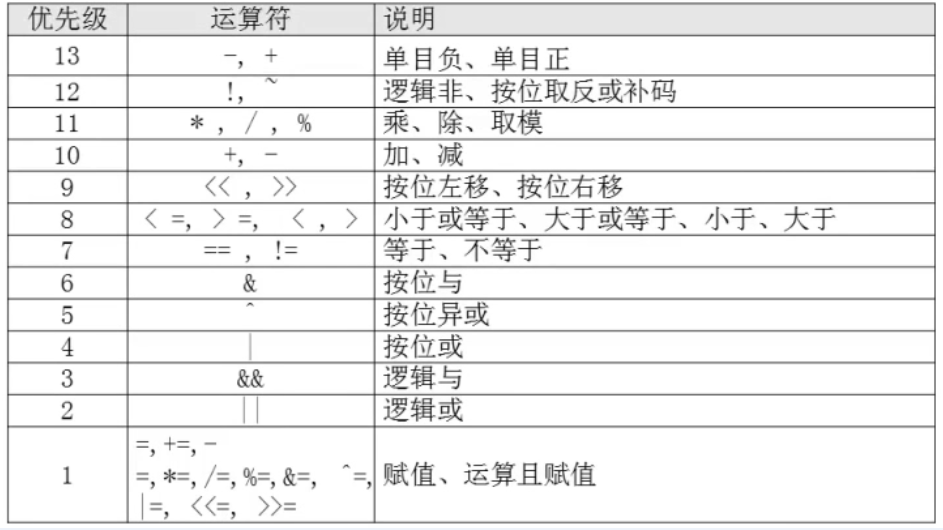
SHELL脚本编程的运算符
作者:尹正杰
版权声明:原创作品,谢绝转载!否则将追究法律责任。
[root@node101.yinzhengjie.org.cn ~]# help let

let: let arg [arg ...]

    Evaluate arithmetic expressions.

    Evaluate each ARG as an arithmetic expression.  Evaluation is done in

    fixed-width integers with no check for overflow, though division by

    is trapped and flagged as an error.  The following list of operators is

    grouped into levels of equal-precedence operators.  The levels are listed

    in order of decreasing precedence.

        id++, id--    variable post-increment, post-decrement

        ++id, --id    variable pre-increment, pre-decrement

        -, +        unary minus, plus

        !, ~        logical and bitwise negation

        **        exponentiation

        *, /, %        multiplication, division, remainder

        +, -        addition, subtraction

        <<, >>        left and right bitwise shifts

        <=, >=, <, >    comparison

        ==, !=        equality, inequality

        &        bitwise AND

        ^        bitwise XOR

        |        bitwise OR

        &&        logical AND

        ||        logical OR

        expr ? expr : expr

                conditional operator

        =, *=, /=, %=,

        +=, -=, <<=, >>=,

        &=, ^=, |=    assignment

    Shell variables are allowed as operands.  The name of the variable

    is replaced by its value (coerced to a fixed-width integer) within

    an expression.  The variable need not have its integer attribute

    turned on to be used in an expression.

    Operators are evaluated in order of precedence.  Sub-expressions in

    parentheses are evaluated first and may override the precedence

    rules above.

    Exit Status:

    If the last ARG evaluates to , let returns ; let returns  otherwise.

[root@node101.yinzhengjie.org.cn ~]#
[root@node101.yinzhengjie.org.cn ~]# help let
+, -, *, /, %取模(取余), **(乘方),乘法符号有些场景中需要转义。

实现算术运算:

  () let var=算术表达式

  () var=$[算术表达式]

  () var=$((算术表达式))

  () var=$(expr arg1 arg2 arg3 ...)

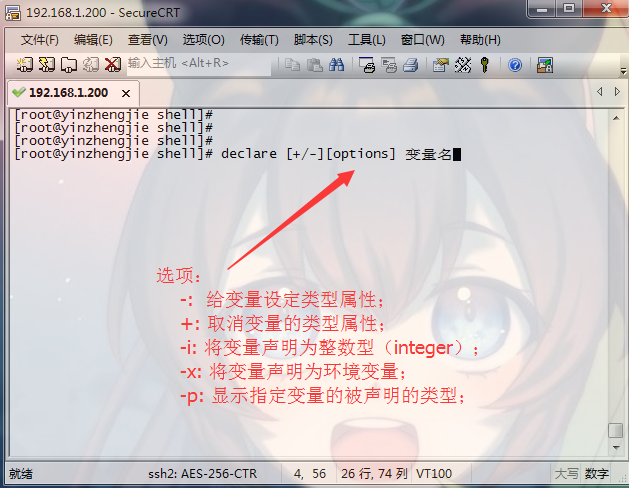
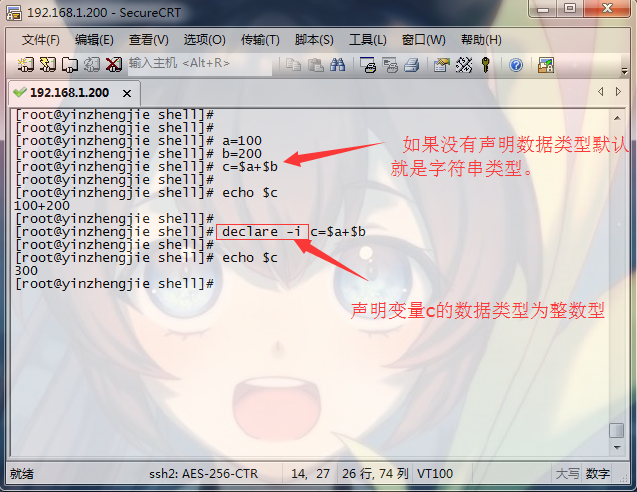
  () declare –i var = 数值

  () echo ‘算术表达式’ | bc

增强型赋值:

  +=, -=, *=, /=, %=

let varOPERvalue

  例如:let count+=

  自加3后自赋值

自增,自减:

  let var+=

  let var++

  let var-=

  let var--
[root@node101.yinzhengjie.org.cn ~]# x=

[root@node101.yinzhengjie.org.cn ~]# y=

[root@node101.yinzhengjie.org.cn ~]#

[root@node101.yinzhengjie.org.cn ~]# let num=$x*$y

[root@node101.yinzhengjie.org.cn ~]# echo $num

[root@node101.yinzhengjie.org.cn ~]#

[root@node101.yinzhengjie.org.cn ~]# let num=x*y

[root@node101.yinzhengjie.org.cn ~]# echo $num

[root@node101.yinzhengjie.org.cn ~]#

[root@node101.yinzhengjie.org.cn ~]# echo $[x-y]

-

[root@node101.yinzhengjie.org.cn ~]# echo $[x**y]

[root@node101.yinzhengjie.org.cn ~]# echo $[y%x]

[root@node101.yinzhengjie.org.cn ~]#

[root@node101.yinzhengjie.org.cn ~]# i=

[root@node101.yinzhengjie.org.cn ~]# echo $i

[root@node101.yinzhengjie.org.cn ~]# ((i++))           #等价于i=i+,表示要先使用i变量后,在对其进行加1操作。

[root@node101.yinzhengjie.org.cn ~]#

[root@node101.yinzhengjie.org.cn ~]# echo $i

[root@node101.yinzhengjie.org.cn ~]# unset i

[root@node101.yinzhengjie.org.cn ~]#

[root@node101.yinzhengjie.org.cn ~]# m=

[root@node101.yinzhengjie.org.cn ~]# let ++m          #在循环中使用会需要先对m变量进行加1在使用它。

[root@node101.yinzhengjie.org.cn ~]# echo $m

[root@node101.yinzhengjie.org.cn ~]#

[root@node101.yinzhengjie.org.cn ~]# echo $x

[root@node101.yinzhengjie.org.cn ~]# echo $y

[root@node101.yinzhengjie.org.cn ~]#

[root@node101.yinzhengjie.org.cn ~]# expr $x \* $y

[root@node101.yinzhengjie.org.cn ~]#

[root@node101.yinzhengjie.org.cn ~]# declare -i m=

[root@node101.yinzhengjie.org.cn ~]# declare -i n=

[root@node101.yinzhengjie.org.cn ~]# declare -i num=m+n

[root@node101.yinzhengjie.org.cn ~]# echo $num

[root@node101.yinzhengjie.org.cn ~]#

[root@node101.yinzhengjie.org.cn ~]# echo "100 * 2" | bc

[root@node101.yinzhengjie.org.cn ~]#

[root@node101.yinzhengjie.org.cn ~]# x=

[root@node101.yinzhengjie.org.cn ~]# let x+=

[root@node101.yinzhengjie.org.cn ~]# echo $x

[root@node101.yinzhengjie.org.cn ~]# let x-=

[root@node101.yinzhengjie.org.cn ~]# echo $x

[root@node101.yinzhengjie.org.cn ~]#

[root@node101.yinzhengjie.org.cn ~]# let x/=               #不支持浮点数,因此除等得到的值只能取整数。

[root@node101.yinzhengjie.org.cn ~]# echo $x

[root@node101.yinzhengjie.org.cn ~]#
算术运算符测试案例
[root@node101.yinzhengjie.org.cn ~]# man bash            #保存了BASH中默认存在的变量,RANDOM只是其中之一。

[root@node101.yinzhengjie.org.cn ~]# echo $RANDOM

[root@node101.yinzhengjie.org.cn ~]#

[root@node101.yinzhengjie.org.cn ~]# echo $RANDOM

[root@node101.yinzhengjie.org.cn ~]#

[root@node101.yinzhengjie.org.cn ~]# echo $RANDOM                 #默认生成  -  之间随机数

[root@node101.yinzhengjie.org.cn ~]#

[root@node101.yinzhengjie.org.cn ~]# echo $[$RANDOM%]        #生成  -  之间随机数

[root@node101.yinzhengjie.org.cn ~]#

[root@node101.yinzhengjie.org.cn ~]# echo $[$RANDOM%]

[root@node101.yinzhengjie.org.cn ~]#

[root@node101.yinzhengjie.org.cn ~]# echo $[$RANDOM%]

[root@node101.yinzhengjie.org.cn ~]#


()编写脚本 sumid.sh,计算/etc/passwd文件中的第10个用户和第20用户的UID之和

()编写脚本 sumspace.sh,传递两个文件路径作为参数给脚本,计算这两个文件中所有空白行之和

()编写脚本 sumfile.sh,统计/etc, /var, /usr 目录中共有多少个一级子目录和文件
与运算只能是二进制的操作,任何数和0相与,结果为0,任何数和1相与,保留原值。

举例,请将十进制的12和8进行与运算。

  首先将12和8转换成二进制,如下所示:

     ------> 0b0000

      ------> 0b0000

  得到的最终结果为:0b0000 ,即12&=。
与运算只能是二进制的操作,两个数字只要有1,结果为1,两个书数字都为0,结果才为0。

举例,请将十进制的12和8进行或运算。

  首先将12和8转换成二进制,如下所示:

     ------> 0b0000

      ------> 0b0000

  得到的最终结果为:0b0000 ,即12|=。
非操作就是取反,如:
  !1 = 0,即1(true)的非为0(false)。
  !0 = 1,即0(false)的非为1(true)。
短路与(&&):

  举例:我们将0表示为假,1表示为真,则有以下关系:

    假与真=假(&&=)

    假与假=假(&&=)

    真与真=真(&&=)

    真与假=假(&&=)


  总结:

    CMD1 && CMD2

    如果与前面的CMD1执行是假,结果必定是假,没有必要执行与后的操作CMD2。反之,则CMD2要参加运算。

短路或(||):

  举例:我们将0表示为假,1表示为真,则有以下关系:

    真或真=真(||=)

    真或假=真(||=)

    假或真=真(||=)

    假或假=假(||=)

  总结:

    CMD1 || CMD2

    如果或前面的CMD1执行结果是真,结果必定是真,没有必要执行或后的操作CMD2。反正,则CMD2要参与运算。
  举例:我们将0表示为假,1表示为真,则有以下关系:

    假异或假=假(^=)

    假异或真=真(^=)

    真异或假=真(^=)

    真异或真=假(^=)

  总结:

    异或的两个值,相同为假,不同为真。

  小试牛刀:请将十进制的12和8进行异或运算。

    首先将12和8转换成二进制,如下所示:

       ------> 0b0000

        ------> 0b0000

    得到的最终结果为:0b0000 0,即12^=4。由此可迅速推断出4^8=12,4^12=8。
[root@node101.yinzhengjie.org.cn ~]# x=;y=;tmp=$x;x=$y;y=$tmp;echo x=$x,y=$y        #借助于中间变量

x=,y=

[root@node101.yinzhengjie.org.cn ~]#

[root@node101.yinzhengjie.org.cn ~]# x=;y=;x=$[x^y];y=$[x^y];x=$[x^y];echo x=$x,y=$y    #借助于异或运算,效率更好,因为是基于二进制的。

x=,y=

[root@node101.yinzhengjie.org.cn ~]#
变量互换案例(将x=100,y=200变为y=100,x=200)
Bash基本功能的更多相关文章
- 鸟哥的私房菜:Bash shell(一)-Bash shell功能简介
Bash shell系列里,由变量谈起,先讲到环境变量的功能与修改的问题, 然后会继续提到历史指令的运用.接下来,就会谈一下『数据流重导向』这个重要概念, 最后就是管线命令的利用! 一 Bash s ...
- 6.Bash的功能
6.Bash的功能本章介绍 Bash 的特色功能.6.1 Bash的启动 bash [长选项] [-ir] [-abefhkmnptuvxdBCDHP] [-o 选项] [-O shopt 选项] [ ...
- Linux学习笔记(15)shell基础之Bash基本功能
1 shell概述 shell是一个命令解释器,为用户提供了一个向Linux内核发送请求以便运行程序的界面系统级程序.用户可以用shell启动.挂起.停止甚至是编写一些程序. shell是一个功能强大 ...
- Linux系列教程(二十一)——Linux的bash基本功能
上篇博客我们介绍了什么是shell,以及编写shell脚本的两种执行方式.我们知道在敲命令的时候,有很多快捷键,比如tab键能补全命令,在比如为什么我们直接敲 ll 命令能显示目录的长格式,其实这是b ...
- bash 基本功能
1 shell概述 shell是一个命令解释器,为用户提供了一个向Linux内核发送请求以便运行程序的界面系统级程序.用户可以用shell启动.挂起.停止甚至是编写一些程序. shell是一个功能强大 ...
- 『忘了再学』Shell基础 — 4、Bash基本功能(history命令)
目录 1.history历史命令 2.设置命令历史记录的条数 3.清空历史命令 4.历史命令的调用 5.命令与文件的补全 在Linux系统中默认的Shell就是Bourne-AgainShell(简称 ...
- linux笔记:shell基础-bash基本功能
历史命令的调用: 命令和文件补全(如果当前有多个可选的补全,则按2次tab键,可以列出所有的可选项): 命令别名: 让别名永久生效: 删除别名: bash常用快捷键: 标准输入输出: 输出重定向: 输 ...
- Linux学习 -- Shell基础 -- Bash基本功能
历史命令 history -c clear -w 写入 ~/.bash_history 默认保存1000条, 可在/etc/profile中修改 调用 Tab补全 命令.目录.文件 命令别名 ...
- Shell基础 - Bash基础功能
历史命令 history选项: -c 清空历史命令 -w 立即保存历史命令Linux 下输入过的历史命令,都会保存在根目录下的:~/root/.bash_history 文件中默认保存 1000 条, ...
随机推荐
- 《Linux内核分析》读书笔记(四章)
<Linux内核分析>读书笔记(四章) 标签(空格分隔): 20135328陈都 第四章 进程调度 调度程序负责决定将哪个进程投入运行,何时运行以及运行多长时间,进程调度程序可看做在可运行 ...
- Opentsdb 启动显示配置文件不存在
今天 重新启动opentsdb 出现本地配置文件不存在 这不知道 我查了一下官网 了解到 You can use the --config command line argument to s ...
- JSONObject使用方法详解
1.JSONObject介绍 JSONObject-lib包是一个beans,collections,maps,java arrays和xml和JSON互相转换的包. 2.下载jar包 http:// ...
- OA实例
let express = require('express'); let consolidate = require('consolidate'); let bodyParser = require ...
- [日常工作]GS使用安装盘修改密码后的处理
1. GS服务器端有时候需要修改 9999 的用户密码.但是修改完密码之后有几个注意事项: 一般有两个可以修改注册的地方: 使用setup里面的修改用户密码 修改完密码之后要手工注册一下数据库实例 也 ...
- pandas取值
#!/usr/bin/env python # -*- coding: utf-8 -*- # @Time : 2018/5/24 15:03 # @Author : zhang chao # @Fi ...
- flask+mako+peewee(上)
其实关于什么用flask搭建一个后台博客啥的跟着官方文档做一遍就行了.感觉啥都有我这里就不赘述了只是记录一个笔记,因为稍微有几个地方有点坑. 目标:做了一个简易页面给电商的同事用来添加商品 首先是安装 ...
- Maven Archetype简介以及搭建
为什么会写这篇文章,因为公司先在构建项目骨架都是用的 maven archetype ,身为一个上进的渣渣猿,自己还是有必要了解下这个东西的. Archetype介绍 Archetype 是一个 Ma ...
- 【Spring】—— 自动装配
一.Spring中装配bean的方式 1.在XML中显式配置 2.在Java中进行显式配置 3.隐士的bean发现机制和自动装配 二.自动装配示例 1.在需要装配到其他bean中的类中加入@Compo ...
- Lodop多分出空白页的可能(情况1)
在用Lodop进行打印超文本的时候,本身内容看上去只有一页,却分页分出空白的一页,很有可能有不可见内容的存在,下面是测试的一种情况,如html内部有内容占着空间,却是不可见的,如一些对象,或者如测试内 ...