
Bash基本功能
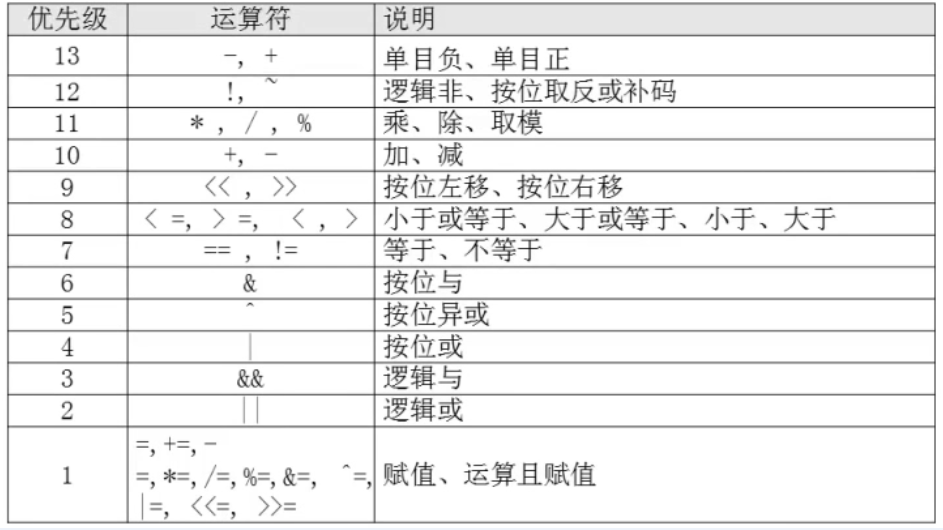
SHELL脚本编程的运算符
作者:尹正杰
版权声明:原创作品,谢绝转载!否则将追究法律责任。
[root@node101.yinzhengjie.org.cn ~]# help let

let: let arg [arg ...]

    Evaluate arithmetic expressions.

    Evaluate each ARG as an arithmetic expression.  Evaluation is done in

    fixed-width integers with no check for overflow, though division by

    is trapped and flagged as an error.  The following list of operators is

    grouped into levels of equal-precedence operators.  The levels are listed

    in order of decreasing precedence.

        id++, id--    variable post-increment, post-decrement

        ++id, --id    variable pre-increment, pre-decrement

        -, +        unary minus, plus

        !, ~        logical and bitwise negation

        **        exponentiation

        *, /, %        multiplication, division, remainder

        +, -        addition, subtraction

        <<, >>        left and right bitwise shifts

        <=, >=, <, >    comparison

        ==, !=        equality, inequality

        &        bitwise AND

        ^        bitwise XOR

        |        bitwise OR

        &&        logical AND

        ||        logical OR

        expr ? expr : expr

                conditional operator

        =, *=, /=, %=,

        +=, -=, <<=, >>=,

        &=, ^=, |=    assignment

    Shell variables are allowed as operands.  The name of the variable

    is replaced by its value (coerced to a fixed-width integer) within

    an expression.  The variable need not have its integer attribute

    turned on to be used in an expression.

    Operators are evaluated in order of precedence.  Sub-expressions in

    parentheses are evaluated first and may override the precedence

    rules above.

    Exit Status:

    If the last ARG evaluates to , let returns ; let returns  otherwise.

[root@node101.yinzhengjie.org.cn ~]#
[root@node101.yinzhengjie.org.cn ~]# help let
+, -, *, /, %取模(取余), **(乘方),乘法符号有些场景中需要转义。

实现算术运算:

  () let var=算术表达式

  () var=$[算术表达式]

  () var=$((算术表达式))

  () var=$(expr arg1 arg2 arg3 ...)

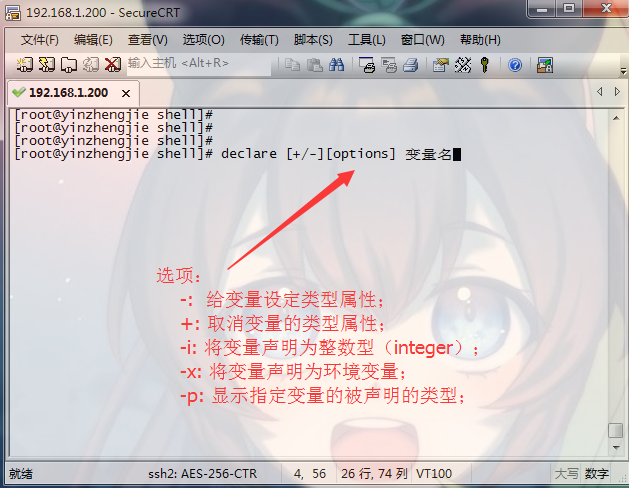
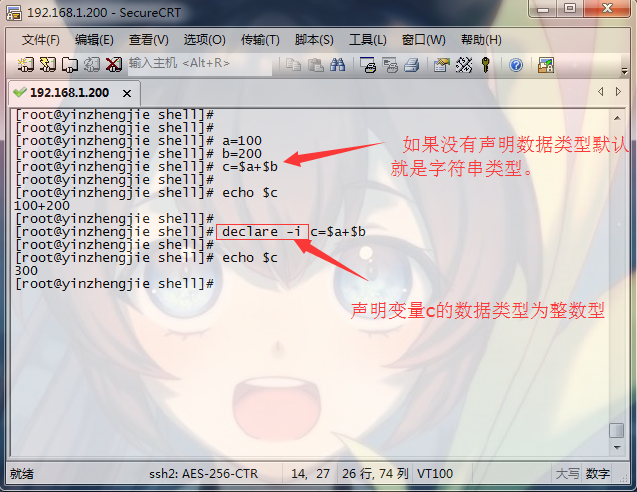
  () declare –i var = 数值

  () echo ‘算术表达式’ | bc

增强型赋值:

  +=, -=, *=, /=, %=

let varOPERvalue

  例如:let count+=

  自加3后自赋值

自增,自减:

  let var+=

  let var++

  let var-=

  let var--
[root@node101.yinzhengjie.org.cn ~]# x=

[root@node101.yinzhengjie.org.cn ~]# y=

[root@node101.yinzhengjie.org.cn ~]#

[root@node101.yinzhengjie.org.cn ~]# let num=$x*$y

[root@node101.yinzhengjie.org.cn ~]# echo $num

[root@node101.yinzhengjie.org.cn ~]#

[root@node101.yinzhengjie.org.cn ~]# let num=x*y

[root@node101.yinzhengjie.org.cn ~]# echo $num

[root@node101.yinzhengjie.org.cn ~]#

[root@node101.yinzhengjie.org.cn ~]# echo $[x-y]

-

[root@node101.yinzhengjie.org.cn ~]# echo $[x**y]

[root@node101.yinzhengjie.org.cn ~]# echo $[y%x]

[root@node101.yinzhengjie.org.cn ~]#

[root@node101.yinzhengjie.org.cn ~]# i=

[root@node101.yinzhengjie.org.cn ~]# echo $i

[root@node101.yinzhengjie.org.cn ~]# ((i++))           #等价于i=i+,表示要先使用i变量后,在对其进行加1操作。

[root@node101.yinzhengjie.org.cn ~]#

[root@node101.yinzhengjie.org.cn ~]# echo $i

[root@node101.yinzhengjie.org.cn ~]# unset i

[root@node101.yinzhengjie.org.cn ~]#

[root@node101.yinzhengjie.org.cn ~]# m=

[root@node101.yinzhengjie.org.cn ~]# let ++m          #在循环中使用会需要先对m变量进行加1在使用它。

[root@node101.yinzhengjie.org.cn ~]# echo $m

[root@node101.yinzhengjie.org.cn ~]#

[root@node101.yinzhengjie.org.cn ~]# echo $x

[root@node101.yinzhengjie.org.cn ~]# echo $y

[root@node101.yinzhengjie.org.cn ~]#

[root@node101.yinzhengjie.org.cn ~]# expr $x \* $y

[root@node101.yinzhengjie.org.cn ~]#

[root@node101.yinzhengjie.org.cn ~]# declare -i m=

[root@node101.yinzhengjie.org.cn ~]# declare -i n=

[root@node101.yinzhengjie.org.cn ~]# declare -i num=m+n

[root@node101.yinzhengjie.org.cn ~]# echo $num

[root@node101.yinzhengjie.org.cn ~]#

[root@node101.yinzhengjie.org.cn ~]# echo "100 * 2" | bc

[root@node101.yinzhengjie.org.cn ~]#

[root@node101.yinzhengjie.org.cn ~]# x=

[root@node101.yinzhengjie.org.cn ~]# let x+=

[root@node101.yinzhengjie.org.cn ~]# echo $x

[root@node101.yinzhengjie.org.cn ~]# let x-=

[root@node101.yinzhengjie.org.cn ~]# echo $x

[root@node101.yinzhengjie.org.cn ~]#

[root@node101.yinzhengjie.org.cn ~]# let x/=               #不支持浮点数,因此除等得到的值只能取整数。

[root@node101.yinzhengjie.org.cn ~]# echo $x

[root@node101.yinzhengjie.org.cn ~]#
算术运算符测试案例
[root@node101.yinzhengjie.org.cn ~]# man bash            #保存了BASH中默认存在的变量,RANDOM只是其中之一。

[root@node101.yinzhengjie.org.cn ~]# echo $RANDOM

[root@node101.yinzhengjie.org.cn ~]#

[root@node101.yinzhengjie.org.cn ~]# echo $RANDOM

[root@node101.yinzhengjie.org.cn ~]#

[root@node101.yinzhengjie.org.cn ~]# echo $RANDOM                 #默认生成  -  之间随机数

[root@node101.yinzhengjie.org.cn ~]#

[root@node101.yinzhengjie.org.cn ~]# echo $[$RANDOM%]        #生成  -  之间随机数

[root@node101.yinzhengjie.org.cn ~]#

[root@node101.yinzhengjie.org.cn ~]# echo $[$RANDOM%]

[root@node101.yinzhengjie.org.cn ~]#

[root@node101.yinzhengjie.org.cn ~]# echo $[$RANDOM%]

[root@node101.yinzhengjie.org.cn ~]#


()编写脚本 sumid.sh,计算/etc/passwd文件中的第10个用户和第20用户的UID之和

()编写脚本 sumspace.sh,传递两个文件路径作为参数给脚本,计算这两个文件中所有空白行之和

()编写脚本 sumfile.sh,统计/etc, /var, /usr 目录中共有多少个一级子目录和文件
与运算只能是二进制的操作,任何数和0相与,结果为0,任何数和1相与,保留原值。

举例,请将十进制的12和8进行与运算。

  首先将12和8转换成二进制,如下所示:

     ------> 0b0000

      ------> 0b0000

  得到的最终结果为:0b0000 ,即12&=。
与运算只能是二进制的操作,两个数字只要有1,结果为1,两个书数字都为0,结果才为0。

举例,请将十进制的12和8进行或运算。

  首先将12和8转换成二进制,如下所示:

     ------> 0b0000

      ------> 0b0000

  得到的最终结果为:0b0000 ,即12|=。
非操作就是取反,如:
  !1 = 0,即1(true)的非为0(false)。
  !0 = 1,即0(false)的非为1(true)。
短路与(&&):

  举例:我们将0表示为假,1表示为真,则有以下关系:

    假与真=假(&&=)

    假与假=假(&&=)

    真与真=真(&&=)

    真与假=假(&&=)


  总结:

    CMD1 && CMD2

    如果与前面的CMD1执行是假,结果必定是假,没有必要执行与后的操作CMD2。反之,则CMD2要参加运算。

短路或(||):

  举例:我们将0表示为假,1表示为真,则有以下关系:

    真或真=真(||=)

    真或假=真(||=)

    假或真=真(||=)

    假或假=假(||=)

  总结:

    CMD1 || CMD2

    如果或前面的CMD1执行结果是真,结果必定是真,没有必要执行或后的操作CMD2。反正,则CMD2要参与运算。
  举例:我们将0表示为假,1表示为真,则有以下关系:

    假异或假=假(^=)

    假异或真=真(^=)

    真异或假=真(^=)

    真异或真=假(^=)

  总结:

    异或的两个值,相同为假,不同为真。

  小试牛刀:请将十进制的12和8进行异或运算。

    首先将12和8转换成二进制,如下所示:

       ------> 0b0000

        ------> 0b0000

    得到的最终结果为:0b0000 0,即12^=4。由此可迅速推断出4^8=12,4^12=8。
[root@node101.yinzhengjie.org.cn ~]# x=;y=;tmp=$x;x=$y;y=$tmp;echo x=$x,y=$y        #借助于中间变量

x=,y=

[root@node101.yinzhengjie.org.cn ~]#

[root@node101.yinzhengjie.org.cn ~]# x=;y=;x=$[x^y];y=$[x^y];x=$[x^y];echo x=$x,y=$y    #借助于异或运算,效率更好,因为是基于二进制的。

x=,y=

[root@node101.yinzhengjie.org.cn ~]#
变量互换案例(将x=100,y=200变为y=100,x=200)
Bash基本功能的更多相关文章
- 鸟哥的私房菜:Bash shell(一)-Bash shell功能简介
Bash shell系列里,由变量谈起,先讲到环境变量的功能与修改的问题, 然后会继续提到历史指令的运用.接下来,就会谈一下『数据流重导向』这个重要概念, 最后就是管线命令的利用! 一 Bash s ...
- 6.Bash的功能
6.Bash的功能本章介绍 Bash 的特色功能.6.1 Bash的启动 bash [长选项] [-ir] [-abefhkmnptuvxdBCDHP] [-o 选项] [-O shopt 选项] [ ...
- Linux学习笔记(15)shell基础之Bash基本功能
1 shell概述 shell是一个命令解释器,为用户提供了一个向Linux内核发送请求以便运行程序的界面系统级程序.用户可以用shell启动.挂起.停止甚至是编写一些程序. shell是一个功能强大 ...
- Linux系列教程(二十一)——Linux的bash基本功能
上篇博客我们介绍了什么是shell,以及编写shell脚本的两种执行方式.我们知道在敲命令的时候,有很多快捷键,比如tab键能补全命令,在比如为什么我们直接敲 ll 命令能显示目录的长格式,其实这是b ...
- bash 基本功能
1 shell概述 shell是一个命令解释器,为用户提供了一个向Linux内核发送请求以便运行程序的界面系统级程序.用户可以用shell启动.挂起.停止甚至是编写一些程序. shell是一个功能强大 ...
- 『忘了再学』Shell基础 — 4、Bash基本功能(history命令)
目录 1.history历史命令 2.设置命令历史记录的条数 3.清空历史命令 4.历史命令的调用 5.命令与文件的补全 在Linux系统中默认的Shell就是Bourne-AgainShell(简称 ...
- linux笔记:shell基础-bash基本功能
历史命令的调用: 命令和文件补全(如果当前有多个可选的补全,则按2次tab键,可以列出所有的可选项): 命令别名: 让别名永久生效: 删除别名: bash常用快捷键: 标准输入输出: 输出重定向: 输 ...
- Linux学习 -- Shell基础 -- Bash基本功能
历史命令 history -c clear -w 写入 ~/.bash_history 默认保存1000条, 可在/etc/profile中修改 调用 Tab补全 命令.目录.文件 命令别名 ...
- Shell基础 - Bash基础功能
历史命令 history选项: -c 清空历史命令 -w 立即保存历史命令Linux 下输入过的历史命令,都会保存在根目录下的:~/root/.bash_history 文件中默认保存 1000 条, ...
随机推荐
- Opentsdb分布式安装
Opentsdb分布式安装 --李琦 1.下载文件上传到虚拟机 -rw-r--r--. 1 root root 76793860 Apr 27 10:56 opentsdb-2.2.0.tar ...
- 第二个spring, 第7天
陈志棚:成绩的统筹 李天麟:界面音乐 徐侃:代码算法 代码初步已经完成.还差最后一步整合.附上最后一张截图
- AAPT2 error: check logs for details 问题的终究修复
AAPT2 error: check logs for details Process 'command '***\build-tools\27.0.3\aapt.exe'' finished wit ...
- Ajax的注意事项
case 1: 无论是使用原生的JavaScript,还是JQuery,通过Ajax请求后端程序数据,返回的数据默认是字符串,字符串,字符串,重要的事情说三遍!!! case 2: 不要尝试直接将返回 ...
- python 协程库gevent学习--gevent源码学习(二)
在进行gevent源码学习一分析之后,我还对两个比较核心的问题抱有疑问: 1. gevent.Greenlet.join()以及他的list版本joinall()的原理和使用. 2. 关于在使用mon ...
- tenda u1 usb wireless device install driver for kali linux kernal Debian 4.3.3-7kali2 (2016-01-27) x86_64 GNU/Linux
因为内核比较新的关系,tenda官方网站上面提供给u1无线网卡的驱动并不能正常编译使用,编译的时候报一个类似错误 /usr/src/linux-headers--kali1-common/Makefi ...
- Codeforces 1103 E. Radix sum
题目链接 神题. 题意:给定一个长度为\(10^5\)的幂级数\(a\),将卷积的下标运算定义为十进制下的不进位加法,求\(a^k\)模\(2^{58}\)的结果.\(k\leq 10^9\). 题解 ...
- python----内置函数2与匿名函数
1.迭代器生成器相关 range:创建一个可迭代对象,一般与for混合使用,可设置步长. for i in range(0,10,2): #步长2范围为0-10不包括10 print(i) # 0 2 ...
- 使用libcurl 发送post请求
SendHttpPost(string& strUrl, string& strPost, string& strResponse, int nTimeOut) { CURLc ...
- php-编译模块1
在路径中找到phpize 在需要编译的模块文件夹中执行 如: /usr/bin/phpize Configuring for: PHP Api Version: 20131106 Zend Modul ...