
.Net 读取配置文件 xml
直接解析XML文件
1、System.Xml.Linq命名空间下提供可以使用linq查询的类,使用linq to xml读取也很方便。
2、还可以使用System.Xml.Serialization类的DeSerialize方法直接实例化。
https://docs.microsoft.com/zh-cn/dotnet/api/system.xml.serialization.xmlserializer.deserialize?view=netcore-2.2
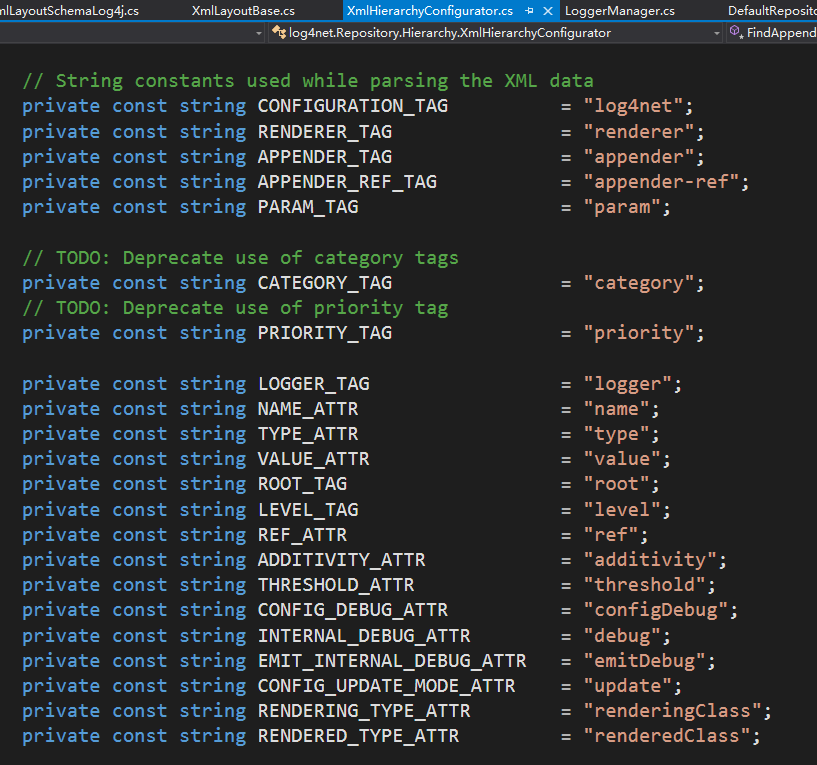
在直接读取文件的时候由于手动getAttribute很麻烦,而且容易出错,attribute可以参考log4net的方式,全部做成宏定义:
使用.Net提供的的方式(ConfigurationManager类,支持.Net Core 2)
特别说明:
using System.Configuration 之后可能还要手动勾选,如下图:

使用.Net提供的方法读取有时候会很方便,可以直接将配置信息填写在app.config文件中例如下面的配置文件
<?xml version="1.0" encoding="utf-8" ?>

<configuration>

  <startup>

      <supportedRuntime version="v4.0" sku=".NETFramework,Version=v4.5" />

  </startup>

  <appSettings>

    <add key="name" value="kun"/>

    <add key="name2" value="kun"/>

  </appSettings>

  <connectionStrings>

    <add name="WingtipToys" connectionString="Data Source=(LocalDB)\v11.0;Initial Catalog=WingtipToys;Integrated Security=True;Pooling=False" />

  </connectionStrings>

</configuration>
读取的时候:
static void ReadAllSettings()

        {

            try

            {

                var appSettings = ConfigurationManager.AppSettings;

                if (appSettings.Count == 0)

                {

                    Console.WriteLine("AppSettings is empty.");

                }

                else

                {

                    foreach (var key in appSettings.AllKeys.Where((key) =>  key == "name"))

                    {

                        Console.WriteLine("Key: {0} Value: {1}", key, appSettings[key]);

                    }

                }

            }

            catch (ConfigurationErrorsException)

            {

                Console.WriteLine("Error reading app settings");

            }

        }

        static void ReadSetting(string key)

        {

            try

            {

                var appSettings = ConfigurationManager.AppSettings;

                string result = appSettings[key] ?? "Not Found";

                Console.WriteLine(result);

            }

            catch (ConfigurationErrorsException)

            {

                Console.WriteLine("Error reading app settings");

            }

        }
读取数据库连接信息也可以只用一句代码:
var connectionString = ConfigurationManager.ConnectionStrings["WingtipToys"].ConnectionString;
对于这种简单key/Value方式的配置,使用ConfigurationManager类还是很方便的。
自定义配置
配置比较复杂呢?当然App.config文件也支持自定义,就是用起来比较复杂,需要手动写一个有各种限制的类。
<?xml version="1.0" encoding="utf-8" ?>

<configuration>

  <configSections>

    <section name="sampleSection" type="System.Configuration.SingleTagSectionHandler" />

  </configSections>

  <startup>

      <supportedRuntime version="v4.0" sku=".NETFramework,Version=v4.5" />

  </startup>

  <appSettings>

    <add key="name" value="kun"/>

    <add key="name2" value="kun"/>

  </appSettings>

  <connectionStrings>

    <add name="WingtipToys" connectionString="Data Source=(LocalDB)\v11.0;Initial Catalog=WingtipToys;Integrated Security=True;Pooling=False" />

  </connectionStrings>

  <sampleSection setting1="Value1"

                 setting2="value two"

                 setting3="third value">

  </sampleSection>

</configuration>
上面sampleSection 就是自定义的配置,使用起来的话需要手动实现下面这个类(微软官方的示例):
// Define a custom section.

// The CustomSection type allows to define a custom section

// programmatically.

public sealed class CustomSection :

    ConfigurationSection

{

    // The collection (property bag) that contains

    // the section properties.

    private static ConfigurationPropertyCollection _Properties;

    // Internal flag to disable

    // property setting.

    private static bool _ReadOnly;

    // The FileName property.

    private static readonly ConfigurationProperty _FileName =

        new ConfigurationProperty("fileName",

        typeof(string),"default.txt",

        ConfigurationPropertyOptions.IsRequired);

    // The MaxUsers property.

    private static readonly ConfigurationProperty _MaxUsers =

        new ConfigurationProperty("maxUsers",

        typeof(long), (long)1000,

        ConfigurationPropertyOptions.None);

    // The MaxIdleTime property.

    private static readonly ConfigurationProperty _MaxIdleTime =

        new ConfigurationProperty("maxIdleTime",

        typeof(TimeSpan), TimeSpan.FromMinutes(5),

        ConfigurationPropertyOptions.IsRequired);

    // CustomSection constructor.

    public CustomSection()

    {

        // Property initialization

        _Properties =

            new ConfigurationPropertyCollection();

        _Properties.Add(_FileName);

        _Properties.Add(_MaxUsers);

        _Properties.Add(_MaxIdleTime);

   }

    // This is a key customization.

    // It returns the initialized property bag.

    protected override ConfigurationPropertyCollection Properties

    {

        get

        {

            return _Properties;

        }

    }

    private new bool IsReadOnly

    {

        get

        {

            return _ReadOnly;

        }

    }

    // Use this to disable property setting.

    private void ThrowIfReadOnly(string propertyName)

    {

        if (IsReadOnly)

            throw new ConfigurationErrorsException(

                "The property " + propertyName + " is read only.");

    }

    // Customizes the use of CustomSection

    // by setting _ReadOnly to false.

    // Remember you must use it along with ThrowIfReadOnly.

    protected override object GetRuntimeObject()

    {

        // To enable property setting just assign true to

        // the following flag.

        _ReadOnly = true;

        return base.GetRuntimeObject();

    }

    [StringValidator(InvalidCharacters = " ~!@#$%^&*()[]{}/;'\"|\\",

        MinLength = 1, MaxLength = 60)]

    public string FileName

    {

        get

        {

            return (string)this["fileName"];

        }

        set

        {

            // With this you disable the setting.

            // Remember that the _ReadOnly flag must

            // be set to true in the GetRuntimeObject.

            ThrowIfReadOnly("FileName");

            this["fileName"] = value;

        }

    }

    [LongValidator(MinValue = 1, MaxValue = 1000000,

        ExcludeRange = false)]

    public long MaxUsers

    {

        get

        {

            return (long)this["maxUsers"];

        }

        set

        {

            this["maxUsers"] = value;

        }

    }

    [TimeSpanValidator(MinValueString = "0:0:30",

        MaxValueString = "5:00:0",

        ExcludeRange = false)]

    public TimeSpan MaxIdleTime

    {

        get

        {

            return  (TimeSpan)this["maxIdleTime"];

        }

        set

        {

            this["maxIdleTime"] = value;

        }

    }

}
参考:
https://docs.microsoft.com/zh-cn/dotnet/api/system.configuration.configurationmanager?view=netframework-4.7.2
https://docs.microsoft.com/zh-cn/dotnet/api/system.configuration.configurationsection?view=netframework-4.7.2
https://blog.csdn.net/aojiancc2/article/details/21618299
.Net 读取配置文件 xml的更多相关文章
- 读取配置文件包含properties和xml文件
读取properties配置文件 /** * 读取配置文件 * @author ll-t150 */ public class Utils { private static Properties pr ...
- python读取配置文件(ini、yaml、xml)
python读取配置文件(ini.yaml.xml)
- bean.xml配置数据源和读取配置文件配置数据源
一.bean.xml配置数据源 bean.xml装配bean,依赖注入其属性的时候,对应实体类中属性一定要有set方法, 二.读取配置文件配置数据源 1.配置文件 bean.xml配置: classp ...
- 解决IntelliJ IDEA无法读取配置文件的问题
解决IntelliJ IDEA无法读取配置文件的问题 最近在学Mybatis,按照视频的讲解在项目的某个包里建立配置文件,然后读取配置文件,但是一直提示异常. 读取配置文件的为官方代码: String ...
- java 4种方式读取配置文件 + 修改配置文件
版权声明:本文为博主原创文章,未经博主允许不得转载. 目录(?)[-] 方式一采用ServletContext读取读取配置文件的realpath然后通过文件流读取出来 方式二采用ResourceB ...
- ASP.NET Core开发-读取配置文件Configuration
ASP.NET Core 是如何读取配置文件,今天我们来学习. ASP.NET Core的配置系统已经和之前版本的ASP.NET有所不同了,之前是依赖于System.Configuration和XML ...
- Java 利用 ByteArrayOutputStream 和 ByteArrayInputStream 避免重复读取配置文件
最近参与了github上的一个开源项目 Mycat,是一个mysql的分库分表的中间件.发现其中读取配置文件的代码,存在频繁多次重复打开,读取,关闭的问题,代码写的很初级,稍微看过一些框架源码的人,是 ...
- ASP.NET读取配置文件发送邮件
之前写过一篇文章C#使用SMTP发送邮件 后来做了改进,改成读取独立的配置文件,本文只记录读取配置文件的部分,发送部分见上面的链接. 读取配置文件C#代码: using System; using S ...
- 通过读取配置文件App.config来获取数据库连接字符串
有两种方式://通过读取配置文件来获取连接字符串 第一种方式: App.config 文件的格式: <?xml version="1.0" encoding="ut ...
随机推荐
- JBPM工作流(五)——执行流程实例
概念: ProcessInstance,流程实例:代表流程定义的一次执行.如:张三昨天按请假流程请了一次假.一个流程实例包括了所有运行阶段,其中最典型的属性就是跟踪当前节点的指针,如下图. Execu ...
- 唉,可爱的小朋友---(DFS)
唉,小朋友是比较麻烦的.在一个幼儿园里,老师要上一节游戏课,有N个小朋友要玩游戏,做游戏时要用小皮球,但是幼儿园里只有M个小皮球,而且有些小朋友不喜欢和一些小朋友在一起玩,而只喜欢和另一些小朋友一起玩 ...
- Yet Another Ball Problem
Yet Another Ball Problem time limit per test 3 seconds memory limit per test 256 megabytes input sta ...
- Dev_GridView:设置列为Button
1. gridview ——run designer ——columns ——columns Edit选择repositoryItemButtonEdit1列 2. 更改colums ——showBu ...
- kill、killall、pkill杀手三人组
1.1 kill.killall.pkill杀手三人组 1.利用kill 进程号 方式杀掉rsync进程 [root@backup ~]# ps -ef |grep rsync root 3500 1 ...
- java学习(二)--- 变量类型
变量声明 type identifier [ = value][, identifier [= value] ...] ; 局部变量: 1.局部变量声明在方法.构造方法.语句块中 2.局部变量在方法. ...
- VS调试时JSON格式文件加载不了
在使用VS2012进行调试时发现加载数据为JSON格式的都加载不了,应该是MIME类型没有正确设置的问题. 直接通过浏览器地址栏访问时会收到提示,根据提示在IIS EXPRESS的安装目录下面执行一条 ...
- Luogu 1177 - 【模板】快速排序 - [快速排序][归并排序][无旋Treap]
题目链接:https://www.luogu.org/problemnew/show/P1177 题意:输入 $n$ 以及后续 $n$ 个整数,让你将这 $n$ 个整数从小到大排序输出. 归并排序(用 ...
- Oracle11g 配置DG broker
在配置DG broker之前需要确保Dataguard配置正常且主库和备库均使用spfile. 1. 主库配置 配置DG_BROKER_START参数 检查主库dg_broker_start设置 SQ ...
- WebMagic
一.WebMagic的四个组件 1.Downloader Downloader负责从互联网上下载页面,默认使用apache HttpClient作为下载工具 2.PageProcessor 负责解析页 ...