
SpringBoot(十六)_springboot整合JasperReport6.6.0
现在项目上要求实现套打,结果公司里有个人建议用JaperReport进行实现,就进入这个东西的坑中。好歹经过挣扎现在已经脱离此坑中。现在我也是仅能实现读取数据库数据转成pdf进行展示,包括中文的展示。于是记录下整个过程。
1.下载 安装 Jaspersoft Studio
下载地址:https://community.jaspersoft.com/community-download
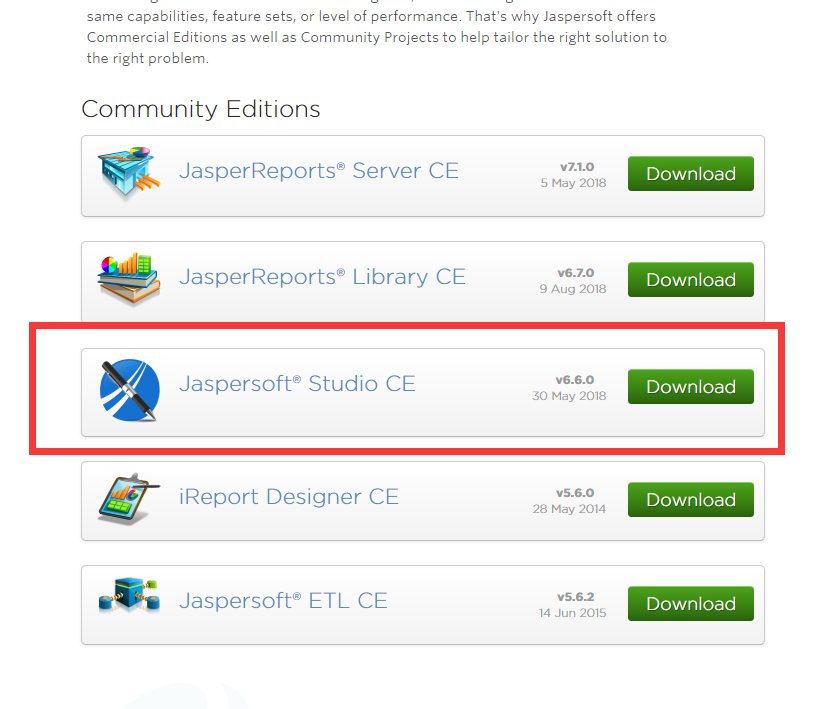
我下载的就是6.6.0这个版本,Jasper Report 分为专业版(收费)和社区版(免费),这里下载的社区版本。
2.设计模板
对这个模板设计我也不是很熟悉,这里我就不展开说明了。大家自行设计吧
2.1 导入并设置字体
这里需要注意一点就是,这个设计出的不显示中文,需要导入字体。
点击window->Preferences->jaspersoft Studio->font->add

设置完成后,点击Finish.
2.2 设计模板选择设置的myfont字体
查看jrxml文件后,设置后会多出font标签
				<font fontName="myfont" size="26" pdfFontName="" pdfEncoding="UniGB-UCS2-H" isPdfEmbedded="true"/>

				</textElement>

				<text><![CDATA[三年二班学生信息]]></text>
2.3 导出myfont字体jar包
点击window->Preferences->jaspersoft Studio->font
选择myfont 点击export 导出。这里我保存为kevin.jar
2.4 将kevin.jar 安装到本地maven库
mvn install:install-file -Dfile=kevin.jar -DgroupId=com.kevin -DartifactId=myfont -Dversion=1.0.0 -Dpackaging=jar
至此,前期的准备工作都已经完成。
3.构建springboot项目
这里我使用的版本是 2.1.1.RELEASE
3.1 pom文件
<dependencies>

        <dependency>

            <groupId>org.springframework.boot</groupId>

            <artifactId>spring-boot-starter-jdbc</artifactId>

        </dependency>

        <dependency>

            <groupId>org.springframework.boot</groupId>

            <artifactId>spring-boot-starter-web</artifactId>

        </dependency>

        <dependency>

            <groupId>org.springframework.boot</groupId>

            <artifactId>spring-boot-starter-freemarker</artifactId>

        </dependency>

        <dependency>

            <groupId>mysql</groupId>

            <artifactId>mysql-connector-java</artifactId>

            <scope>runtime</scope>

        </dependency>

        <dependency>

            <groupId>org.springframework.boot</groupId>

            <artifactId>spring-boot-starter-test</artifactId>

            <scope>test</scope>

        </dependency>

        <dependency>

            <groupId>net.sf.jasperreports</groupId>

            <artifactId>jasperreports</artifactId>

            <version>6.6.0</version>

        </dependency>

        <dependency>

            <groupId>com.kevin</groupId>

            <artifactId>myfont</artifactId>

            <version>1.0.0</version>

        </dependency>

    </dependencies>
注意 ,我这里引用的是我设置的com.kevin.myfont版本,个人根据自己步骤2.4设置的情况进行修改
3.2 application.yml
# Server settings

server:

  port: 8080

# SPRING PROFILES

spring:

  http:

    encoding.charset: UTF-8

    encoding.enable: true

    encoding.force: true

  datasource:

    url: jdbc:mysql://127.0.0.1:3306/kevin?characterEncoding=utf8&useSSL=false&serverTimezone=GMT%2B8

    username: root

    password: 123456

    driver-class-name: com.mysql.jdbc.Driver
3.3 ReportController 代码
@RestController

public class ReportController {

    @Resource

    private DataSource dataSource;

    /**

     * 转换为pdf展示

     *

     * @param reportName

     * @param parameters

     * @param response

     * @throws SQLException

     * @throws ClassNotFoundException

     * @throws JRException

     * @throws IOException

     */

    @GetMapping("/{reportName}")

    public void getReportByParam(

            @PathVariable("reportName") final String reportName,

            @RequestParam(required = false) Map<String, Object> parameters,

            HttpServletResponse response) throws SQLException, ClassNotFoundException, JRException, IOException {

        parameters = parameters == null ? new HashMap<>() : parameters;

        //获取文件流

        ClassPathResource resource = new ClassPathResource("jaspers" + File.separator + reportName + ".jasper");

        InputStream jasperStream = resource.getInputStream();

        JasperReport jasperReport = (JasperReport) JRLoader.loadObject(jasperStream);

        JasperPrint jasperPrint = JasperFillManager.fillReport(jasperReport, parameters, dataSource.getConnection());

        // JasperPrint jasperPrint = JasperFillManager.fillReport(jasperReport, null, new JREmptyDataSource());

        response.setContentType("application/pdf");

        response.setHeader("Content-Disposition", "inline;");

        final OutputStream outputStream = response.getOutputStream();

        JasperExportManager.exportReportToPdfStream(jasperPrint, outputStream);

    }

}
3.4 完整目录结构
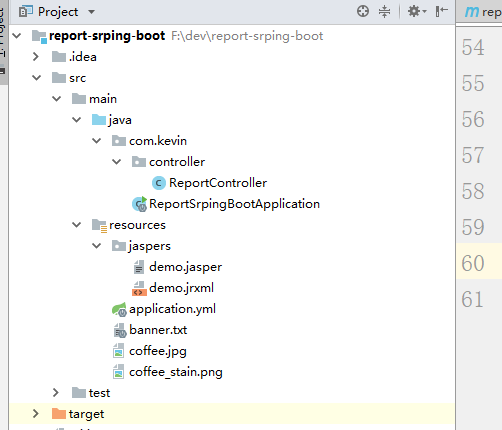
4.运行效果
启动项目,运行http://localhost:8080/demo

完整代码
github:https://github.com/runzhenghengbin/SpringBoot
玩的开心!
SpringBoot(十六)_springboot整合JasperReport6.6.0的更多相关文章
- SpringBoot(十二)_springboot整合PageHelper
我之所以会发现这个PageHelper这个东东 是因为公司在使用 ,刚开始我也没太注意这个插件,感觉不就是个分页插件吗?也就那样,直到一天,我在网上找了个代码生成器,用来构建代码,因为它是针对mysq ...
- springboot(十六):springboot整合shiro
数据库有五张表(userInfo,uerrole,role,rolepermission,permission) userInfo(id,username,password) userrole(uid ...
- springboot(十六)-swagger2
SpringBoot整合Swagger2 相信各位在公司写API文档数量应该不少,当然如果你还处在自己一个人开发前后台的年代,当我没说,如今为了前后台更好的对接,还是为了以后交接方便,都有要求写API ...
- SpringBoot(十四)_springboot使用内置定时任务Scheduled的使用(一)
为什么使用定时? 日常工作中,经常会用到定时任务,比如各种统计,并不要求实时性.此时可以通过提前设置定时任务先把数据跑出来,后续处理起来更方便. 本篇文章主要介绍 springboot内置定时任务. ...
- SpringBoot(十六):SpringBoot2.1.1集成fastjson,并使用fastjson替代默认的MappingJackson
springboot2.1.1默认采用的json converter是MappingJackson,通过调试springboot项目中代码可以确定这点.在springboot项目中定义WebMvcCo ...
- springboot(十六):使用Jenkins部署Spring Boot
jenkins是devops神器,本篇文章介绍如何安装和使用jenkins部署Spring Boot项目 jenkins搭建 部署分为三个步骤: 第一步,jenkins安装 第二步,插件安装和配置 第 ...
- SpringBoot(十五)_springboot实现预览pdf
最近,项目上要做个打印的东西,还要预览.我想就直接生成pdf预览,然后用户选择打印 于是,昨天找了找资料.一般用itext 进行转pdf.于是我就用springboot试了试,代码比较简单,现在只是简 ...
- Java微信公众平台开发(十六)--微信网页授权(OAuth2.0授权)获取用户基本信息
转自:http://www.cuiyongzhi.com/post/78.html 好长时间没有写文章了,主要是最近的工作和生活上的事情比较多而且繁琐,其实到现在我依然还是感觉有些迷茫,最后还是决定静 ...
- SpringBoot(十八)_springboot打成war包部署
最近在做项目的时候,由于使用的是springboot,需要打成war包.我就按照正常的思路去打包,结果部署后无法访问,一直报错404.后续问了问 公司同事,他给解决了.说大部分都是这个原因. 如果需要 ...
随机推荐
- Linux安装solr
solr官网下载地址为:http://mirror.bit.edu.cn/apache/lucene/solr/ 以7.6.0版本作为实践 1.下载 wget http://mirror.bit.ed ...
- VsCode之使用WebView通信
之前我在这篇文章VsCode插件开发之插件初步通信 通过插件完成通信,这回我还是通过插件,只不过方式主要以在ts文件里面使用webview来进行通信. 另外在此声明,一定要好好看仔细看官方文档,国内关 ...
- 崩 oj 1768 最大子矩阵
描述 已知矩阵的大小定义为矩阵中所有元素的和.给定一个矩阵,你的任务是找到最大的非空(大小至少是1 * 1)子矩阵.比如,如下4 * 4的矩阵0 -2 -7 0 9 2 -6 2 -4 1 - ...
- Qt+QGIS二次开发:自定义类实现查询矢量数据的属性字段值(图查属性)
在GIS领域,有两种重要的查询操作,图查属性和属性查图. 本文主要介绍如何在QGIS中通过从QgsMapToolIdentify中派生自定义类实现查询矢量数据的属性字段值(图查属性). 重点参考资料: ...
- Objective-C 类簇深入理解
类簇(class cluster),是一种基于抽象工厂的设计模式,广泛运用于系统的Foundation框架.顾名思义,即一坨类,这里指的是继承自同一父类的一组私有子类.这种实现既可以简化公共接口,又保 ...
- Objective-C 性能监控
1.内存监控 2.卡顿监控 3.fps监控
- Linux 防火墙 开放 端口 iptables
查看状态:iptables -L -n 方法1.使用iptables开放如下端口/sbin/iptables -I INPUT -p tcp --dport 8000 -j ACCEPT保存/etc/ ...
- Saltstack管理对象属性之grains和pillar组件
Grains组件 Grains是saltstack记录minion的一些静态信息组件,可以简单的理解为grains里面记录着每台minion的一些常用的属性,比如cpu.内存.磁盘.网络信息等,可以通 ...
- ORA-14551: 无法在查询中执行 DML 操作
编写了一个oracle函数,函数体内实现一系列数据库的逻辑处理,涉及到数据的增删等操作,返回NCLOB类型. 然后通过查询方式调用函数: SELECT PKG.MY_FUN('A') FROM DUA ...
- tab键设置为空4格和自动缩进
.打开vim配置文件~@vim etc/vim/vimrc 二 .设置tab和自动缩进即:添加如下内容 "set tab by charly!" softtabstop= (注意等 ...