
MVC+三层+ASP.NET简单登录验证
通过制作一个登录小案例来搭建MVC简单三层

在View --Shared下创建一个母版页:
<!DOCTYPE html>

<html>

<head>

    <meta name="viewport" content="width=device-width" />

    <script src="~/Scripts/jquery-1.10.2.min.js"></script>

    <script src="~/Scripts/jquery.validate.min.js"></script>

    <script src="~/Scripts/jquery.validate.unobtrusive.min.js"></script>

    <link href="~/Content/LogIn.css" rel="stylesheet" />

    <style type="text/css">

        * {

            margin: ;

            padding: ;

        }

        .nav {

            border: 2px solid border-right:none;

            overflow: hidden;

            float: center;

        }

            .nav ul li {

                float: left;

                width: 130px;

                height: 20px;

            }

                .nav ul li a {

                    width: 150px;

                    height: 30px;

                    text-align: center;

                    line-height: 28px;

                    display: block;

                    border-right: 2px solid #FFFFFF;

                    color: #FFF;

                    width: 150px;

                    font-weight: bold;

                }

                    .nav ul li a:hover {

                        font-weight: bold;

                        color: #FFFFFF;

                    }

                .nav ul li ul {

                    position: absolute;

                    display: none;

                }

                    .nav ul li ul li {

                        float: none;

                    }

                        .nav ul li ul li a {

                            width: 150px;

                            height: 40px;

                            border-right: none;

                            border-top: 1px dotted #FFFFFF;

                            background: #cc6698;

                        }

                .nav ul li:hover ul {

                    display: block;

                }

        .barStyle {

            color: #FFFFFF;

            font-weight: bold;

        }

        .style1 {

            text-align: center;

            font-family: "Meiryo UI";

            font-size: x-large;

        }

    </style>

    <title>@ViewBag.Title</title>

</head>

<body>

    <div id="header" style="background: #a6154c; width: 100%; height: 80px">

        <p style="color: #ffffff; padding: 23px" class="style1">

            <strong>User Management System</strong>

        </p>

    </div>

    @if (Request.IsAuthenticated) <span style="color:#ff6600;"> //如果登陆成功</span>

    {

        <center>

            <div class="nav" style="background: #a6154c; width: 100%; height: 30px">

                <ul>

                    <li>@Html.ActionLink("Home", "Index", "Home")</li> //主页

                    <li>@Html.ActionLink("Log Out", "LogOut", "Account")</li>    //导航栏添加一个  log Out  选项

                </ul>

            </div>

            <div><span>Current ID: @Context.User.Identity.Name</span> </div>  <span style="color:#ff6600;">//获取当前登录用户</span>

        </center>

    }

    else  <span style="color:#ff6600;">// 未登录状态</span>

    {

        <center>

            <div class="nav" style="background: #a6154c; width: 100%; height: 30px">

                <ul>

                    <li>@Html.ActionLink("Home", "Index", "Home")</li>  //主页

                    <li>@Html.ActionLink("Log In", "login", "Account")</li>   //登陆选项

                </ul>

            </div>

            <b>Pls login first!</b>  //提示需要先登录

        </center>

    }

    <div>

        @RenderBody()

    </div>

</body>

</html>
母版页
注意:需要使用Request.IsAuthenticated身份验证,记得在Web.config下添加如下代码
<authentication mode="Forms">

      <forms loginUrl="~/Account/Login" protection="All" timeout="" path="/" />

</authentication>
接下来是控制器:AccountController.cs
public class AccountController : Controller

    {

        // GET: Account

        public ActionResult Index()

        {

            return View();

        }

        public ActionResult Login()

        {

            return View();

        }

        [HttpPost]

        public ActionResult Login(AccountEntity account)

        {

            if (new Bll.AccountManageBll().LoginCheck(account))

            {

                FormsAuthentication.SetAuthCookie(account.LogID, true);

                return RedirectToAction("Index", "Home");

            }

            else

            {

                ViewBag.msg = "LogID or Password error.";

                return View();

            }

        }

        public ActionResult LogOut()

        {

            FormsAuthentication.SignOut();

            return RedirectToAction("Index","Home");

        }

    }
AccountController.cs
视图:View--Account--Login.cshtml
@using Model

@model AccountEntity

@{

    ViewBag.Title = "Login";

    Layout = "~/Views/Shared/_LoginPartial.cshtml";

}

<br />

<br />

<br />

@using (Html.BeginForm("Login", "Account", FormMethod.Post))

{

    <div class="full">

        <div class="box">

            <div class="title">

                <span class="titlespan"><b>Log In</b></span>

            </div>

            <br />

            <div class="ID">

                <div><span>Login ID  </span> @Html.TextBoxFor(u => u.LogID)</div>

                <div>@Html.ValidationMessageFor(u => u.LogID, "", new { style = "color:#F00;font-size:10px" })</div>

            </div>

            <div class="password">

                <div><span>Password  </span>@Html.PasswordFor(u => u.Password)</div>

                <div>@Html.ValidationMessageFor(u => u.Password, "", new { style = "color:#F00;font-size:10px" })</div> <span style="color:#ff6600;"> //校验不能为空</span>

            </div>

            <div class="btnLogin">

                <input type="Submit" name="Submit" value="Log In">

            </div>

        </div>

    </div>

        <div class="full">

            <br />

            <span style="color:#F00;font-size:12px;font-weight:bold">@ViewBag.msg</span><br />

        </div>

}
Login.cshtml
Model层新建一个AccountEntity实体模型
public class AccountEntity

{

    [Required(ErrorMessage ="LogID cann't be empty!")] //Required 验证

    public string LogID { get; set; }

    [Required(ErrorMessage = "Password cann't be empty!")]   //Required 验证

    public string Password { get; set; }

    public AccountEntity() { } //无参构造函数

    public AccountEntity(string ID,string Pwd)  //有参构造函数 为了测试数据

    {

        LogID = ID;

        Password = Pwd;

    }

}
AccountEntity
【DAL】数据访问层AccountServiceDal.cs
【使用数据库才需要使用,本实例测试数据在BLL层】
/// <summary>

/// 获取用户信息

/// </summary>

/// <returns></returns>

public List<AccountEntity> GetAccountInfo()

{

    string sqlStr = @"ProcSelAccount";  //存储过程名

    List<AccountEntity> accountList = new List<AccountEntity>();

    using (SqlDataReader reader = SqlHelper.ExecReader(sqlStr))   //SqlHelper: SQL帮助类

    {

        while (reader.Read())

        {

            AccountEntity account = BuildSubject(reader);

            accountList.Add(account);

        }

    }

    return accountList;

}

public AccountEntity BuildSubject(SqlDataReader reader)

{

    AccountEntity account = new AccountEntity();

    account.LogID = reader.GetString();

    account.Password = reader.GetString();
AccountServiceDal.cs
【BLL业务逻辑层】AccountManagerBLL.cs
public bool LoginCheck(AccountEntity account)

{

    bool flag = false;

    // List<AccountEntity> accountList = new AccountServiceDal().GetAccountInfo();   //校验数据库中用户数据,需使用此代码

    <span style="color:#ff0000;">//Test Account Data</span>

    List<AccountEntity> accountList = new List<AccountEntity>()  //增加两条用户数据

    {

        new AccountEntity("Jarvis","ABC123"),

        new AccountEntity("Admin","admin123")

    };

    foreach (AccountEntity accountInfo in accountList)

    {

        if(accountInfo.LogID == account.LogID && accountInfo.Password == account.Password)

        {

            flag = true;

        }

    }

    return flag;

}
AccountManagerBLL.cs
登录状态:
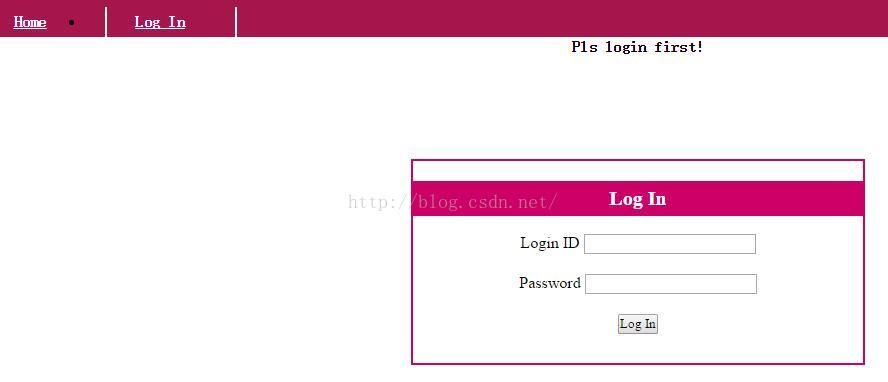
验证:
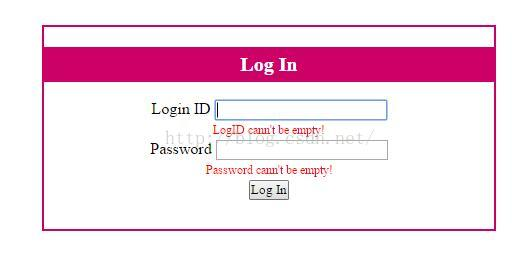
正确登录:
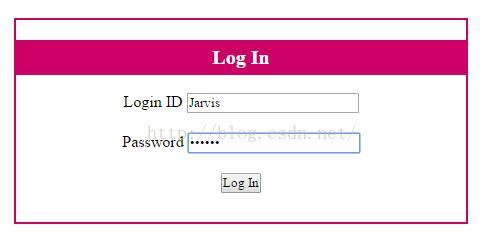
登录成功:

MVC+三层+ASP.NET简单登录验证的更多相关文章
- 【ADO.NET】2、各种版本的 简单登录验证
一.简单登录验证(防SQL注入) GetString(序号) 返回某一列的值(当用户不记得列名序号时,可使用GetOrdinal()获取到序号)GetInt32(序号) 针对的是 int 字段,返回i ...
- ASP.NET简单登录注册实例
<%@ Page Language="C#" AutoEventWireup="true" CodeBehind="WebForm1.aspx. ...
- asp.net mvc3登录验证
1,在web.config中 <system.web>节点下面增加: <authentication mode="Forms"> <forms na ...
- Python第一天-----简单登录验证
----------------------------------------- 编写登录接口 要求:1.输入用户名密码 2.认证成功后显示欢迎信息 3.输错三次后锁定 -------------- ...
- nodejs(一) 简单登录验证 使用mongoose 操作MongoDB
---恢复内容开始--- 开发使用webstorm 9 新建nodejs+express 项目 newfarmer 文章目录 配置Mongoose 创建目录及文件 插入数据,POST提交JSON增加 ...
- nutz中实现登录验证
一.nutz是什么 nutz是一个轻便的web端开发框架.主页如下:http://www.nutzam.com/core/nutz_preface.html 二.session简单介绍 大家都知道ht ...
- Asp.NetMVC利用LigerUI搭建一个简单的后台管理详解(函登录验证)
上一篇 Asp.Net 中Grid详解两种方法使用LigerUI加载数据库数据填充数据分页 了解了LigerUI 中Grid的基本用法 现在结合上一篇的内容做一个简单的后台管理,当然也有前台的页面 ...
- 程序猿修仙之路--数据结构之你是否真的懂数组? c#socket TCP同步网络通信 用lambda表达式树替代反射 ASP.NET MVC如何做一个简单的非法登录拦截
程序猿修仙之路--数据结构之你是否真的懂数组? 数据结构 但凡IT江湖侠士,算法与数据结构为必修之课.早有前辈已经明确指出:程序=算法+数据结构 .要想在之后的江湖历练中通关,数据结构必不可少. ...
- ASP.NET MVC 登录验证
好久没写随笔了,这段时间没 什么事情,领导 一直没安排任务,索性 一直在研究代码,说实在的,这个登录都 搞得我云里雾里的,所以这次我可能也讲得不是 特别清楚,但是 我尽力把我知道的讲出来,顺便也对自 ...
随机推荐
- 国服最强JWT生成Token做登录校验讲解,看完保证你学会!
转载于:https://blog.csdn.net/u011277123/article/details/78918390 Free码农 2017-12-28 00:08:02 JWT简介 JWT(j ...
- java中什么是泛型
一. 泛型概念的提出(为什么需要泛型)? 首先,我们看下下面这段简短的代码: 1 public class GenericTest { 2 3 public static void main(Stri ...
- 关于redis集群的问题no reachable node in cluster
重新启动redis集群时启动失败 n context with path [] threw exception [Request processing failed; nested exception ...
- Bytom合约预编译
比原项目仓库: Github地址:https://github.com/Bytom/bytom Gitee地址:https://gitee.com/BytomBlockchain/bytom 在开发合 ...
- java基础 (二)之HashMap,HashTable,ConcurrentHashMap区别
HashTable: put方法加了同步锁synchronized,底层数组+链表实现,无论key还是value都不能为null,线程安全,实现线程安全的方式是在修改数据时锁住整个HashTable, ...
- HDU 2612 (2次BFS,有点小细节)
Problem Description Pass a year learning in Hangzhou, yifenfei arrival hometown Ningbo at finally. L ...
- elementUI
开始学习elementUI了. 怎么可以快速的学习一个UI框架,是我们的值得思考的事情. 博客,重点,记忆. <el-button @click="visible = true&quo ...
- 使用Jekins自动构建项目(GitLab+Java Maven)
1. 登录Jekins 前提: Jekins 已经部署完成并能登录版本:Jenkins2.60.2 http://IP:端口/jenkins/view/all/newJob 2. 新建构建任务 选择项 ...
- guxh的python笔记一:数据类型
1,基本概念 1.1,数据类型 基本数据类型:字符串,数字,布尔等 引用数据类型:相对不可变(元组),可变(列表,字典,集合等) 基本数据类型存放实际值,引用数据类型存放对象的地址(即引用) ==:判 ...
- scrapy中XMLFeedSpider
爬取案例: 目标网站: url = 'http://www.chinanews.com/rss/scroll-news.xml' 页面特点: 先创建爬虫项目: 也可以查看爬虫类: 创建xmlFeed ...