
bootstrap中popover.js(弹出框)使用总结+案例
bootstrap中popover.js(弹出框)使用总结+案例
*转载请注明出处:
作者:willingtolove;
http://www.cnblogs.com/willingtolove/p/4694573.html
*bootstrap官方说明:http://v3.bootcss.com/javascript/#popovers
一. popover常用配置参数:
 //常用配置参数:

 $(document).ready(function() {

             $('#temp').popover(

                 {

                     trigger:'click', //触发方式

                     template: '', //你自定义的模板

                     title:"标题",//设置 弹出框 的标题

                     html: true, // 为true的话,data-content里就能放html代码了

                     content:"",//这里可以直接写字符串,也可以 是一个函数,该函数返回一个字符串;

                 }

             );

         }

 //常用方法:

 $('#element').popover('show');

 $('#element').popover('hide');

 $('#element').popover('destroy')
二. 案例分析:
1. 案例要求:动态产生一个按钮,并给页面中所有具有data-toggle="popover"属性的元素绑定popover(弹出框)效果,触发方式:当鼠标指针放到元素上时弹出弹出框,离开元素时,弹出框消失;弹出框内容要求:一定要包含该触发弹窗元素的文本信息;
2. html代码:(注意引入bootstrap.js和样式)
 <body>

     <a id="temp1" tabindex="0" class="btn btn-lg btn-danger" role="button" data-toggle="popover"  title="Dismissible popover" >弹出框1</a>

     <a id="temp2" tabindex="0" class="btn btn-lg btn-danger" role="button" data-toggle="popover">弹出框2</a>

     <div id="LinkDIV" style="float:left;width:200px">

     </div>

 </body>
3. js代码:
<script>

        $(function () {

            $("#LinkDIV").html('<button type="btn btn-lg btn-primary" data-toggle="popover" id="temp3">弹出框3</button>');

            $('[data-toggle="popover"]').each(function () {

                var element = $(this);

                var id = element.attr('id');

                var txt = element.html();

                element.popover({

                    trigger: 'manual',

                    placement: 'bottom', //top, bottom, left or right

                    title: txt,

                    html: 'true',

                    content: ContentMethod(txt),

                }).on("mouseenter", function () {

                    var _this = this;

                    $(this).popover("show");

                    $(this).siblings(".popover").on("mouseleave", function () {

                        $(_this).popover('hide');

                    });

                }).on("mouseleave", function () {

                    var _this = this;

                    setTimeout(function () {

                        if (!$(".popover:hover").length) {

                            $(_this).popover("hide")

                        }

                    }, 100);

                });

            });

        });

        function ContentMethod(txt) {

            return '<table class="table table-bordered"><tr><td>' + txt + '</td><td>BB</td><td>CC</td><td>DD</td></tr>' +

                    '<tr><td>' + txt + '</td><td>BB</td><td>CC</td><td>DD</td></tr>' +

                    '<tr><td>' + txt + '</td><td>BB</td><td>CC</td><td>DD</td></tr>'+

                    '<tr><td>AAAAAAAAAAAAAAAAAAAAAAAAAAAAAAAAAAAAAAAAAAAAAAAAA</td><td>BB</td><td>CC</td><td>DD</td></tr></table>';

        }

    </script>
4. 效果图:
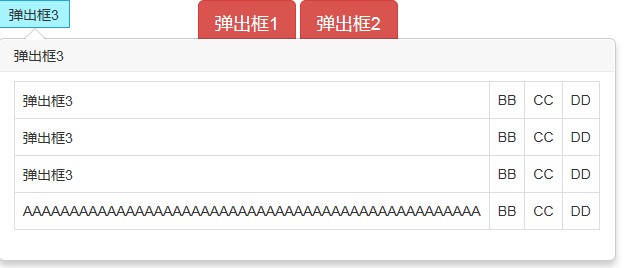
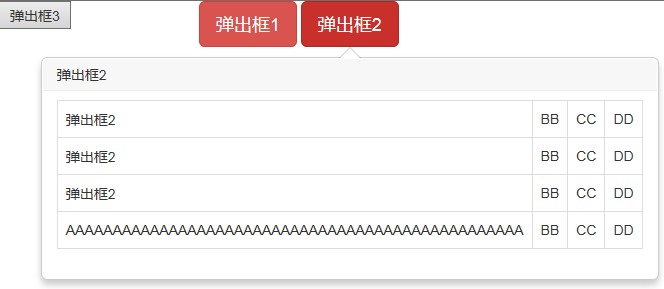
*tips:
1. 弹出框的最大宽度有默认值:275px;(bootstrap.min.css)
 .popover {

             position: absolute;

             top:;

             left:;

             z-index:;

             display: none;

             max-width: 2000px;//我改为了2000px

             padding: 1px;

             font-family: "Helvetica Neue",Helvetica,Arial,sans-serif;

             font-size: 14px;

             font-style: normal;

             font-weight:;

             line-height: 1.42857143;

             text-align: left;

             text-align: start;

             text-decoration: none;

             text-shadow: none;

             text-transform: none;

             letter-spacing: normal;

             word-break: normal;

             word-spacing: normal;

             word-wrap: normal;

             white-space: normal;

             background-color: #fff;

             -webkit-background-clip: padding-box;

             background-clip: padding-box;

             border: 1px solid #ccc;

             border: 1px solid rgba(0,0,0,.2);

             border-radius: 6px;

             -webkit-box-shadow: 0 5px 10px rgba(0,0,0,.2);

             box-shadow: 0 5px 10px rgba(0,0,0,.2);

             line-break: auto;

         }
bootstrap中popover.js(弹出框)使用总结+案例的更多相关文章
- Bootstrap历练实例:弹出框(popover)事件
事件 下表列出了弹出框(Popover)插件中要用到的事件.这些事件可在函数中当钩子使用. 事件 描述 实例 show.bs.popover 当调用 show 实例方法时立即触发该事件. $('#my ...
- 【转】js弹出框、对话框、提示框、弹窗总结
js弹出框.对话框.提示框.弹窗总结 一.js的三种最常见的对话框 //====================== JS最常用三种弹出对话框 ======================== //弹 ...
- js js弹出框、对话框、提示框、弹窗总结
js弹出框.对话框.提示框.弹窗总结 一.JS的三种最常见的对话框 //====================== JS最常用三种弹出对话框 ======================== //弹 ...
- 在IOS11中position:fixed弹出框中的input出现光标错位的问题
问题出现的背景: 在IOS11中position:fixed弹出框中的input出现光标错位的问题 解决方案 一.设计交互方面最好不要让弹窗中出现input输入框: 二.前端处理此兼容性的方案思路: ...
- 5月12日上课笔记-js 弹出框、函数、程序调试、基本事件、浏览器对象模型
一.弹出框 a.提示框 alert(); b.输入框 prompt(); c.确认框 confirm(); var flag= confirm("确认删除吗?"); 二.js程序调 ...
- 如何妥善处理WebBrowser对Javascript的错误问题,阻止JS弹出框,提高用户体验
由于项目需求,最近转战客户端,开始搞浏览器开发.众所周知,现在在微软平台上开发浏览器,最常用的方法就是扩展Webbrowser,但是首先要清楚的是,WebBrowser控件仅仅是对WebBrowser ...
- JS弹出框插件zDialog再次封装
zDialog插件网址:http://www.jq22.com/jquery-info2426 再次封装zDialog的代码: (function ($) { $.extend({ iDialog: ...
- 转:WebDriver(Selenium2) 处理可能存在的JS弹出框
在自动化测试过程中,有些情况下我们会遇到一些潜在的Javascript弹出框.(即某些条件下才会出现,不是固定出现),然后如果当这种弹出框出现,我们没有加以处理,WebDriver将无法进行下一步的操 ...
- WebDriver(Selenium2) 处理可能存在的JS弹出框
http://uniquepig.iteye.com/blog/1703103 在自动化测试过程中,有些情况下我们会遇到一些潜在的Javascript弹出框.(即某些条件下才会出现,不是固定出现),然 ...
随机推荐
- [jquery]将当前时间转换成yyyymmdd格式
如题: function nowtime(){//将当前时间转换成yyyymmdd格式 var mydate = new Date(); var str = "" + mydate ...
- Checkstyle:整洁你的代码
内容 Checkstyle简介 下载 Checkstyle的几种使用方式 1) 与Ant结合使用 2) 通过CLI使用 3)在IDE上使用插件 4)在Maven上使用插件 Checkstyle配置 配 ...
- Transient的作用
1:transient的作用及其使用方法 当一个对象实现类Serilizable接口,那么这个类就可以被序列化,java的这种序列化的模式为开发者提供了很多的便利. 然而在实际开发中,我们常常遇到这样 ...
- 转 jQuery 中bind(),live(),delegate(),on() 区别
当我们试图绑定一些事件到DOM元素上的时候,我相信上面这4个方法是最常用的.而它们之间到底有什么不同呢?在什么场合下用什么方法是最有效的呢? 准备知识: 当我们在开始的时候,有些知识是必须具备的: D ...
- OSG3.40 编译时,无法打开输入文件“optimized.lib”
解决方案: 正常情况下,下图中会多出一项:ZLIB_LIBRARY_RELEASE,之后屡次编译,都提示"无法打开输入文件"optimized.lib"" 因为 ...
- 安装CentOS7文字界面版后,无法联网,用yum安装软件提示 cannot find a valid baseurl for repo:base/7/x86_64 的解决方法
*无法联网的明显表现会有: 1.yum install出现 Error: cannot find a valid baseurl or repo:base 2.ping host会提示unknown ...
- xwalk_core_library-15.44.384 .13.aar 百度云分享
xwalk_core_library-15.44.384.13.aar 这玩意下载很慢 特意放到百度,需要的可以通过百度下载 http://pan.baidu.com/s/1nt0Cmbn 下完后放到 ...
- django 缓存、中间件、信号、CSRF 详解
中间件 django 中的中间件(middleware),在django中,中间件其实就是一个类,在请求到来和结束后,django会根据自己的规则在合适的时机执行中间件中相应的方法. 在django项 ...
- 让PDF.NET支持最新的SQLite数据库
最近项目中用到了SQLite,之前项目中用的是PDF.NET+MySQL的组合,已经写了不少代码,如果能把写好的代码直接用在SQLite上就好了,PDF.NET支持大部分主流的数据库,这个当然可以,只 ...
- FilenameFilter过滤文件名
前言: 文件IO是程序设计语言的一个特点,本文将针对Java的File文件名过滤进行测试. 测试目录截图: 测试结果: data.txt output-.txt output-.txt output- ...