
python-django-请求响应对象
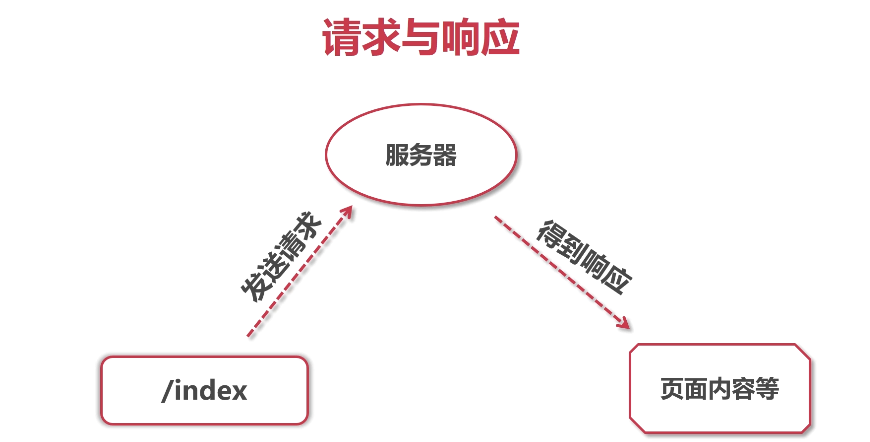
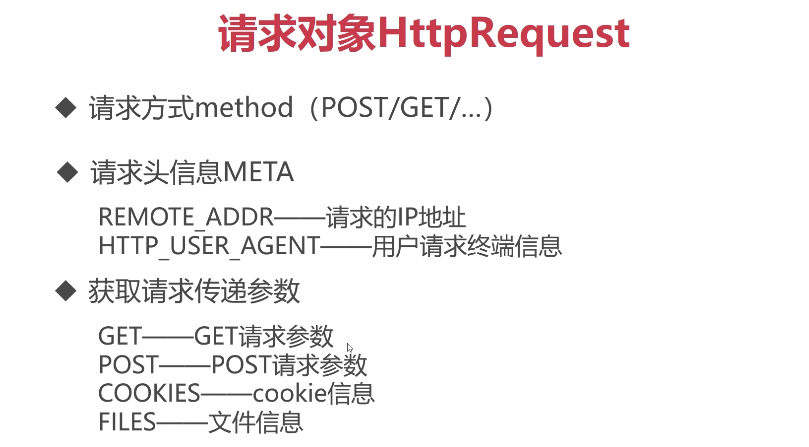
用户请求终端的信息:

包括使用的ip地址,浏览器类型等

cookie:
测试测试;
def print_request(request):

    print(request)

    print("!!!!!!!!!!!!!!!!")

    ip = request.META['REMOTE_ADDR']

    print(ip)

    #用户浏览器的信息,终端信息

    user_agent = request.META['HTTP_USER_AGENT']

    print(user_agent)

    print(dir(request))

    return HttpResponse()

urls.py如下:

url(r'print/request',views.print_request,name='print_request'),
结果:
<WSGIRequest: GET '/print/request'>

!!!!!!!!!!!!!!!!

127.0.0.1

Mozilla/5.0 (Windows NT 10.0; Win64; x64) AppleWebKit/537.36 (KHTML, like Gecko) Chrome/81.0.4044.92 Safari/537.36 Edg/81.0.416.53

['COOKIES', 'FILES', 'GET', 'META', 'POST', '__class__', '__delattr__', '__dict__', '__dir__', '__doc__', '__eq__', '__format__', '__ge__',
 '__getattribute__', '__gt__', '__hash__', '__init__', '__init_subclass__', '__iter__', '__le__', '__lt__', '__module__', '__ne__',
 '__new__', '__reduce__', '__reduce_ex__', '__repr__', '__setattr__', '__sizeof__', '__str__', '__subclasshook__', '__weakref__',
 '_encoding', '_get_post', '_get_raw_host', '_get_scheme', '_initialize_handlers', '_load_post_and_files', '_mark_post_parse_error',
 '_messages', '_post_parse_error', '_read_started', '_set_post', '_stream', '_upload_handlers', 'body', 'build_absolute_uri', 'close',
'content_params', 'content_type', 'csrf_processing_done', 'encoding', 'environ', 'get_full_path', 'get_host', 'get_port', 'get_raw_uri',
'get_signed_cookie', 'is_ajax', 'is_secure', 'method', 'parse_file_upload', 'path', 'path_info', 'read', 'readline', 'readlines',
'resolver_match', 'scheme', 'session', 'upload_handlers', 'user', 'xreadlines']
def print_resp(request):

    now = datetime.now()

    html = """

       <html>

       <head>

           <style type="text/css">

               body{{color:red;}}

           </style>

       </head>

       <body>

           now:{0}

       </body>

       </html>

       """.format(now)

    return HttpResponse(html,content_type='text/plain')
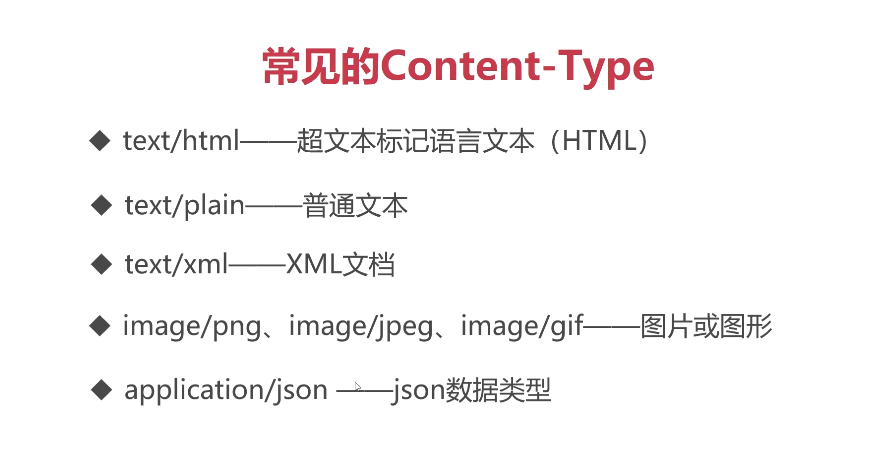
通过content——type进行指定返回的响应对象
def print_json(request):

    user_info = {

        'username':'张三',

        'age':50

    }

    import json

    user_info = json.dumps(user_info)

    return HttpResponse(user_info,content_type='application/json')

虽然python中的字典是和json有点相似,但是要以json的格式 进行输出是要

使用转换函数,json.dumps进行转换再输出的

更加快捷的响应json:
def print_json(request):

    user_info = {

        'username':'张三',

        'age':50

    }

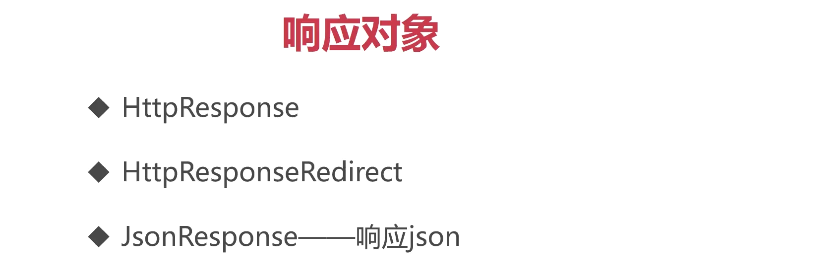
    return JsonResponse(user_info)

直接响应,因为里面封装了一个转换格式的函数,并且继承了httpresponse
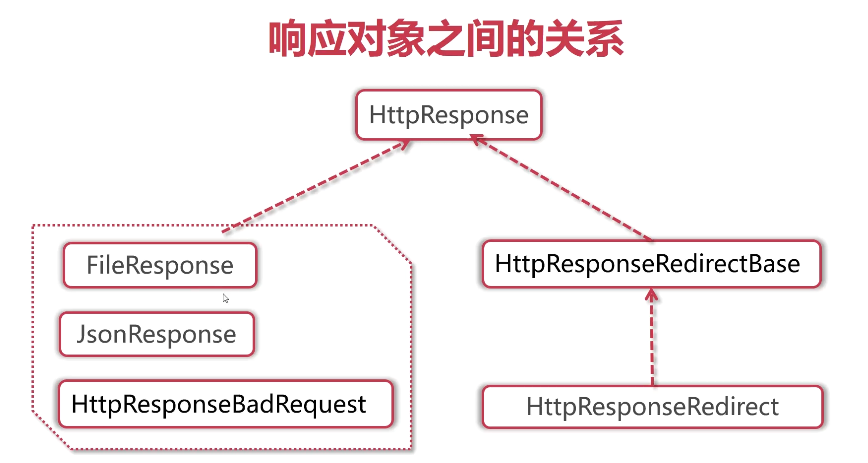
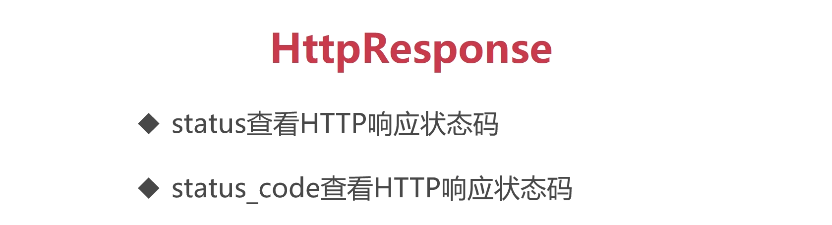
两个的区别是:

一个是需要对象进行给与,statud_code 是resp的一个对象属性,通过对象使用
def print_resp_attr(request):

    # return HttpResponse('eee',status=209)

    resp = HttpResponse('打印响应对象',status=404)

    #重新设置HTTP的转台码

    resp.status_code=203

    print(resp.status_code)
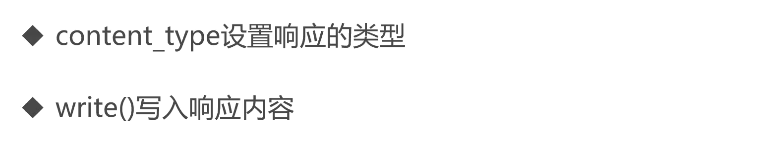
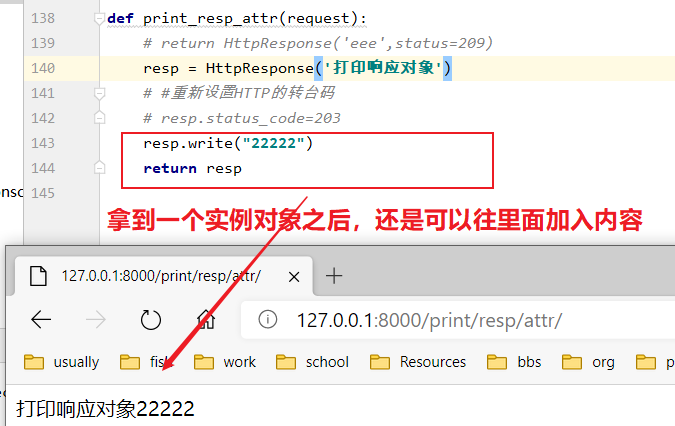
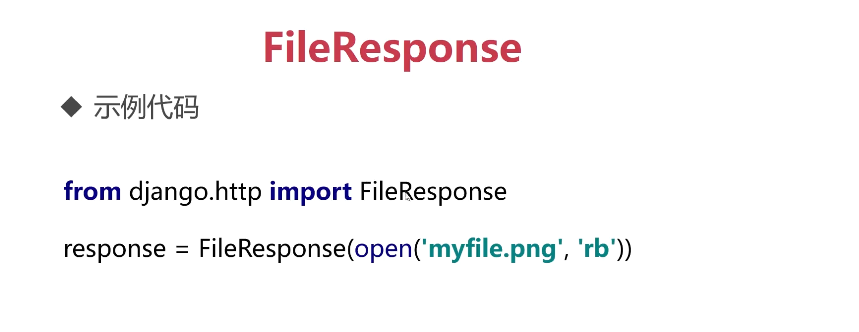
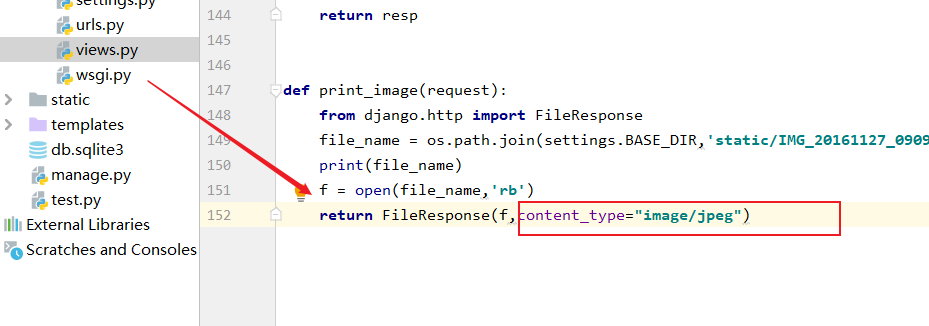
通过二进制流读取图片并进行展示到页面里面
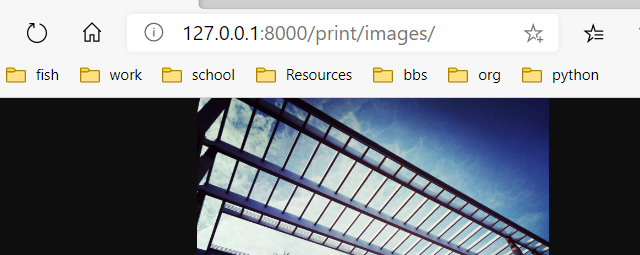
结果:
展示表格:
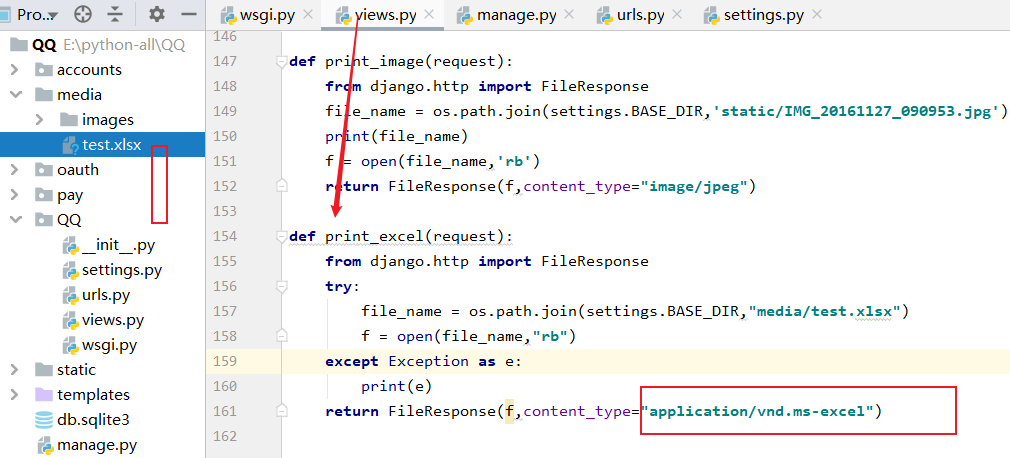
content_type 包括以下的选项:
.aiff = audio/aiff

.anv = application/x-anv

.asa = text/asa

.asf = video/x-ms-asf

.asp = text/asp

.asx = video/x-ms-asf

.au = audio/basic

.avi = video/avi

.awf = application/vnd.adobe.workflow

.biz = text/xml

.bmp = application/x-bmp

.bot = application/x-bot

.c4t = application/x-c4t

.c90 = application/x-c90

.cal = application/x-cals

.cat = application/vnd.ms-pki.seccat

.cdf = application/x-netcdf

.cdr = application/x-cdr

.cel = application/x-cel

.cer = application/x-x509-ca-cert

.cg4 = application/x-g4

.cgm = application/x-cgm

.cit = application/x-cit

.class = java/*

.cml = text/xml :客户端浏览器按XML格式进行解析文档

.cmp = application/x-cmp

.cmx = application/x-cmx

.cot = application/x-cot

.crl = application/pkix-crl

.crt = application/x-x509-ca-cert

.csi = application/x-csi

.css = text/css :客户端浏览器按CSS格式进行解析文档

.cut = application/x-cut

.dbf = application/x-dbf

.dbm = application/x-dbm

.dbx = application/x-dbx

.dcd = text/xml :客户端浏览器按XML格式进行解析文档

.dcx = application/x-dcx

.der = application/x-x509-ca-cert

.dgn = application/x-dgn

.dib = application/x-dib

.dll = application/x-msdownload

.doc = application/msword

.dot = application/msword

.drw = application/x-drw

.dtd = text/xml :客户端浏览器按XML格式进行解析文档

.dwf = Model/vnd.dwf

.dwf = application/x-dwf

.dwg = application/x-dwg

.dxb = application/x-dxb

.dxf = application/x-dxf

.edn = application/vnd.adobe.edn

.emf = application/x-emf

.eml = message/rfc822

.ent = text/xml :客户端浏览器按XML格式进行解析文档

.epi = application/x-epi

.eps = application/x-ps

.eps = application/postscript

.etd = application/x-ebx

.exe = application/x-msdownload

.fax = image/fax

.fdf = application/vnd.fdf

.fif = application/fractals

.fo = text/xml :客户端浏览器按XML格式进行解析文档

.frm = application/x-frm

.g4 = application/x-g4

.gbr = application/x-gbr

.gcd = application/x-gcd

.gif = image/gif

.gl2 = application/x-gl2

.gp4 = application/x-gp4

.hgl = application/x-hgl

.hmr = application/x-hmr

.hpg = application/x-hpgl

.hpl = application/x-hpl

.hqx = application/mac-binhex40

.hrf = application/x-hrf

.hta = application/hta

.htc = text/x-component

.htm = text/html :客户端浏览器按超文本格式进行解析文档

.html = text/html :客户端浏览器按超文本格式进行解析文档

.htt = text/webviewhtml

.htx = text/html :客户端浏览器按超文本格式进行解析文档

.icb = application/x-icb

.ico = image/x-icon

.ico = application/x-ico

.iff = application/x-iff

.ig4 = application/x-g4

.igs = application/x-igs

.iii = application/x-iphone

.img = application/x-img

.ins = application/x-internet-signup

.isp = application/x-internet-signup

.IVF = video/x-ivf

.java = java/*

.jfif = image/jpeg

.jpe = image/jpeg

.jpe = application/x-jpe

.jpeg = image/jpeg

.jpg = image/jpeg

.jpg = application/x-jpg

.js = application/x-javascript

.jsp = text/html :客户端浏览器按超文本格式进行解析文档

.la1 = audio/x-liquid-file

.lar = application/x-laplayer-reg

.latex = application/x-latex

.lavs = audio/x-liquid-secure

.lbm = application/x-lbm

.lmsff = audio/x-la-lms

.ls = application/x-javascript

.ltr = application/x-ltr

.m1v = video/x-mpeg

.m2v = video/x-mpeg

.m3u = audio/mpegurl

.m4e = video/mpeg4

.mac = application/x-mac

.man = application/x-troff-man

.math = text/xml

.mdb = application/msaccess

.mdb = application/x-mdb

.mfp = application/x-shockwave-flash

.mht = message/rfc822

.mhtml = message/rfc822

.mi = application/x-mi

.mid = audio/mid

.midi = audio/mid

.mil = application/x-mil

.mml = text/xml

.mnd = audio/x-musicnet-download

.mns = audio/x-musicnet-stream

.mocha = application/x-javascript

.movie = video/x-sgi-movie

.mp1 = audio/mp1

.mp2 = audio/mp2

.mp2v = video/mpeg

.mp3 = audio/mp3

.mp4 = video/mpeg4

.mpa = video/x-mpg

.mpd = application/vnd.ms-project

.mpe = video/x-mpeg

.mpeg = video/mpg

.mpg = video/mpg

.mpga = audio/rn-mpeg

.mpp = application/vnd.ms-project

.mps = video/x-mpeg

.mpt = application/vnd.ms-project

.mpv = video/mpg

.mpv2 = video/mpeg

.mpw = application/vnd.ms-project

.mpx = application/vnd.ms-project

.mtx = text/xml

.mxp = application/x-mmxp

.net = image/pnetvue

.nrf = application/x-nrf

.nws = message/rfc822

.odc = text/x-ms-odc

.out = application/x-out

.p10 = application/pkcs10

.p12 = application/x-pkcs12

.p7b = application/x-pkcs7-certificates

.p7c = application/pkcs7-mime

.p7m = application/pkcs7-mime

.p7r = application/x-pkcs7-certreqresp

.p7s = application/pkcs7-signature

.pc5 = application/x-pc5

.pci = application/x-pci

.pcl = application/x-pcl

.pcx = application/x-pcx

.pdf = application/pdf :客户端浏览器按PDF格式进行解析文档

.pdf = application/pdf

.pdx = application/vnd.adobe.pdx

.pfx = application/x-pkcs12

.pgl = application/x-pgl

.pic = application/x-pic

.pko = application/vnd.ms-pki.pko

.pl = application/x-perl

.plg = text/html

.pls = audio/scpls

.plt = application/x-plt

.png = image/png

.png = application/x-png

.pot = application/vnd.ms-powerpoint

.ppa = application/vnd.ms-powerpoint

.ppm = application/x-ppm

.pps = application/vnd.ms-powerpoint

.ppt = application/vnd.ms-powerpoint

.ppt = application/x-ppt

.pr = application/x-pr

.prf = application/pics-rules

.prn = application/x-prn

.prt = application/x-prt

.ps = application/x-ps

.ps = application/postscript

.ptn = application/x-ptn

.pwz = application/vnd.ms-powerpoint

.r3t = text/vnd.rn-realtext3d

.ra = audio/vnd.rn-realaudio

.ram = audio/x-pn-realaudio

.ras = application/x-ras

.rat = application/rat-file

.rdf = text/xml

.rec = application/vnd.rn-recording

.red = application/x-red

.rgb = application/x-rgb

.rjs = application/vnd.rn-realsystem-rjs

.rjt = application/vnd.rn-realsystem-rjt

.rlc = application/x-rlc

.rle = application/x-rle

.rm = application/vnd.rn-realmedia

.rmf = application/vnd.adobe.rmf

.rmi = audio/mid

.rmj = application/vnd.rn-realsystem-rmj

.rmm = audio/x-pn-realaudio

.rmp = application/vnd.rn-rn_music_package

.rms = application/vnd.rn-realmedia-secure

.rmvb = application/vnd.rn-realmedia-vbr

.rmx = application/vnd.rn-realsystem-rmx

.rnx = application/vnd.rn-realplayer

.rp = image/vnd.rn-realpix

.rpm = audio/x-pn-realaudio-plugin

.rsml = application/vnd.rn-rsml

.rt = text/vnd.rn-realtext

.rtf = application/msword

.rtf = application/x-rtf

.rv = video/vnd.rn-realvideo

.sam = application/x-sam

.sat = application/x-sat

.sdp = application/sdp

.sdw = application/x-sdw

.sit = application/x-stuffit

.slb = application/x-slb

.sld = application/x-sld

.slk = drawing/x-slk

.smi = application/smil

.smil = application/smil

.smk = application/x-smk

.snd = audio/basic

.sol = text/plain

.sor = text/plain

.spc = application/x-pkcs7-certificates

.spl = application/futuresplash

.spp = text/xml

.ssm = application/streamingmedia

.sst = application/vnd.ms-pki.certstore

.stl = application/vnd.ms-pki.stl

.stm = text/html

.sty = application/x-sty

.svg = text/xml

.swf = application/x-shockwave-flash :客户端浏览器按 Flash 格式进行解析文档

.tdf = application/x-tdf

.tg4 = application/x-tg4

.tga = application/x-tga

.tif = image/tiff

.tif = application/x-tif

.tiff = image/tiff

.tld = text/xml

.top = drawing/x-top

.torrent = application/x-bittorrent

.tsd = text/xml

.txt = text/plain :客户端浏览器按 纯文本 格式进行解析文档

.uin = application/x-icq

.uls = text/iuls

.vcf = text/x-vcard

.vda = application/x-vda

.vdx = application/vnd.visio

.vml = text/xml

.vpg = application/x-vpeg005

.vsd = application/vnd.visio

.vsd = application/x-vsd

.vss = application/vnd.visio

.vst = application/vnd.visio

.vst = application/x-vst

.vsw = application/vnd.visio

.vsx = application/vnd.visio

.vtx = application/vnd.visio

.vxml = text/xml

.wav = audio/wav

.wax = audio/x-ms-wax

.wb1 = application/x-wb1

.wb2 = application/x-wb2

.wb3 = application/x-wb3

.wbmp = image/vnd.wap.wbmp

.wiz = application/msword

.wk3 = application/x-wk3

.wk4 = application/x-wk4

.wkq = application/x-wkq

.wks = application/x-wks

.wm = video/x-ms-wm

.wma = audio/x-ms-wma

.wmd = application/x-ms-wmd

.wmf = application/x-wmf

.wml = text/vnd.wap.wml

.wmv = video/x-ms-wmv

.wmx = video/x-ms-wmx

.wmz = application/x-ms-wmz

.wp6 = application/x-wp6

.wpd = application/x-wpd

.wpg = application/x-wpg

.wpl = application/vnd.ms-wpl

.wq1 = application/x-wq1

.wr1 = application/x-wr1

.wri = application/x-wri

.wrk = application/x-wrk

.ws = application/x-ws

.ws2 = application/x-ws

.wsc = text/scriptlet

.wsdl = text/xml

.wvx = video/x-ms-wvx

.xdp = application/vnd.adobe.xdp

.xdr = text/xml

.xfd = application/vnd.adobe.xfd

.xfdf = application/vnd.adobe.xfdf

.xhtml = text/html

.xls = application/vnd.ms-excel

.xls = application/x-xls

.xlw = application/x-xlw

.xml = text/xml

.xpl = audio/scpls

.xq = text/xml

.xql = text/xml

.xquery = text/xml

.xsd = text/xml

.xsl = text/xml

.xslt = text/xml

.xwd = application/x-xwd

.x_b = application/x-x_b

.x_t = application/x-x_t
python-django-请求响应对象的更多相关文章
- Django请求响应对象
请求与响应对象 HttpRequest HttpRequest存储了客户请求的相关参数和一些查询方法. path 请求页面的全路径,不包括域名-例如, "/hello/". met ...
- python+requests 请求响应文本出错返回“登录超时”
Python+requests请求响应:"msg":"登录过时" 1.出错原代码: import requests import json#页面按条件搜索返回相 ...
- Django请求,响应,ajax以及CSRF问题
二.request对象常用属性: Attribute Description path 请求页面的全路径,不包括域名端口参数.例如: /users/index method 一个全大写的字符串,表示请 ...
- DRF对Django请求响应做了技术升级
Django视图是用来处理请求和响应的,Django默认是按Form和Template来设计的,如果要处理以JSON格式为主的RESTful API,那么就需要对Django请求和响应的处理代码进行优 ...
- request和response——请求响应对象
请求对象--request 获取get请求的值 一次请求,返回一个响应. 地址栏:http://127.0.0.1:8000/day3/get_request?lan=python 问号:代表请求参数 ...
- django返回响应对象
Django的视图必须要返回一个HttpResponse对象(或者其子类对象),不能像flask一样直接返回字符串. Django: return HttpResponse("Hello&q ...
- python http 请求 响应 post表单提交
1. 查看请求 响应情况 print(response.text) print(response.headers) print(response.request.body) print(respons ...
- django之三剑客、静态文件配置、请求响应对象、数据库操作
三剑客 from django.shortcuts import render,HttpResponse,redirect HttpResponse # 返回字符串 render(response, ...
- python Django请求生命周期
首先我们知道HTTP请求及服务端响应中传输的所有数据都是字符串. 在Django中,当我们访问一个的url时,会通过路由匹配进入相应的html网页中. Django的请求生命周期是指当用户在浏览器上输 ...
- 关于Tomcat中封装请求-响应的结构的分析
在编写Servlet时,往往只重写了doGet和doPost方法,使用Tomcat通过(HttpServletRequest 和 HttpServletResponse)接口传递来的request和r ...
随机推荐
- PCIE学习笔记--PCIe错误源详解(二)
转载地址:http://blog.chinaaet.com/justlxy/p/5100057799 这篇文章主要介绍事务(Transaction)错误.链路流量控制(Link Flow Contro ...
- 第07课 OpenGL 光照和键盘(2)
下一段代码绘制贴图立方体.我只对新增的代码进行注解.如果您对没有注解的代码有疑问,回头看看第六课. int DrawGLScene(GLvoid) // 从这里开始进行所有的绘制 { glClear( ...
- ReentrantLock & AQS
概念 Syncronized由于其使用的不灵活性,逐渐的被抛弃~ 常用解决方案,有以下三种使用方式:(暂时的不考虑condition的应用,暂时还没有总结出来) 同步普通方法,锁的是当前对象. 同步静 ...
- sudo 命令详解
在linux系统中,由于root的权限过大,一般情况都不使用它.只有在一些特殊情况下才采用登录root执行管理任务,一般情况下临时使用root权限多采用su和sudo命令. 一.su和sudo命令对比 ...
- 重装系统——联想window 10
大四了,读了四年大学,唉,混的,啥也不会,工作也找不到,真的不知道这大学四年到底干了什么.专业是计算机方向的,但居然,不敢,也不会装电脑系统,大学四年的文件都是乱放的,更那个的是,有些软件卸载不完全, ...
- Java-基础-HashMap
1. 简介 Java8 HashMap结构(数组 + 列表 + 红黑树)如图: 基于哈希表的 Map 接口的实现.此实现提供所有可选的映射操作,并允许使用 null 值和 null 键.(除了非同步和 ...
- js之变量与数据类型
变量 声明 一个变量被重新复赋值后,它原有的值就会被覆盖,变量值将以最后一次赋的值为准. var age = 18; age = 81; // 最后的结果就是81因为18 被覆盖掉了 同时声明多个变量 ...
- 六问六答理解ForkJoin原理
摘要:ForkJoin线程池是将任务分割为子任务,有可能子任务还是很大,还需要进一步拆解,最终得到足够小的任务. 本文分享自华为云社区<ForkJoin线程池的学习和思考>,作者:brea ...
- 百度ueditor编辑器注入漏洞修补查杀程序
百度ueditor编辑器注入查杀程序,用于对百度ueditor的漏洞补丁进行查杀,使用时需要保证本地正确部署了.net 4.0服务. 百度ueditor编辑器是目前网上比较流行的一个网站编辑器,但由于 ...
- 1组-Alpha冲刺-2/6
一.基本情况 队名:震震带着六菜鸟 组长博客:https://www.cnblogs.com/Klein-Wang/p/15535649.html 小组人数:7人 二.冲刺概况汇报 王业震 过去两天完 ...