
ceph对象存储场景
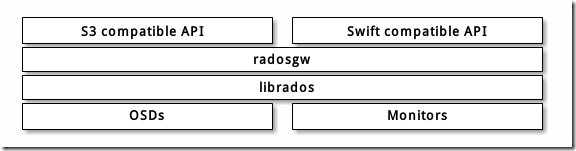
安装ceph-radosgw
[root@ceph-node1 ~]# cd /etc/ceph

# 这里要注意ceph的源,要和之前安装的ceph集群同一个版本

[root@ceph-node1 ceph]# sudo yum install -y ceph-radosgw
创建RGW用户和keyring
在ceph-node1服务器上创建keyring:
[root@ceph-node1 ceph]# sudo ceph-authtool --create-keyring /etc/ceph/ceph.client.radosgw.keyring

[root@ceph-node1 ceph]# sudo chmod +r /etc/ceph/ceph.client.radosgw.keyring
生成ceph-radosgw服务对应的用户和key:
[root@ceph-node1 ceph]# sudo ceph-authtool /etc/ceph/ceph.client.radosgw.keyring -n client.radosgw.gateway --gen-key
为用户添加访问权限:
[root@ceph-node1 ceph]# sudo ceph-authtool -n client.radosgw.gateway --cap osd 'allow rwx' --cap mon 'allow rwx' /etc/ceph/ceph.client.radosgw.keyring
导入keyring到集群中:
[root@ceph-node1 ceph]# sudo ceph -k /etc/ceph/ceph.client.admin.keyring auth add client.radosgw.gateway -i /etc/ceph/ceph.client.radosgw.keyring
创建资源池
由于RGW要求专门的pool存储数据,这里手动创建这些Pool,在admin-node上执行:
ceph osd pool create .rgw 64 64

ceph osd pool create .rgw.root 64 64

ceph osd pool create .rgw.control 64 64

ceph osd pool create .rgw.gc 64 64

ceph osd pool create .rgw.buckets 64 64

ceph osd pool create .rgw.buckets.index 64 64

ceph osd pool create .rgw.buckets.extra 64 64

ceph osd pool create .log 64 64

ceph osd pool create .intent-log 64 64

ceph osd pool create .usage 64 64

ceph osd pool create .users 64 64

ceph osd pool create .users.email 64 64

ceph osd pool create .users.swift 64 64

ceph osd pool create .users.uid 64 64
列出pool信息确认全部成功创建:
[root@ceph-admin ~]# rados lspools

cephfs_data

cephfs_metadata

rbd_data

.rgw

.rgw.root

.rgw.control

.rgw.gc

.rgw.buckets

.rgw.buckets.index

.rgw.buckets.extra

.log

.intent-log

.usage

.users

.users.email

.users.swift

.users.uid

default.rgw.control

default.rgw.meta

default.rgw.log

[root@ceph-admin ~]#
报错:too many PGs per OSD (492 > max 250)
[cephfsd@ceph-admin ceph]$ ceph -s

  cluster:

    id:     6d3fd8ed-d630-48f7-aa8d-ed79da7a69eb

    health: HEALTH_ERR

            779 PGs pending on creation

            Reduced data availability: 236 pgs inactive

            application not enabled on 1 pool(s)

            14 slow requests are blocked > 32 sec. Implicated osds

            58 stuck requests are blocked > 4096 sec. Implicated osds 3,5

            too many PGs per OSD (492 > max 250)

  services:

    mon: 1 daemons, quorum ceph-admin

    mgr: ceph-admin(active)

    mds: cephfs-1/1/1 up  {0=ceph-node3=up:active}, 2 up:standby

    osd: 6 osds: 6 up, 6 in

    rgw: 1 daemon active

  data:

    pools:   19 pools, 1104 pgs

    objects: 153 objects, 246MiB

    usage:   18.8GiB used, 161GiB / 180GiB avail

    pgs:     10.779% pgs unknown

             10.598% pgs not active

             868 active+clean

             119 unknown

             117 creating+activating
修改配置admin上的ceph.conf
[cephfsd@ceph-admin ceph]$ vim /etc/ceph/ceph.conf

mon_max_pg_per_osd = 1000

mon_pg_warn_max_per_osd = 1000

# 重启服务

[cephfsd@ceph-admin ceph]$ systemctl restart ceph-mon.target

[cephfsd@ceph-admin ceph]$ systemctl restart ceph-mgr.target

[cephfsd@ceph-admin ceph]$ ceph -s

  cluster:

    id:     6d3fd8ed-d630-48f7-aa8d-ed79da7a69eb

    health: HEALTH_ERR

            779 PGs pending on creation

            Reduced data availability: 236 pgs inactive

            application not enabled on 1 pool(s)

            14 slow requests are blocked > 32 sec. Implicated osds

            62 stuck requests are blocked > 4096 sec. Implicated osds 3,5

  services:

    mon: 1 daemons, quorum ceph-admin

    mgr: ceph-admin(active)

    mds: cephfs-1/1/1 up  {0=ceph-node3=up:active}, 2 up:standby

    osd: 6 osds: 6 up, 6 in

    rgw: 1 daemon active

  data:

    pools:   19 pools, 1104 pgs

    objects: 153 objects, 246MiB

    usage:   18.8GiB used, 161GiB / 180GiB avail

    pgs:     10.779% pgs unknown

             10.598% pgs not active

             868 active+clean

             119 unknown

             117 creating+activating

[cephfsd@ceph-admin ceph]$
仍然报错Implicated osds 3,5
# 查看osd 3和5在哪个节点上

[cephfsd@ceph-admin ceph]$ ceph osd tree

ID CLASS WEIGHT  TYPE NAME           STATUS REWEIGHT PRI-AFF

-1       0.17578 root default

-3       0.05859     host ceph-node1

 0   ssd 0.00980         osd.0           up  1.00000 1.00000

 3   ssd 0.04880         osd.3           up  1.00000 1.00000

-5       0.05859     host ceph-node2

 1   ssd 0.00980         osd.1           up  1.00000 1.00000

 4   ssd 0.04880         osd.4           up  1.00000 1.00000

-7       0.05859     host ceph-node3

 2   ssd 0.00980         osd.2           up  1.00000 1.00000

 5   ssd 0.04880         osd.5           up  1.00000 1.00000

[cephfsd@ceph-admin ceph]$
去到相对应的节点重启服务
# ceph-node1上重启osd3

[root@ceph-node1 ceph]# systemctl restart ceph-osd@3.service
# ceph-node3上重启osd5

[root@ceph-node3 ceph]# systemctl restart ceph-osd@5.service
再次检查ceph健康状态,报application not enabled on 1 pool(s)
[cephfsd@ceph-admin ceph]$ ceph -s

  cluster:

    id:     6d3fd8ed-d630-48f7-aa8d-ed79da7a69eb

    health: HEALTH_WARN

            643 PGs pending on creation

            Reduced data availability: 225 pgs inactive, 53 pgs peering

            Degraded data redundancy: 62/459 objects degraded (13.508%), 27 pgs degraded

            application not enabled on 1 pool(s)

  services:

    mon: 1 daemons, quorum ceph-admin

    mgr: ceph-admin(active)

    mds: cephfs-1/1/1 up  {0=ceph-node3=up:active}, 2 up:standby

    osd: 6 osds: 6 up, 6 in

    rgw: 1 daemon active

  data:

    pools:   19 pools, 1104 pgs

    objects: 153 objects, 246MiB

    usage:   18.8GiB used, 161GiB / 180GiB avail

    pgs:     5.163% pgs unknown

             24.094% pgs not active

             62/459 objects degraded (13.508%)

             481 active+clean

             273 active+undersized

             145 peering

             69  creating+activating+undersized

             57  unknown

             34  creating+activating

             27  active+undersized+degraded

             14  stale+creating+activating

             4   creating+peering

[cephfsd@ceph-admin ceph]$

# 查看详细信息

[root@ceph-admin ~]# ceph health detail

HEALTH_WARN Reduced data availability: 175 pgs inactive; application not enabled on 1 pool(s); 6 slow requests are blocked > 32 sec. Implicated osds 4,5

PG_AVAILABILITY Reduced data availability: 175 pgs inactive

    pg 24.20 is stuck inactive for 13882.112368, current state creating+activating, last acting [5,4,3]

    pg 24.21 is stuck inactive for 13882.112368, current state creating+activating, last acting [5,3,4]

    pg 24.2c is stuck inactive for 13882.112368, current state creating+activating, last acting [3,2,4]

    pg 24.32 is stuck inactive for 13882.112368, current state creating+activating, last acting [5,3,4]

    pg 25.9 is stuck inactive for 13881.051411, current state creating+activating, last acting [3,5,4]

    pg 25.20 is stuck inactive for 13881.051411, current state creating+activating, last acting [5,3,4]

    pg 25.21 is stuck inactive for 13881.051411, current state creating+activating, last acting [3,4,2]

    pg 25.22 is stuck inactive for 13881.051411, current state creating+activating, last acting [5,4,3]

    pg 25.25 is stuck inactive for 13881.051411, current state creating+activating, last acting [3,4,5]

    pg 25.29 is stuck inactive for 13881.051411, current state creating+activating, last acting [3,5,4]

    pg 25.2a is stuck inactive for 13881.051411, current state creating+activating, last acting [0,5,4]

    pg 25.2b is stuck inactive for 13881.051411, current state creating+activating, last acting [5,4,3]

    pg 25.2c is stuck inactive for 13881.051411, current state creating+activating, last acting [3,4,2]

    pg 25.2f is stuck inactive for 13881.051411, current state creating+activating, last acting [3,2,4]

    pg 25.33 is stuck inactive for 13881.051411, current state creating+activating, last acting [5,4,0]

    pg 26.a is stuck inactive for 13880.050194, current state creating+activating, last acting [5,4,3]

    pg 26.20 is stuck inactive for 13880.050194, current state creating+activating, last acting [3,5,4]

    pg 26.21 is stuck inactive for 13880.050194, current state creating+activating, last acting [3,4,5]

    pg 26.22 is stuck inactive for 13880.050194, current state creating+activating, last acting [5,3,4]

    pg 26.23 is stuck inactive for 736.400482, current state unknown, last acting []

    pg 26.24 is stuck inactive for 13880.050194, current state creating+activating, last acting [5,4,3]

    pg 26.25 is stuck inactive for 13880.050194, current state creating+activating, last acting [2,4,3]

    pg 26.26 is stuck inactive for 736.400482, current state unknown, last acting []

    pg 26.27 is stuck inactive for 13880.050194, current state creating+activating, last acting [0,5,4]

    pg 26.28 is stuck inactive for 13880.050194, current state creating+activating, last acting [5,4,3]

    pg 26.29 is stuck inactive for 736.400482, current state unknown, last acting []

    pg 26.2a is stuck inactive for 13880.050194, current state creating+activating, last acting [3,2,4]

    pg 26.2b is stuck inactive for 13880.050194, current state creating+activating, last acting [5,4,3]

    pg 26.2c is stuck inactive for 13880.050194, current state creating+activating, last acting [3,5,4]

    pg 26.2d is stuck inactive for 13880.050194, current state creating+activating, last acting [5,4,3]

    pg 26.2e is stuck inactive for 736.400482, current state unknown, last acting []

    pg 26.30 is stuck inactive for 13880.050194, current state creating+activating, last acting [3,5,4]

    pg 26.31 is stuck inactive for 13880.050194, current state creating+activating, last acting [3,4,2]

    pg 27.a is stuck inactive for 13877.888382, current state creating+activating, last acting [3,5,4]

    pg 27.b is stuck inactive for 13877.888382, current state creating+activating, last acting [3,2,4]

    pg 27.20 is stuck inactive for 13877.888382, current state creating+activating, last acting [5,4,3]

    pg 27.21 is stuck inactive for 13877.888382, current state creating+activating, last acting [3,5,4]

    pg 27.22 is stuck inactive for 13877.888382, current state creating+activating, last acting [5,3,4]

    pg 27.23 is stuck inactive for 736.400482, current state unknown, last acting []

    pg 27.24 is stuck inactive for 13877.888382, current state creating+activating, last acting [3,5,4]

    pg 27.25 is stuck inactive for 736.400482, current state unknown, last acting []

    pg 27.27 is stuck inactive for 13877.888382, current state creating+activating, last acting [5,3,4]

    pg 27.28 is stuck inactive for 736.400482, current state unknown, last acting []

    pg 27.29 is stuck inactive for 736.400482, current state unknown, last acting []

    pg 27.2a is stuck inactive for 13877.888382, current state creating+activating, last acting [5,3,4]

    pg 27.2b is stuck inactive for 736.400482, current state unknown, last acting []

    pg 27.2c is stuck inactive for 13877.888382, current state creating+activating, last acting [3,4,2]

    pg 27.2d is stuck inactive for 13877.888382, current state creating+activating, last acting [3,2,4]

    pg 27.2f is stuck inactive for 13877.888382, current state creating+activating, last acting [3,4,5]

    pg 27.30 is stuck inactive for 13877.888382, current state creating+activating, last acting [3,4,5]

    pg 27.31 is stuck inactive for 13877.888382, current state creating+activating, last acting [3,5,4]

POOL_APP_NOT_ENABLED application not enabled on 1 pool(s)

    application not enabled on pool '.rgw.root'

    use 'ceph osd pool application enable <pool-name> <app-name>', where <app-name> is 'cephfs', 'rbd', 'rgw', or freeform for custom applications.

REQUEST_SLOW 6 slow requests are blocked > 32 sec. Implicated osds 4,5

    4 ops are blocked > 262.144 sec

    1 ops are blocked > 65.536 sec

    1 ops are blocked > 32.768 sec

    osds 4,5 have blocked requests > 262.144 sec

[root@ceph-admin ~]#

# 允许就好了

[root@ceph-admin ~]# ceph osd pool application enable .rgw.root rgw

enabled application 'rgw' on pool '.rgw.root'

# 再次查看健康状态,Ok了

[root@ceph-admin ~]# ceph -s

  cluster:

    id:     6d3fd8ed-d630-48f7-aa8d-ed79da7a69eb

    health: HEALTH_OK

  services:

    mon: 1 daemons, quorum ceph-admin

    mgr: ceph-admin(active)

    mds: cephfs-1/1/1 up  {0=ceph-node3=up:active}, 2 up:standby

    osd: 6 osds: 6 up, 6 in

    rgw: 3 daemons active

  data:

    pools:   20 pools, 1112 pgs

    objects: 336 objects, 246MiB

    usage:   19.1GiB used, 161GiB / 180GiB avail

    pgs:     1112 active+clean

[root@ceph-admin ~]#

# node1上的7480端口也起来了

[root@ceph-node1 ceph]# netstat -anplut|grep 7480

tcp        0      0 0.0.0.0:7480            0.0.0.0:*               LISTEN      45110/radosgw

[root@ceph-node1 ceph]#
参考:http://www.strugglesquirrel.com/2019/04/23/centos7%E9%83%A8%E7%BD%B2ceph/
http://docs.ceph.org.cn/radosgw/
ceph对象存储场景的更多相关文章
- 腾讯云存储专家深度解读基于Ceph对象存储的混合云机制
背景 毫无疑问,乘着云计算发展的东风,Ceph已经是当今最火热的软件定义存储开源项目.如下图所示,它在同一底层平台之上可以对外提供三种存储接口,分别是文件存储.对象存储以及块存储,本文主要关注的是对象 ...
- Ceph对象存储网关中的索引工作原理<转>
Ceph 对象存储网关允许你通过 Swift 及 S3 API 访问 Ceph .它将这些 API 请求转化为 librados 请求.Librados 是一个非常出色的对象存储(库)但是它无法高效的 ...
- 006.Ceph对象存储基础使用
一 Ceph文件系统 1.1 概述 Ceph 对象网关是一个构建在 librados 之上的对象存储接口,它为应用程序访问Ceph 存储集群提供了一个 RESTful 风格的网关 . Ceph 对象存 ...
- 基于LAMP php7.1搭建owncloud云盘与ceph对象存储S3借口整合案例
ownCloud简介 是一个来自 KDE 社区开发的免费软件,提供私人的 Web 服务.当前主要功能包括文件管理(内建文件分享).音乐.日历.联系人等等,可在PC和服务器上运行. 简单来说就是一个基于 ...
- Ceph对象存储 S3
ceph对象存储 作为文件系统的磁盘,操作系统不能直接访问对象存储.相反,它只能通过应用程序级别的API访问.ceph是一种分布式对象存储系统,通过ceph对象网关提供对象存储接口,也称为RADOS网 ...
- ceph 对象存储跨机房容灾
场景分析 每个机房的Ceph都是独立的cluster,彼此之间没有任何关系. 多个机房都独立的提供对象存储功能,每个Ceph Radosgw都有自己独立的命名空间和存储空间. 这样带来两个问题: 针对 ...
- ceph对象存储RADOSGW安装与使用
本文章ceph版本为luminous,操作系统为centos7.7,ceph安装部署方法可以参考本人其他文章. [root@ceph1 ceph-install]# ceph -v ceph vers ...
- ceph块存储场景
1.创建rbd使用的存储池. admin节点需要安装ceph才能使用该命令,如果没有,也可以切换到ceph-node1节点去操作. [cephfsd@ceph-admin ceph]$ ceph os ...
- CEPH 对象存储的系统池介绍
RGW抽象来看就是基于rados集群之上的一个rados-client实例. Object和pool简述 Rados集群网上介绍的文章很多,这里就不一一叙述,主要要说明的是object和pool.在r ...
随机推荐
- native连接远程mysql数据库
1.环境 CentOS7.mysqld 8.0.19 2.登录数据库 #mysql -u root -p 2.修改root登录地址为%(任何IP) mysql> update user set ...
- Laravel 中输出 SQL 语句的到 log 日志
在 AppServiceProvider.php 中的 boot 方法中添加如下代码 即可 public function boot() { //数据库监听 DB::listen(function ( ...
- 02-Java中的锁详解
I. 使用Lock接口 只要不涉及到复杂用法,一般采用的是Java的synchronized机制 不过,Lock可以提供一些synchronized不支持的机制 非阻塞的获取锁:尝试获取锁,如果能获取 ...
- 攻防世界 WEB 高手进阶区 upload1 Writeup
攻防世界 WEB 高手进阶区 upload1 Writeup 题目介绍 题目考点 文件上传漏洞 一句话木马 中国菜刀类工具的使用 Writeup 使用burpsuite抓包 可见只是对上传文件的后缀进 ...
- 网络带宽和速度测试windows和linux用iperf工具
网络带宽和速度测试windows和linux用iperf工具 Iperf是一个网络性能测试工具.Iperf可以测试TCP和UDP带宽质量.Iperf可以测量最大TCP带宽,具有多种参数和UDP特性 ...
- halcon基础算子介绍(窗口创建,算子运行时长,是否启用更新函数)
前言 halcon有有大约1500个算子,我总结一些简单大家用得到的算子,比如创建窗口的方式有3种,接下来结束这方式,及其异同点等! 1.窗口创建的三种方式 1.1使用dev_open_window算 ...
- 行星万象表白墙微信小程序、社交微信小程序,后台完整,支持多区域运营,扫码体验。
简介 中国目前大概有5000个表白墙,累计用户近3000万,是一个庞大的群体,但现在大都以微信朋友圈为基础进行信息中转,但是这种模式经营者和用户都不友好,尤其是经营者无法变现,用户无法公开评论,这些种 ...
- [noi707]LP
(以下用$Sa=\sum_{j=1}^{i}xi\cdot ai$,Sb和Sc同理)令f[i][x]表示前i个数,$Sa\le x\le Sb$时最小的Sc考虑第i个数是否选择,可以得到递推式$f[i ...
- 【JavaSE】泛型
Java泛型 2019-07-05 22:00:24 by冲冲 1. 泛型的引例 1 List list = new ArrayList(); 2 list.add(1022); //向集合中添加 ...
- idea明明设置了utf-8, 但是提交的配置文件到远程中文乱码
IDEA中编辑的.properties配置文件提交到Git后显示乱码 解决方法: