
带你十天轻松搞定 Go 微服务系列(三)
序言
我们通过一个系列文章跟大家详细展示一个 go-zero 微服务示例,整个系列分十篇文章,目录结构如下:
- 环境搭建
- 服务拆分
- 用户服务(本文)
- 产品服务
- 订单服务
- 支付服务
- RPC 服务 Auth 验证
- 服务监控
- 链路追踪
- 分布式事务
期望通过本系列带你在本机利用 Docker 环境利用 go-zero 快速开发一个商城系统,让你快速上手微服务。
完整示例代码:https://github.com/nivin-studio/go-zero-mall
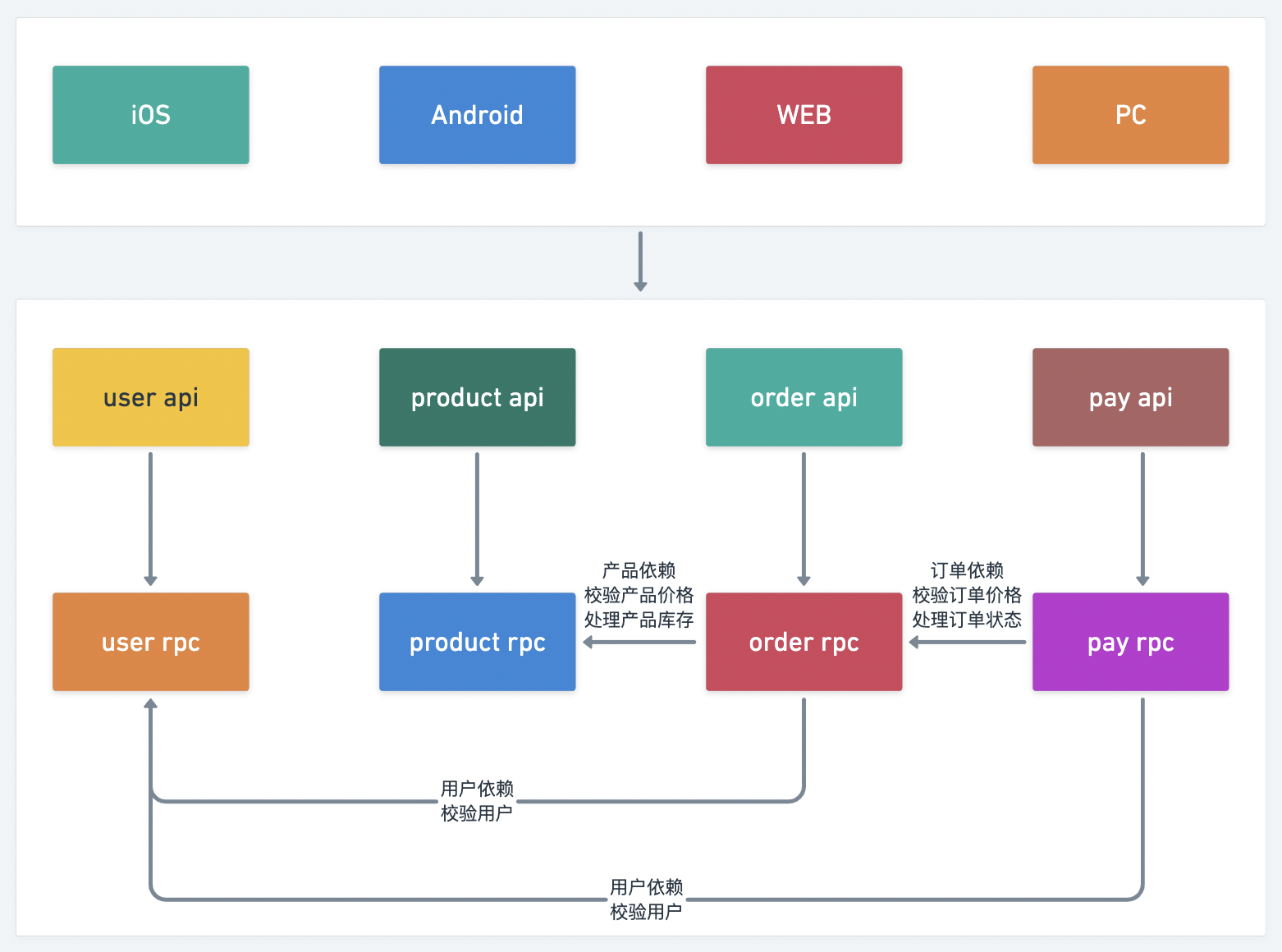
首先,我们来更新一下上篇文章中的服务拆分图片,由于微信公众号手机和电脑端不同步,导致美化的图片没有跟大家见面,特此补上,如图:
3 用户服务(user)
- 进入服务工作区
$ cd mall/service/user
3.1 生成 user model 模型
- 创建 sql 文件
$ vim model/user.sql
- 编写 sql 文件
CREATE TABLE `user` (

  `id` bigint unsigned NOT NULL AUTO_INCREMENT,

  `name` varchar(255)  NOT NULL DEFAULT '' COMMENT '用户姓名',

  `gender` tinyint(3) unsigned NOT NULL DEFAULT '0' COMMENT '用户性别',

  `mobile` varchar(255)  NOT NULL DEFAULT '' COMMENT '用户电话',

  `password` varchar(255)  NOT NULL DEFAULT '' COMMENT '用户密码',

  `create_time` timestamp NULL DEFAULT CURRENT_TIMESTAMP,

  `update_time` timestamp NULL DEFAULT CURRENT_TIMESTAMP ON UPDATE CURRENT_TIMESTAMP,

  PRIMARY KEY (`id`),

  UNIQUE KEY `idx_mobile_unique` (`mobile`)

) ENGINE=InnoDB  DEFAULT CHARSET=utf8mb4;
- 运行模板生成命令
$ goctl model mysql ddl -src ./model/user.sql -dir ./model -c
3.2 生成 user api 服务
- 创建 api 文件
$ vim api/user.api
- 编写 api 文件
type (

  // 用户登录

  LoginRequest {

    Mobile   string `json:"mobile"`

    Password string `json:"password"`

  }

  LoginResponse {

    AccessToken  string `json:"accessToken"`

    AccessExpire int64  `json:"accessExpire"`

  }

  // 用户登录

  // 用户注册

  RegisterRequest {

    Name     string `json:"name"`

    Gender   int64  `json:"gender"`

    Mobile   string `json:"mobile"`

    Password string `json:"password"`

  }

  RegisterResponse {

    Id     int64  `json:"id"`

    Name   string `json:"name"`

    Gender int64  `json:"gender"`

    Mobile string `json:"mobile"`

  }

  // 用户注册

  // 用户信息

  UserInfoResponse {

    Id     int64  `json:"id"`

    Name   string `json:"name"`

    Gender int64  `json:"gender"`

    Mobile string `json:"mobile"`

  }

  // 用户信息

)

service User {

  @handler Login

  post /api/user/login(LoginRequest) returns (LoginResponse)

  @handler Register

  post /api/user/register(RegisterRequest) returns (RegisterResponse)

}

@server(

  jwt: Auth

)

service User {

  @handler UserInfo

  post /api/user/userinfo() returns (UserInfoResponse)

}
- 运行模板生成命令
$ goctl api go -api ./api/user.api -dir ./api
3.3 生成 user rpc 服务
- 创建 proto 文件
$ vim rpc/user.proto
- 编写 proto 文件
syntax = "proto3";

package userclient;

option go_package = "user";

// 用户登录

message LoginRequest {

    string Mobile = 1;

    string Password = 2;

}

message LoginResponse {

    int64 Id = 1;

    string Name = 2;

    int64 Gender = 3;

    string Mobile = 4;

}

// 用户登录

// 用户注册

message RegisterRequest {

    string Name = 1;

    int64 Gender = 2;

    string Mobile = 3;

    string Password = 4;

}

message RegisterResponse {

    int64 Id = 1;

    string Name = 2;

    int64 Gender = 3;

    string Mobile = 4;

}

// 用户注册

// 用户信息

message UserInfoRequest {

    int64 Id = 1;

}

message UserInfoResponse {

    int64 Id = 1;

    string Name = 2;

    int64 Gender = 3;

    string Mobile = 4;

}

// 用户信息

service User {

    rpc Login(LoginRequest) returns(LoginResponse);

    rpc Register(RegisterRequest) returns(RegisterResponse);

    rpc UserInfo(UserInfoRequest) returns(UserInfoResponse);

}
- 运行模板生成命令
$ goctl rpc proto -src ./rpc/user.proto -dir ./rpc
添加下载依赖包
回到
mall项目根目录执行如下命令:
$ go mod tidy
3.4 编写 user rpc 服务
3.4.1 修改配置文件
- 修改 user.yaml 配置文件
$ vim rpc/etc/user.yaml
- 修改服务监听地址,端口号为0.0.0.0:9000,
Etcd服务配置,Mysql服务配置,CacheRedis服务配置
Name: user.rpc

ListenOn: 0.0.0.0:9000

Etcd:

  Hosts:

  - etcd:2379

  Key: user.rpc

Mysql:

  DataSource: root:123456@tcp(mysql:3306)/mall?charset=utf8mb4&parseTime=true&loc=Asia%2FShanghai

CacheRedis:

- Host: redis:6379

  Type: node

  Pass:
3.4.2 添加 user model 依赖
- 添加
Mysql服务配置,CacheRedis服务配置的实例化
$ vim rpc/internal/config/config.go
package config

import (

  "github.com/tal-tech/go-zero/core/stores/cache"

  "github.com/tal-tech/go-zero/zrpc"

)

type Config struct {

  zrpc.RpcServerConf

  Mysql struct {

    DataSource string

  }

  CacheRedis cache.CacheConf

}
- 注册服务上下文
user model的依赖
$ vim rpc/internal/svc/servicecontext.go
package svc

import (

  "mall/service/user/model"

  "mall/service/user/rpc/internal/config"

  "github.com/tal-tech/go-zero/core/stores/sqlx"

)

type ServiceContext struct {

  Config config.Config

  UserModel model.UserModel

}

func NewServiceContext(c config.Config) *ServiceContext {

  conn := sqlx.NewMysql(c.Mysql.DataSource)

  return &ServiceContext{

    Config:    c,

    UserModel: model.NewUserModel(conn, c.CacheRedis),

  }

}
3.4.3 添加用户注册逻辑 Register
添加密码加密工具
在根目录
common新建crypt工具库,此工具方法主要用于密码的加密处理。
$ vim common/cryptx/crypt.go
package cryptx

import (

  "fmt"

  "golang.org/x/crypto/scrypt"

)

func PasswordEncrypt(salt, password string) string {

  dk, _ := scrypt.Key([]byte(password), []byte(salt), 32768, 8, 1, 32)

  return fmt.Sprintf("%x", string(dk))

}
- 添加密码加密
Salt配置
$ vim rpc/etc/user.yaml
Name: user.rpc

ListenOn: 0.0.0.0:9000

...

Salt: HWVOFkGgPTryzICwd7qnJaZR9KQ2i8xe
$ vim rpc/internal/config/config.go
package config

import (

  "github.com/tal-tech/go-zero/core/stores/cache"

  "github.com/tal-tech/go-zero/zrpc"

)

type Config struct {

  ...

  Salt string

}
添加用户注册逻辑
用户注册流程,先判断注册手机号是否已经被注册,手机号未被注册,将用户信息写入数据库,用户密码需要进行加密存储。
$ vim rpc/internal/logic/registerlogic.go
package logic

import (

  "context"

  "mall/common/cryptx"

  "mall/service/user/model"

  "mall/service/user/rpc/internal/svc"

  "mall/service/user/rpc/user"

  "github.com/tal-tech/go-zero/core/logx"

  "google.golang.org/grpc/status"

)

type RegisterLogic struct {

  ctx    context.Context

  svcCtx *svc.ServiceContext

  logx.Logger

}

func NewRegisterLogic(ctx context.Context, svcCtx *svc.ServiceContext) *RegisterLogic {

  return &RegisterLogic{

    ctx:    ctx,

    svcCtx: svcCtx,

    Logger: logx.WithContext(ctx),

  }

}

func (l *RegisterLogic) Register(in *user.RegisterRequest) (*user.RegisterResponse, error) {

  // 判断手机号是否已经注册

  _, err := l.svcCtx.UserModel.FindOneByMobile(in.Mobile)

  if err == nil {

    return nil, status.Error(100, "该用户已存在")

  }

  if err == model.ErrNotFound {

    newUser := model.User{

      Name:     in.Name,

      Gender:   in.Gender,

      Mobile:   in.Mobile,

      Password: cryptx.PasswordEncrypt(l.svcCtx.Config.Salt, in.Password),

    }

    res, err := l.svcCtx.UserModel.Insert(&newUser)

    if err != nil {

      return nil, status.Error(500, err.Error())

    }

    newUser.Id, err = res.LastInsertId()

    if err != nil {

      return nil, status.Error(500, err.Error())

    }

    return &user.RegisterResponse{

      Id:     newUser.Id,

      Name:   newUser.Name,

      Gender: newUser.Gender,

      Mobile: newUser.Mobile,

    }, nil

  }

  return nil, status.Error(500, err.Error())

}
3.4.4 添加用户登录逻辑 Login
用户登录流程,通过手机号查询判断用户是否是注册用户,如果是注册用户,需要将用户输入的密码进行加密与数据库中用户加密密码进行对比验证。
$ vim rpc/internal/logic/loginlogic.go
package logic

import (

  "context"

  "mall/common/cryptx"

  "mall/service/user/model"

  "mall/service/user/rpc/internal/svc"

  "mall/service/user/rpc/user"

  "github.com/tal-tech/go-zero/core/logx"

  "google.golang.org/grpc/status"

)

type LoginLogic struct {

  ctx    context.Context

  svcCtx *svc.ServiceContext

  logx.Logger

}

func NewLoginLogic(ctx context.Context, svcCtx *svc.ServiceContext) *LoginLogic {

  return &LoginLogic{

    ctx:    ctx,

    svcCtx: svcCtx,

    Logger: logx.WithContext(ctx),

  }

}

func (l *LoginLogic) Login(in *user.LoginRequest) (*user.LoginResponse, error) {

  // 查询用户是否存在

  res, err := l.svcCtx.UserModel.FindOneByMobile(in.Mobile)

  if err != nil {

    if err == model.ErrNotFound {

      return nil, status.Error(100, "用户不存在")

    }

    return nil, status.Error(500, err.Error())

  }

  // 判断密码是否正确

  password := cryptx.PasswordEncrypt(l.svcCtx.Config.Salt, in.Password)

  if password != res.Password {

    return nil, status.Error(100, "密码错误")

  }

  return &user.LoginResponse{

    Id:     res.Id,

    Name:   res.Name,

    Gender: res.Gender,

    Mobile: res.Mobile,

  }, nil

}
3.4.5 添加用户信息逻辑 UserInfo
$ vim rpc/internal/logic/userinfologic.go
package logic

import (

  "context"

  "mall/service/user/model"

  "mall/service/user/rpc/internal/svc"

  "mall/service/user/rpc/user"

  "github.com/tal-tech/go-zero/core/logx"

  "google.golang.org/grpc/status"

)

type UserInfoLogic struct {

  ctx    context.Context

  svcCtx *svc.ServiceContext

  logx.Logger

}

func NewUserInfoLogic(ctx context.Context, svcCtx *svc.ServiceContext) *UserInfoLogic {

  return &UserInfoLogic{

    ctx:    ctx,

    svcCtx: svcCtx,

    Logger: logx.WithContext(ctx),

  }

}

func (l *UserInfoLogic) UserInfo(in *user.UserInfoRequest) (*user.UserInfoResponse, error) {

  // 查询用户是否存在

  res, err := l.svcCtx.UserModel.FindOne(in.Id)

  if err != nil {

    if err == model.ErrNotFound {

      return nil, status.Error(100, "用户不存在")

    }

    return nil, status.Error(500, err.Error())

  }

  return &user.UserInfoResponse{

    Id:     res.Id,

    Name:   res.Name,

    Gender: res.Gender,

    Mobile: res.Mobile,

  }, nil

}
3.5 编写 user api 服务
3.5.1 修改配置文件
- 修改 user.yaml 配置文件
$ vim api/etc/user.yaml
- 修改服务地址,端口号为0.0.0.0:8000,
Mysql服务配置,CacheRedis服务配置,Auth验证配置
Name: User

Host: 0.0.0.0

Port: 8000

Mysql:

  DataSource: root:123456@tcp(mysql:3306)/mall?charset=utf8mb4&parseTime=true&loc=Asia%2FShanghai

CacheRedis:

- Host: redis:6379

  Pass:

  Type: node

Auth:

  AccessSecret: uOvKLmVfztaXGpNYd4Z0I1SiT7MweJhl

  AccessExpire: 86400
3.5.2 添加 user rpc 依赖
- 添加
user rpc服务配置
$ vim api/etc/user.yaml
Name: User

Host: 0.0.0.0

Port: 8000

......

UserRpc:

  Etcd:

    Hosts:

    - etcd:2379

    Key: user.rpc
- 添加
user rpc服务配置的实例化
$ vim api/internal/config/config.go
package config

import (

  "github.com/tal-tech/go-zero/rest"

  "github.com/tal-tech/go-zero/zrpc"

)

type Config struct {

  rest.RestConf

  Auth struct {

    AccessSecret string

    AccessExpire int64

  }

  UserRpc zrpc.RpcClientConf

}
- 注册服务上下文
user rpc的依赖
$ vim api/internal/svc/servicecontext.go
package svc

import (

  "mall/service/user/api/internal/config"

  "mall/service/user/rpc/userclient"

  "github.com/tal-tech/go-zero/zrpc"

)

type ServiceContext struct {

  Config config.Config

  UserRpc userclient.User

}

func NewServiceContext(c config.Config) *ServiceContext {

  return &ServiceContext{

    Config:  c,

    UserRpc: userclient.NewUser(zrpc.MustNewClient(c.UserRpc)),

  }

}
3.5.3 添加用户注册逻辑 Register
$ vim api/internal/logic/registerlogic.go
package logic

import (

  "context"

  "mall/service/user/api/internal/svc"

  "mall/service/user/api/internal/types"

  "mall/service/user/rpc/userclient"

  "github.com/tal-tech/go-zero/core/logx"

)

type RegisterLogic struct {

  logx.Logger

  ctx    context.Context

  svcCtx *svc.ServiceContext

}

func NewRegisterLogic(ctx context.Context, svcCtx *svc.ServiceContext) RegisterLogic {

  return RegisterLogic{

    Logger: logx.WithContext(ctx),

    ctx:    ctx,

    svcCtx: svcCtx,

  }

}

func (l *RegisterLogic) Register(req types.RegisterRequest) (resp *types.RegisterResponse, err error) {

  res, err := l.svcCtx.UserRpc.Register(l.ctx, &userclient.RegisterRequest{

    Name:     req.Name,

    Gender:   req.Gender,

    Mobile:   req.Mobile,

    Password: req.Password,

  })

  if err != nil {

    return nil, err

  }

  return &types.RegisterResponse{

    Id:     res.Id,

    Name:   res.Name,

    Gender: res.Gender,

    Mobile: res.Mobile,

  }, nil

}
3.5.4 添加用户登录逻辑 Login
添加
JWT工具在根目录
common新建jwtx工具库,用于生成用户token。
$ vim common/jwtx/jwt.go
package jwtx

import "github.com/golang-jwt/jwt"

func GetToken(secretKey string, iat, seconds, uid int64) (string, error) {

  claims := make(jwt.MapClaims)

  claims["exp"] = iat + seconds

  claims["iat"] = iat

  claims["uid"] = uid

  token := jwt.New(jwt.SigningMethodHS256)

  token.Claims = claims

  return token.SignedString([]byte(secretKey))

}
添加用户登录逻辑
通过调用
user rpc服务进行登录验证,登录成功后,使用用户信息生成对应的token以及token的有效期。
$ vim api/internal/logic/loginlogic.go
package logic

import (

  "context"

  "time"

  "mall/common/jwtx"

  "mall/service/user/api/internal/svc"

  "mall/service/user/api/internal/types"

  "mall/service/user/rpc/userclient"

  "github.com/tal-tech/go-zero/core/logx"

)

type LoginLogic struct {

  logx.Logger

  ctx    context.Context

  svcCtx *svc.ServiceContext

}

func NewLoginLogic(ctx context.Context, svcCtx *svc.ServiceContext) LoginLogic {

  return LoginLogic{

    Logger: logx.WithContext(ctx),

    ctx:    ctx,

    svcCtx: svcCtx,

  }

}

func (l *LoginLogic) Login(req types.LoginRequest) (resp *types.LoginResponse, err error) {

  res, err := l.svcCtx.UserRpc.Login(l.ctx, &userclient.LoginRequest{

    Mobile:   req.Mobile,

    Password: req.Password,

  })

  if err != nil {

    return nil, err

  }

  now := time.Now().Unix()

  accessExpire := l.svcCtx.Config.Auth.AccessExpire

  accessToken, err := jwtx.GetToken(l.svcCtx.Config.Auth.AccessSecret, now, accessExpire, res.Id)

  if err != nil {

    return nil, err

  }

  return &types.LoginResponse{

    AccessToken:  accessToken,

    AccessExpire: now + accessExpire,

  }, nil

}
3.5.5 添加用户信息逻辑 UserInfo
$ vim api/internal/logic/userinfologic.go
package logic

import (

  "context"

  "encoding/json"

  "mall/service/user/api/internal/svc"

  "mall/service/user/api/internal/types"

  "mall/service/user/rpc/userclient"

  "github.com/tal-tech/go-zero/core/logx"

)

type UserInfoLogic struct {

  logx.Logger

  ctx    context.Context

  svcCtx *svc.ServiceContext

}

func NewUserInfoLogic(ctx context.Context, svcCtx *svc.ServiceContext) UserInfoLogic {

  return UserInfoLogic{

    Logger: logx.WithContext(ctx),

    ctx:    ctx,

    svcCtx: svcCtx,

  }

}

func (l *UserInfoLogic) UserInfo() (resp *types.UserInfoResponse, err error) {

  uid, _ := l.ctx.Value("uid").(json.Number).Int64()

  res, err := l.svcCtx.UserRpc.UserInfo(l.ctx, &userclient.UserInfoRequest{

    Id: uid,

  })

  if err != nil {

    return nil, err

  }

  return &types.UserInfoResponse{

    Id:     res.Id,

    Name:   res.Name,

    Gender: res.Gender,

    Mobile: res.Mobile,

  }, nil

}
通过
l.ctx.Value("uid")可获取 jwt token 中自定义的参数
3.6 启动 user rpc 服务
提示:启动服务需要在
golang容器中启动
$ cd mall/service/user/rpc

$ go run user.go -f etc/user.yaml

Starting rpc server at 127.0.0.1:9000...
3.7 启动 user api 服务
提示:启动服务需要在
golang容器中启动
$ cd mall/service/user/api

$ go run user.go -f etc/user.yaml

Starting server at 0.0.0.0:8000...
项目地址
https://github.com/zeromicro/go-zero
欢迎使用 go-zero 并 star 支持我们!
微信交流群
关注『微服务实践』公众号并点击 交流群 获取社区群二维码。
带你十天轻松搞定 Go 微服务系列(三)的更多相关文章
- 带你十天轻松搞定 Go 微服务系列(一)
本文开始,我们会出一个系列文章跟大家详细展示一个 go-zero 微服务示例,整个系列分十篇文章,目录结构如下: 环境搭建(本文) 服务拆分 用户服务 产品服务 订单服务 支付服务 RPC 服务 Au ...
- 带你十天轻松搞定 Go 微服务系列(二)
上篇文章开始,我们通过一个系列文章跟大家详细展示一个 go-zero 微服务示例,整个系列分十篇文章,目录结构如下: 环境搭建 服务拆分(本文) 用户服务 产品服务 订单服务 支付服务 RPC 服务 ...
- 带你十天轻松搞定 Go 微服务系列(五)
序言 我们通过一个系列文章跟大家详细展示一个 go-zero 微服务示例,整个系列分十篇文章,目录结构如下: 环境搭建 服务拆分 用户服务 产品服务 订单服务(本文) 支付服务 RPC 服务 Auth ...
- 带你十天轻松搞定 Go 微服务系列(六)
序言 我们通过一个系列文章跟大家详细展示一个 go-zero 微服务示例,整个系列分十篇文章,目录结构如下: 环境搭建 服务拆分 用户服务 产品服务 订单服务 支付服务(本文) RPC 服务 Auth ...
- 带你十天轻松搞定 Go 微服务系列(七)
序言 我们通过一个系列文章跟大家详细展示一个 go-zero 微服务示例,整个系列分十篇文章,目录结构如下: 环境搭建 服务拆分 用户服务 产品服务 订单服务 支付服务 RPC 服务 Auth 验证( ...
- 带你十天轻松搞定 Go 微服务系列(八、服务监控)
序言 我们通过一个系列文章跟大家详细展示一个 go-zero 微服务示例,整个系列分十篇文章,目录结构如下: 环境搭建 服务拆分 用户服务 产品服务 订单服务 支付服务 RPC 服务 Auth 验证 ...
- 带你十天轻松搞定 Go 微服务系列(九、链路追踪)
序言 我们通过一个系列文章跟大家详细展示一个 go-zero 微服务示例,整个系列分十篇文章,目录结构如下: 环境搭建 服务拆分 用户服务 产品服务 订单服务 支付服务 RPC 服务 Auth 验证 ...
- 带你十天轻松搞定 Go 微服务之大结局(分布式事务)
序言 我们通过一个系列文章跟大家详细展示一个 go-zero 微服务示例,整个系列分十篇文章,目录结构如下: 环境搭建 服务拆分 用户服务 产品服务 订单服务 支付服务 RPC 服务 Auth 验证 ...
- 【微服务】之二:从零开始,轻松搞定SpringCloud微服务系列--注册中心(一)
微服务体系,有效解决项目庞大.互相依赖的问题.目前SpringCloud体系有强大的一整套针对微服务的解决方案.本文中,重点对微服务体系中的服务发现注册中心进行详细说明.本篇中的注册中心,采用Netf ...
随机推荐
- 【LeetCode】141. Linked List Cycle 解题报告(Java & Python & C++)
作者: 负雪明烛 id: fuxuemingzhu 个人博客: http://fuxuemingzhu.cn/ 目录 题目描述 题目大意 解题方法 双指针 保存已经走过的路径 日期 [LeetCode ...
- 【LeetCode】899. Orderly Queue 解题报告(Python)
作者: 负雪明烛 id: fuxuemingzhu 个人博客: http://fuxuemingzhu.cn/ 题目地址: https://leetcode.com/problems/orderly- ...
- 【LeetCode】817. Linked List Components 解题报告(Python & C++)
作者: 负雪明烛 id: fuxuemingzhu 个人博客: http://fuxuemingzhu.cn/ 目录 题目描述 题目大意 解题方法 日期 题目地址:https://leetcode.c ...
- 1036 - A Refining Company
1036 - A Refining Company PDF (English) Statistics Forum Time Limit: 3 second(s) Memory Limit: 32 ...
- Docker 与 K8S学习笔记(十)—— 容器的端口映射
我们一般将应用部署在容器里面,而一个服务器上会有许许多多的容器,那么外界该如何访问我们的应用呢?答案是:端口映射. Docker可以将容器对外提供服务的端口映射到host的某个端口上,外网通过此端口访 ...
- 「HAOI 2006」数字序列
Description 给定一长度为 \(n\) 的数列 \(a\),可将 \(a_i\) 改为任意整数 \(k\),代价为 \(\mid a_i-k\mid\). 问最少改变多少个数能把它变成一个单 ...
- Denoising Diffusion Probabilistic Models (DDPM)
目录 概 主要内容 Diffusion models reverse process forward process 变分界 损失求解 最后的算法 细节 代码 Ho J., Jain A. and A ...
- Sharpness-Aware Minimization for Efficiently Improving Generalization
目录 概 主要内容 代码 Foret P., Kleiner A., Mobahi H., Neyshabur B. Sharpness-aware minimization for efficien ...
- Entropy, relative entropy and mutual information
目录 Entropy Joint Entropy Conditional Entropy Chain rule Mutual Information Relative Entropy Chain Ru ...
- [炼丹术]EfficientDet训练模型学习总结
EfficientDet训练模型学习总结 1.Introduction简介 pytorch用SOTA实时重新实现官方EfficientDet,原文链接:https : //arxiv.org/abs/ ...