
Mybatis-plus<一> Springboot框架使用MybatisPlus代码自动生成器
Mybatis-plus<一> Springboot框架使用MybatisPlus代码自动生成器
Mybatis-plus官网: https://mp.baomidou.com/
Demo GitHub下载地址(包含数据库建表sql,数据库数据与源代码):https://github.com/RJvon/Mybatis_plus_demo
未经作者同意请勿转载
Mybatis-plus简介
MyBatis-Plus (简称 MP)是一个 MyBatis的增强工具,在 MyBatis 的基础上只做增强不做改变,为简化开发、提高效率而生。
AutoGenerator 是 MyBatis-Plus 的代码生成器,通过 AutoGenerator 可以快速生成 Entity、Mapper、Mapper XML、Service、Controller 等各个模块的代码,极大的提升了开发效率。
MP 提供了大量的自定义设置,生成的代码完全能够满足各类型的需求
MP 的代码生成器 和 Mybatis MBG 代码生成器: MP 的代码生成器都是基于 java 代码来生成。MBG 基于 xml 文件进行代码生成 MyBatis 的代码生成器可生成: 实体类、Mapper 接口、Mapper 映射文件 MP 的代码生成器可生成: 实体类(可以选择是否支持 AR)、Mapper 接口、Mapper 映射文件、 Service 层、Controller 层.
表及字段命名策略选择 在 MP 中,我们建议数据库表名 和 表字段名采用驼峰命名方式, 如果采用下划 线命名方式 请开启全局下划线开关,如果表名字段名命名方式不一致请注解指定,我们建议最好保持一致。
这么做的原因是为了避免在对应实体类时产生的性能损耗,这样字段不用做映射就能直接和实体类对应。当然如果项目里不用考虑这点性能损耗,那么你采用下滑线也是没问题的,只需要在生成代码时配置 dbColumnUnderline 属性就可以 。
新建Springboot项目,导入相关依赖
<dependencies>

    <dependency>

        <groupId>org.springframework.boot</groupId>

        <artifactId>spring-boot-starter-web</artifactId>

    </dependency>

    <dependency>

        <groupId>org.springframework.boot</groupId>

        <artifactId>spring-boot-starter-test</artifactId>

        <scope>test</scope>

    </dependency>

    <dependency>

        <groupId>org.projectlombok</groupId>

        <artifactId>lombok</artifactId>

        <version>1.16.10</version>

        <scope>provided</scope>

    </dependency>

    <dependency>

        <groupId>com.baomidou</groupId>

        <artifactId>mybatis-plus-boot-starter</artifactId>

        <version>3.3.1.tmp</version>

    </dependency>

    <dependency>

        <groupId>mysql</groupId>

        <artifactId>mysql-connector-java</artifactId>

        <scope>runtime</scope>

    </dependency>

    <dependency>

        <groupId>com.baomidou</groupId>

        <artifactId>mybatis-plus-generator</artifactId>

        <version>3.4.1</version>

    </dependency>

    <!-- https://mvnrepository.com/artifact/org.freemarker/freemarker -->

    <dependency>

        <groupId>org.freemarker</groupId>

        <artifactId>freemarker</artifactId>

        <version>2.3.28</version>

    </dependency>

</dependencies>
在数据库中建一个表
Demo GitHub下载地址:https://github.com/RJvon/Mybatis_plus_demo(数据库建表sql与源代码)

数据库:New_employees

新员工表:Employees

create database New_employees default charset utf8;

create table Employees

(

id integer not null,

name varchar(20) not null,

sex bit default 1,

birth datetime not null,

tel char(11),

school varchar(255),

primary key (id)

);

insert into Employees values

(101, '赵清华',1, '1996-5-5', '14894728324','清华大学'),

(102, '钱北大',1, '1997-6-6','14894728321', '北京大学'),

(103, '孙复旦',1, '1996-7-7', '14894728322','复旦大学'),

(104, '李交通',0, '1999-8-8', '14894728323','上海交通大学'),

(105, '周浙大',1, '1995-9-9', '14894728325','浙江大学'),

(106, '吴中科',1, '1997-10-10','14894728326', '中国科学技术大学'),

(107, '郑南京',0, '1983-11-11', '14894728327','南京大学'),

(108, '王人民',1, '1999-12-12', '14894728328','中国人民大学'),

(1001, '赵清',1, '1996-5-5', '14894728324','清华大学'),

(1002, '钱北',1, '1997-6-6','14894728321', '北京大学'),

(1003, '孙复',1, '1996-7-7', '14894728322','复旦大学'),

(1004, '李交',0, '1999-8-8', null,'上海交通大学'),

(1005, '周浙',1, '1995-9-9', '14894728325','浙江大学'),

(1006, '吴中',1, '1997-10-10','14894728326', '中国科学技术大学'),

(1007, '郑南',0, '1983-11-11', '14894728327','南京大学'),

(1008, '王人',1, '1999-12-12', '14894728328','中国人民大学');
代码自动生成器代码:
package com.von.demo;

import com.baomidou.mybatisplus.core.exceptions.MybatisPlusException;

import com.baomidou.mybatisplus.core.toolkit.StringPool;

import com.baomidou.mybatisplus.core.toolkit.StringUtils;

import com.baomidou.mybatisplus.generator.*;

import com.baomidou.mybatisplus.generator.config.*;

import com.baomidou.mybatisplus.generator.config.builder.ConfigBuilder;

import com.baomidou.mybatisplus.generator.config.po.TableInfo;

import com.baomidou.mybatisplus.generator.config.rules.FileType;

import com.baomidou.mybatisplus.generator.config.rules.NamingStrategy;

import com.baomidou.mybatisplus.generator.engine.FreemarkerTemplateEngine;

import java.io.File;

import java.util.ArrayList;

import java.util.List;

import java.util.Scanner;

/**

 * @author xueqing f

 * @version 1.0

 * @date 2021/7/31 16:33

 * Demo GitHub下载地址:https://github.com/RJvon/Mybatis_plus_demo(数据库建表sql与源代码)

 */

public class CodeGenerator {

    /**

     * <p>

     * 读取控制台内容

     * </p>

     */

    public static String scanner(String tip) {

        Scanner scanner = new Scanner(System.in);

        StringBuilder help = new StringBuilder();

        help.append("请输入" + tip + ":");

        System.out.println(help.toString());

        if (scanner.hasNext()) {

            String ipt = scanner.next();

            if (StringUtils.isNotBlank(ipt)) {

                return ipt;

            }

        }

        throw new MybatisPlusException("请输入正确的" + tip + "!");

    }

    public static void main(String[] args) {

        // 代码生成器

        AutoGenerator mpg = new AutoGenerator();

        // 全局配置

        GlobalConfig gc = new GlobalConfig();

        String projectPath = System.getProperty("user.dir");

        gc.setOutputDir(projectPath + "/src/main/java");

        gc.setAuthor("xueqing");

        gc.setOpen(false);

        // gc.setSwagger2(true); 实体属性 Swagger2 注解

        mpg.setGlobalConfig(gc);

        // 数据源配置

        DataSourceConfig dsc = new DataSourceConfig();

        dsc.setUrl("jdbc:mysql://localhost:3306/New_employees?serverTimezone=GMT%2B8&useSSL=true");

        // dsc.setSchemaName("public");

        dsc.setDriverName("com.mysql.cj.jdbc.Driver");

        dsc.setUsername("root");

        dsc.setPassword("root");

        mpg.setDataSource(dsc);

        // 包配置

        PackageConfig pc = new PackageConfig();

        pc.setModuleName(scanner("module"));

        pc.setParent("com.von.demo");

        mpg.setPackageInfo(pc);

        // 自定义配置

        InjectionConfig cfg = new InjectionConfig() {

            @Override

            public void initMap() {

                // to do nothing

            }

        };

        // 如果模板引擎是 freemarker

        String templatePath = "/templates/mapper.xml.ftl";

            /*// 如果模板引擎是 velocity

            String templatePath = "/templates/mapper.xml.vm";*/

        // 自定义输出配置

        List<FileOutConfig> focList = new ArrayList<>();

        // 自定义配置会被优先输出

        focList.add(new FileOutConfig(templatePath) {

            @Override

            public String outputFile(TableInfo tableInfo) {

                // 自定义输出文件名 , 如果你 Entity 设置了前后缀、此处注意 xml 的名称会跟着发生变化!!

                return projectPath + "/src/main/resources/mapper/"

                        + "/" + tableInfo.getEntityName() + "Mapper" + StringPool.DOT_XML;

            }

        });

        cfg.setFileOutConfigList(focList);

        mpg.setCfg(cfg);

        // 配置模板

        TemplateConfig templateConfig = new TemplateConfig();

        templateConfig.setXml(null);

        mpg.setTemplate(templateConfig);

        // 策略配置

        StrategyConfig strategy = new StrategyConfig();

        strategy.setNaming(NamingStrategy.underline_to_camel);

        strategy.setColumnNaming(NamingStrategy.underline_to_camel);

        strategy.setEntityLombokModel(true);

        strategy.setRestControllerStyle(true);

        // 写于父类中的公共字段

//        strategy.setSuperEntityColumns("id");

        strategy.setInclude(scanner("表名,多个英文逗号分割").split(","));

        strategy.setControllerMappingHyphenStyle(true);

        strategy.setTablePrefix("_");

        mpg.setStrategy(strategy);

        mpg.setTemplateEngine(new FreemarkerTemplateEngine());

        mpg.execute();

    }

}
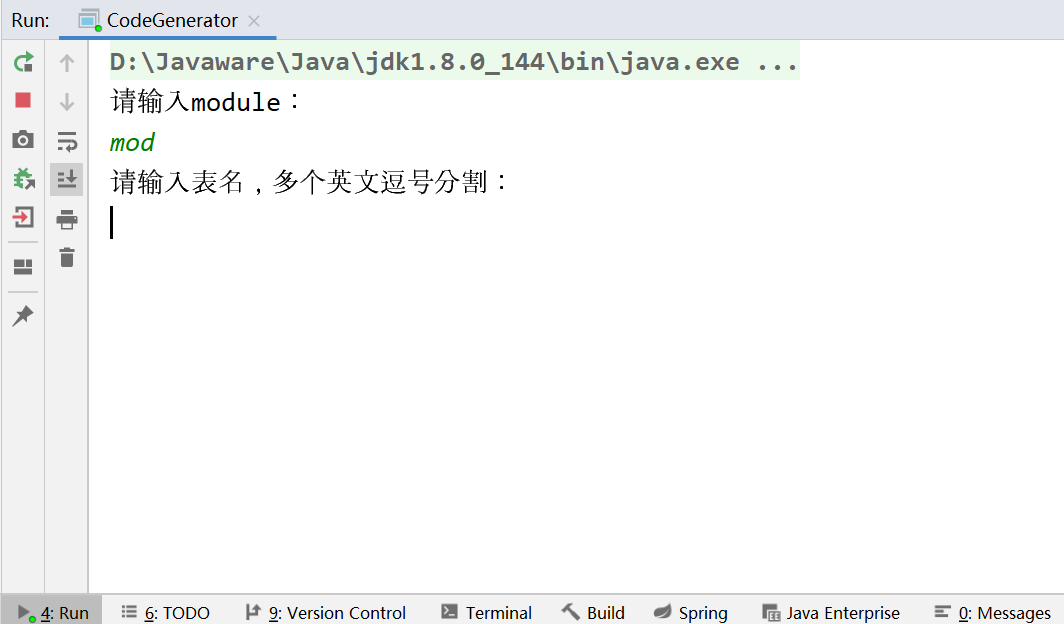
运行CodeGenerator:
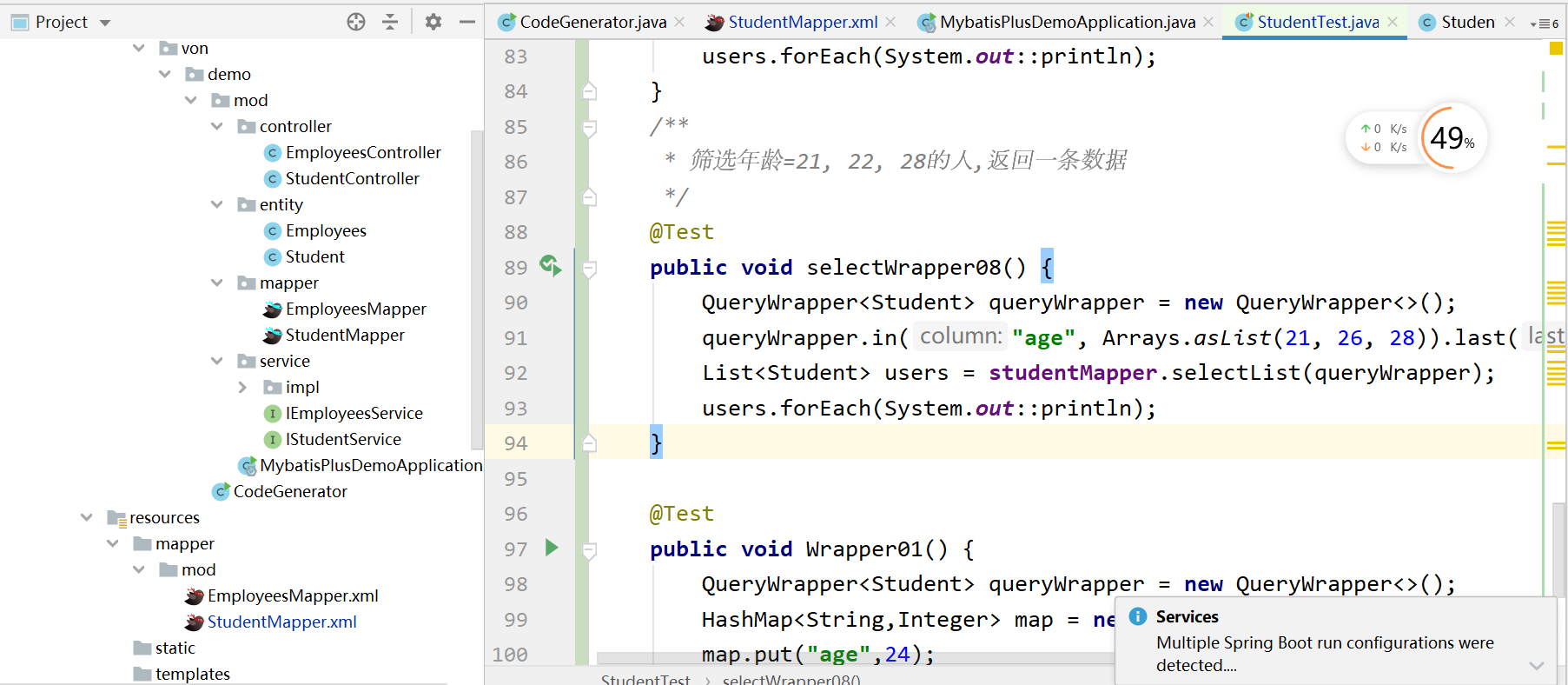
生成的代码结构:
Mybatis-plus<一> Springboot框架使用MybatisPlus代码自动生成器的更多相关文章
- MyBatis-plus 代码自动生成器
MyBatis-plus 代码自动生成器 1.添加pom文件依赖 <!-- Mybatis-Plus 自动生成实体类--> <dependency> <groupId& ...
- MyBatisPlus性能分析插件,条件构造器,代码自动生成器详解
性能分析插件 我们在平时的开发中,会遇到一些慢sql,测试,druid MP(MyBatisPlus)也提供性能分析插件,如果超过这个时间就停止 不过官方在3.2版本的时候取消了,原因如下 条件构造器 ...
- 专门为小白准备的入门级mybatis-plus-generator代码自动生成器,提高开发效率。值得收藏
引入依赖 <dependency> <groupId>com.baomidou</groupId> <artifactId>mybatis-plus-g ...
- Mybatis-Plus03 代码自动生成器
先看完Mybatis-Plus01和Mybatis-Plus02再看Mybatis-Plus03 AutoGenerator 是 MyBatis-Plus 的代码生成器,通过 AutoGenerato ...
- SpringBoot整合MyBatis-Plus代码自动生成类
在springboot的test测试类下创建 MpGenerator.java 配置 MpGenerator.java public class MpGenerator { @Test publ ...
- MybatisPlus根据模板生成器代码
导读 网上的代码生成器,都不是自己想要的,今天下午研究了下,可以使用mybatisplus自定义模板,根据模板生成相应的代码,可以根据需求,改造相应模板即可.代码已上传github/百度云. 项目结构 ...
- 基于Maven的Springboot+Mybatis+Druid+Swagger2+mybatis-generator框架环境搭建
基于Maven的Springboot+Mybatis+Druid+Swagger2+mybatis-generator框架环境搭建 前言 最近做回后台开发,重新抓起以前学过的SSM(Spring+Sp ...
- SpringBoot框架与MyBatis集成,连接Mysql数据库
SpringBoot是一种用来简化新Spring应用初始搭建及开发过程的框架,它使用特定方式来进行配置,使得开发人员不再需要定义样板化的配置.MyBatis是一个支持普通SQL查询.存储和高级映射的持 ...
- springboot+mybatis+maven角色权限框架
发布时间:2018-10-24 技术:springboot,mybatis,maven,shiro 概述 Springboot作为基础框架,使用mybatis作为持久层框架 使用官方推荐的th ...
随机推荐
- SQL之case when then用法_之二
select CustomerNo, Name, Sex, Birthday, IDType, IDNo, validityday, case (null ) when '1' then '高级VIP ...
- etcd学习(5)-etcd的Raft一致性算法原理
ETCD的Raft一致性算法原理 前言 Raft原理了解 raft选举 raft中的几种状态 任期 leader选举 日志复制 安全性 leader宕机,新的leader未同步前任committed的 ...
- 记一次 GitLab 的迁移过程
目录 1. 迁移背景 2. GitLab 整体架构介绍 3. GitLab 安装 配置选择 安装方式选择 安装的网络区域 安装 GitLab GitLab 常用命令 配置管理员账号密码 4. 配置 G ...
- 看完就会的Spring Cloud Gateway
在前面几节,我给大家介绍了当一个系统拆分成微服务后,会产生的问题与解决方案:服务如何发现与管理(Nacos注册中心实战),服务与服务如何通信(Ribbon, Feign实战) 今天我们就来聊一聊另一个 ...
- ElasticSearch入门检索
前面简介说到 elsatic是通过RestFul API接口操作数据的,可以通过postman模拟接口请求测试一下 一._cat 1.GET /_cat/nodes:查看所有节点 2.GET /_ca ...
- i春秋“百度杯”CTF比赛 十月场-Vld(单引号逃逸+报错注入)
题目源代码给出了提示index.php.txt,打开拿到了一段看不太懂得东西. 图片标注的有flag1,flag2,flag3,同时还有三段字符,然后还出现了_GET,脑洞一一点想到访问 ?flag1 ...
- 如何高效、快速学习Flutter?如何避坑?(文末送服福利)
稳住,今天是周末,不过我今天要上班....啊..啊... 对于 Flutter 我没有太多的发言权,不过GSY是对 Flutter 充分理解并精深掌握的前辈了,所以转一篇他对 Flutter 的一些解 ...
- 针对Cloud-init的可行性报告
by hyc 针对Cloud-init的可行性报告 一.Cloud-init研究进展: (1)ubuntu镜像: 已在版本为ubuntu-server-14.04-amd64上实现了修改主机名和用户密 ...
- Python -类型提示 Type Hints
为什么会有类型提示 Python是一种动态类型语言,这意味着我们在编写代码的时候更为自由,运行时不需要指定变量类型 但是与此同时 IDE 无法像静态类型语言那样分析代码,及时给我们相应的提示,比如字符 ...
- Python--构建发布自己的模块
参考博客https://www.cnblogs.com/simple-free/p/8283263.html 1. 新建一个模块(名称自定义),存放要发布的模块代码. 2. 新建一个setup ...