
C#反射机制 (转载)
转载:原文出处
http://www.cnblogs.com/binfire/archive/2013/01/17/2864887.html
一:反射的定义
审查元数据并收集关于它的类型信息的能力。元数据(编译以后的最基本数据单元)就是一大堆的表,当编译程序集或者模块时,编译器会创建一个类定义表,一个字段定义表,和一个方法定义表等。
System.reflection命名空间包含的几个类,允许你反射(解析)这些元数据表的代码
System.Reflection.Assembly System.Reflection.MemberInfo System.Reflection.EventInfo System.Reflection.FieldInfo System.Reflection.MethodBase System.Reflection.ConstructorInfo System.Reflection.MethodInfo System.Reflection.PropertyInfo System.Type
层次模型:
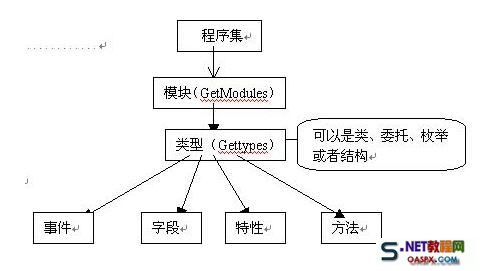
二:获取类型信息:

 1         class MyClass

 2         {

 3             public string m;

 4             public void test() { }

 5             public int MyProperty { get; set; }

 6         }

 7

 8         //获取类型信息

 9         protected void Button1_Click(object sender, EventArgs e)

10         {

11             Type type = typeof(MyClass);

12             Response.Write("类型名:" + type.Name);

13             Response.Write("<br/>");

14             Response.Write("类全名:" + type.FullName);

15             Response.Write("<br/>");

16             Response.Write("命名空间名:" + type.Namespace);

17             Response.Write("<br/>");

18             Response.Write("程序集名:" + type.Assembly);

19             Response.Write("<br/>");

20             Response.Write("模块名:" + type.Module);

21             Response.Write("<br/>");

22             Response.Write("基类名:" + type.BaseType);

23             Response.Write("<br/>");

24             Response.Write("是否类:" + type.IsClass);

25             Response.Write("<br/>");

26             Response.Write("类的公共成员:");

27             Response.Write("<br/>");

28             MemberInfo[] memberInfos = type.GetMembers();//得到所有公共成员

29             foreach (var item in memberInfos)

30             {

31                 Response.Write(string.Format("{0}:{1}", item.MemberType, item));

32                 Response.Write("<br/>");

33             }

34         }
三:获取程序集信息
protected void Button2_Click(object sender, EventArgs e){ //获取当前执行代码的程序集 Assembly assem = Assembly.GetExecutingAssembly(); Response.Write("程序集全名:"+assem.FullName); Response.Write("<br/>"); Response.Write("程序集的版本:"+assem.GetName().Version); Response.Write("<br/>"); Response.Write("程序集初始位置:"+assem.CodeBase); Response.Write("<br/>"); Response.Write("程序集位置:"+assem.Location); Response.Write("<br/>"); Response.Write("程序集入口:"+assem.EntryPoint); Response.Write("<br/>"); Type[] types = assem.GetTypes(); Response.Write("程序集下包含的类型:"); foreach (var item in types) { Response.Write("<br/>"); Response.Write("类:"+item.Name); }}<br> |
四:反射调用方法
|
1
2
3
4
5
6
7
8
9
10
11
12
13
14
15
16
|
protected void Page_Load(object sender, EventArgs e) { System.Reflection.Assembly ass = Assembly.LoadFrom(AppDomain.CurrentDomain.BaseDirectory+"bin\\WebApplication1.dll"); //加载DLL System.Type t = ass.GetType("WebApplication1.MainPage");//获得类型 string name=typeof(MainPage).AssemblyQualifiedName; System.Type t1 = Type.GetType(name);System.Type t2 = typeof(MainPage); object o = System.Activator.CreateInstance(t);//创建实例 System.Reflection.MethodInfo mi = t.GetMethod("RunJs1");//获得方法 mi.Invoke(o, new object[] { this.Page, "alert('测试反射机制')" });//调用方法 System.Reflection.MethodInfo mi1 = t.GetMethod("RunJs"); mi1.Invoke(t, new object[] { this.Page, "alert('测试反射机制1')" });//调用方法 }<br> |
五:反射调用用户/自定义控件
|
1
2
3
4
5
6
7
8
9
10
11
12
13
14
15
16
17
18
19
20
21
22
23
24
25
26
27
28
29
30
31
32
33
34
35
36
37
38
39
40
|
protected override void OnInit(EventArgs e) { //生成控件 CreateControl(); base.OnInit(e); } private void CreateControl() { Table tb = new Table(); TableRow dr = new TableRow(); TableCell cell = new TableCell(); Control c = <span style="color: rgb(255, 0, 0);">LoadControl("WebUserControl1.ascx");</span> cell.Controls.Add(c); dr.Cells.Add(cell); tb.Rows.Add(dr); this.PlaceHolder1.Controls.Add(tb); } protected void Button1_Click(object sender, EventArgs e) { foreach (TableRow tr in PlaceHolder1.Controls[0].Controls) { foreach (TableCell tc in tr.Controls) { foreach (Control ctl in tc.Controls) { if (ctl is UserControl) { Type type = ctl.GetType(); System.Reflection.MethodInfo methodInfo = type.GetMethod("GetResult"); string selectedValue = string.Concat(methodInfo.Invoke(ctl, new object[] { })); Response.Write(selectedValue); break; } } } } }<br> |
六:反射实现工厂模式
|
1
2
3
4
5
6
7
8
9
10
11
12
13
14
15
16
17
18
19
20
21
22
23
24
25
26
27
28
29
30
31
32
33
34
35
36
37
38
39
40
41
|
public partial class 反射 : System.Web.UI.Page { protected void Page_Load(object sender, EventArgs e) { string typeName = typeof(TestClass).AssemblyQualifiedName; ITestInterface iface = RawGenericFactory.Create<ITestInterface>(typeName); string result = iface.doSomething(); Response.Write(result); } } public static class RawGenericFactory { public static T Create<T>(string typeName) { //Activator.CreateInstance 反射 根据程序集创建借口或者类 //Type.GetType() 根据名称获得程序集信息 //typeof(ConcertProduct).AssemblyQualifiedName //_iproduct.GetType().AssemblyQualifiedName return (T)Activator.CreateInstance(Type.GetType(typeName)); } } public interface ITestInterface { string doSomething(); } public class TestClass : ITestInterface { public int Id { get; set; } public override string ToString() { return Id.ToString(); } public string doSomething() { return "ok"; } }<br> |
七:自定义ORM框架
|
1
2
3
4
5
6
7
8
9
10
11
12
13
14
15
16
17
18
19
20
21
22
23
24
25
26
27
28
29
30
31
32
33
34
35
36
37
38
39
40
41
42
43
44
45
46
47
48
49
50
51
52
53
54
55
56
57
58
59
60
61
62
63
64
65
66
67
68
69
70
71
72
73
74
75
76
77
78
79
80
81
82
83
84
85
86
87
88
89
90
91
92
93
94
95
96
97
98
99
100
101
102
103
104
105
106
107
108
109
110
111
112
113
114
115
116
117
118
119
120
121
122
123
124
125
126
127
128
129
130
131
132
133
134
135
136
137
138
139
140
141
142
143
144
145
146
147
148
149
150
151
152
153
154
155
156
157
158
159
|
[Orm.Table("TestORM")] public class TestORM { [Orm.Colum("Id",DbType.Int32)] public int Id { get; set; } [Orm.Colum("UserName", DbType.String)] public string UserName { get; set; } [Orm.Colum("Password", DbType.String)] public string Password { get; set; } [Orm.Colum("CreatedTime", DbType.DateTime)] public DateTime CreatedTime { get; set; } } protected void Button3_Click(object sender, EventArgs e) { TestORM t = new TestORM() { Id=1, UserName="binfire", Password="xxx", CreatedTime=DateTime.Now }; Orm.OrmHelp h=new Orm.OrmHelp(); h.Insert(t); }namespace Orm{ [AttributeUsageAttribute(AttributeTargets.Class, Inherited = false, AllowMultiple = false)] public class TableAttribute : Attribute { //保存表名的字段 private string _tableName; public TableAttribute() { } public TableAttribute(string tableName) { this._tableName = tableName; } /// /// 映射的表名(表的全名:模式名.表名) /// public string TableName { set { this._tableName = value; } get { return this._tableName; } } } [AttributeUsageAttribute(AttributeTargets.Property, Inherited = false, AllowMultiple = false)] public class ColumAttribute : Attribute { private string _columName; private DbType _dbType; public ColumAttribute() { } public ColumAttribute(string columName) : this() { this._columName = columName; } public ColumAttribute(string columName, DbType dbType) : this(columName) { this._dbType = dbType; } //列名 public virtual string ColumName { set { this._columName = value; } get { return this._columName; } } //描述一些特殊的数据库类型 public DbType DbType { get { return _dbType; } set { _dbType = value; } } } public class OrmHelp { public void Insert(object table) { Type type = table.GetType(); //定义一个字典来存放表中字段和值的对应序列 Dictionary<string,string> columValue = new Dictionary<string,string>(); StringBuilder SqlStr = new StringBuilder(); SqlStr.Append("insert into "); //得到表名子 TableAttribute temp = (TableAttribute)type.GetCustomAttributes(typeof(TableAttribute), false).First(); SqlStr.Append(temp.TableName); SqlStr.Append("("); PropertyInfo[] Propertys = type.GetProperties(); foreach (var item in Propertys) { object[] attributes = item.GetCustomAttributes(false); foreach (var item1 in attributes) { //获得相应属性的值 string value = table.GetType().InvokeMember(item.Name, System.Reflection.BindingFlags.GetProperty, null, table, null).ToString(); ColumAttribute colum = item1 as ColumAttribute; if (colum != null) { columValue.Add(colum.ColumName, value); } } } //拼插入操作字符串 foreach (var item in columValue) { SqlStr.Append(item.Key); SqlStr.Append(","); } SqlStr.Remove(SqlStr.Length - 1, 1); SqlStr.Append(") values('"); foreach (var item in columValue) { SqlStr.Append(item.Value); SqlStr.Append("','"); } SqlStr.Remove(SqlStr.Length - 2, 2); SqlStr.Append(")"); HttpContext.Current.Response.Write(SqlStr.ToString()); } }} |
C#反射机制 (转载)的更多相关文章
- Java基础 -- 深入理解Java类型信息(Class对象)与反射机制
一 RTTI概念 认识Claa对象之前,先来了解一个概念,RTTI(Run-Time Type Identification)运行时类型识别,对于这个词一直是 C++ 中的概念,至于Java中出现RT ...
- Java反射机制(转载)
原文链接:http://www.blogjava.net/zh-weir/archive/2011/03/26/347063.html Java反射机制是Java语言被视为准动态语言的关键性质.Jav ...
- (转载)Java反射机制
Java反射机制是Java语言被视为准动态语言的关键性质.Java反射机制的核心就是允许在运行时通过Java Reflection APIs来取得已知名字的class类的相关信息,动态地生成此类,并调 ...
- [转载]Java 反射机制(包括组成、结构、示例说明等内容)
FROM:http://www.cnblogs.com/skywang12345/p/3345205.html 第1部分 Java 反射机制介绍 Java 反射机制.通俗来讲呢,就是在运行状态中,我们 ...
- 【转载】Java反射机制详解
转自:http://baike.xsoftlab.net/view/209.html#3_8 1反射机制是什么 反射机制是在运行状态中,对于任意一个类,都能够知道这个类的所有属性和方法:对于任意一个对 ...
- NPOI操作EXCEL(四)——反射机制批量导出excel文件
前面我们已经实现了反射机制进行excel表格数据的解析,既然有上传就得有下载,我们再来写一个通用的导出方法,利用反射机制实现对系统所有数据列表的筛选结果导出excel功能. 我们来构想一下这样一个画面 ...
- Java 类反射机制分析
Java 类反射机制分析 一.反射的概念及在Java中的类反射 反射主要是指程序可以访问.检测和修改它本身状态或行为的一种能力.在计算机科学领域,反射是一类应用,它们能够自描述和自控制.这类应用通过某 ...
- python的反射机制
转载自:http://www.cnblogs.com/feixuelove1009/p/5576206.html 对编程语言比较熟悉的朋友,应该知道"反射"这个机制.Python作 ...
- js反射机制
本文转载自:http://blog.csdn.net/liuzizi888/article/details/6632434 什么是反射机制反射机制指的是程序在运行时能够获取自身的信息.例如一个对象能够 ...
随机推荐
- npoi批量导入实现及相关技巧
批量导入功能对于大部分后台系统来说都是不可或缺的一部分,常见的场景-基础数据的录入(部门,用户),用批量导入方便快捷.最近项目需要用到批量导入,决定花点时间写套比较通用的Excel导入功能.经过考虑, ...
- 读深入了解c++内核对象模型小结(1/3/4)
之前早就听说这本书不错,如果想对c++进一步的了解可以看看,此书是进阶阶段参考,笔者自己看了书的第一.三.四章节,后面会继续. 第一章讲了c++的对象模型的引入,各种模型的对比和现在c++采 ...
- 大流量网站性能优化:一步一步打造一个适合自己的BigRender插件
BigRender 当一个网站越来越庞大,加载速度越来越慢的时候,开发者们不得不对其进行优化,谁愿意访问一个需要等待 10 秒,20 秒才能出现的网页呢? 常见的也是相对简单易行的一个优化方案是 图片 ...
- 基于FPGA的飞机的小游戏
基于FPGA的飞机的小游戏 实验原理 该实验主要分为4个模块,采用至上而下的设计方法进行设计.由50M的晶振电路提供时钟源,VGA显示控制模块.图形显示控制模块.移动模块的时钟为25M,由时钟分频电路 ...
- JavaScript的客户端存储
一.前言: 客户端存储实际上就是Web浏览器的记忆功能,通过浏览器的API实现数据存储到硬盘: 二.存储的不同形式: 1.Web存储:localStorage 和 sessionStorage 代表同 ...
- APP
第一天 1.环境初步搭建 SmartSniff fiddler ddms AntiDroid Android Killer 百度方法 http://jingyan.baidu.com/article/ ...
- redis主从同步
本文是在window环境下的主从同步 1.redis是如何实现主从同步的 redis会周期性的把更新的数据写入磁盘或者把修改操作写入追加的记录文件,并且在此基础上实现了master-slave(主从) ...
- SVN合并代码
分之合并主干代码, 修改冲突后提交, 更新本地代码, 主干合并分之,
- 篇二:JS身份证校验
身份证校验 function identityCodeValid(code) { var city={11:"北京",12:"天津",13:"河北&q ...
- Poisson泊松分布
PMF 若随机变量\(K\)的概率质量函数PMF为 \[ P(K = k) = e^ {-\lambda} \frac {\lambda^k}{k!} \] 则称:\(K \sim Poisson(\ ...