
[备查]使用 SPQuery 查询 "Person or Group" 字段
Querying the “Person or Group” field using SPQuery (Update)
One of the weak points of Sharepoint 2007 is documentation. If you want to query a “Person or Group” field, the documentation on MSDN is a bit sparse.
Here is how to query a person:
<where>

  <eq>

    <fieldref name="PersonFieldName"/>

    <value type="User">User Display Name</value>

  </eq>

</where>
Replace PersonFieldName with the internal Name of the Field.
The two important things here: Value Type is “User”, and the String to search for is the Display Name. So if you have a user called “John Doe” whose login is “mydomain\jdoe”, you have to search for “John Doe”, not for “mydomain\jdoe”.
There is an obvious drawback to this: What if you have two users called John Doe?
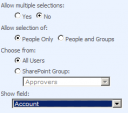 I was quite disappointed that the Person field does not store the LoginName by default and can therefore not be queried for it.
There are two workarounds. The first one: Go to the properties of the field in the list, and at the bottom you can change “Show Field” to “Account”.
This has the advantage that you can use the “domain\username” Syntax now. The drawback: The field looks bad in the list as it does now show the Login, not the Display Name with the neat presence status.
The second workaround: Use the undocumented LookupId property and search for the numeric ID:
<where>

  <eq>

    <fieldref name="PersonFieldName" LookupId="TRUE"/>

    <value type="int">UserID</value>

  </eq>

</where>
The UserID is not the “domain\username”, but the numeric internal ID (SPUser.ID). As I use this in a workflow, I can easily access this through workflowProperties.OriginatorUser.ID, which is good enough for me.
Update: The second code example was incorrect, I fixed it now.
[备查]使用 SPQuery 查询 "Person or Group" 字段的更多相关文章
- SQL查询每个表的字段数量
--SQL查询每个表的字段数量select b.[name], count(*) As AllCount,ISNULL(ISNULL(sum(case when isnullable=0 then 1 ...
- [转]SQL数据库查询到的汉字字段是乱码
使用英文版SQL数据库查询到的汉字字段是乱码的解决方案 2007-12-04 14:55:45 标签:函数 SQL 数据库 乱码 排序规则 原创作品,允许转载,转载时请务必以超链接形式标明文章 原始出 ...
- Mysql 单表查询-排序-分页-group by初识
Mysql 单表查询-排序-分页-group by初识 对于select 来说, 分组聚合(((group by; aggregation), 排序 (order by** ), 分页查询 (limi ...
- MongoDB查询操作限制返回字段的方法
这篇文章主要介绍了MongoDB查询操作限制返回字段的方法,需要的朋友可以参考下 映射(projection )声明用来限制所有查询匹配文档的返回字段.projection以文档的形式列举结果集中 ...
- linq查询结果转换为指定字段类型的list集合
转换查询结果为ProductId字段的类型的list集合 (from s in _db.Mobile_TeamAction || s.ActionStatus == select new { s.Pr ...
- Java 通过JDBC查询数据库表结构(字段名称,类型,长度等)
Java 通过JDBC查询数据库表结构(字段名称,类型,长度等) 发布者:唛唛家的豆子 时间:2012-11-20 17:54:02 Java 通过JDBC查询数据库表结构(字段名称,类型,长 ...
- mysql查询order by 指定字段排序
当MySQL查询时排序的字段不是数字时而是汉字的时候也可以用when then 来指定排序. 列如yewu_check表的status 字段不是0,1,2而是汉字待办,已办,退回.可以如下写法: S ...
- Oracle数据库里面查询字符串类型的字段不为空和为空的SQL语句:
一:查询字符串类型的字段的值不为空的SQL: select * from TB_CMS_FLGTINFO_A t where (t.fsta is not null and t.fsta <&g ...
- Qt+QGIS二次开发:自定义类实现查询矢量数据的属性字段值(图查属性)
在GIS领域,有两种重要的查询操作,图查属性和属性查图. 本文主要介绍如何在QGIS中通过从QgsMapToolIdentify中派生自定义类实现查询矢量数据的属性字段值(图查属性). 重点参考资料: ...
随机推荐
- 【腾讯Bugly干货分享】Android进程保活招式大全
本文来自于腾讯bugly开发者社区,非经作者同意,请勿转载,原文地址:http://dev.qq.com/topic/57ac4a0ea374c75371c08ce8 作者:腾讯——张兴华 目前市面上 ...
- 关于领域驱动设计(DDD)中聚合设计的一些思考
关于DDD的理论知识总结,可参考这篇文章. DDD社区官网上一篇关于聚合设计的几个原则的简单讨论: 文章地址:http://dddcommunity.org/library/vernon_2011/, ...
- Vue.js——60分钟browserify项目模板快速入门
概述 在之前的一系列vue.js文章,我们都是用传统模式引用vue.js以及其他的js文件的,这在开发时会产生一些问题. 首先,这限定了我们的开发模式是基于页面的,而不是基于组件的,组件的所有代码都直 ...
- 基于 SailingEase WinForm Framework 开发客户端程序(3:实现菜单/工具栏按钮的解耦及状态控制)
本系列文章将详细阐述客户端应用程序的设计理念,实现方法. 本系列文章以 SailingEase WinForm Framework 为基础进行设计并实现,但其中的设计理念及方法,亦适用于任何类型的客 ...
- 【Java并发编程实战】----- AQS(四):CLH同步队列
在[Java并发编程实战]-–"J.U.C":CLH队列锁提过,AQS里面的CLH队列是CLH同步锁的一种变形.其主要从两方面进行了改造:节点的结构与节点等待机制.在结构上引入了头 ...
- ASP.NET Web API 控制器执行过程(一)
ASP.NET Web API 控制器执行过程(一) 前言 前面两篇讲解了控制器的创建过程,只是从框架源码的角度去简单的了解,在控制器创建过后所执行的过程也是尤为重要的,本篇就来简单的说明一下控制器在 ...
- 日向blog开发记录
一点历史关于,Sonne Blog 2016.03.25springmvc + hibernate框架搭建.2016.04.21日向blog首页.2016.04.24分页实现.2016.04.30登录 ...
- Intellij IDEA 13.1.3 使用Junit4
作者QQ:1095737364 一.环境配置 安装JUnit插件步骤: File-->settings-->Plguins-->Browse repositories--> ...
- Android开发学习之路-3DTouch效果模仿
3D Touch是什么效果的大家应该都知道了.什么?不知道,那也没办法呀,我也没有iPhone 6s演示给你看的. 本篇博客要做的效果图: 来个低质量动图: 这个动图效果不是很好,实际上模糊效果应该是 ...
- Handler系列之原理分析
上一节我们讲解了Handler的基本使用方法,也是平时大家用到的最多的使用方式.那么本节让我们来学习一下Handler的工作原理吧!!! 我们知道Android中我们只能在ui线程(主线程)更新ui信 ...