
基于Netty4的HttpServer和HttpClient的简单实现
Netty的主页:http://netty.io/index.html
使用的Netty的版本:netty-4.0.23.Final.tar.bz2 ‐ 15-Aug-2014 (Stable, Recommended)
Http 消息格式:
Http request:
Method path-to-resource HTTPVersion-number

Header-name-: value1

Header-name-: value2

Optional request body
Http response:
HTTP/Version-number response-code response-phrase

Header-name-: value1

Header-name-: value2

Optional response body
实现一个简单的Http请求及响应过程:
1、Client向Server发送http请求。
2、Server端对http请求进行解析。
3、Server端向client发送http响应。
4、Client对http响应进行解析。
Netty中Http request消息格式:
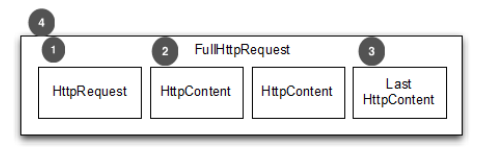
Netty中Http response消息格式:

代码实例:
Http Server:
package com.netty.test;

import org.apache.commons.logging.Log;

import org.apache.commons.logging.LogFactory;

import io.netty.bootstrap.ServerBootstrap;

import io.netty.channel.ChannelFuture;

import io.netty.channel.ChannelInitializer;

import io.netty.channel.ChannelOption;

import io.netty.channel.EventLoopGroup;

import io.netty.channel.nio.NioEventLoopGroup;

import io.netty.channel.socket.SocketChannel;

import io.netty.channel.socket.nio.NioServerSocketChannel;

import io.netty.handler.codec.http.HttpRequestDecoder;

import io.netty.handler.codec.http.HttpResponseEncoder;

public class HttpServer {

    private static Log log = LogFactory.getLog(HttpServer.class);

    public void start(int port) throws Exception {

        EventLoopGroup bossGroup = new NioEventLoopGroup();

        EventLoopGroup workerGroup = new NioEventLoopGroup();

        try {

            ServerBootstrap b = new ServerBootstrap();

            b.group(bossGroup, workerGroup).channel(NioServerSocketChannel.class)

                    .childHandler(new ChannelInitializer<SocketChannel>() {

                                @Override

                                public void initChannel(SocketChannel ch) throws Exception {

                                    // server端发送的是httpResponse,所以要使用HttpResponseEncoder进行编码

                                    ch.pipeline().addLast(new HttpResponseEncoder());

                                    // server端接收到的是httpRequest,所以要使用HttpRequestDecoder进行解码

                                    ch.pipeline().addLast(new HttpRequestDecoder());

                                    ch.pipeline().addLast(new HttpServerInboundHandler());

                                }

                            }).option(ChannelOption.SO_BACKLOG, 128)

                    .childOption(ChannelOption.SO_KEEPALIVE, true);

            ChannelFuture f = b.bind(port).sync();

            f.channel().closeFuture().sync();

        } finally {

            workerGroup.shutdownGracefully();

            bossGroup.shutdownGracefully();

        }

    }

    public static void main(String[] args) throws Exception {

        HttpServer server = new HttpServer();

        log.info("Http Server listening on 8844 ...");

        server.start(8844);

    }

}
响应请求的HttpServerInboundHandler:
package com.netty.test;

import static io.netty.handler.codec.http.HttpHeaders.Names.CONNECTION;

import static io.netty.handler.codec.http.HttpHeaders.Names.CONTENT_LENGTH;

import static io.netty.handler.codec.http.HttpHeaders.Names.CONTENT_TYPE;

import static io.netty.handler.codec.http.HttpResponseStatus.OK;

import static io.netty.handler.codec.http.HttpVersion.HTTP_1_1;

import org.apache.commons.logging.Log;

import org.apache.commons.logging.LogFactory;

import io.netty.buffer.ByteBuf;

import io.netty.buffer.Unpooled;

import io.netty.channel.ChannelHandlerContext;

import io.netty.channel.ChannelInboundHandlerAdapter;

import io.netty.handler.codec.http.DefaultFullHttpResponse;

import io.netty.handler.codec.http.FullHttpResponse;

import io.netty.handler.codec.http.HttpContent;

import io.netty.handler.codec.http.HttpHeaders;

import io.netty.handler.codec.http.HttpHeaders.Values;

import io.netty.handler.codec.http.HttpRequest;

public class HttpServerInboundHandler extends ChannelInboundHandlerAdapter {

    private static Log log = LogFactory.getLog(HttpServerInboundHandler.class);

    private HttpRequest request;

    @Override

    public void channelRead(ChannelHandlerContext ctx, Object msg)

            throws Exception {

        if (msg instanceof HttpRequest) {

            request = (HttpRequest) msg;

            String uri = request.getUri();

            System.out.println("Uri:" + uri);

        }

        if (msg instanceof HttpContent) {

            HttpContent content = (HttpContent) msg;

            ByteBuf buf = content.content();

            System.out.println(buf.toString(io.netty.util.CharsetUtil.UTF_8));

            buf.release();

            String res = "I am OK";

            FullHttpResponse response = new DefaultFullHttpResponse(HTTP_1_1,

                    OK, Unpooled.wrappedBuffer(res.getBytes("UTF-8")));

            response.headers().set(CONTENT_TYPE, "text/plain");

            response.headers().set(CONTENT_LENGTH,

                    response.content().readableBytes());

            if (HttpHeaders.isKeepAlive(request)) {

                response.headers().set(CONNECTION, Values.KEEP_ALIVE);

            }

            ctx.write(response);

            ctx.flush();

        }

    }

    @Override

    public void channelReadComplete(ChannelHandlerContext ctx) throws Exception {

        ctx.flush();

    }

    @Override

    public void exceptionCaught(ChannelHandlerContext ctx, Throwable cause) {

        log.error(cause.getMessage());

        ctx.close();

    }

}
Http Client:
package com.netty.test;

import io.netty.bootstrap.Bootstrap;

import io.netty.buffer.Unpooled;

import io.netty.channel.ChannelFuture;

import io.netty.channel.ChannelInitializer;

import io.netty.channel.ChannelOption;

import io.netty.channel.EventLoopGroup;

import io.netty.channel.nio.NioEventLoopGroup;

import io.netty.channel.socket.SocketChannel;

import io.netty.channel.socket.nio.NioSocketChannel;

import io.netty.handler.codec.http.DefaultFullHttpRequest;

import io.netty.handler.codec.http.HttpHeaders;

import io.netty.handler.codec.http.HttpMethod;

import io.netty.handler.codec.http.HttpRequestEncoder;

import io.netty.handler.codec.http.HttpResponseDecoder;

import io.netty.handler.codec.http.HttpVersion;

import java.net.URI;

public class HttpClient {

    public void connect(String host, int port) throws Exception {

        EventLoopGroup workerGroup = new NioEventLoopGroup();

        try {

            Bootstrap b = new Bootstrap();

            b.group(workerGroup);

            b.channel(NioSocketChannel.class);

            b.option(ChannelOption.SO_KEEPALIVE, true);

            b.handler(new ChannelInitializer<SocketChannel>() {

                @Override

                public void initChannel(SocketChannel ch) throws Exception {

                    // 客户端接收到的是httpResponse响应,所以要使用HttpResponseDecoder进行解码

                    ch.pipeline().addLast(new HttpResponseDecoder());

                    // 客户端发送的是httprequest,所以要使用HttpRequestEncoder进行编码

                    ch.pipeline().addLast(new HttpRequestEncoder());

                    ch.pipeline().addLast(new HttpClientInboundHandler());

                }

            });

            // Start the client.

            ChannelFuture f = b.connect(host, port).sync();

            URI uri = new URI("http://127.0.0.1:8844");

            String msg = "Are you ok?";

            DefaultFullHttpRequest request = new DefaultFullHttpRequest(HttpVersion.HTTP_1_1, HttpMethod.GET,

                    uri.toASCIIString(), Unpooled.wrappedBuffer(msg.getBytes("UTF-8")));

            // 构建http请求

            request.headers().set(HttpHeaders.Names.HOST, host);

            request.headers().set(HttpHeaders.Names.CONNECTION, HttpHeaders.Values.KEEP_ALIVE);

            request.headers().set(HttpHeaders.Names.CONTENT_LENGTH, request.content().readableBytes());

            // 发送http请求

            f.channel().write(request);

            f.channel().flush();

            f.channel().closeFuture().sync();

        } finally {

            workerGroup.shutdownGracefully();

        }

    }

    public static void main(String[] args) throws Exception {

        HttpClient client = new HttpClient();

        client.connect("127.0.0.1", 8844);

    }

}
处理Server响应的HttpClientInboundHandler:
package com.netty.test;

import io.netty.buffer.ByteBuf;

import io.netty.channel.ChannelHandlerContext;

import io.netty.channel.ChannelInboundHandlerAdapter;

import io.netty.handler.codec.http.HttpContent;

import io.netty.handler.codec.http.HttpHeaders;

import io.netty.handler.codec.http.HttpResponse;

public class HttpClientInboundHandler extends ChannelInboundHandlerAdapter {

    @Override

    public void channelRead(ChannelHandlerContext ctx, Object msg) throws Exception {

        if (msg instanceof HttpResponse)

        {

            HttpResponse response = (HttpResponse) msg;

            System.out.println("CONTENT_TYPE:" + response.headers().get(HttpHeaders.Names.CONTENT_TYPE));

        }

        if(msg instanceof HttpContent)

        {

            HttpContent content = (HttpContent)msg;

            ByteBuf buf = content.content();

            System.out.println(buf.toString(io.netty.util.CharsetUtil.UTF_8));

            buf.release();

        }

    }

}
参考代码:https://github.com/luxiaoxun/Code4Java
参考:
https://github.com/netty/netty
基于Netty4的HttpServer和HttpClient的简单实现的更多相关文章
- (高级篇 Netty多协议开发和应用)第十章-Http协议开发应用(基于Netty的HttpServer和HttpClient的简单实现)
1.HttpServer package nettyHttpTest; import io.netty.bootstrap.ServerBootstrap; import io.netty.chann ...
- 【原创】NIO框架入门(一):服务端基于Netty4的UDP双向通信Demo演示
申明:本文由作者基于日常实践整理,希望对初次接触MINA.Netty的人有所启发.如需与作者交流,见文签名,互相学习. 学习交流 更多学习资料:点此进入 推荐 移动端即时通讯交流: 215891622 ...
- 14 微服务电商【黑马乐优商城】:day02-springcloud(理论篇一:HttpClient的简单使用)
本项目的笔记和资料的Download,请点击这一句话自行获取. day01-springboot(理论篇) :day01-springboot(实践篇) day02-springcloud(理论篇一: ...
- HttpURLConnection和HttpClient的简单用法
HttpURLConnection的简单用法:先通过一个URL创建一个conn对象,然后就是可以设置get或者是post方法,接着用流来读取响应结果即可 String html = null; lon ...
- SpringBoot整合Shiro实现基于角色的权限访问控制(RBAC)系统简单设计从零搭建
SpringBoot整合Shiro实现基于角色的权限访问控制(RBAC)系统简单设计从零搭建 技术栈 : SpringBoot + shiro + jpa + freemark ,因为篇幅原因,这里只 ...
- 一个基于 .NET Core 2.0 开发的简单易用的快速开发框架 - LinFx
LinFx 一个基于 .NET Core 2.0 开发的简单易用的快速开发框架,遵循领域驱动设计(DDD)规范约束,提供实现事件驱动.事件回溯.响应式等特性的基础设施.让开发者享受到正真意义的面向对象 ...
- 基于C++11的100行实现简单线程池
基于C++11的100行实现简单线程池 1 线程池原理 线程池是一种多线程处理形式,处理过程中将任务添加到队列,然后在创建线程后自动启动这些任务.线程池线程都是后台线程.每个线程都使用默认的堆栈大小, ...
- 基于AOP和ThreadLocal实现的一个简单Http API日志记录模块
Log4a 基于AOP和ThreadLocal实现的一个简单Http API日志记录模块 github地址 : https://github.com/EalenXie/log4a 在API每次被请求时 ...
- Python网络编程02 /基于TCP、UDP协议的socket简单的通信、字符串转bytes类型
Python网络编程02 /基于TCP.UDP协议的socket简单的通信.字符串转bytes类型 目录 Python网络编程02 /基于TCP.UDP协议的socket简单的通信.字符串转bytes ...
随机推荐
- rcync 备份命令
不写复杂的命令参数什么意思,网上一搜一大堆. 这是我用的命令: rsync -ax --progress -e "ssh -p 12345" --delete root@143.2 ...
- CSS3-transform 转换/变换
transform 向元素应用 2D 或 3D 转换.该属性允许我们对元素进行旋转.缩放.移动或倾斜. 兼容性: Internet Explorer 10.Firefox.Opera 支持 trans ...
- css-margin与百分数的关系
可以对元素的margin设置百分数,百分数是相对于父元素的width计算,不管是margin-top/margin-bottom还是margin-left/margin-right.(padding同 ...
- ionic ios 发布设置 header-bar高度无效
在公司app发布过程中发现一旦改过header-bar的高度之后在ios内部或者通过ionic build browser生成的网页打开都不是正常的 通过chrome的查看工具发现自己写的样式被直接覆 ...
- 漫谈JVM
背景介绍 JVM已经是Java开发的必备技能了,JVM相当于Java的操作系统. JVM,java virtual machine, 即Java虚拟机,是运行java class文件的程序. Java ...
- Google Map API V3开发(5)
Google Map API V3开发(1) Google Map API V3开发(2) Google Map API V3开发(3) Google Map API V3开发(4) Google M ...
- CocoaPods 升级
也不知道是什么时候,ruby.taobao开始不能用了,在公司的电脑上一直装不上,还卡在那里, 旁边的老大投来了异样的目光,或者我是应该提升下技术了-- 一.升级gem gem update --sy ...
- apache启动出错原因举例
这是我这两天频繁遇到的问题.Apache服务器还真是问题少年!任何点改动都可能导致它无法使用. 原因一:80端口占用例如IIS,另外就是迅雷.我的apache服务器就是被迅雷害得无法启用! 原因二:软 ...
- ueditor 百度编辑器,取消或自定义右键菜单
如图:有2种自定义方法,一种是改源码,一种是初始化 初始化,如下代码: var ue = UE.getEditor('XXXid',{ // contextMenu:[ {label:'', cmdN ...
- ActiveMQ的静态网络链接
-------------------------------------------------------------------- (1)ActiveMQ的networkConnector是什么 ...