
WPF编程,通过DoubleAnimation控制图片的透明度,将重叠的图片依次显示。
原文:WPF编程,通过DoubleAnimation控制图片的透明度,将重叠的图片依次显示。
版权声明:我不生产代码,我只是代码的搬运工。 https://blog.csdn.net/qq_43307934/article/details/87369585
3张图片按照1-3的顺序叠放在面板上,然后依次将图片的透明度由1变化到0。当第1张图片的透明度变为0时显示第2张图片,这样形成了一幅连续的动画。
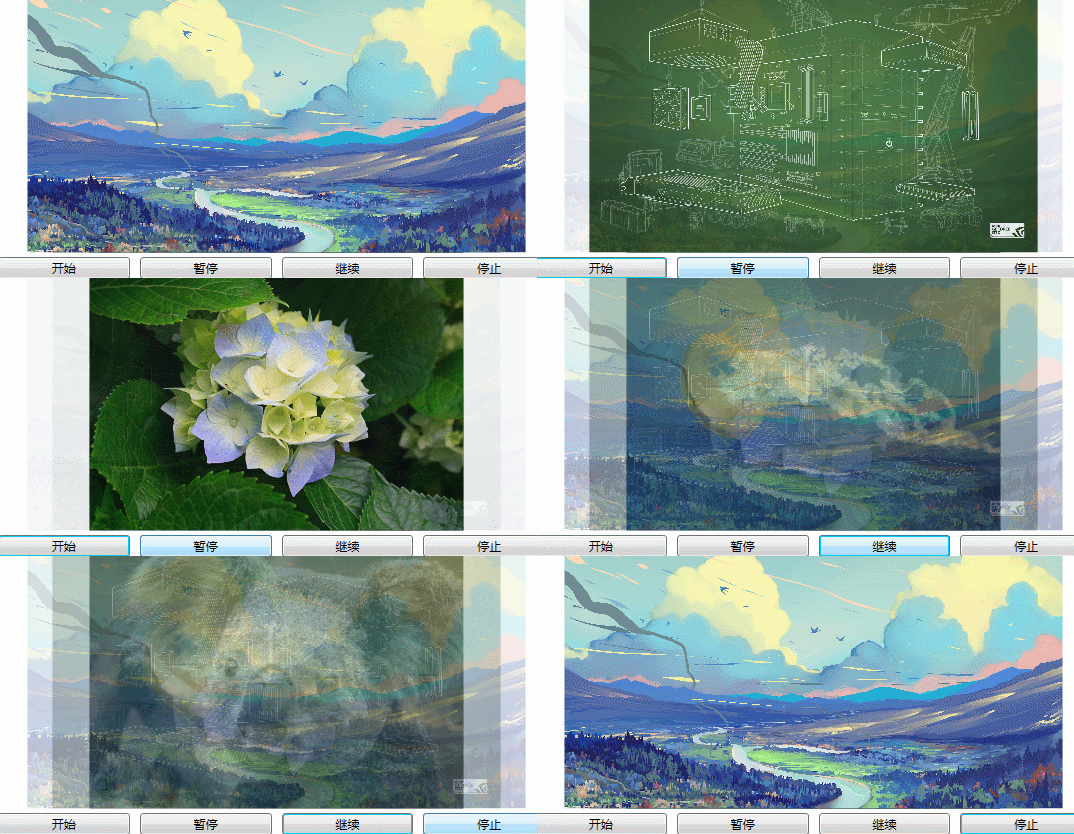
1、建立窗口在Grid 面板中放置图片
    <Grid>

        <Grid.RowDefinitions>

            <RowDefinition />

            <RowDefinition Height="auto"/>

        </Grid.RowDefinitions>

        <Grid Name="grid">

        </Grid>

        <Grid Grid.Row="1">

            <Grid.ColumnDefinitions>

                <ColumnDefinition />

                <ColumnDefinition />

                <ColumnDefinition />

                <ColumnDefinition />

            </Grid.ColumnDefinitions>

            <Button Grid.Column="0"

                    Margin="5"

                    Content="开始"

                    Click="Buttonstart" />

            <Button Grid.Column="1"

                    Margin="5"

                    Content="暂停"

                    Click="ButtonPause" />

            <Button Grid.Column="2"

                    Margin="5"

                    Content="继续"

                    Click="ButtonResume"/>

                <Button Grid.Column="3"

                        Margin="5"

                        Content="停止"

                        Click="ButtonStop" />

        </Grid>

    </Grid>
2、后台
public partial class Window3 : Window

    {

        Storyboard story;

        private List<Image> imagelist;

        public Window3()

        {

            InitializeComponent();

        }

        private void Window_Loaded(object sender, RoutedEventArgs e)

        {

            story = new Storyboard();

            NameScope.SetNameScope(this, new NameScope());

            imagelist = new List<Image>();

            for (int i = 0; i < 3; i++)

            {

                string name = "img" + (3 - i);

                string strUri;

                strUri = string.Format("pack://application:,,,/Photo/{0}.jpg", (3 - i));

                Image img = new Image();

                img.Name = name;

                BitmapImage myBitmapImage = new BitmapImage();

                myBitmapImage.BeginInit();

                myBitmapImage.UriSource = new Uri(strUri);

                myBitmapImage.EndInit();

                img.Source = myBitmapImage;

                this.RegisterName(name, img);

                grid.Children.Add(img);

                Grid.SetRow(img, 0);

                Grid.SetColumn(img, 0);

                imagelist.Add(img);

            }

            imagelist.Reverse();

            for (int i = 0; i < imagelist.Count - 1; i++)

            {

                DoubleAnimation anim = new DoubleAnimation();

                anim.BeginTime = TimeSpan.FromSeconds(0.9 * i);

                anim.From = 1;

                anim.To = 0;

               // anim.AutoReverse = true;

                anim.RepeatBehavior = RepeatBehavior.Forever;

                anim.Duration = TimeSpan.FromSeconds(0.5);

                Storyboard.SetTargetName(anim, imagelist[i].Name);

                Storyboard.SetTargetProperty(anim, new PropertyPath(Image.OpacityProperty));

                story.Children.Add(anim);

            }

        }

        private void Buttonstart(object sender, RoutedEventArgs e)

        {

            story.Begin(this, true);

        }

        private void ButtonPause(object sender, RoutedEventArgs e)

        {

            story.Pause(this);

        }

        private void ButtonResume(object sender, RoutedEventArgs e)

        {

            story.Resume(this);

        }

        private void ButtonStop(object sender, RoutedEventArgs e)

        {

            story.Stop(this);

        }

    }
WPF编程,通过DoubleAnimation控制图片的透明度,将重叠的图片依次显示。的更多相关文章
- javacpp-opencv图像处理之2:实时视频添加图片水印,实现不同大小图片叠加,图像透明度控制,文字和图片双水印
欢迎大家积极开心的加入讨论群 群号:371249677 (点击这里进群) javaCV图像处理系列: javaCV图像处理之1:实时视频添加文字水印并截取视频图像保存成图片,实现文字水印的字体.位置. ...
- WPF编程-WPF体系结构
WPF简介 Windows Presentation Foundation(WPF)是微软新一代图形系统,运行在.NET Framework 3.0架构下,为用户界面.2D/3D 图形.文档和媒体提供 ...
- WPF编程,通过Double Animation动态旋转控件的一种方法。
原文:WPF编程,通过Double Animation动态旋转控件的一种方法. 版权声明:我不生产代码,我只是代码的搬运工. https://blog.csdn.net/qq_43307934/art ...
- WPF编程,通过Double Animation动态更改控件属性的一种方法。
原文:WPF编程,通过Double Animation动态更改控件属性的一种方法. 版权声明:我不生产代码,我只是代码的搬运工. https://blog.csdn.net/qq_43307934/a ...
- WPF编程,通过Double Animation同时动态缩放和旋转控件的一种方法。
原文:WPF编程,通过Double Animation同时动态缩放和旋转控件的一种方法. 版权声明:我不生产代码,我只是代码的搬运工. https://blog.csdn.net/qq_4330793 ...
- WPF编程,通过Double Animation动态缩放控件的一种方法。
原文:WPF编程,通过Double Animation动态缩放控件的一种方法. 版权声明:我不生产代码,我只是代码的搬运工. https://blog.csdn.net/qq_43307934/art ...
- WPF编程,窗体最大化、最小化、关闭按钮功能的禁用
原文:WPF编程,窗体最大化.最小化.关闭按钮功能的禁用 版权声明:我不生产代码,我只是代码的搬运工. https://blog.csdn.net/qq_43307934/article/detail ...
- WPF编程,通过Path类型制作沿路径运动的动画一种方法。
原文:WPF编程,通过Path类型制作沿路径运动的动画一种方法. 版权声明:我不生产代码,我只是代码的搬运工. https://blog.csdn.net/qq_43307934/article/de ...
- WPF编程,指定窗口图标、窗口标题,使得在运行状态下任务栏显示窗口图标的一种方法。
原文:WPF编程,指定窗口图标.窗口标题,使得在运行状态下任务栏显示窗口图标的一种方法. 版权声明:我不生产代码,我只是代码的搬运工. https://blog.csdn.net/qq_4330793 ...
随机推荐
- Html5+离线打包创建本地消息
自己离线打包Html5+ Runtime,通常是导入SDK的Hello实例,然后修改.在做消息通知功能时,使用push.createMessage不起作用. 首先参考Android平台离线打包推送插件 ...
- 【Python】zlib压缩文件
import zlib import os ss = 's' * 1024 * 1024 #写入原始文件 file = open("src.dat", "wb" ...
- 前端需要掌握的后台基础:HTTP协议
什么是HTTP? 以下来自度娘最为专业的解释: 超文本传输协议(HTTP,HyperText Transfer Protocol)是互联网上应用最为广泛的一种网络协议.所有的WWW文件都必须遵守这个标 ...
- python的函数(二)
1,函数的变量 2,函数的返回值 1,函数的变量 1.0,函数的变量分为局部变量和全局变量. def fun(): x = 100 print x 这个x是局部变量,函数执行完后,x的变量就会销毁,只 ...
- 【转】Java学习---集合框架那些事
[原文]https://www.toutiao.com/i6593220692525711885/ Arraylist 与 LinkedList 异同 1. 是否保证线程安全: ArrayList 和 ...
- PgSQL基础之 安装postgresql数据系统
参考这位仁兄的文章,真的非常好:https://blog.csdn.net/jerry_sc/article/details/76408116#创建数据目录 后来我又自己写了一个shell脚本,来自动 ...
- 阿里八八Alpha阶段Scrum(1/12)
任务分配 叶文滔:整体框架UI设计.作为组长进行任务协调 俞鋆:后端服务器及数据库搭建 王国超:日程模块多日显示部分设计 黄梅玲:日程模块单日显示部分设计 林炜鸿:日程模块文本添加部分设计 张岳.刘晓 ...
- php读取文件内容几种正确方
1: //方法一 用while来些fgets一行行读 2: $file_name="1.txt"; 3: $fp=fopen($file_name,'r'); 4: while(! ...
- python第二十八课——编码小常识
2.内存和硬盘: 内存:计算机硬件组成部分之一,它是一个容器,用来存储数据:处理数据速度快, 存储数据量小:断电死机数据会丢失,短暂性存储数据 硬盘:计算机硬件组成部分之一,它是一个容器,用来存储数据 ...
- 使用vs2010编译lua5.1源代码生成lua.lib
版权声明:本文为博主原创文章.未经博主同意不得转载. https://blog.csdn.net/wangbin_jxust/article/details/37557807 一.打开vs2010 二 ...