
WPF 触摸屏小键盘样式
WPF程序,用于平板时,一些输入数量的地方我们需要弹出小键盘输入,这个键盘可以调系统的,也可以自己写。
分享个我现在用的一个数字键盘界面。
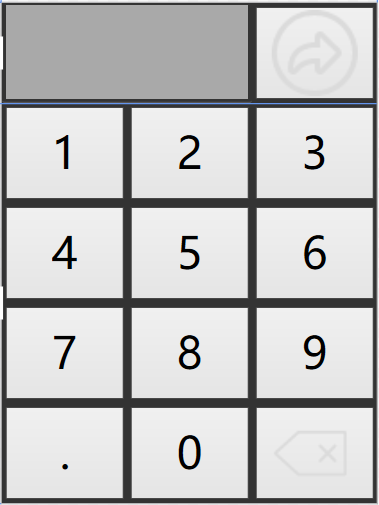
<Window xmlns:dxe="http://schemas.devexpress.com/winfx/2008/xaml/editors"  x:Class="NFMES.UI.Base.NumericKeyBoard"

        xmlns="http://schemas.microsoft.com/winfx/2006/xaml/presentation"

        xmlns:x="http://schemas.microsoft.com/winfx/2006/xaml"

      WindowStyle="None" Background="#FF333333" Title="NumericKeyBoard" ResizeMode="NoResize"

        Height="400" Width="300"   Deactivated="Window_Deactivated" FocusManager.FocusedElement="{Binding ElementName=btn}">

    <Window.Resources>

        <Style TargetType="{x:Type Button}">

            <Setter Property="FontSize" Value="35" />

            <Setter Property="Margin" Value="3"/>

        </Style>

    </Window.Resources>

    <Grid  FocusManager.FocusedElement="{Binding ElementName=btn}">

        <Grid.RowDefinitions>

            <RowDefinition Height="0.2*"/>

            <RowDefinition  Height="0.8*"/>

        </Grid.RowDefinitions>

        <Grid>

            <Grid.ColumnDefinitions>

                <ColumnDefinition Width="2*"/>

                <ColumnDefinition Width="1*"/>

            </Grid.ColumnDefinitions>

            <dxe:TextEdit x:Name="txtValue" Background="DarkGray" BorderThickness="2" BorderBrush="Black" FontSize="30" HorizontalContentAlignment="Right"/>

            <Button Grid.Column="1" Click="Button_Click" >

                <!--<Button.Background>

                    <ImageBrush ImageSource="返回2.png" Stretch="Fill"/>

                </Button.Background>-->

                <Image Source="前进.png" />

            </Button>

        </Grid>

        <Grid Grid.Row="1" Button.Click="Grid_Click"   FocusManager.FocusedElement="{Binding ElementName=btn}">

            <Grid.RowDefinitions>

                <RowDefinition />

                <RowDefinition/>

                <RowDefinition/>

                <RowDefinition/>

            </Grid.RowDefinitions>

            <Grid.ColumnDefinitions>

                <ColumnDefinition />

                <ColumnDefinition />

                <ColumnDefinition />

            </Grid.ColumnDefinitions>

            <Button x:Name="btn" Content="1" />

            <Button Content="2" Grid.Row="0" Grid.Column="1"/>

            <Button Content="3" Grid.Row="0" Grid.Column="2"/>

            <Button Content="4" Grid.Row="1" Grid.Column="0"/>

            <Button Content="5" Grid.Row="1" Grid.Column="1"/>

            <Button Content="6" Grid.Row="1" Grid.Column="2"/>

            <Button Content="7" Grid.Row="2" Grid.Column="0"/>

            <Button Content="8" Grid.Row="2" Grid.Column="1"/>

            <Button Content="9" Grid.Row="2" Grid.Column="2"/>

            <Button Content="." Grid.Row="3" Grid.Column="0"/>

            <Button Content="0" Grid.Row="3" Grid.Column="1"/>

            <Button x:Name="Back"  Grid.Row="3" Grid.Column="2">

                <!--<Button.Background>

                    <ImageBrush ImageSource="返回1.png" Stretch="Fill"/>

                </Button.Background>-->

                <Image Source="返回1.png" />

            </Button>

        </Grid>

    </Grid>

</Window>
后台cs文件代码:
using DevExpress.Xpf.Editors;

using System;

using System.Collections.Generic;

using System.Linq;

using System.Text;

using System.Windows;

using System.Windows.Controls;

using System.Windows.Data;

using System.Windows.Documents;

using System.Windows.Input;

using System.Windows.Media;

using System.Windows.Media.Imaging;

using System.Windows.Shapes;

namespace NFMES.UI.Base

{

    /// <summary>

    /// NumericKeyBoard.xaml 的交互逻辑

    /// </summary>

    public partial class NumericKeyBoard : Window

    {

        private static SpinEdit _SpinEdit;

        private static NumericKeyBoard _NumericKeyBoard;

        public NumericKeyBoard(SpinEdit spinEdit)

        {

            InitializeComponent();

            _SpinEdit = spinEdit;

        }

        private void Window_Deactivated(object sender, EventArgs e)

        {

           // this.Hide();

        }

        private void Grid_Click(object sender, RoutedEventArgs e)

        {

            try

            {

            Button btn = e.OriginalSource as Button;

            if (btn.Name == "Back")

            {

                txtValue.Text = txtValue.Text.Substring(, txtValue.Text.Length-);

            }

            else

            {

                txtValue.Text += btn.Content;

            }

            }

            catch

            {

            }

        }

        private void Button_Click(object sender, RoutedEventArgs e)

        {

            _SpinEdit.Text = (txtValue.Text.Length==?"":txtValue.Text);

            this.Close();

        }

    }

}
当然触摸屏上也可以直接调用系统键盘。
System.Diagnostics.Process.Start(@"C:\Windows\System32\osk.exe");
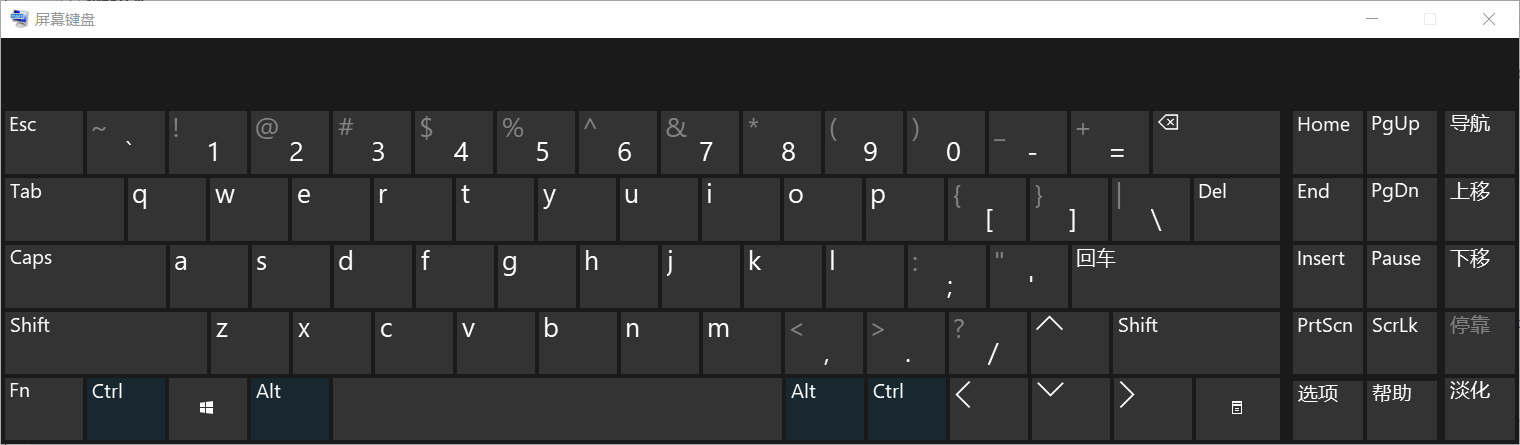
有时候因为权限问题,不可以直接调用系统盘下面的键盘。我们可以将osk.exe拷贝到程序根目录下再调用。
WPF 触摸屏小键盘样式的更多相关文章
- wpf 触摸屏 button 背景为null的 问题
原文:wpf 触摸屏 button 背景为null的 问题 <!-- button样式--> <Style x:Key="myBtn" TargetType=&q ...
- WPF自定义控件与样式(3)-TextBox & RichTextBox & PasswordBox样式、水印、Label标签、功能扩展
一.前言.预览 申明:WPF自定义控件与样式是一个系列文章,前后是有些关联的,但大多是按照由简到繁的顺序逐步发布的等,若有不明白的地方可以参考本系列前面的文章,文末附有部分文章链接. 本文主要是对文本 ...
- WPF自定义控件与样式(1)-矢量字体图标(iconfont)
一.图标字体 图标字体在网页开发上运用非常广泛,具体可以网络搜索了解,网页上的运用有很多例子,如Bootstrap.但在C/S程序中使用还不多,字体图标其实就是把矢量图形打包到字体文件里,就像使用一般 ...
- WPF自定义控件与样式(2)-自定义按钮FButton
一.前言.效果图 申明:WPF自定义控件与样式是一个系列文章,前后是有些关联的,但大多是按照由简到繁的顺序逐步发布的等,若有不明白的地方可以参考本系列前面的文章,文末附有部分文章链接. 还是先看看效果 ...
- WPF自定义控件与样式(15)-终结篇 & 系列文章索引 & 源码共享
系列文章目录 WPF自定义控件与样式(1)-矢量字体图标(iconfont) WPF自定义控件与样式(2)-自定义按钮FButton WPF自定义控件与样式(3)-TextBox & Ric ...
- WPF自定义控件与样式(4)-CheckBox/RadioButton自定义样式
一.前言 申明:WPF自定义控件与样式是一个系列文章,前后是有些关联的,但大多是按照由简到繁的顺序逐步发布的等,若有不明白的地方可以参考本系列前面的文章,文末附有部分文章链接. 本文主要内容: Che ...
- WPF自定义控件与样式(5)-Calendar/DatePicker日期控件自定义样式及扩展
一.前言 申明:WPF自定义控件与样式是一个系列文章,前后是有些关联的,但大多是按照由简到繁的顺序逐步发布的等,若有不明白的地方可以参考本系列前面的文章,文末附有部分文章链接. 本文主要内容: 日历控 ...
- WPF自定义控件与样式(6)-ScrollViewer与ListBox自定义样式
一.前言 申明:WPF自定义控件与样式是一个系列文章,前后是有些关联的,但大多是按照由简到繁的顺序逐步发布的等,若有不明白的地方可以参考本系列前面的文章,文末附有部分文章链接. 本文主要内容: Scr ...
- WPF自定义控件与样式(7)-列表控件DataGrid与ListView自定义样式
一.前言 申明:WPF自定义控件与样式是一个系列文章,前后是有些关联的,但大多是按照由简到繁的顺序逐步发布的等,若有不明白的地方可以参考本系列前面的文章,文末附有部分文章链接. 本文主要内容: Dat ...
随机推荐
- Sophus libSophus.so
在编译包含Sophus的源文件的时候,出现如下错误 ../lib/libmyslam.so: undefined reference to `Sophus::SO3::SO3(double, doub ...
- mybatis 接口绑定 和 动态SQL
一.MyBatis 接口绑定方案及多参数传递 1.作用:实现创建一个接口后把mapper.xml由mybatis生成接口的实现类,通过调用接口对象就可以获取mapper.xml中编写的sql 2.后面 ...
- python 中 __name__ 的使用
1. 如果模块是被导入,__name__的值为模块名字2. 如果模块是被直接执行,__name__的值为’__main__’ Py1.py #!/usr/bin/env python def te ...
- 关于oracle的基础增删改查操作总结
① 进入数据库: sqlplus“/as sysdba” 或者sqlplus / as sysdba 注:完整格式: sqlplus“用户名/密码@数据库名as sysdba” 注:请注意,sqlp ...
- nxn随机矩阵乘以概率向量依旧是概率向量
由上面可进一步推到出A*A是随机矩阵看成(A a1,A a2...A an) 所以A^m依然是随机矩阵.
- C++STL 函数对象和谓词
函数对象:重载函数调用操作符的类,其对象常称为函数对象. 函数对象属于类对象,能突破函数概念,保持类的状态 谓词: 一元函数对象:函数参数1个: 二元函数对象:函数参数2个: 一元谓词 函数参数1个, ...
- 安卓修改开机logo
这里我们是在ubuntu下进行操作我是用root用户登陆的,首先安装netpbm库 执行:apt-get install netpbm 对于Android系统最开始表现logo是在内核当中,所以首先我 ...
- 移动端meta设置
网页作者: <meta name="author" content="name, email@gmail.com"/>声明文档使用的字符编码: &l ...
- RGB,YCBCR在HDMI传输线是数据排列
RGB4:4:4 YCbCr4:4:4 YCbCr4:2:2 YCbCr4:2:0
- c语言结构体链表
原文链接:http://zhina123.blog.163.com/blog/static/417895782012106036289/ 引用自身的结构体,一个结构体中有一个或多个成员的基类型就是本结 ...