
ASP.NET Core Razor生成Html静态文件
一、前言
最近做项目的时候,使用Util进行开发,使用Razor写前端页面。初次使用感觉还是不大习惯,之前都是前后端分离的方式开发的,但是使用Util封装后的Angular后,感觉开发效率还是杠杠滴。
二、问题
在发布代码的时候,Webpack打包异常,提示是缺少了某些Html文件,我看了下相应的目录,发现目录缺少了部分Html文件,然后就问了何镇汐大大,给出的解决方案是,每个页面都需要访问一下才能生成相应的Html静态文件。这时候就产生了疑虑,是否有一种方式能获取所有路由,然后只需访问一次即可生成所有的Html页面。
三、解决方案
3.1 每次访问生成Html
解决方案思路:
- 继承
ActionFilterAttribute特性,重写执行方法 - 访问的时候判断访问的
Result是否ViewResult,如果是方可生成Html - 从
RazorViewEngine中查找到View后进行渲染
/// <summary>

/// 生成Html静态文件

/// </summary>

public class HtmlAttribute : ActionFilterAttribute {

    /// <summary>

    /// 生成路径,相对根路径,范例:/Typings/app/app.component.html

    /// </summary>

    public string Path { get; set; }

    /// <summary>

    /// 路径模板,范例:Typings/app/{area}/{controller}/{controller}-{action}.component.html

    /// </summary>

    public string Template { get; set; }

    /// <summary>

    /// 执行生成

    /// </summary>

    public override async Task OnResultExecutionAsync( ResultExecutingContext context, ResultExecutionDelegate next ) {

        await WriteViewToFileAsync( context );

        await base.OnResultExecutionAsync( context, next );

    }

    /// <summary>

    /// 将视图写入html文件

    /// </summary>

    private async Task WriteViewToFileAsync( ResultExecutingContext context ) {

        try {

            var html = await RenderToStringAsync( context );

            if( string.IsNullOrWhiteSpace( html ) )

                return;

            var path = Util.Helpers.Common.GetPhysicalPath( string.IsNullOrWhiteSpace( Path ) ? GetPath( context ) : Path );

            var directory = System.IO.Path.GetDirectoryName( path );

            if( string.IsNullOrWhiteSpace( directory ) )

                return;

            if( Directory.Exists( directory ) == false )

                Directory.CreateDirectory( directory );

            File.WriteAllText( path, html );

        }

        catch( Exception ex ) {

            ex.Log( Log.GetLog().Caption( "生成html静态文件失败" ) );

        }

    }

    /// <summary>

    /// 渲染视图

    /// </summary>

    protected async Task<string> RenderToStringAsync( ResultExecutingContext context ) {

        string viewName = "";

        object model = null;

        if( context.Result is ViewResult result ) {

            viewName = result.ViewName;

            viewName = string.IsNullOrWhiteSpace( viewName ) ? context.RouteData.Values["action"].SafeString() : viewName;

            model = result.Model;

        }

        var razorViewEngine = Ioc.Create<IRazorViewEngine>();

        var tempDataProvider = Ioc.Create<ITempDataProvider>();

        var serviceProvider = Ioc.Create<IServiceProvider>();

        var httpContext = new DefaultHttpContext { RequestServices = serviceProvider };

        var actionContext = new ActionContext( httpContext, context.RouteData, new ActionDescriptor() );

        using( var stringWriter = new StringWriter() ) {

            var viewResult = razorViewEngine.FindView( actionContext, viewName, true );

            if( viewResult.View == null )

                throw new ArgumentNullException( $"未找到视图: {viewName}" );

            var viewDictionary = new ViewDataDictionary( new EmptyModelMetadataProvider(), new ModelStateDictionary() ) { Model = model };

            var viewContext = new ViewContext( actionContext, viewResult.View, viewDictionary, new TempDataDictionary( actionContext.HttpContext, tempDataProvider ), stringWriter, new HtmlHelperOptions() );

            await viewResult.View.RenderAsync( viewContext );

            return stringWriter.ToString();

        }

    }

    /// <summary>

    /// 获取Html默认生成路径

    /// </summary>

    protected virtual string GetPath( ResultExecutingContext context ) {

        var area = context.RouteData.Values["area"].SafeString();

        var controller = context.RouteData.Values["controller"].SafeString();

        var action = context.RouteData.Values["action"].SafeString();

        var path = Template.Replace( "{area}", area ).Replace( "{controller}", controller ).Replace( "{action}", action );

        return path.ToLower();

    }

}
3.2 一次访问生成所有Html
解决方案思路:
- 获取所有已注册的路由
- 获取使用
RazorHtml自定义特性的路由 - 忽略Api接口的路由
- 构建
RouteData信息,用于在RazorViewEngine中查找到相应的视图 - 构建
ViewContext用于渲染出Html字符串 - 将渲染得到的Html字符串写入文件
获取所有注册的路由,此处是比较重要的,其他地方也可以用到。
/// <summary>

/// 获取所有路由信息

/// </summary>

/// <returns></returns>

public IEnumerable<RouteInformation> GetAllRouteInformations()

{

    List<RouteInformation> list = new List<RouteInformation>();

    var actionDescriptors = this._actionDescriptorCollectionProvider.ActionDescriptors.Items;

    foreach (var actionDescriptor in actionDescriptors)

    {

        RouteInformation info = new RouteInformation();

        if (actionDescriptor.RouteValues.ContainsKey("area"))

        {

            info.AreaName = actionDescriptor.RouteValues["area"];

        }

        // Razor页面路径以及调用

        if (actionDescriptor is PageActionDescriptor pageActionDescriptor)

        {

            info.Path = pageActionDescriptor.ViewEnginePath;

            info.Invocation = pageActionDescriptor.RelativePath;

        }

        // 路由属性路径

        if (actionDescriptor.AttributeRouteInfo != null)

        {

            info.Path = $"/{actionDescriptor.AttributeRouteInfo.Template}";

        }

        // Controller/Action 的路径以及调用

        if (actionDescriptor is ControllerActionDescriptor controllerActionDescriptor)

        {

            if (info.Path.IsEmpty())

            {

                info.Path =

                    $"/{controllerActionDescriptor.ControllerName}/{controllerActionDescriptor.ActionName}";

            }

            var controllerHtmlAttribute = controllerActionDescriptor.ControllerTypeInfo.GetCustomAttribute<RazorHtmlAttribute>();

            if (controllerHtmlAttribute != null)

            {

                info.FilePath = controllerHtmlAttribute.Path;

                info.TemplatePath = controllerHtmlAttribute.Template;

            }

            var htmlAttribute = controllerActionDescriptor.MethodInfo.GetCustomAttribute<RazorHtmlAttribute>();

            if (htmlAttribute != null)

            {

                info.FilePath = htmlAttribute.Path;

                info.TemplatePath = htmlAttribute.Template;

            }

            info.ControllerName = controllerActionDescriptor.ControllerName;

            info.ActionName = controllerActionDescriptor.ActionName;

            info.Invocation = $"{controllerActionDescriptor.ControllerName}Controller.{controllerActionDescriptor.ActionName}";

        }

        info.Invocation += $"({actionDescriptor.DisplayName})";

        list.Add(info);

    }

    return list;

}
生成Html静态文件
/// <summary>

/// 生成Html文件

/// </summary>

/// <returns></returns>

public async Task Generate()

{

    foreach (var routeInformation in _routeAnalyzer.GetAllRouteInformations())

    {

        // 跳过API的处理

        if (routeInformation.Path.StartsWith("/api"))

        {

            continue;

        }

        await WriteViewToFileAsync(routeInformation);

    }

}

/// <summary>

/// 渲染视图为字符串

/// </summary>

/// <param name="info">路由信息</param>

/// <returns></returns>

public async Task<string> RenderToStringAsync(RouteInformation info)

{

    var razorViewEngine = Ioc.Create<IRazorViewEngine>();

    var tempDataProvider = Ioc.Create<ITempDataProvider>();

    var serviceProvider = Ioc.Create<IServiceProvider>();

    var routeData = new RouteData();

    if (!info.AreaName.IsEmpty())

    {

        routeData.Values.Add("area", info.AreaName);

    }

    if (!info.ControllerName.IsEmpty())

    {

        routeData.Values.Add("controller", info.ControllerName);

    }

    if (!info.ActionName.IsEmpty())

    {

        routeData.Values.Add("action", info.ActionName);

    }

    var httpContext = new DefaultHttpContext { RequestServices = serviceProvider };

    var actionContext = new ActionContext(httpContext, routeData, new ActionDescriptor());

    var viewResult = razorViewEngine.FindView(actionContext, info.ActionName, true);

    if (!viewResult.Success)

    {

        throw new InvalidOperationException($"找不到视图模板 {info.ActionName}");

    }

    using (var stringWriter = new StringWriter())

    {

        var viewDictionary = new ViewDataDictionary(new EmptyModelMetadataProvider(), new ModelStateDictionary());

        var viewContext = new ViewContext(actionContext, viewResult.View, viewDictionary, new TempDataDictionary(actionContext.HttpContext, tempDataProvider), stringWriter, new HtmlHelperOptions());

        await viewResult.View.RenderAsync(viewContext);

        return stringWriter.ToString();

    }

}

/// <summary>

/// 将视图写入文件

/// </summary>

/// <param name="info">路由信息</param>

/// <returns></returns>

public async Task WriteViewToFileAsync(RouteInformation info)

{

    try

    {

        var html = await RenderToStringAsync(info);

        if (string.IsNullOrWhiteSpace(html))

            return;

        var path = Utils.Helpers.Common.GetPhysicalPath(string.IsNullOrWhiteSpace(info.FilePath) ? GetPath(info) : info.FilePath);

        var directory = System.IO.Path.GetDirectoryName(path);

        if (string.IsNullOrWhiteSpace(directory))

            return;

        if (Directory.Exists(directory) == false)

            Directory.CreateDirectory(directory);

        File.WriteAllText(path, html);

    }

    catch (Exception ex)

    {

        ex.Log(Log.GetLog().Caption("生成html静态文件失败"));

    }

}

protected virtual string GetPath(RouteInformation info)

{

    var area = info.AreaName.SafeString();

    var controller = info.ControllerName.SafeString();

    var action = info.ActionName.SafeString();

    var path = info.TemplatePath.Replace("{area}", area).Replace("{controller}", controller).Replace("{action}", action);

    return path.ToLower();

}
四、使用方式
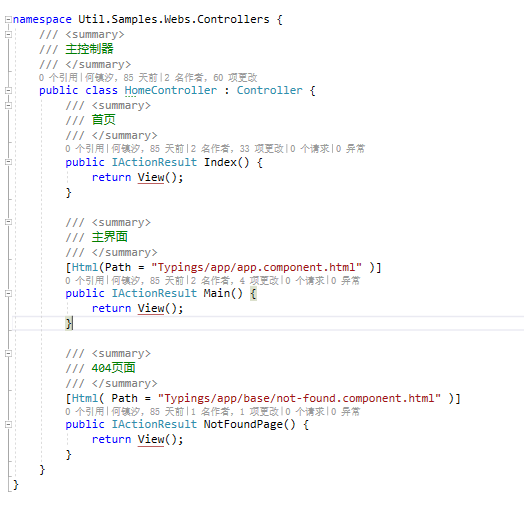
MVC控制器配置
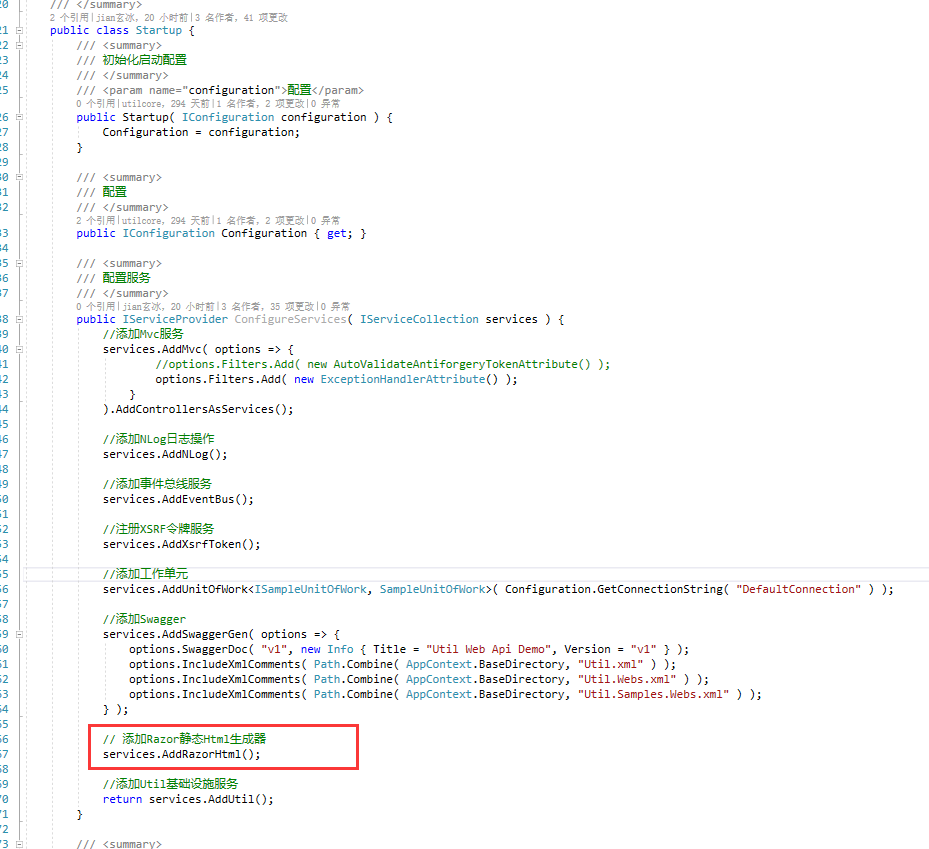
Startup配置
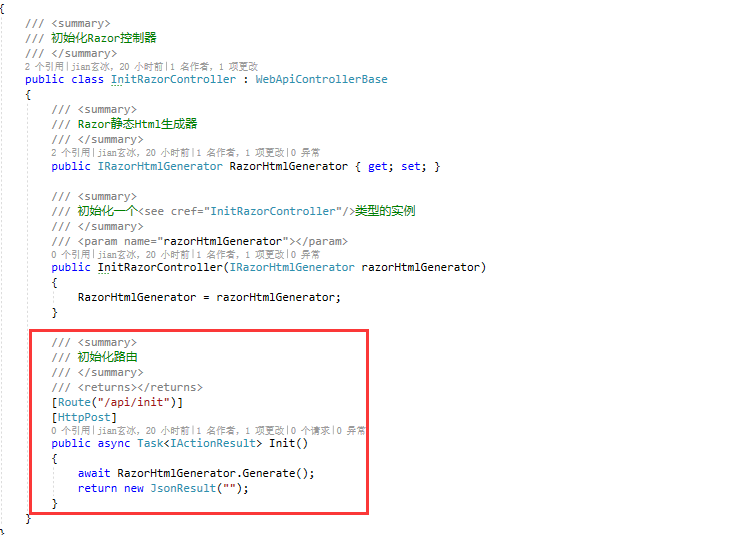
一次性生成方式,调用一次接口即可
五、源码地址
Util
Bing.NetCore
Razor生成静态Html文件:https://github.com/dotnetcore/Util/tree/master/src/Util.Webs/Razors 或者 https://github.com/bing-framework/Bing.NetCore/tree/master/src/Bing.Webs/Razors
六、参考
获取所有已注册的路由:https://github.com/kobake/AspNetCore.RouteAnalyzer
ASP.NET Core Razor生成Html静态文件的更多相关文章
- 学习ASP.NET Core Razor 编程系列十三——文件上传功能(一)
学习ASP.NET Core Razor 编程系列目录 学习ASP.NET Core Razor 编程系列一 学习ASP.NET Core Razor 编程系列二——添加一个实体 学习ASP.NET ...
- 《ASP.NET Core 高性能系列》静态文件中间件
一.概述 静态文件(如 HTML.CSS.图片和 JavaScript等文件)是 Web程序直接提供给客户端的直接加载的文件. 较比于程序动态交互的代码而言,其实原理都一样(走Http协议), ASP ...
- 学习ASP.NET Core Razor 编程系列十四——文件上传功能(二)
学习ASP.NET Core Razor 编程系列目录 学习ASP.NET Core Razor 编程系列一 学习ASP.NET Core Razor 编程系列二——添加一个实体 学习ASP.NET ...
- 学习ASP.NET Core Razor 编程系列十五——文件上传功能(三)
学习ASP.NET Core Razor 编程系列目录 学习ASP.NET Core Razor 编程系列一 学习ASP.NET Core Razor 编程系列二——添加一个实体 学习ASP.NET ...
- 学习ASP.NET Core Razor 编程系列十八——并发解决方案
学习ASP.NET Core Razor 编程系列目录 学习ASP.NET Core Razor 编程系列一 学习ASP.NET Core Razor 编程系列二——添加一个实体 学习ASP.NET ...
- 学习ASP.NET Core Razor 编程系列十六——排序
学习ASP.NET Core Razor 编程系列目录 学习ASP.NET Core Razor 编程系列一 学习ASP.NET Core Razor 编程系列二——添加一个实体 学习ASP.NET ...
- 学习ASP.NET Core Razor 编程系列十九——分页
学习ASP.NET Core Razor 编程系列目录 学习ASP.NET Core Razor 编程系列一 学习ASP.NET Core Razor 编程系列二——添加一个实体 学习ASP.NET ...
- 学习ASP.NET Core Razor 编程系列十七——分组
学习ASP.NET Core Razor 编程系列目录 学习ASP.NET Core Razor 编程系列一 学习ASP.NET Core Razor 编程系列二——添加一个实体 学习ASP.NET ...
- C#编译器优化那点事 c# 如果一个对象的值为null,那么它调用扩展方法时为甚么不报错 webAPI 控制器(Controller)太多怎么办? .NET MVC项目设置包含Areas中的页面为默认启动页 (五)Net Core使用静态文件 学习ASP.NET Core Razor 编程系列八——并发处理
C#编译器优化那点事 使用C#编写程序,给最终用户的程序,是需要使用release配置的,而release配置和debug配置,有一个关键区别,就是release的编译器优化默认是启用的.优化代码 ...
随机推荐
- freerdp服务器共享屏幕,skype lync终端显示黑屏的原因分析
问题描述:freerdp支持远程桌面共享协议rdp,使用freerdp与skype终端进行远程桌面共享时.发送1080p 视频数据时 skype终端显示黑屏 经过分析,发现rdp协商参数大于一定值时, ...
- Eclipse \ MyEclipse \Scala IDEA for Eclipse里如何将控制台console输出的过程记录全程保存到指定的文本文件(图文详解)
不多说,直接上干货! 问题详情 运行Java程序的时候,控制台输出过多,或者同时运行多个Java程序,输出结果一闪而过的时候,可以考虑将将控制台输出,改为输出到文本文件.无须修改Java代码,引入流这 ...
- mpvue图片轮播遇到的问题
小程序官方写法: <swiper indicator-dots="{{indicatorDots}}" autoplay="{{autoplay}}" i ...
- WPF ViewBox中的TextBlock自适应
想让 TextBlock即换行又能自动根据内容进行缩放,说到自动缩放,当然是ViewBox控件了,而TextBlock有TextWrapping属性控制换行, 所以在ViewBox中套用一个TextB ...
- Ceph/共享存储 汇总
Ceph 存储集群 - 搭建存储集群 Ceph 存储集群 - 存储池 Ceph 块设备 - 命令,快照,镜像 Ceph 块设备 - 块设备快速入门 OpenStack 对接 Ceph CentOS7 ...
- 大数据之presto
1.概述 Presto是一个分布式SQL查询引擎,用于查询分布在一个或多个不同数据源中的大数据集.presto可以通过使用分布式查询,可以快速高效的完成海量数据的查询.它是完全基于内存的,所以速度非常 ...
- Linux下删除Tomcat缓存
step1:进入Tomcat的bin目录,停止Tomcat服务 ./shutdown.sh step2:进入Tomcat的work目录,删除work目录里面的全部文件 step3.启动Tomcat服务 ...
- js实现响应式瀑布流
导读:瀑布流,又称瀑布流式布局.是比较流行的一种网站页面布局,视觉表现为参差不齐的多栏布局,随着页面滚动条向下滚动,这种布局还会不断加载数据块并附加至当前尾部.最早采用此布局的网站是Pinterest ...
- 根据ip获取地点
#region 根据ip获取地点 /// 获取Ip归属地 /// </summary> /// <param name="ip">ip</param& ...
- .net开源项目整理
整理一些平时收藏和应用的开源代码,方便自己学习和查阅 1.应用 nopcommerce,开源电商网站,开发环境asp.net mvc(未支持.net core),使用技术(autofac,ef,页面插 ...