
8.2、常用模块介绍2:xml,configparser,hashlib
xml:
介绍:包含关于可扩展标记语言xml的函数
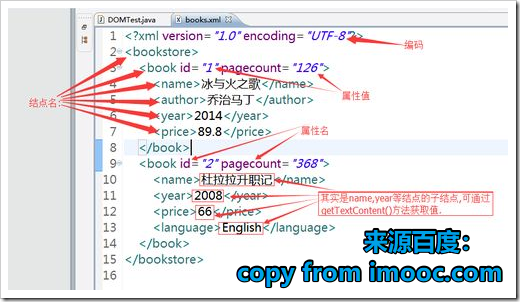
使用:
- python有三种方法解析XML--SAX,DOM,以及ElementTree,由于xml技术落后,所以这里不对sax,dom介绍:
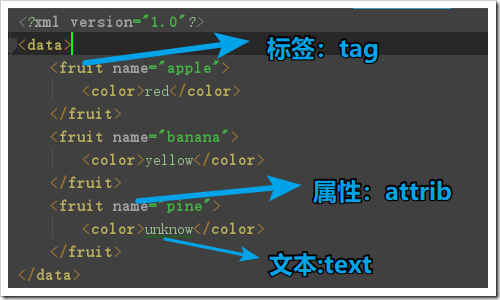
xml文本:
<?xml version="1.0"?>

<data>

    <fruit name="apple">

        <color>red</color>

    </fruit>

    <fruit name="banana">

        <color>yellow</color>

    </fruit>

    <fruit name="pine">

        <color>unknow</color>

    </fruit>

</data>
ElementTree的使用:导入模块--》获取解析对象--》获取结点--》操作结点
#导入模块

import xml.etree.ElementTree as ET

#创建对应解析对象

tree=ET.parse('data.xml')

#获取结点

root=tree.getroot()#获取根节点

print(root.tag)

# print(root.getchildren())#获取子结点

#通过迭代获取子结点,“建议”

for child in root:

    print(child.tag)#获取子结点的标签

    print(child.attrib)#获取子结点的属性

    print(child.text)#获取子结点的文本

    for cc in child:#孙子结点

        print(cc.tag)

        print(cc.attrib)

        print(cc.text)

    print("-----------------")

#通过标签名查找结点:

for i in root.findall('fruit'):#这个只能找子结点

    print(i.tag)

    print(i.attrib)

    print(i.text)

print("*********************")

for i in root.iter('color'):

    print(i.tag)

    print(i.text)

###查找结点并修改

print("*********************")

for i in root.iter('color'):

    print(i.text)

    if i.text=='unknow':

        i.text='unknowd'#修改text

        #设置属性用set: i.set(属性名,属性值)

tree.write("data2.xml")#可写回原文件,也可新写来另外的文件

###查找结点并删除

for i in root.findall('fruit'):

    if i.attrib['name'] == 'pine':

        root.remove(i)#从父结点删除子结点

tree.write("data3.xml")#可写回原文件,也可新写来另外的文件

###新建结点

new_xml = ET.Element("new parent")#新建父结点 注:只能有唯一一个父结点,这相当于新建xml

son_name = ET.SubElement(new_xml, "name", attrib={"att": "yes"})#新建子结点

son_color = ET.SubElement(son_name, "color", attrib={"att": "no"})

son_color.text = 'unknow'

name2 = ET.SubElement(new_xml, "name", attrib={"att": "no"})

color2 = ET.SubElement(name2, "color")

et = ET.ElementTree(new_xml)  # 生成文档对象

et.write("test.xml", encoding="utf-8", xml_declaration=True)#写入文件,确定格式
configparser:
介绍:包括关于配置文件的函数
初始文本内容:
[DEFAULT]

ip = 192.168.1.1

hostname=aotuman

[african]

color = black

luck = no
用法:
#导入模块

import configparser

#创建解析器

con=configparser.ConfigParser()

print("-------读-------------")

con.read('config.ini')

print(con.default_section)#默认标签的标签名

print(con.defaults())#默认标签的结果

print(con.sections())#默认标签以外的标签名

print(con['african']['color'])#获取对应标签属性

print("-------------写的方式------------")

con["DEFAULT"] = {'root':'yes'}#覆盖式修改

con['Europe'] = {'color':'white','luck':'super'}#

con['Europe']['life']='0'#增加式修改

with open('example.ini', 'w') as configfile:

    con.write(configfile)#写回,或写到新文件

print("-------------增加------------")

#先判断是否存在

if con.has_section('superman')==False:

    con.add_section('superman')

    con['superman']={'size':'big'}

    with open('example2.ini', 'w') as configfile:

        con.write(configfile)  # 写回,或写到新文件

print("-------------删除------------")

# con.remove_option('Europe','life')#删除选项

con.remove_section('Europe')#删除标签

with open('example3.ini', 'w') as configfile:

    con.write(configfile)  # 写回,或写到新文件
注意:所有的赋值都要使用字符串
hashlib:
介绍:包括关于hash加密的函数【hmac 和hashlib都是python中常用的加密模块】
用法:
#导入模块

import hashlib

my_md5=hashlib.md5()##选择加密方式,创建对象

my_md5.update(b'123')#添加加密文本

my_md5.update('中文'.encode())#需要转换成bytes才能加密

print(my_md5.hexdigest())#以十六进制格式显示加密信息(常用)

# ######## sha1 ########

hash = hashlib.sha1()

hash.update(b'123')

print(hash.hexdigest())

# ######## sha256 ########

hash = hashlib.sha256()

hash.update(b'123')

print(hash.hexdigest())

# ######## sha384 ########

hash = hashlib.sha384()

hash.update(b'123')

print(hash.hexdigest())

# ######## sha512 ########

hash = hashlib.sha512()

hash.update(b'123')

print(hash.hexdigest())
8.2、常用模块介绍2:xml,configparser,hashlib的更多相关文章
- 常用模块之 re shutil configparser hashlib xldt和xlwd
shutil 高级文件处理模块 封装的更简单了 主要是文件的复制,移动,压缩解压缩 需要保证目标文件已经存在shutil.copymode('test.txt','testcopy4.txt') 压缩 ...
- python基础31[常用模块介绍]
python基础31[常用模块介绍] python除了关键字(keywords)和内置的类型和函数(builtins),更多的功能是通过libraries(即modules)来提供的. 常用的li ...
- Ansible常用模块介绍及使用(week5_day1_part2)--技术流ken
Ansible模块 在上一篇博客<Ansible基础认识及安装使用详解(一)--技术流ken>中以及简单的介绍了一下ansible的模块.ansible是基于模块工作的,所以我们必须掌握几 ...
- Ansible常用模块介绍及使用(2)
Ansible模块 在上一篇博客<Ansible基础认识及安装使用详解(一)–技术流ken>中以及简单的介绍了一下ansible的模块.ansible是基于模块工作的,所以我们必须掌握几个 ...
- python模块(shelve,xml,configparser,hashlib,logging)
1.1shelve模块 shelve 模块比pickle模块简单,只有一个open函数,返回类似字典对象,可读可写:key必须为字符串, 而值可以是python所支持的数据类型. shelve模块主要 ...
- python3之xml&ConfigParser&hashlib&Subprocess&logging模块
1.xml模块 XML 指可扩展标记语言(eXtensible Markup Language),标准通用标记语言的子集,是一种用于标记电子文件使其具有结构性的标记语言. XML 被设计用来传输和存储 ...
- Python模块 shelve xml configparser hashlib
常用模块1. shelve 一个字典对象模块 自动序列化2.xml 是一个文件格式 写配置文件或数据交换 <a name="hades">123</a>3. ...
- IIS7 常用模块介绍说明
1.1.0 IIS常用的功能模块介绍: 1) 静态内容:可发布静态 Web 文件格式,比如 HTML 页面和图像文件. 2) 默认文档:允许您配置当用户未在 URL ...
- python 2.0 s12 day5 常用模块介绍
模块,用一砣代码实现了某个功能的代码集合. 类似于函数式编程和面向过程编程,函数式编程则完成一个功能,其他代码用来调用即可,提供了代码的重用性和代码间的耦合.而对于一个复杂的功能来,可能需要多个函数才 ...
随机推荐
- Sublime text3 Package Control不能使用
Package Control打开时提示"There are no availabel for installation"的两个处理办法: 第一种: ping一下sublime的服 ...
- (转)【OSGI】1.初识OSGI-到底什么是OSGI
原文:https://blog.csdn.net/acmman/article/details/50848595 目前,业内关于OSGI技术的学习资源或者技术文档还是很少的.我在某宝网搜索了一下“OS ...
- zend studio 9.0.2 破解-注册-汉化流程
1.运行 ZendStudio-9.0.2.msi :注意安装后不要启动: 附其下载地址:下载9.0.2版本的Zend StudioZend Studio 9.0.2下载地址:http://www.g ...
- TCP/IP 笔记 - 概述
Effective communication depends on the use of a common language. 有效沟通取决于使用共同的语言 . TCP/IP协议族 一系列相关协议的 ...
- centos 修改时区
# date 2014年 07月 22日 星期二 :: EDT # cat /etc/sysconfig/clock -------------------------- ZONE="Ame ...
- 基数估算HyperLogLog
HyperLogLog HyperLogLog 可以接受多个元素作为输入,并给出输入元素的基数估算值: • 基数:集合中不同元素的数量.比如 {'apple', 'banana', 'cherry', ...
- BEA-290074 <Deployment service servlet received file download request for file "security/SerializedSystemIni.dat". The file may exist, but download of this file is not allowed.>
Bug 19766239 - WLS 12.1.3 - MS NOT STARTING - 'DOWNLOAD OF THIS FILE IS NOT ALLOWED' Issue is fixed ...
- mysqlbinlog命令介绍及实战
MySQL的binlog日志的作用 - 1:用来记录mysql内部增删改查等对MySQL数据有更新内容的记录.像show和select一般不会记录 - 2:mysqlbinlog --base64-o ...
- k8s之安装docker-ce17.06
1.下载rpm包 https://download.docker.com/linux/centos/7/x86_64/stable/Packages/ https://download.docker. ...
- SHA-1退休:数千万用户通向加密网站之路被阻
Facebook和Cloudflare警告道:上千万用户将无法访问只使用SHA-2签名证书的HTTPS网站.2016年-2017年是SHA-1算法的缓冲期.2017年开始CA机构将不能颁发含有sh ...