
两个Vue Demo
1 实现 person list
<!DOCTYPE html>

<html>

    <head>

        <meta charset="UTF-8">

        <title></title>

        <link rel="stylesheet" href="css/vueDemo413.css" />

    </head>

    <body>

        <div id="app">

            <fieldset>

                <legend>

                    Person List

                </legend>

                <div class="form-group">

                    <label>Name:</label>

                    <input type="text" v-model="newPerson.name"/>

                </div>

                <div class="form-group">

                    <label>Age:</label>

                    <input type="text" v-model="newPerson.age"/>

                </div>

                <div class="form-group">

                    <label>Sex:</label>

                    <select v-model="newPerson.sex">

                    <option value="Male">Male</option>

                    <option value="Female">Female</option>

                </select>

                </div>

                <div class="form-group">

                    <label></label>

                    <button @click="createPerson">Create</button>

                </div>

        </fieldset>

        <table>

            <thead>

                <tr>

                    <th>Name</th>

                    <th>Age</th>

                    <th>Sex</th>

                    <th>Delete</th>

                </tr>

            </thead>

            <tbody>

                <tr v-for="person in people">

                    <td>{{ person.name }}</td>

                    <td>{{ person.age }}</td>

                    <td>{{ person.sex }}</td>

                    <td :class="'text-center'"><button @click="deletePerson($index)">Delete</button></td>

                </tr>

            </tbody>

        </table>

        </div>

    </body>

    <!-- <script src="js\node_modules\vue\dist\vue.js"></script> -->

    <script src="js/vue.js"></script>

    <script>

        var vm = new Vue({

            el: '#app',

            data: {

                newPerson: {

                    name: '',

                    age: 0,

                    sex: 'Male'

                },

            people: [{

                    name: 'Richard',

                    age: 30,

                    sex: 'Male'

                }, {

                    name: 'Roy',

                    age: 26,

                    sex: 'Male'

                }, {

                    name: 'Sansa',

                    age: 22,

                    sex: 'Female'

                }, {

                    name: 'Micheal',

                    age: 36,

                    sex: 'Male'

                }]

            },

            methods:{

                createPerson: function(){

                    this.people.push(this.newPerson);

                    // 添加完newPerson对象后,重置newPerson对象

                    this.newPerson = {name: '', age: 0, sex: 'Male'}

                },

                deletePerson: function(index){

                    // 删一个数组元素

                    this.people.splice(index,1);

                }

            }

        })

    </script>

</html>
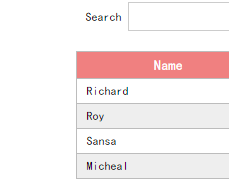
2 搜索person
<!DOCTYPE html>

<html>

    <head>

        <meta charset="UTF-8">

        <title></title>

        <link rel="stylesheet" href="css/myTest417.css" />

    </head>

    <body>

        <div id="app">

            <div id="searchBar">

                Search <input type="text" v-model="searchQuery" />

            </div>

            <simple-grid :data="gridData" :columns="gridColumns" :filter-key="searchQuery">//:v-bind,@v-on

            </simple-grid>

        </div>

        <template id="grid-template">

            <table>

                <thead>

                    <tr>

                        <th v-for="col in columns">

                            {{ col | capitalize}}

                        </th>

                    </tr>

                </thead>

                <tbody>

                    <tr v-for="entry in data | filterBy filterKey">

                        <td v-for="col in columns">

                            {{entry[col]}}

                        </td>

                    </tr>

                </tbody>

            </table>

        </template>

    </body>

    <script src="js/vue.js"></script>

    <script>

        Vue.component('simple-grid', {

            template: '#grid-template',

            props: {

                data: Array,

                columns: Array,

                filterKey: String

            }

        })

        var demo = new Vue({

            el: '#app',

            data: {

                searchQuery: '',

                gridColumns: ['name', 'age', 'sex'],

                gridData: [{

                    name: 'Richard',

                    age: 30,

                    sex: 'Male'

                }, {

                    name: 'Roy',

                    age: 26,

                    sex: 'Male'

                }, {

                    name: 'Sansa',

                    age: 22,

                    sex: 'Female'

                }, {

                    name: 'Micheal',

                    age: 36,

                    sex: 'Male'

                }]

            }

        })

    </script>

</html>
CSS:
1:
* {

    margin:;

    padding:;

    box-sizing: border-box

}

html {

    font-size: 12px;

    font-family: Ubuntu, simHei, sans-serif;

    font-weight: 400

}

body {

    font-size: 1rem

}

table,

td,

th {

    border-collapse: collapse;

    border-spacing: 0

}

table {

    width: 100%

}

td,

th {

    border: 1px solid #bcbcbc;

    padding: 5px 10px

}

th {

    background: lightcoral;

    font-size: 1.2rem;

    font-weight:;

    color: #fff;

    cursor: pointer

}

tr:nth-of-type(odd) {

    background: #fff

}

tr:nth-of-type(even) {

    background: #eee

}

fieldset {

    border: 1px solid #BCBCBC;

    padding: 15px;

}

input {

    outline: none

}

input[type=text] {

    border: 1px solid #ccc;

    padding: .5rem .3rem;

}

input[type=text]:focus {

    border-color: #42b983;

}

button {

    outline: none;

    padding: 5px 8px;

    color: #fff;

    border: 1px solid #BCBCBC;

    border-radius: 3px;

    background-color: lightcoral;

    cursor: pointer;

}

button:hover{

    opacity: 0.8;

}

#app {

    margin: 0 auto;

    max-width: 640px

}

.form-group {

    margin: 10px;

}

.form-group > label {

    display: inline-block;

    width: 10rem;

    text-align: right;

}

.form-group > input,

.form-group > select {

    display: inline-block;

    height: 2.5rem;

    line-height: 2.5rem;

}

.text-center{

    text-align: center;

}

.pagination {

    display: inline-block;

    padding-left:;

    margin: 21px 0;

    border-radius: 3px;

}

.pagination > li {

    display: inline;

}

.pagination > li > a {

    position: relative;

    float: left;

    padding: 6px 12px;

    line-height: 1.5;

    text-decoration: none;

    color: #009a61;

    background-color: #fff;

    border: 1px solid #ddd;

    margin-left: -1px;

    list-style: none;

}

.pagination > li > a:hover {

    background-color: #eee;

}

.pagination .active {

    color: #fff;

    background-color: #009a61;

    border-left: none;

    border-right: none;

}

.pagination .active:hover {

    background: #009a61;

    cursor: default;

}

.pagination > li:first-child > a .p {

    border-bottom-left-radius: 3px;

    border-top-left-radius: 3px;

}

.pagination > li:last-child > a {

    border-bottom-right-radius: 3px;

    border-top-right-radius: 3px;

}
2:
* {

    margin:;

    padding:;

    box-sizing: border-box

}

html {

    font-size: 12px;

    font-family: Ubuntu, simHei, sans-serif;

    font-weight: 400

}

body {

    font-size: 1rem

}

table,

td,

th {

    border-collapse: collapse;

    border-spacing: 0

}

table {

    width: 100%;

    margin: 20px;

}

td,

th {

    border: 1px solid #bcbcbc;

    padding: 5px 10px

}

th {

    background: lightcoral;

    font-size: 1.2rem;

    font-weight:;

    color: #fff;

    cursor: pointer

}

tr:nth-of-type(odd) {

    background: #fff

}

tr:nth-of-type(even) {

    background: #eee

}

fieldset {

    border: 1px solid #BCBCBC;

    padding: 15px;

}

input {

    outline: none

}

input[type=text] {

    border: 1px solid #ccc;

    padding: .5rem .3rem;

}

input[type=text]:focus {

    border-color: #42b983;

}

button {

    outline: none;

    padding: 5px 8px;

    color: #fff;

    border: 1px solid #BCBCBC;

    border-radius: 3px;

    background-color: #009A61;

    cursor: pointer;

}

button:hover{

    opacity: 0.8;

}

#app {

    margin: 0 auto;

    max-width: 480px;

}

#searchBar{

    margin: 10px;

    padding-left: 20px;

}

#searchBar input[type=text]{

    width: 80%;

}

.arrow {

    display: inline-block;

    vertical-align: middle;

    width:;

    height:;

    margin-left: 5px;

    opacity: 0.66;

}

.arrow.asc {

    border-left: 4px solid transparent;

    border-right: 4px solid transparent;

    border-bottom: 4px solid #fff;

}

.arrow.dsc {

    border-left: 4px solid transparent;

    border-right: 4px solid transparent;

    border-top: 4px solid #fff;

}
1:

2:
两个Vue Demo的更多相关文章
- vue demo todo-list
html <input type='text' v-model="todoItem" v-on:keyup.enter='addItem'> <ul> &l ...
- 个人推荐的两款vue导出EXCEL插件
个人认为前端VUE项目中导出EXCEL比较好的两种方法,均不是我个人原创,我只是收录简单说明,原创地址在下面. 下面推荐两种方法,个人推荐第一种,第二种不做详细讲解,因为作者已经写过博客了,你们可以点 ...
- 两万字Vue.js基础学习笔记
Vue.js学习笔记 目录 Vue.js学习笔记 ES6语法 1.不一样的变量声明:const和let 2.模板字符串 3.箭头函数(Arrow Functions) 4. 函数的参数默认值 5.Sp ...
- 两万字Vue.js基础学习笔记(二)
Vue.js学习笔记(二) 4.模块化开发 ES6模块化的导入和导出 我们使用export指令导出了模块对外提供的接口,下面我们就可以通过import命令来加载对应的这个模块了 首先,我们需要在HTM ...
- 一文解析Pinia和Vuex,带你全面理解这两个Vue状态管理模式
Pinia和Vuex一样都是是vue的全局状态管理器.其实Pinia就是Vuex5,只不过为了尊重原作者的贡献就沿用了这个看起来很甜的名字Pinia. 本文将通过Vue3的形式对两者的不同实现方式进行 ...
- Framework7+vue demo
最近看了下f7+vue做了几个测试页面,商品图片来自淘宝,代码等有时间了再传,
- 一个基于ES6+webpack的vue小demo
上一篇文章<一个基于ES5的vue小demo>我们讲了如何用ES5,vue-router做一个小demo,接下来我们来把它变成基于ES6+webpack的demo. 一.环境搭建及代码转换 ...
- vue环境的搭建与第一个demo
参考两个博客 1 2 git.npm和淘宝镜像的安装过程过程省略了,直接开始webpack + vue-cli + 创建demo 首先,在磁盘创建一个文件夹,命名为vue-projects,里面再建一 ...
- Vue.js之组件嵌套小demo
Vue.js之组件嵌套的小demo项目 第一步:初始化一个wabpack项目,这里不在复述.第二步:在components文件夹下新建Header.vue Footer.vue和Users.vue三个 ...
随机推荐
- servlet从服务器磁盘文件读出到浏览器显示,中文乱码问题,不要忘记在输入流和输出流都要设置编码格式,否则一个地方没设置不统一就会各种乱码
package com.swift; import java.io.BufferedReader; import java.io.FileInputStream; import java.io.IOE ...
- d3.js--01
D3 的全称是(Data-Driven Documents),顾名思义可以知道是一个被数据驱动的文档.听名字有点抽象,说简单一点,其实就是一个 JavaScript 的函数库,使用它主要是用来做数据可 ...
- Spring Boot 前世今生
Spring Boot 2.0 的推出又激起了一阵学习 Spring Boot 热,就单从我个人的博客的访问量大幅增加就可以感受到大家对学习 Spring Boot 的热情,那么在这么多人热衷于学习 ...
- Mysql5.7自定义函数递归报错1424 Recursive stored functions and triggers are not allowed
示例: DELIMITER $$CREATE FUNCTION test(countnum INT)RETURNS INT DETERMINISTICBEGINDECLARE tempnum INT ...
- HashMap原理以及自己实现HashMap
1.HashMap是什么? HashMap是java常用来存储键值对的数据结构,它是以key/value的形式存储的,它不是线程安全的,Key可以为null值. 2.HashMap的实现原理 Hash ...
- js禁止微信浏览器下拉显示黑底查看网址
// 首先禁止body document.body.ontouchmove = function (e) { e.preventDefault(); }; // 然后取得触摸点的坐标 var star ...
- 第37课 thinkphp5添加商品基本信息及通过前置钩子上传商品主图 模型事件(勾子函数)
目录 手册地址: before_insert(新增之前的操作) 要实现的功能 思路 触发条件: 1. 控制器里必须要调用模型的save()方式保存数据,用insert()触发不了勾子函数的 2. 模型 ...
- 动态规划:HDU1864-最大报销额(处理带小数的dp问题)
最大报销额 Time Limit: 1000/1000 MS (Java/Others) Memory Limit: 32768/32768 K (Java/Others) Descriptio ...
- Appium环境搭建及“fn must be a function”问题解决
由于appium在线安装比较困难,大多数应该是由于FQ造成的吧,索性直接下载appium安装包:http://pan.baidu.com/s/1bpfrvjD nodejs下载也很缓慢,现提供node ...
- 快速从mysqldump文件中恢复一个表
快速从较大的mysqldump文件中恢复一个表到数据库中: 1.先获取目标表(md_gas_check_record)在文件中的位置 [publish@LF-PRO-DB-01 ~]$ cat dby ...