
Rigging a Versatile Weapon Bone for 3ds Max
说明:先添加weapon到点的约束,位置,方向约束都调整好了后再建立点到手,hip的父子关系,注意这个顺序
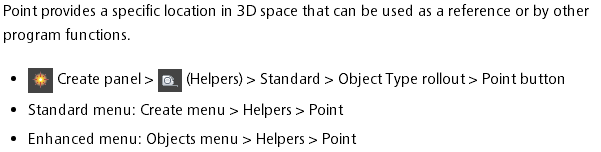
加点的方法
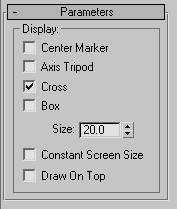
点设置成box的方法:
http://hewiki.heroengine.com/wiki/Rigging_a_Versatile_Weapon_Bone_for_3ds_Max
This is an advanced-level tutorial for artists, which explains how to configure a character-held item such as a weapon or some other prop. This item could be attached to a character at multiple locations (not just one hand), and then animated to change
positions from one location to the next.
Goal
The goal of this tutorial is to build a weapon rig that allows the character to hold and manipulate the weapon with different grips, and even different hands. We also want to be able to sheath the weapon either on the hip or the back. We will achieve this by
skinning the weapon to a weapon bone, and then use a series of point helpers, position, and orient constraints to achieve fluid motion.
Although this tutorial was done in 3ds Max, the concepts translate directly to Maya.
See Rigging a Versatile
Weapon Bone for Maya page for Maya tutorial.
Tutorial
In 3ds Max, start off with the character in a relaxed root pose. 
Create a small bone and name it Weapon Bone, color it if you like. There are 2 ways to parent this bone, either is ok, what matters is that you pick one and stay consistent.
Orient the bone so that it is laying flat at (0,0,0) degrees.
- The first way is to just parent the weapon bone to the hand that the weapon will be in most often, in this case, the right.
- The other is to parent it to the Bip01 node. You may want to do this especially if your character has long limbs. Longer limbs means there will be more floating point errors in all the bones of the limb, resulting in jittery
motions. If you parent directly to the bip01, that's less to go through resulting in more accurate motion.
You will never animate this bone directly, it will be driven by other things. This relationship is strictly for the engine to read the hierarchy, and for granny to figure out the baked down curves.
Also, build a stand-in weapon, and parent it to the weapon bone, make sure your axis alignment is the same. 
Next, create 4 point helpers. Sometimes it's easier to select them if you change there shape to box. Roughly place one in each hand, these will be used for holding weapons. Place one on his hip so the weapon can be sheathed. The other one will remain free.
This is handy in case you want to animate the weapon free of the character rig. Place it on the ground temporarily, or what ever you may come up with. Some times it's good to have more than 1 free point helper for some extra freedom.
- For best results, name your point helpers appropriately

Now we want to add a position constraint to the weapon bone so that we can control its motion with the point helpers. Select the Weapon Bone, go: Animation/Constraints/Position Constraint. Select the Right_weapon_control with
the tool. The weapon bone should snap to the controller location.


- Ensure the weapon bone is still selected.
- From the main menu, go: Animation/Constraints/Orientation Constraint. Select the Right_weapon_control with the tool. The
weapon bone should orient to the controllers orientation. Select the right_weapon_controller and rotate it so that it's an appropriate rotation for the weapon itself.


Next, select the weapon bone again, on your control panel, open the Motion tab. Under PRS parameters, make sure you haveRotation selected, then under Orientation Constraint select Add Orientation Target. Select the other weapon controls. The
result should be an oddly rotated weapon bone, that's okay, we'll get to that later.

Do the same procedure, except this time, add positional targets. The weapon should now be in between all the controls.

Now adjust the weight on the position and orientation targets so that only the left_weapon_control is 100% and the other are all 0%. The weapon should now be on the left hand. Adjust the left_weapon_control to have the correct orientation with the rotate tool


Repeat the last step and adjust each positional and orientation constraint so that it is 100% for 1 control at a time, adjust the controllers rotation.


- parent the right_weapon_control to the right hand
- parent the left_weapon_control to the left hand
- parent the hip_control to the pelvis bone
- keep the free_control unparented.
Now to finesse this a little bit, select the hip control and do an orientation constraint on it. select the Right thigh bone. Select Keep initial offset on the orientation panel. Now the sheathed weapon maintains its position to the pelvis, but rotates
with the leg as it walks.

The last thing to do is to create a selection set for the controls.
The controls should not be a part of the exported skeleton or animation files. That way you don't have to manually select them each time to hide and unhide them.
- Now you can effectively transition the weapon between the hands and various other parts of the rig just by animating the controls and the constraint weighting on the weapon bone
Rigging a Versatile Weapon Bone for 3ds Max的更多相关文章
- 3dmax实例教程-使用3ds Max 创建一个完整的场景
本篇教程讲述了利用3ds max创建一个完整的场景. 灵感来源:当我在遇到一些事情睡不着觉的时候我便在努力想象一些别的事情,于是我便想到了这个场景,其实对于我的这个角色我即没有参考图也没有草稿图,有的 ...
- 3ds max 渲染清晰面片的边缘
3ds max的菜单栏 -> 渲染 -> 材质编辑器->精简材质编辑器,将面状打勾,如下图,就能渲染出面片清晰的图形.
- 学习3ds max插件开发过程中的一些小结
1. 3ds max是以树状结构来管理整个场景的,每个树节点类型为INode 2. Interface类很关键,可以通过其中的GetRootNode.NumberOfChildren和GetChild ...
- 3ds max的动画输出
转自:http://zhidao.baidu.com/link?url=qc3vV2A9-ydb-YiVKoF7z_bIIRlmLSkyl8DcuWNYn8FaBxa2BDVLwuGPX_jYWxbw ...
- 3DS MAX调慢摄像机动画
在3ds max的右下角找到时间配置,然后出现该对话框,然后调整结束时间,将原来的时间翻倍,就能够是摄像机动画变慢. 下图的旋转速度比上图慢一半.
- Cityengine, 3ds MAX, FME
Cityengine 和 3ds MAX 一次只可以导入 (import) 一个模型. FME可以一次导入多个模型,因此可以用它来进行数据整合,然后放到cityengine里头去现实.FZViewer ...
- 。【自学总结 1】------3ds Max 界面
3ds Max 界面包含4部分(7区域) 4部分:菜单.控制工具.命令面板.窗口区 7区域: 1.标题栏:主要用于显示当前工作文件的名称,可以看到文件存储路径. 2.菜单栏:菜单中的命令如果带有省略号 ...
- 3ds Max光照纹理导入Unity的教程.
原地址:http://www.cocoachina.com/gamedev/gameengine/2010/0531/1581.html 相信这个3ds Max光照纹理导入Unity的教程对游戏设计师 ...
- 3ds max 2016 新功能
3ds max 2016 新功能_MCG节点编辑器 这是介绍视频下载: http://pan.baidu.com/s/1gds4wqJ
随机推荐
- PHP收邮件receiveMail
用PHP来发邮件,相信大家都不陌生,但读取收件箱的话,接触就少了,这次总结下自己的经验,希望能够帮助大家. 注意:1.PHP读取收件箱主要是利用imap扩展,所以在使用下面方法前,必须开启imap扩展 ...
- java nio 通道(二)
本文章来源于我的个人博客: java nio 通道(二) 一,文件通道 文件通道总是堵塞式的,因此不能被置于非堵塞模式. FileChannel对象是线程安全的.多个进程能够在同一个实例上并发调用方法 ...
- java基础知识查漏 三
一.Servlet 和Jsp的生命周期 1.Servlet生命周期 Servlet是运行在Servlet容器(有时候也叫Servlet引擎,是web服务器和应用程序服务器的一部分,用于在发 ...
- Android开发之onMeasure(int widthMeasureSpec, int heightMeasureSpec)方法
onMeasure()函数由包含这个View的具体的ViewGroup调用,因此值也是由其ViewGroup中传入的.子类View的这两个参数widthMeasureSpec, heightMeasu ...
- Struts action
<action name="KnowledgeBankManageAction_*" class="knowledgeBankManageAction" ...
- CodeSign相关
要让苹果App在真机上跑,需要私钥(PrivateKey),证书(Certificate)和描述文件(Provisioning Profile). (一) 安全基础: 1.非对称加密: 2.Hash码 ...
- Codeforces Round #363 (Div. 2) C. Vacations —— DP
题目链接:http://codeforces.com/contest/699/problem/C 题解: 1.可知每天有三个状态:1.contest ,2.gym,3.rest. 2.所以设dp[i] ...
- SQL server 备份/恢复/压缩 进度查询
第一步,用 sp_who2 查出备份的sid(或在窗口中的连接属性中看) exec sp_who2 第二步,用以下查询获得运行情况(看 percent_complete列) SELECT sessio ...
- 记一次关于return的错误
有时候瞎JB程序,调一天东改西改,都发现不了错:到最后弄出来发现就是那样一个SB错误,真不知道该笑还是该哭. 这个if语句中的return,如果加了那么判断了if语句成立后,下面就不再执行了. ...
- (转)使用cygwin注意事项一
原文出处:http://gotgit.readthedocs.io/en/latest/01-meet-git/050-install-on-windows-cygwin.html 在Windows下 ...