
Elasticsearchs的安装/laravel-scout和laravel-scout-elastic的安装
安装:
https://github.com/medcl/elasticsearch-rtf
先下载包
下载解压后
cd elasticsearch-rtf-master
ll
bin/elasticsearch-plugin list 这里会显示所有的插件
过滤插件
bin/elasticsearch-plugin list > /tmp/plugin.log
vim /tmp/plugin.log 在这里面把我们需要的analysis-ik这个插件去掉
cat /tmp/plugin.log|xargs -I {} bin/elasticsearch-plugin remove {} //删除
bin/elasticsearch-plugin list //查看
bin/elasticsearch -d //启动
ps aux|grep java
查看是否启动:: vim logs/elasticsearch.log
127.0.0.1:9200
安装laravel使用elastic的包
安装laravel/scout 查看文档地址 https://laravel-china.org/docs/laravel/5.4/scout/1276

接下来安装laravel-scout-elastic
执行这个
composer require tamayo/laravel-scout-elastic
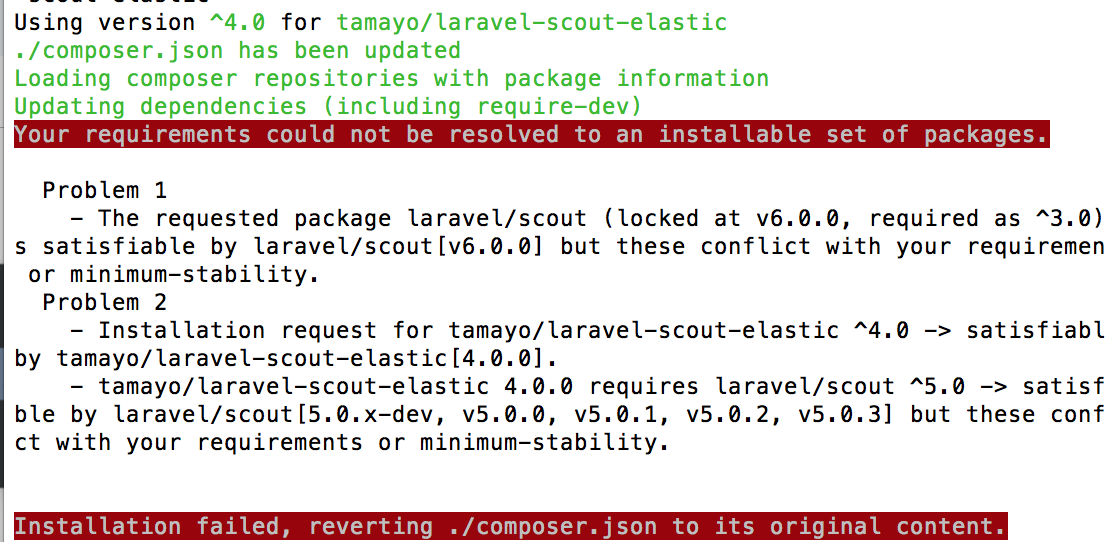
报这个错,我查了下,最终找到原因,是我安装的
laravel/scout版本太高了,我给降到5.0就ok啦

后面的按照这个网址走就行啦    https://github.com/ErickTamayo/laravel-scout-elastic

来到项目中的config\scout.php中修改配置
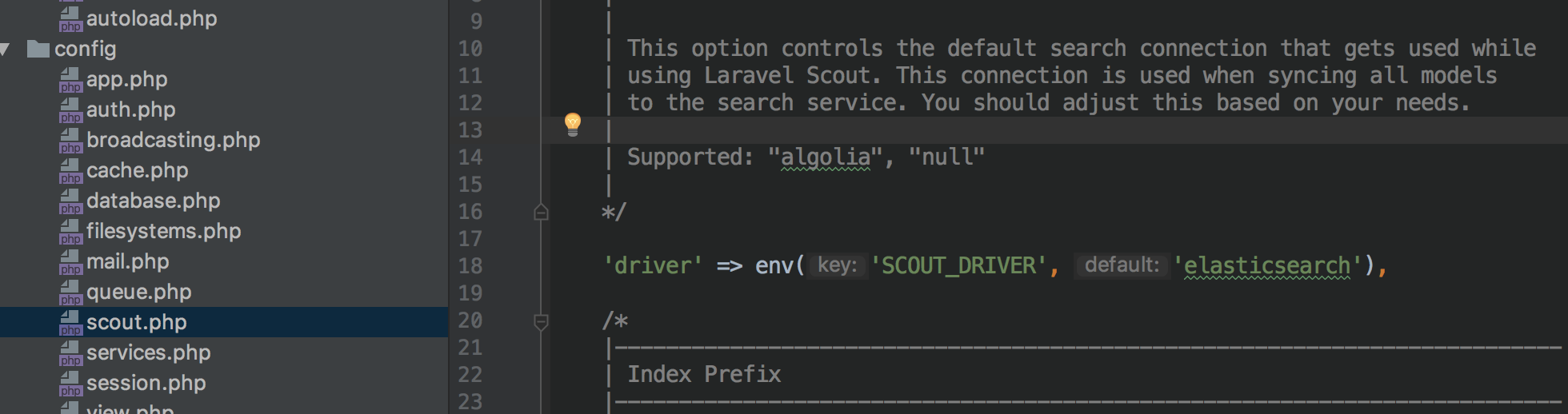
 'elasticsearch' => [

        'index' => env('ELASTICSEARCH_INDEX', 'laravel'),

        'hosts' => [

            env('ELASTICSEARCH_HOST', 'http://localhost'),

        ],

    ]
就ok啦,主要查看文档,!!!!
使用laravel的command实现搜索引擎索引和模板的建立
分为三步走:
创建Command
php artsan make:command ESInit
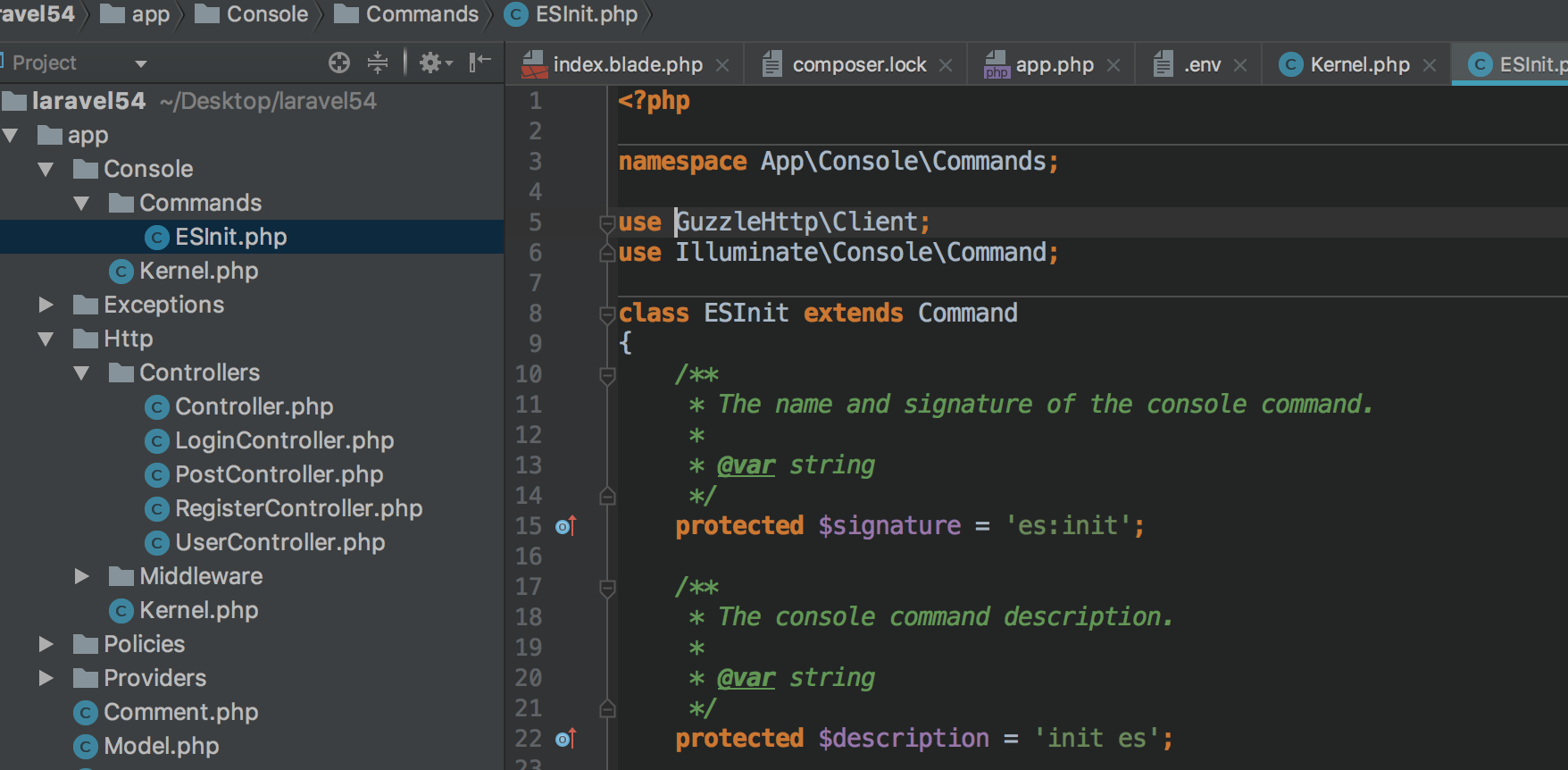
然后来到下面这个类
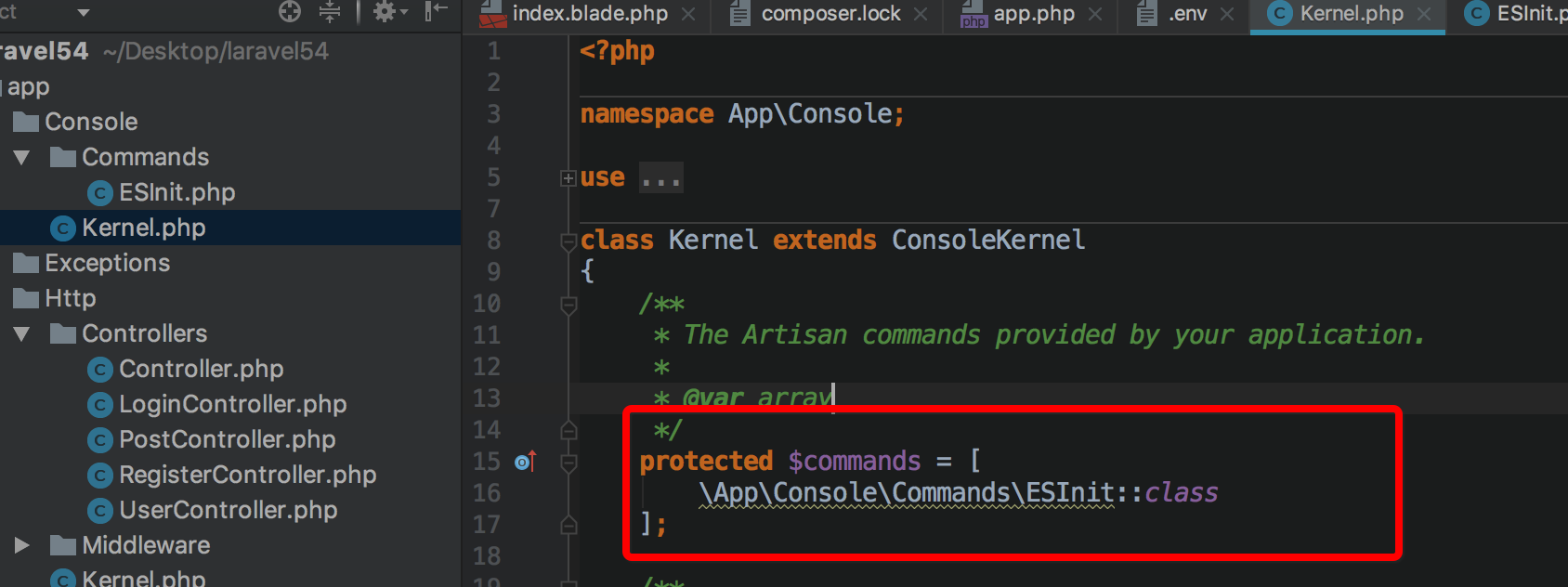
然后查看php artisan 就会看到 ps:init命令
编辑handle
在ESInit.php文件中,添加文件
use GuzzleHttp\Client;
需要安装这个插件
composer require GuzzleHttp/guzzle
public function handle()

    {

        //创建template

        $client = new Client();

        // 创建模版

        $url = config('scout.elasticsearch.hosts')[0] . '/_template/tmp';

        $client->put($url, [

            'json' => [

                'template' => config('scout.elasticsearch.index'),

                'settings' => [

                    'number_of_shards' => 1

                ],

                'mappings' => [

                    '_default_' => [

                        '_all' => [

                            'enabled' => true

                        ],

                        'dynamic_templates' => [

                            [

                                'strings' => [

                                    'match_mapping_type' => 'string',

                                    'mapping' => [

                                        'type' => 'text',

                                        'analyzer' => 'ik_smart',

                                        'ignore_above' => 256,

                                        'fields' => [

                                            'keyword' => [

                                                'type' => 'keyword'

                                            ]

                                        ]

                                    ]

                                ]

                            ]

                        ]

                    ]

                ]

            ]

        ]);

        $this->info("=====创建模板成功=====");

        $url = config('scout.elasticsearch.hosts')[0] . '/' . config('scout.elasticsearch.index');

        $client->put($url, [

            'json' => [

                'settings' => [

                    'refresh_interval' => '5s',

                    'number_of_shards' => 1,

                    'number_of_replicas' => 0,

                ],

                'mappings' => [

                    '_default_' => [

                        '_all' => [

                            'enabled' => false

                        ]

                    ]

                ]

            ]

        ]);

        $this->info("=====创建索引成功=====");

    }
挂载到laravel的artisan中去
然后这边,我们来到控制台
php artisan es:init 就ok了
Elasticsearchs的安装/laravel-scout和laravel-scout-elastic的安装的更多相关文章
- Laravel 5.5 文档 ] 快速入门 —— 安装配置篇
服务器要求 Laravel 框架对PHP版本和扩展有一定要求,不过这些要求 Laravel Homestead 都已经满足了,不过如果你没有使用 Homestead 的话(那真是一件很遗憾的事情),有 ...
- Laravel 调试利器 —— Laravel Debugbar 扩展包安装及使用教程
1.简介 Laravel Debugbar 在 Laravel 5 中集成了 PHP Debug Bar ,用于显示调试及错误信息以方便开发.该扩展包包含了一个 ServiceProvider 用于注 ...
- Laravel 5使用Laravel Excel实现Excel/CSV文件导入导出的功能详解
1.简介 本文主要给大家介绍了关于Laravel 5用Laravel Excel实现Excel/CSV文件导入导出的相关内容,下面话不多说了,来一起看看详细的介绍吧. Laravel Excel 在 ...
- Windows无法完成安装,若要在此计算机上安装Windows,请中心启动安装。
现在安装系统已经很简单了,我觉得U盘启动的话两步就差不多了, 壹:设置BIOS,将U盘启动作为系统默认启动选项 贰:直接进去大白菜之类的,一键安装... 今天终于看到第三部了, 报错:Windows无 ...
- 安装了VS2012 还有Update4 我的Silverlight5安装完后 我的Silverlight4项目打不开
安装了VS2012 还有Update4 我的Silverlight5安装完后 我的Silverlight4项目打不开 求助 不知道是哪里出问题了 我的Silverlihgt4项目一直报错 无法打开 ...
- 2016最新 wamp2.5+windows 10安装CoedSgniffer代码格式检查:5分钟安装 30分钟入门和浏览常用命令
14:59 2016/1/112016最新 wamp2.5+windows 10安装CoedSgniffer代码格式检查:注意问题:1.手动安装2.5.0和pear安装方式都成功但是执行时无任何反映, ...
- php通用安装程序,导入数据文件(.sql)的安装程序
php通用安装程序,导入数据文件(.sql)的安装程序 该程序只需要1个php文件 和 1个数据文件,很方便调用.install/index.php 程序文件install/mycms ...
- caffe 安装在win 7 vs2015 无gpu的安装方式-是无法安装 的
网上多数是vs2012或者vs2013上安装方式,带NA-显卡的需要安装CUDA7.5,安装cuDNN4,cuDNN. 一 :下载caffe源码(microsoft版) 下载地址:https://gi ...
- PE安装原版XP系统(含高版本PE安装选项灰色处理办法)
PE 安装 XP 镜像流程准备原版 XP 安装光盘镜像放到硬盘非 C 盘. 可解压到本地经行安装, 也可以使用虚拟光驱载入安装 (本教程主要讲 PE 内虚拟光驱载入安装) 第一步:用 U 盘或硬盘/光 ...
- 安装sass时,gem在国内不能安装的解决
最近在安装SASS的时候,用到gem命令,但是运行出行如下错误!(先声明,安装sass前,要保证自己电脑安装了ruby:ruby -v可以测试下有没有装) 原因是ruby 的gem被和谐了,现在淘宝的 ...
随机推荐
- 数据库 | 远程连接centos7上数据库
用root身份进入远程服务器控制台: 进入Mysql命令: # mysql -uroot -p 或者在本地上连接到远程主机上的MySQL: 假设远程主机的IP为:10.0.0.1,用户名为root,密 ...
- python数据结构转换&格式化
列表,元组和字符串python中有三个内建函数:,他们之间的互相转换使用三个函数,str(),tuple()和list(),具体示例如下所示 >>> s = "xxxxx& ...
- 洛谷 P1094 纪念品分组
P1094 纪念品分组 先按价格对纪念品排序(这里是从大到小),然后从两端向中心开始配对,有两个变量i和j,表示正在处理的两个纪念品编号,开始时i=1,j=n,如果a[i]+a[j]>w则第i贵 ...
- Action类为何要 extends ActionSupport以及实现ModelDriven
http://blog.sina.com.cn/s/blog_164e377490102wqhk.html
- Spring的ioc(DI)复习概念和原理简介
IOC的好处 ioc或者说di的概念很显然了,反转控制和依赖注入,那本来直接new就行的东西,为什么要搞这么复杂呢?? 开发维护方便,高层设计不用依赖底层的,不然底层一个类改下构造器,高层就全要改,因 ...
- override和overload的小笔记
override是覆盖的意思,也就是我们的重写.可以重写覆盖父类的方法,然后实现接口的方法也可以叫做override. 几个要注意的点: 重写一定要用和被重写方法同样的方法名还有参数列表. 抛出的异常 ...
- KEIL_RTX资源介绍
调度方法:时间片轮转. 参考文档:Keil参考手册和rtl.h(任务的每个.c文件都应包含此头文件)头文件这两个文档 1)事件管理:让一个进程等待一个事件,这个事件可以由其它进程和中断触发(只能在中断 ...
- C#私有的构造函数的作用
C#私有的构造函数的作用:当类的构造函数是私有的时候,也已防止C1 c1=new C1();实例化类.常见的应用是工具类和单例模式. using System;using System.Collect ...
- Masonry UIScrollView autolayout 的一个奇特的问题
事情是这样的.... 我一个工程里 一直使用的 masonry 做autolayout,有个gesturerReconizer的bug,找了很久,发现很奇怪一个现象: 我的某个view 是这样的 |- ...
- 创建Maven项目出错 pom出错
错误为 org.apache.maven.archiver.MavenArchiver.getManifest(org.apache.maven.project.MavenProject, org.a ...