
一步一步学习IdentityServer4 (7) IdentityServer4成功配置全部配置
auth.liyouming.com 全部配
public class Startup

    {

        public Startup(IConfiguration configuration)

        {

            Configuration = configuration;

        }

        public IConfiguration Configuration { get; }

        public void ConfigureServices(IServiceCollection services)

        {

            services.AddMvc();

            #region 业务数据库

            services.AddOptions();

            services.AddDbContext<CustomContext>(builder =>

            {

                builder.UseSqlServer(this.Configuration["ConnectionString"], options =>

                {

                    options.UseRowNumberForPaging();

                    options.MigrationsAssembly("LYM.OAuth2OpenId");

                });

            }, ServiceLifetime.Transient);

            #endregion

            #region IdentityServer4  By liyouming Add At 2017-11-28

            //结合EFCore生成IdentityServer4数据库

            // 项目工程文件最后添加 <ItemGroup><DotNetCliToolReference Include="Microsoft.EntityFrameworkCore.Tools.DotNet" Version="2.0.0" /></ItemGroup>

            //dotnet ef migrations add InitialIdentityServerPersistedGrantDbMigration -c PersistedGrantDbContext -o Data/Migrations/IdentityServer/PersistedGrantDb

            //dotnet ef migrations add InitialIdentityServerConfigurationDbMigration -c ConfigurationDbContext -o Data/Migrations/IdentityServer/ConfigurationDb

            //黎又铭 Add 2017-11-28 添加IdentityServer4对EFCore数据库的支持

            //但是这里需要初始化数据 默认生成的数据库中是没有配置数据

            const string connectionString = @"Data Source=192.168.0.42;Initial Catalog=A.IdentityServer4;User ID=sa;password=lym123!@#;Integrated Security=false;";

            var migrationsAssembly = typeof(Startup).GetTypeInfo().Assembly.GetName().Name;

             string customUrl = this.Configuration["Authority"]; //"http://192.168.0.42:5000";

            #region 添加对IdentiyServer4配置内容处理 By Liyouming 2017-11-29

            services.AddIdentityServer(idroptions =>

               {

                   //设置将在发现文档中显示的颁发者名称和已发布的JWT令牌。建议不要设置此属性,该属性从客户端使用的主机名中推断颁发者名称

                   //idroptions.IssuerUri = "";

                   //设置认证

                   idroptions.Authentication = new IdentityServer4.Configuration.AuthenticationOptions

                   {

                       //监控浏览器cookie不难发现lym.Cookies=8660972474e55224ff37f7421c79a530 实际是cookie记录服务器session的名称

                       CheckSessionCookieName = "lym.SessionId", // CookieAuthenticationDefaults.AuthenticationScheme,//用于检查会话端点的cookie的名称

                       CookieLifetime = new TimeSpan(, , ),//身份验证Cookie生存期(仅在使用IdentityServer提供的Cookie处理程序时有效)

                       CookieSlidingExpiration = true,//指定cookie是否应该滑动(仅在使用IdentityServer提供的cookie处理程序时有效)

                       RequireAuthenticatedUserForSignOutMessage = true //指示是否必须对用户进行身份验证才能接受参数以结束会话端点。默认为false

                   };

                   //活动事件 允许配置是否应该将哪些事件提交给注册的事件接收器

                   idroptions.Events = new IdentityServer4.Configuration.EventsOptions

                   {

                       RaiseErrorEvents = true,

                       RaiseFailureEvents = true,

                       RaiseSuccessEvents = true,

                       RaiseInformationEvents = true

                   };

                   //允许设置各种协议参数(如客户端ID,范围,重定向URI等)的长度限制

                   //idroptions.InputLengthRestrictions = new IdentityServer4.Configuration.InputLengthRestrictions

                   //{

                   //    //可以看出下面很多参数都是对长度的限制

                   //    AcrValues = 100,

                   //    AuthorizationCode = 100,

                   //    ClientId = 100,

                   //    /*

                   //    ..

                   //    ..

                   //    ..

                   //    */

                   //    ClientSecret = 1000

                   //};

                   //用户交互页面定向设置处理

                   idroptions.UserInteraction = new IdentityServer4.Configuration.UserInteractionOptions

                   {

                       LoginUrl = customUrl + "/Account/Login",//【必备】登录地址

                       LogoutUrl = customUrl + "/Account/Logout",//【必备】退出地址

                       ConsentUrl = customUrl + "/Consent/Index",//【必备】允许授权同意页面地址

                       ErrorUrl = customUrl + "/Error/Index", //【必备】错误页面地址

                       LoginReturnUrlParameter = "returnUrl",//【必备】设置传递给登录页面的返回URL参数的名称。默认为returnUrl

                       LogoutIdParameter = "logoutId", //【必备】设置传递给注销页面的注销消息ID参数的名称。缺省为logoutId

                       ConsentReturnUrlParameter = "returnUrl", //【必备】设置传递给同意页面的返回URL参数的名称。默认为returnUrl

                       ErrorIdParameter = "errorId", //【必备】设置传递给错误页面的错误消息ID参数的名称。缺省为errorId

                       CustomRedirectReturnUrlParameter = "returnUrl", //【必备】设置从授权端点传递给自定义重定向的返回URL参数的名称。默认为returnUrl

                       CookieMessageThreshold =  //【必备】由于浏览器对Cookie的大小有限制,设置Cookies数量的限制,有效的保证了浏览器打开多个选项卡,一旦超出了Cookies限制就会清除以前的Cookies值

                   };

                   //缓存参数处理  缓存起来提高了效率 不用每次从数据库查询

                   idroptions.Caching = new IdentityServer4.Configuration.CachingOptions

                   {

                       ClientStoreExpiration = new TimeSpan(, , ),//设置Client客户端存储加载的客户端配置的数据缓存的有效时间

                       ResourceStoreExpiration = new TimeSpan(, , ),// 设置从资源存储加载的身份和API资源配置的缓存持续时间

                       CorsExpiration = new TimeSpan(, , )  //设置从资源存储的跨域请求数据的缓存时间

                   };

                   //IdentityServer支持一些端点的CORS。底层CORS实现是从ASP.NET Core提供的,因此它会自动注册在依赖注入系统中

                   idroptions.Cors = new IdentityServer4.Configuration.CorsOptions

                   {

                       CorsPaths = new List<PathString>() {

                           new PathString("/")

                       }, //支持CORS的IdentityServer中的端点。默认为发现,用户信息,令牌和撤销终结点

                       CorsPolicyName = "default", //【必备】将CORS请求评估为IdentityServer的CORS策略的名称(默认为"IdentityServer4")。处理这个问题的策略提供者是ICorsPolicyService在依赖注入系统中注册的。如果您想定制允许连接的一组CORS原点,则建议您提供一个自定义的实现ICorsPolicyService

                       PreflightCacheDuration = new TimeSpan(, , )//可为空的<TimeSpan>,指示要在预检Access-Control-Max-Age响应标题中使用的值。默认为空,表示在响应中没有设置缓存头

                   };

               })

            #endregion

            #region 添加IdentityServer4 认证证书相关处理  By Liyouming 2017-11-29

            //AddSigningCredential 添加登录证书 这个是挂到IdentityServer4中间件上  提供多种证书处理  RsaSecurityKey\SigningCredentials

            //这里可以采用IdentiServe4的证书封装出来

            //添加一个签名密钥服务,该服务将指定的密钥材料提供给各种令牌创建/验证服务。您可以从证书存储中传入X509Certificate2一个SigningCredential或一个证书引用

            //.AddSigningCredential(new System.Security.Cryptography.X509Certificates.X509Certificate2()

            //{

            //    Archived = true,

            //    FriendlyName = "",

            //    PrivateKey = System.Security.Cryptography.AsymmetricAlgorithm.Create("key")

            //})

            //AddDeveloperSigningCredential在启动时创建临时密钥材料。这是仅用于开发场景,当您没有证书使用。

            //生成的密钥将被保存到文件系统,以便在服务器重新启动之间保持稳定(可以通过传递来禁用false)。

            //这解决了在开发期间client / api元数据缓存不同步的问题

            .AddDeveloperSigningCredential()

               //添加验证令牌的密钥。它们将被内部令牌验证器使用,并将显示在发现文档中。

               //您可以从证书存储中传入X509Certificate2一个SigningCredential或一个证书引用。这对于关键的转换场景很有用

               //.AddValidationKeys(new AsymmetricSecurityKey[] {

               //})

            #endregion

            #region 添加IdentityServer4用户缓存数据 By Liyouming 2017-11-29

               //添加配置数据全部配置到内存中 如果有EFCore数据库持久化这里不会配置 只需要配置 AddConfigurationStore、AddOperationalStore 数据仓储服务

               //寄存器IClientStore和ICorsPolicyService实现基于内存中的Client配置对象集合。

               //.AddInMemoryClients(IdrConfig.IdrConfigurations.GetClient())

               //IResourceStore基于IdentityResource配置对象的内存中收集来注册实现。

               //.AddInMemoryIdentityResources(IdrConfig.IdrConfigurations.GetIdentityResources())

               //IResourceStore基于ApiResource配置对象的内存中收集来注册实现。

               //.AddInMemoryApiResources(IdrConfig.IdrConfigurations.GetApiResources())

               //添加测试用户

               //.AddTestUsers(new List<IdentityServer4.Test.TestUser>() {

               //    new IdentityServer4.Test.TestUser{

               //        SubjectId=Guid.NewGuid().ToString(),

               //        Username="liyouming",

               //        Password="liyouming"

               //    }

               //})

            #endregion

            #region 添加对IdentityServer4 EF数据库持久化支持 By Liyouming 2017-11-29

               //黎又铭 Add 2017-11-28 添加IdentityServer4对EFCore数据库的支持

               .AddConfigurationStore(options =>

            {

                options.ConfigureDbContext = builder =>

                {

                    builder.UseSqlServer(connectionString,

                        builderoptions =>

                        {

                            builderoptions.MigrationsAssembly(migrationsAssembly);

                        });

                };

            })

            .AddOperationalStore(options =>

            {

                options.ConfigureDbContext = builder =>

                {

                    builder.UseSqlServer(connectionString, builderoptions =>

                    {

                        builderoptions.MigrationsAssembly(migrationsAssembly);

                    });

                };

                options.EnableTokenCleanup = true;  //允许对Token的清理

                options.TokenCleanupInterval = ;  //清理周期时间Secends

            })

            #endregion

            ;

            #endregion

            //services.AddScoped<IUserService, UserService>();

            #region 添加授权验证方式 这里是Cookies & OpenId Connect

            JwtSecurityTokenHandler.DefaultInboundClaimTypeMap.Clear();

            services.AddAuthentication(

                options =>

                {

                    options.DefaultScheme = "lym.oauth.cookies";

                    options.DefaultChallengeScheme = "oidc";

                }

                )

            .AddCookie("lym.oauth.cookies", options=> {

                options.ExpireTimeSpan = TimeSpan.FromMinutes();

                options.Cookie.Name = "lym.idrserver";

            })  //监控浏览器Cookies不难发现有这样一个 .AspNetCore.lym.Cookies 记录了加密的授权信息

            .AddOpenIdConnect("oidc", options =>

            {

                options.Authority = customUrl;

                options.ClientId = "lym.clienttest";

                options.ClientSecret = "lym.clienttest";

                options.RequireHttpsMetadata = false;

                options.SaveTokens = true;

                options.ResponseType = "code id_token";

                //布尔值来设置处理程序是否应该转到用户信息端点检索。额外索赔或不在id_token创建一个身份收到令牌端点。默认为“false”

                options.GetClaimsFromUserInfoEndpoint = true;

                options.CallbackPath = new PathString("/oidc/login-callback");

                options.SignInScheme = "lym.oauth.cookies";

                options.SignOutScheme = "lym.oauth.cookies";

                options.RemoteSignOutPath = new PathString("/oidc/front-channel-logout-callback");

                options.Scope.Add("openid");

                options.Scope.Add("profile");

                options.Scope.Add("cloudservices");

                options.Events = new OpenIdConnectEvents

                {

                    OnRedirectToIdentityProvider = OnRedirectToIdentityProvider,

                    OnRemoteSignOut = OnRemoteSignOut,

                    OnRemoteFailure = OnRemoteFailure,

                    OnAuthenticationFailed = OnAuthenticationFailed,

                    OnRedirectToIdentityProviderForSignOut = OnRedirectToIdentityProviderForSignOut,

                    OnAuthorizationCodeReceived = OnAuthorizationCodeReceived,

                    OnMessageReceived = OnMessageReceived,

                    OnTicketReceived = OnTicketReceived,

                    OnTokenResponseReceived = OnTokenResponseReceived,

                    OnTokenValidated = OnTokenValidated,

                    OnUserInformationReceived = OnUserInformationReceived

                };

            });

            #endregion

        }

        #region  Events事件

        private static Task OnRedirectToIdentityProvider(RedirectContext context)

        {

            if (context.HttpContext.Items.ContainsKey("idp"))

            {

                var idp = context.HttpContext.Items["idp"];

                context.ProtocolMessage.AcrValues = "idp:" + idp;

            }

            return Task.FromResult();

        }

        private static Task OnRemoteSignOut(RemoteSignOutContext context)

        {

            return Task.FromResult();

        }

        private static Task OnRemoteFailure(RemoteFailureContext context)

        {

            return Task.FromResult();

        }

        private static Task OnAuthenticationFailed(AuthenticationFailedContext context)

        {

            return Task.FromResult();

        }

        private static Task OnRedirectToIdentityProviderForSignOut(RedirectContext context)

        {

            context.ProtocolMessage.PostLogoutRedirectUri = context.Request.Scheme + "://" + context.Request.Host;

            return Task.FromResult();

        }

        private static Task OnAuthorizationCodeReceived(AuthorizationCodeReceivedContext context)

        {

            return Task.FromResult();

        }

        private static Task OnMessageReceived(MessageReceivedContext context)

        {

            return Task.FromResult();

        }

        private static Task OnTicketReceived(TicketReceivedContext context)

        {

            return Task.FromResult();

        }

        private static Task OnTokenResponseReceived(TokenResponseReceivedContext context)

        {

            return Task.FromResult();

        }

        private static Task OnTokenValidated(TokenValidatedContext context)

        {

            return Task.FromResult();

        }

        private static Task OnUserInformationReceived(UserInformationReceivedContext context)

        {

            return Task.FromResult();

        }

        #endregion

        public void ConfigureContainer(ContainerBuilder builder)

        {

            //Autofac 注入

            builder.RegisterInstance(this.Configuration).AsImplementedInterfaces();

            //builder.RegisterType<RedisProvider>().As<IRedisProvider>().SingleInstance();

            builder.AddUnitOfWork(provider =>

            {

                provider.Register(new LYM.Data.EntityFramework.ClubUnitOfWorkRegisteration());

            });

            builder.RegisterModule<CoreModule>()

                .RegisterModule<EntityFrameworkModule>();

        }

        // This method gets called by the runtime. Use this method to configure the HTTP request pipeline.

        public void Configure(IApplicationBuilder app, IHostingEnvironment env)

        {

            if (env.IsDevelopment())

            {

                app.UseDeveloperExceptionPage();

                app.UseBrowserLink();

            }

            else

            {

                app.UseExceptionHandler("/Home/Error");

            }

            app.UseAuthentication();

            app.UseStaticFiles();

            app.UseIdentityServer();

            app.UseMvc(routes =>

            {

                routes.MapRoute(

                    name: "default",

                    template: "{controller=Home}/{action=Index}/{id?}");

            });

            // app.UseMvcWithDefaultRoute();

        }

    }
auth.liyouming.com
web.liyouming.com 全部配置
 public class Startup

    {

        public Startup(IConfiguration configuration)

        {

            Configuration = configuration;

        }

        public IConfiguration Configuration { get; }

        public void ConfigureServices(IServiceCollection services)

        {

            #region 数据库连接

            string customUrl = this.Configuration["Authority"];

            services.AddMvc();

            services.AddOptions();

            services.AddDbContext<CustomContext>(builder =>

            {

                builder.UseSqlServer(this.Configuration["ConnectionString"], options =>

                {

                    options.UseRowNumberForPaging();

                    options.MigrationsAssembly("LYM.WebSite");

                });

            }, ServiceLifetime.Transient);

            #endregion

            #region 添加授权验证方式 这里是Cookies & OpenId Connect

            JwtSecurityTokenHandler.DefaultInboundClaimTypeMap.Clear();

            services.AddAuthentication(

                options =>

                {

                    options.DefaultScheme = "lym.oauth.cookies";// CookieAuthenticationDefaults.AuthenticationScheme;

                    options.DefaultChallengeScheme = "oidc";

                }

                )

            .AddCookie("lym.oauth.cookies", options =>

            {

                options.ExpireTimeSpan = TimeSpan.FromMinutes();

                options.Cookie.Name = "lym.website";

            })  //监控浏览器Cookies不难发现有这样一个 .AspNetCore.lym.Cookies 记录了加密的授权信息

            .AddOpenIdConnect("oidc", options =>

            {

                options.Authority = customUrl;

                options.ClientId = "lym.clienttest1";

                options.ClientSecret = "lym.clienttest";

                options.RequireHttpsMetadata = false;

                options.SaveTokens = true;

                options.ResponseType = "code id_token";

                //布尔值来设置处理程序是否应该转到用户信息端点检索。额外索赔或不在id_token创建一个身份收到令牌端点。默认为“false”

                options.GetClaimsFromUserInfoEndpoint = true;

                options.CallbackPath = new PathString("/oidc/login-callback");

                options.SignInScheme = "lym.oauth.cookies";

                options.SignOutScheme = "lym.oauth.cookies";

                options.RemoteSignOutPath = new PathString("/oidc/front-channel-logout-callback");

                options.Scope.Add("openid");

                options.Scope.Add("profile");

                options.Scope.Add("cloudservices");

                options.Events = new OpenIdConnectEvents

                {

                    OnRedirectToIdentityProvider = OnRedirectToIdentityProvider,

                    OnRemoteSignOut = OnRemoteSignOut,

                    OnRemoteFailure = OnRemoteFailure,

                    OnAuthenticationFailed = OnAuthenticationFailed,

                    OnRedirectToIdentityProviderForSignOut = OnRedirectToIdentityProviderForSignOut,

                    OnAuthorizationCodeReceived = OnAuthorizationCodeReceived,

                    OnMessageReceived = OnMessageReceived,

                    OnTicketReceived = OnTicketReceived,

                    OnTokenResponseReceived = OnTokenResponseReceived,

                    OnTokenValidated = OnTokenValidated,

                    OnUserInformationReceived = OnUserInformationReceived

                };

            });

            #endregion

            #region Cap配置

            //services.AddDbContext<CapApiContext>(builder =>

            //{

            //    builder.UseSqlServer(this.Configuration["CapConnectionString"]);

            //}, ServiceLifetime.Transient);

            //services.AddCap(x =>

            //{

            //    //EF实体框架

            //    x.UseEntityFramework<CapApiContext>();

            //    // Dapper

            //    // x.UseSqlServer("Your ConnectionStrings");

            //    //  RabbitMQ 消息

            //    //x.UseRabbitMQ(rabbitMQOption =>

            //    //{

            //    //    #region UseRabbitMQ 参数说明

            //    //    //HostName 宿主地址    string localhost

            //    //    //UserName 用户名 string guest

            //    //    //Password 密码  string guest

            //    //    //VirtualHost 虚拟主机    string  /

            //    //    //Port    端口号 int -1

            //    //    //TopicExchangeName CAP默认Exchange名称 string cap.default.topic

            //    //    //RequestedConnectionTimeout RabbitMQ连接超时时间  int 30,000 毫秒

            //    //    //SocketReadTimeout   RabbitMQ消息读取超时时间    int 30,000 毫秒

            //    //    //SocketWriteTimeout  RabbitMQ消息写入超时时间    int 30,000 毫秒

            //    //    //QueueMessageExpires 队列中消息自动删除时间 int(10天) 毫秒

            //    //    #endregion

            //    //    rabbitMQOption.HostName = "192.168.0.42";

            //    //    //rabbitMQOption.VirtualHost = "/rabbit";

            //    //    //rabbitMQOption.UserName = "lym123";

            //    //    //rabbitMQOption.Password = "lym123";

            //    //    rabbitMQOption.Port = 5672;

            //    //    // rabbitmq options.

            //    //});

            //    x.UseRabbitMQ("localhost");

            //    // Kafka 消息

            //    // x.UseKafka("localhost:5003");

            //    //    执行失败消息时的回调函数,详情见下文        Action<MessageType,string,string>

            //    //x.FailedCallback = null;

            //    //处理消息的线程默认轮询等待时间(秒)        15 秒

            //    x.PollingDelay = 15;

            //    //启动队列中消息的处理器个数    2

            //    x.QueueProcessorCount = 2;

            //    //失败重试次数

            //    x.FailedRetryCount = 3;

            //    //失败重试时间间隔

            //    x.FailedRetryInterval = 15;

            //});

            #endregion

        }

        #region  Events事件

        private static Task OnRedirectToIdentityProvider(RedirectContext context)

        {

            if (context.HttpContext.Items.ContainsKey("idp"))

            {

                var idp = context.HttpContext.Items["idp"];

                context.ProtocolMessage.AcrValues = "idp:" + idp;

            }

            return Task.FromResult();

        }

        private static Task OnRemoteSignOut(RemoteSignOutContext context)

        {

            return Task.FromResult();

        }

        private static Task OnRemoteFailure(RemoteFailureContext context)

        {

            return Task.FromResult();

        }

        private static Task OnAuthenticationFailed(AuthenticationFailedContext context)

        {

            return Task.FromResult();

        }

        private static Task OnRedirectToIdentityProviderForSignOut(RedirectContext context)

        {

            context.ProtocolMessage.PostLogoutRedirectUri = context.Request.Scheme + "://" + context.Request.Host;

            return Task.FromResult();

        }

        private static Task OnAuthorizationCodeReceived(AuthorizationCodeReceivedContext context)

        {

            return Task.FromResult();

        }

        private static Task OnMessageReceived(MessageReceivedContext context)

        {

            return Task.FromResult();

        }

        private static Task OnTicketReceived(TicketReceivedContext context)

        {

            return Task.FromResult();

        }

        private static Task OnTokenResponseReceived(TokenResponseReceivedContext context)

        {

            return Task.FromResult();

        }

        private static Task OnTokenValidated(TokenValidatedContext context)

        {

            return Task.FromResult();

        }

        private static Task OnUserInformationReceived(UserInformationReceivedContext context)

        {

            return Task.FromResult();

        }

        #endregion

        public void ConfigureContainer(ContainerBuilder builder)

        {

            //Autofac 注入

            builder.RegisterInstance(this.Configuration).AsImplementedInterfaces();

            //builder.RegisterType<RedisProvider>().As<IRedisProvider>().SingleInstance();

            builder.AddUnitOfWork(provider =>

            {

                provider.Register(new LYM.Data.EntityFramework.ClubUnitOfWorkRegisteration());

            });

            builder.RegisterModule<CoreModule>()

                .RegisterModule<EntityFrameworkModule>();

        }

        public void Configure(IApplicationBuilder app, IHostingEnvironment env)

        {

            if (env.IsDevelopment())

            {

                app.UseDeveloperExceptionPage();

                app.UseBrowserLink();

            }

            else

            {

                app.UseExceptionHandler("/Home/Error");

            }

            app.UseStaticFiles();

            app.UseAuthentication();

            app.UseMvc(routes =>

            {

                routes.MapRoute(

                    name: "default",

                    template: "{controller=Home}/{action=Index}/{id?}");

            });

          // app.UseCap(); //Cap配置

        }

    }
web.liyouming.com
centos7.0 环境
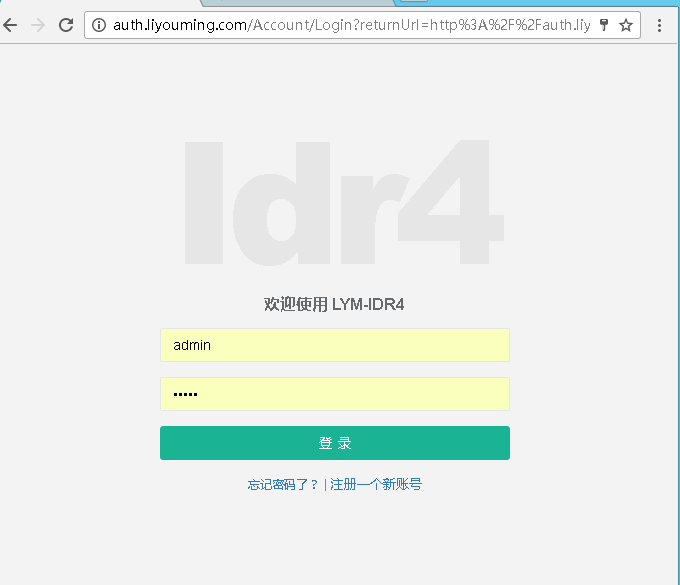
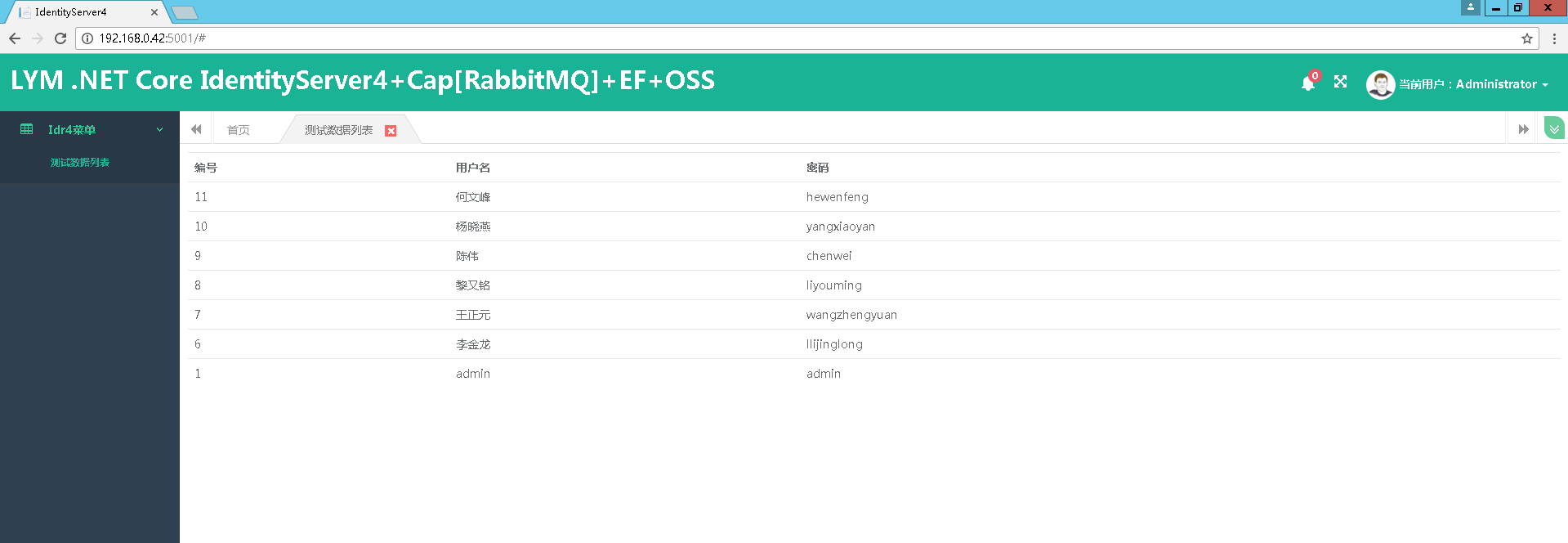
SSO登录,SSO退出 搞定
下面是登录视频演示:
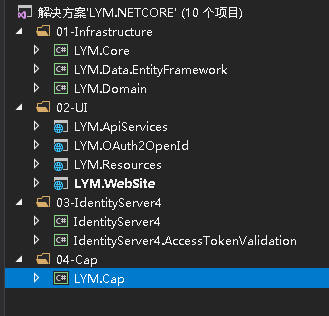
项目目录结构
一步一步学习IdentityServer4 (7) IdentityServer4成功配置全部配置的更多相关文章
- 一步一步学习IdentityServer4 (1) 概要配置说明
//结合EFCore生成IdentityServer4数据库 // 项目工程文件最后添加 <ItemGroup><DotNetCliToolReference Include=&qu ...
- 12.Linux软件安装 (一步一步学习大数据系列之 Linux)
1.如何上传安装包到服务器 有三种方式: 1.1使用图形化工具,如: filezilla 如何使用FileZilla上传和下载文件 1.2使用 sftp 工具: 在 windows下使用CRT 软件 ...
- (转) 一步一步学习ASP.NET 5 (四)- ASP.NET MVC 6四大特性
转发:微软MVP 卢建晖 的文章,希望对大家有帮助.原文:http://blog.csdn.net/kinfey/article/details/44459625 编者语 : 昨晚写好的文章居然csd ...
- (转) 一步一步学习ASP.NET 5 (二)- 通过命令行和sublime创建项目
转发:微软MVP 卢建晖 的文章,希望对大家有帮助. 注:昨天转发之后很多朋友指出了vNext的命名问题,原文作者已经做出了修改,后面的标题都适用 asp.net 5这个名称. 编者语 : 昨天发了第 ...
- 一步一步学习SignalR进行实时通信_1_简单介绍
一步一步学习SignalR进行实时通信\_1_简单介绍 SignalR 一步一步学习SignalR进行实时通信_1_简单介绍 前言 SignalR介绍 支持的平台 相关说明 OWIN 结束语 参考文献 ...
- 一步一步学习SignalR进行实时通信_8_案例2
原文:一步一步学习SignalR进行实时通信_8_案例2 一步一步学习SignalR进行实时通信\_8_案例2 SignalR 一步一步学习SignalR进行实时通信_8_案例2 前言 配置Hub 建 ...
- 一步一步学习SignalR进行实时通信_9_托管在非Web应用程序
原文:一步一步学习SignalR进行实时通信_9_托管在非Web应用程序 一步一步学习SignalR进行实时通信\_9_托管在非Web应用程序 一步一步学习SignalR进行实时通信_9_托管在非We ...
- 一步一步学习SignalR进行实时通信_7_非代理
原文:一步一步学习SignalR进行实时通信_7_非代理 一步一步学习SignalR进行实时通信\_7_非代理 SignalR 一步一步学习SignalR进行实时通信_7_非代理 前言 代理与非代理 ...
- 一步一步学习SignalR进行实时通信_5_Hub
原文:一步一步学习SignalR进行实时通信_5_Hub 一步一步学习SignalR进行实时通信\_5_Hub SignalR 一步一步学习SignalR进行实时通信_5_Hub 前言 Hub命名规则 ...
- 一步一步学习SignalR进行实时通信_6_案例
原文:一步一步学习SignalR进行实时通信_6_案例 一步一步学习SignalR进行实时通信\_6_案例1 一步一步学习SignalR进行实时通信_6_案例1 前言 类的定义 各块功能 后台 上线 ...
随机推荐
- 学习Oracle的一些收获
前言: 在看尚硅谷的Oracle视频时,总结的一些自己之前不熟的,或者完全不了解的知识点,只适用于本人,本人有一定的SQL基础,所以一些我比较熟悉的知识点不会列出来. Oracle中SQL使用技巧: ...
- python中super与成员属性
super的使用直接看例子: class A(): def __init__(self, a): print('init A...') self.a = a class B(A): def __ini ...
- 通过TodoList案例对比Vue.js的MVVM设计模式与JQuery的MVP设计模式
Vue MVVM设计模式: 在使用vue进行编程时,不会再涉及到DOM的操作,取而代之的是修改数据层,当把数据进行变更的时候,vue之中它的底层会自动的根据数据的不同帮助我们去重新渲染页面. 编码时不 ...
- Postman简明教程
一.Postman简介 Postman是一款接口测试工具,常用于日常工作的接口类功能测试和简单的自动化测试. 二.Postman功能介绍 1.常见get请求的接口测试 我们现在有这样一个获取学生信息的 ...
- ECMAScript——(二)
1.语法 区分大小写 变量是弱类型(定义变量时只用 var 运算符,可以将它初始化为任意值.) 每行结尾的分号可有可无(建议写上) 注释与Java一样 括号表示代码块 2.变量 变量可以不用声明,变量 ...
- Linux input子系统学习总结(三)----Input设备驱动
Input 设备驱动 ---操作硬件获取硬件寄存器中设备输入的数据,并把数据交给核心层: 一 .设备驱动的注册步骤: 1.分配一个struct input_dev : struct ...
- ubuntu git 简单入门【转】
转自:http://blog.chinaunix.net/uid-20718384-id-3334859.html 1. 安装 sudo apt-get install git-core 2. 初始 ...
- IIS错误:在唯一密钥属性“fileExtension”设置为“.mp4”时,无法添加类型为“mimeMap”的重复集合项
之前的IIS配置中,.mp4类型的文件默认无法访问,所以个人在IIS7.5的mime类型中增加了.mp4的类型的支持,但问题是需要每台机器中增加这些设置,不利于团队协作,于是,只好将这些修改体现在代码 ...
- linux文件管理 -> 系统文件属性
-rw-------. 1 root root 4434 May 30 13:58 ks.cfg -rw-------. ①:文件类型与权限 ②:硬链接次数 root ③:所属用户 root ④:所属 ...
- MySQL -- JDBC
一 . JDBC的开发步骤 1.准备四大参数 2.注册驱动 3.获得连接 4.获得语句执行者 5.执行sql语句 6.处理结果 7.释放资源 1.准备四大参数 /* * jdbc四大配置参数 * &g ...