
[转]微信小程序 c#后台支付结果回调
本文转自:http://www.cnblogs.com/weizhiing/p/7700723.html
又为大家带来简单的c#后台支付结果回调方法,首先还是要去微信官网下载模板(WxPayAPI),将模板(WxPayAPI)添加到服务器上,然后在打开WxPayAPI项目中的example文件下的
NativeNotifyPage.aspx打开网页中的代码页如图:
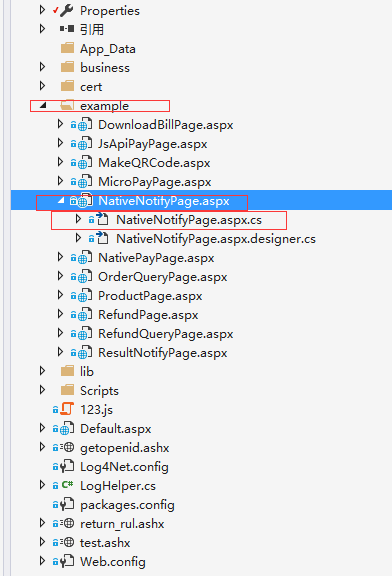
将以下代码加入进去就能完成:

  public partial class NativeNotifyPage : System.Web.UI.Page

    {

        public static string wxJsApiParam { get; set; } //前段显示

        public string return_result = "";

        protected void Page_Load(object sender, EventArgs e)

        {

           Response.ContentType = "text/plain";

            Response.Write("Hello World");

            LogHelper.WriteLog(typeof(NativeNotifyPage), "可以运行1-1");

            String xmlData = getPostStr();//获取请求数据

            if (xmlData == "")

            {

            }

            else

            {

                var dic = new Dictionary<string, string>

                 {

                  {"return_code", "SUCCESS"},

                  {"return_msg","OK"}

                 };

                var sb = new StringBuilder();

                sb.Append("<xml>");

                foreach (var d in dic)

                {

                    sb.Append("<" + d.Key + ">" + d.Value + "</" + d.Key + ">");

                }

                sb.Append("</xml>");

                //把数据重新返回给客户端

                DataSet ds = new DataSet();

                StringReader stram = new StringReader(xmlData);

                XmlTextReader datareader = new XmlTextReader(stram);

                ds.ReadXml(datareader);

                if (ds.Tables[0].Rows[0]["return_code"].ToString() == "SUCCESS")

                {

                    LogHelper.WriteLog(typeof(NativeNotifyPage), "数据能返回");

                    string wx_appid = "";//微信开放平台审核通过的应用APPID

                    string wx_mch_id = "";//微信支付分配的商户号

                    string wx_nonce_str = "";//     随机字符串,不长于32位

                    string wx_sign = "";//签名,详见签名算法

                    string wx_result_code = "";//SUCCESS/FAIL

                    string wx_return_code = "";

                    string wx_openid = "";//用户在商户appid下的唯一标识

                    string wx_is_subscribe = "";//用户是否关注公众账号,Y-关注,N-未关注,仅在公众账号类型支付有效

                    string wx_trade_type = "";//    APP

                    string wx_bank_type = "";//     银行类型,采用字符串类型的银行标识,银行类型见银行列表

                    string wx_fee_type = "";//  货币类型,符合ISO4217标准的三位字母代码,默认人民币:CNY,其他值列表详见货币类型

                    string wx_transaction_id = "";//微信支付订单号

                    string wx_out_trade_no = "";//商户系统的订单号,与请求一致。

                    string wx_time_end = "";//  支付完成时间,格式为yyyyMMddHHmmss,如2009年12月25日9点10分10秒表示为20091225091010。其他详见时间规则

                    int wx_total_fee = 1;//    订单总金额,单位为分

                    int wx_cash_fee = 1;//现金支付金额订单现金支付金额,详见支付金额

                    #region  数据解析

                    //列 是否存在

                    string signstr = "";//需要前面的字符串

                                        //wx_appid

                    if (ds.Tables[0].Columns.Contains("appid"))

                    {

                        wx_appid = ds.Tables[0].Rows[0]["appid"].ToString();

                        if (!string.IsNullOrEmpty(wx_appid))

                        {

                            signstr += "appid=" + wx_appid;

                        }

                    }

                    //wx_bank_type

                    if (ds.Tables[0].Columns.Contains("bank_type"))

                    {

                        wx_bank_type = ds.Tables[0].Rows[0]["bank_type"].ToString();

                        if (!string.IsNullOrEmpty(wx_bank_type))

                        {

                            signstr += "&bank_type=" + wx_bank_type;

                        }

                    }

                    //wx_cash_fee

                    if (ds.Tables[0].Columns.Contains("cash_fee"))

                    {

                        wx_cash_fee = Convert.ToInt32(ds.Tables[0].Rows[0]["cash_fee"].ToString());

                        signstr += "&cash_fee=" + wx_cash_fee;

                    }

                    //wx_fee_type

                    if (ds.Tables[0].Columns.Contains("fee_type"))

                    {

                        wx_fee_type = ds.Tables[0].Rows[0]["fee_type"].ToString();

                        if (!string.IsNullOrEmpty(wx_fee_type))

                        {

                            signstr += "&fee_type=" + wx_fee_type;

                        }

                    }

                    //wx_is_subscribe

                    if (ds.Tables[0].Columns.Contains("is_subscribe"))

                    {

                        wx_is_subscribe = ds.Tables[0].Rows[0]["is_subscribe"].ToString();

                        if (!string.IsNullOrEmpty(wx_is_subscribe))

                        {

                            signstr += "&is_subscribe=" + wx_is_subscribe;

                        }

                    }

                    //wx_mch_id

                    if (ds.Tables[0].Columns.Contains("mch_id"))

                    {

                        wx_mch_id = ds.Tables[0].Rows[0]["mch_id"].ToString();

                        if (!string.IsNullOrEmpty(wx_mch_id))

                        {

                            signstr += "&mch_id=" + wx_mch_id;

                        }

                    }

                    //wx_nonce_str

                    if (ds.Tables[0].Columns.Contains("nonce_str"))

                    {

                        wx_nonce_str = ds.Tables[0].Rows[0]["nonce_str"].ToString();

                        if (!string.IsNullOrEmpty(wx_nonce_str))

                        {

                            signstr += "&nonce_str=" + wx_nonce_str;

                        }

                    }

                    //wx_openid

                    if (ds.Tables[0].Columns.Contains("openid"))

                    {

                        wx_openid = ds.Tables[0].Rows[0]["openid"].ToString();

                        if (!string.IsNullOrEmpty(wx_openid))

                        {

                            signstr += "&openid=" + wx_openid;

                        }

                    }

                    //wx_out_trade_no

                    if (ds.Tables[0].Columns.Contains("out_trade_no"))

                    {

                        wx_out_trade_no = ds.Tables[0].Rows[0]["out_trade_no"].ToString();

                        if (!string.IsNullOrEmpty(wx_out_trade_no))

                        {

                            signstr += "&out_trade_no=" + wx_out_trade_no;

                        }

                    }

                    //wx_result_code

                    if (ds.Tables[0].Columns.Contains("result_code"))

                    {

                        wx_result_code = ds.Tables[0].Rows[0]["result_code"].ToString();

                        if (!string.IsNullOrEmpty(wx_result_code))

                        {

                            signstr += "&result_code=" + wx_result_code;

                        }

                    }

                    //wx_result_code

                    if (ds.Tables[0].Columns.Contains("return_code"))

                    {

                        wx_return_code = ds.Tables[0].Rows[0]["return_code"].ToString();

                        if (!string.IsNullOrEmpty(wx_return_code))

                        {

                            signstr += "&return_code=" + wx_return_code;

                        }

                        LogHelper.WriteLog(typeof(NativeNotifyPage), "wx_return_code" + wx_return_code);

                    }

                    //wx_sign

                    if (ds.Tables[0].Columns.Contains("sign"))

                    {

                        wx_sign = ds.Tables[0].Rows[0]["sign"].ToString();

                        //if (!string.IsNullOrEmpty(wx_sign))

                        //{

                        //    signstr += "&sign=" + wx_sign;

                        //}

                    }

                    //wx_time_end

                    if (ds.Tables[0].Columns.Contains("time_end"))

                    {

                        wx_time_end = ds.Tables[0].Rows[0]["time_end"].ToString();

                        if (!string.IsNullOrEmpty(wx_time_end))

                        {

                            signstr += "&time_end=" + wx_time_end;

                        }

                        LogHelper.WriteLog(typeof(NativeNotifyPage), "time_end" + wx_time_end);

                    }

                    //wx_total_fee

                    if (ds.Tables[0].Columns.Contains("total_fee"))

                    {

                        wx_total_fee = Convert.ToInt32(ds.Tables[0].Rows[0]["total_fee"].ToString());

                        signstr += "&total_fee=" + wx_total_fee;

                        LogHelper.WriteLog(typeof(NativeNotifyPage), "wx_total_fee" + wx_total_fee);

                    }

                    //wx_trade_type

                    if (ds.Tables[0].Columns.Contains("trade_type"))

                    {

                        wx_trade_type = ds.Tables[0].Rows[0]["trade_type"].ToString();

                        if (!string.IsNullOrEmpty(wx_trade_type))

                        {

                            signstr += "&trade_type=" + wx_trade_type;

                        }

                    }

                    //wx_transaction_id

                    if (ds.Tables[0].Columns.Contains("transaction_id"))

                    {

                        wx_transaction_id = ds.Tables[0].Rows[0]["transaction_id"].ToString();

                        if (!string.IsNullOrEmpty(wx_transaction_id))

                        {

                            signstr += "&transaction_id=" + wx_transaction_id;

                        }

                        LogHelper.WriteLog(typeof(NativeNotifyPage), "wx_transaction_id" + wx_transaction_id);

                    }

                    #endregion

                    //追加key 密钥

                    signstr += "&key=" + System.Web.Configuration.WebConfigurationManager.AppSettings["key"].ToString();

                    //签名正确

                    string orderStrwhere = "ordernumber='" + wx_out_trade_no + "'";

                    if (wx_sign == System.Web.Security.FormsAuthentication.HashPasswordForStoringInConfigFile(signstr, "MD5").ToUpper())

                    {

                        //签名正确   处理订单操作逻辑

                    }

                    else

                    {

                        //追加备注信息

                    }

                }

                else

                {

                    // 返回信息,如非空,为错误原因  签名失败 参数格式校验错误

                    string return_msg = ds.Tables[0].Rows[0]["return_msg"].ToString();

                }

                return_result = sb.ToString();

            }

        }

        public bool IsReusable

        {

            get

            {

                return false;

            }

        }

        //获得Post过来的数据

        public string getPostStr()

        {

            Int32 intLen = Convert.ToInt32(System.Web.HttpContext.Current.Request.InputStream.Length);

            byte[] b = new byte[intLen];

            System.Web.HttpContext.Current.Request.InputStream.Read(b, 0, intLen);

            return System.Text.Encoding.UTF8.GetString(b);

        }

    }
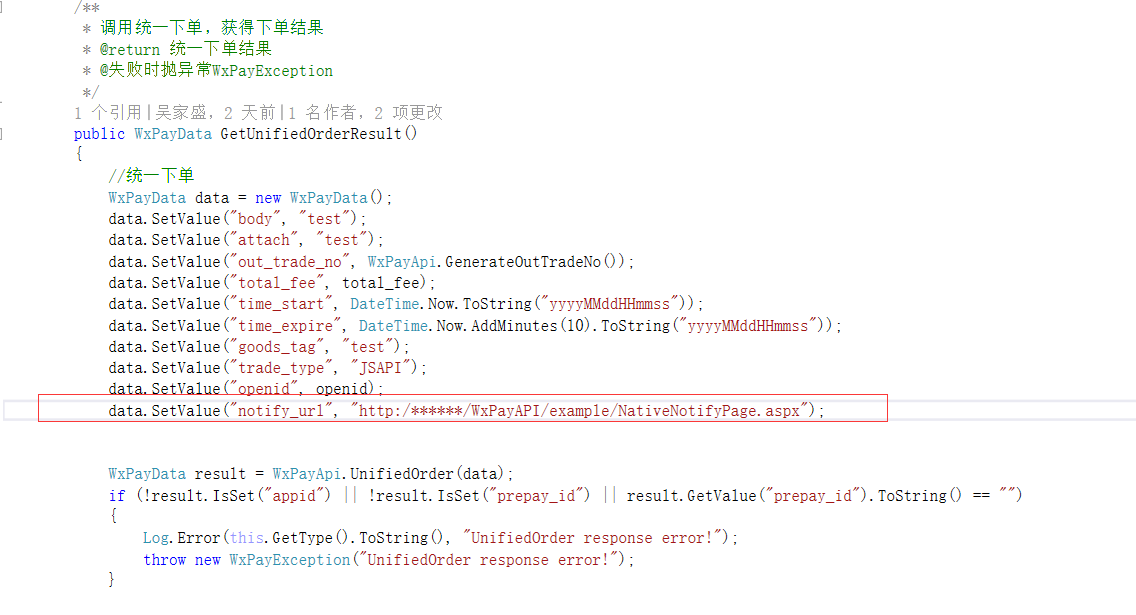
备注:记得将方法地址加入到统一下单的中去如图
[转]微信小程序 c#后台支付结果回调的更多相关文章
- 微信小程序 c#后台支付结果回调
又为大家带来简单的c#后台支付结果回调方法,首先还是要去微信官网下载模板(WxPayAPI),将模板(WxPayAPI)添加到服务器上,然后在打开WxPayAPI项目中的example文件下的 Nat ...
- 微信小程序结合后台数据管理实现商品数据的动态展示、维护
微信小程序给我们提供了一个很好的开发平台,可以用于展现各种数据和实现丰富的功能,本篇随笔介绍微信小程序结合后台数据管理实现商品数据的动态展示.维护,介绍如何实现商品数据在后台管理系统中的维护管理,并通 ...
- 微信小程序+java后台
博主是大四学生,毕业设计做的是微信小程序+java后台.陆陆续续经历了三个月(因为白天要实习又碰上过年玩了一阵子),从对微信小程序一无所知到完成毕设,碰到许多问题,在跟大家分享一下自己的经历和一个小程 ...
- 微信小程序管理后台介绍
微信小程序的管理后台,每次进入都需要扫码,还是特别不爽,现在微信小程序还没正式发布,很多人都还没看到管理后台,这里抢先发布出来 ------------------------------------ ...
- 微信小程序之后台https域名绑定以及免费的https证书申请
微信小程序在11月3号发布了,这是一个全新的生态,没有赶上微信公众号红利的开发者,运营者可别错过这趟车了. 但是微信的后台需要全https,之前我还不相信,后台注册了后进后台才发现,服务器配置如下图 ...
- 让你的微信小程序具有在线支付功能
前言 最近需要在微信小程序中用到在线支付功能,于是看了一下官方的文档,发现要在小程序里实现微信支付还是很方便的,如果你以前开发过服务号下的微信支付,那么你会发现其实小程序里的微信支付和服务号里的开发过 ...
- (二)校园信息通微信小程序从后台获取首页的数据笔记
在从后台获取数据之前,需要先搭建好本地服务器的环境. 确保Apache,MySql处于开启状态.下图为Apache,MySql处于开启时状态 然后进入后台管理平台进行字段和列表的定义 然后在后台添加数 ...
- 微信小程序php后台实现
这里简单介绍用php后台实现获取openid并保存到数据库: 微信的登陆流程是这样的 首先前端发送请求到服务器: wx.login({ success: function (res) { var co ...
- 微信小程序-展示后台传来的json格式数据
昨天粗粗的写了下后台数据传到微信小程序显示,用来熟悉这个过程,适合刚入门学习案例: 需了解的技术:javaSE,C3p0,jdbcTemplate,fastjson,html,javaScript,c ...
随机推荐
- (转)(WinForm)FormBorderStyle属性
原地址
- .NET MVC CSRF/XSRF 漏洞
最近我跟一个漏洞还有一群阿三干起来了…… 背景: 我的客户是一个世界知名的药企,最近这个客户上台了一位阿三管理者,这个货上线第一个事儿就是要把现有的软件供应商重新洗牌一遍.由于我们的客户关系维护的非常 ...
- Python3------装饰器详解
装饰器 定义:本质是函数.(装饰其他函数)就是为其他函数添加附加功能 原则:1.不能修改被装饰的函数的源代码 2.不能修改被装饰的函数的调用方式 理解装饰器前提条件: 1.函数即"变量&qu ...
- RDLC报表学习
RDLC报表由以下三部分构成: 1.制作自己的DateSet集合(就是报表的数据集): 2.制作自己的报表文件.rdlc文件,用于画做报表样式,里面有微软自带的导出和打印功能,其实就为了少做这2个功能 ...
- MVVM Light 新手入门(3) :ViewModel / Model 中定义“事件” ,并在View中调用 (无参数调用)
今天学习MVVM架构中“事件”的添加并调用,特记录如下,学习资料均来自于网络,特别感谢翁智华 的 利刃 MVVMLight 6:命令基础 在MVVM Light框架中,事件是WPF应用程序中UI与后台 ...
- AJPFX简评:MT5平台
MetaTrader 5全面改进的图表和扩展的功能 MetaTrader软件开发商在MT4获得全球交易商全面好评之后,又再次研发推出了更为先进的MT5交易软件. MT5的主要特征●改进的图表和即时 ...
- jzoj5945
這題是均分紙牌求方案數 我們可以分2種情況討論: 1.當前面部分的平均值>=現在我們要的值 那麼我們可以把所有牌都放到第i個點,現在若有k張牌,則要把k−i∗avek-i*avek−i∗ave張 ...
- rocketmq学习
官网地址 安装name server和broker git clone https://github.com/apache/incubator-rocketmq.git cd incubator-ro ...
- python爬虫3——获取审查元素(板野友美吧图片下载)
测试环境:python2.7 + beautifulsoup4.4.1 + selenium2.48.0 测试网址:http://tieba.baidu.com/p/2827883128 目的是下载该 ...
- Flask从入门到精通之flask程序入门
初始化 所有Flask程序都必须创建一个程序实例,Web服务器使用一种名为Web服务器网关接口的的协议(WSGI),把接收自客户端的所有请求转发给这个对象处理.程序实例是Flask类的对象,使用下面代 ...