
python学习(25) BeautifulSoup介绍和实战
BeautifulSoup是python的html解析库,处理html非常方便
BeautifulSoup 安装
pip install beautifulsoup4
BeautifulSoup 配合的解析器
# python标准库

BeautifulSoup(html,'html.parser')

#lxml HTML 解析器

BeautifulSoup(html,'lxml)

#html5lib

BeautifulSoup(html,'html5lib')
python 标准库解析器不需要第三方库,处理效率一般,lxml比较快,需要C语言库支持,html5lib不依赖第三方库,但是效率比较低,容错好。
导入BeautifulSoup并使用
from bs4 import BeautifulSoup
html = '''div id="sslct_menu" class="cl p_pop" style="display: none;">
<span class="sslct_btn" onClick="extstyle('')" title="默认"><i></i></span></div>
<ul id="myitem_menu" class="p_pop" style="display: none;">
<li><a href="https://www.aisinei.org/forum.php?mod=guide&view=my">帖子</a></li>
<li><a href="https://www.aisinei.org/home.php?mod=space&do=favorite&view=me">收藏</a></li>'''
bs = BeautifulSoup(html)
print(bs.prettify())
bs.prettify为格式化输出,效果如下
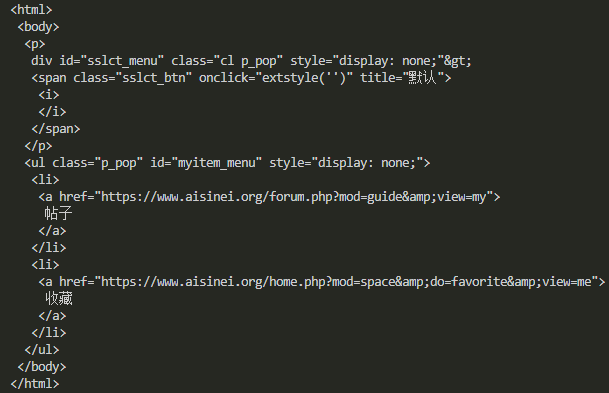
同样可以用本地的html文本创建,也可以添加解析器lxml
s =BeautifulSoup('test.html','lxml')

print(s.prettify())
效果是一样的
BeautifulSoup属性选择和处理
处理节点tag
 html2 = ''' <li class="bus_postbd item masonry_brick">

<div class="bus_vtem">

    <a href="https://www.aisinei.org/thread-17846-1-1.html" title="XIUREN秀人网 2018.11.13 NO.1228 猫宝 [50+1P]" class="preview"  target="_blank">

    "hello world"

       <img src="https://i.asnpic.win/block/a4/a42e6c63ef1ae20a914699f183d5204b.jpg" width="250" height="375" alt="XIUREN秀人网 2018.11.13 NO.1228 猫宝 [50+1P]"/>

               <span class="bus_listag">XIUREN秀人网</span>

    </a>

    <a href="https://www.aisinei.org/thread-17846-1-1.html" title="XIUREN秀人网 2018.11.13 NO.1228 猫宝 [50+1P]"  target="_blank">

        <div class="lv-face"><img src="https://www.aisinei.org/uc_server/avatar.php?uid=2&size=small" alt="发布组小乐"/></div>

        <div class="t">XIUREN秀人网 2018.11.13 NO.1228 猫宝 [50</div>

        <div class="i"><span><i class="bus_showicon bus_showicon_v"></i>6402</span><span><i class="bus_showicon bus_showicon_r"></i>1</span></div>

    </a>

</div>

</li> '''

   s2 = BeautifulSoup(html2,'lxml')

   print(s2.a)

   print(s2.a.name)

   print(s2.a.attrs)
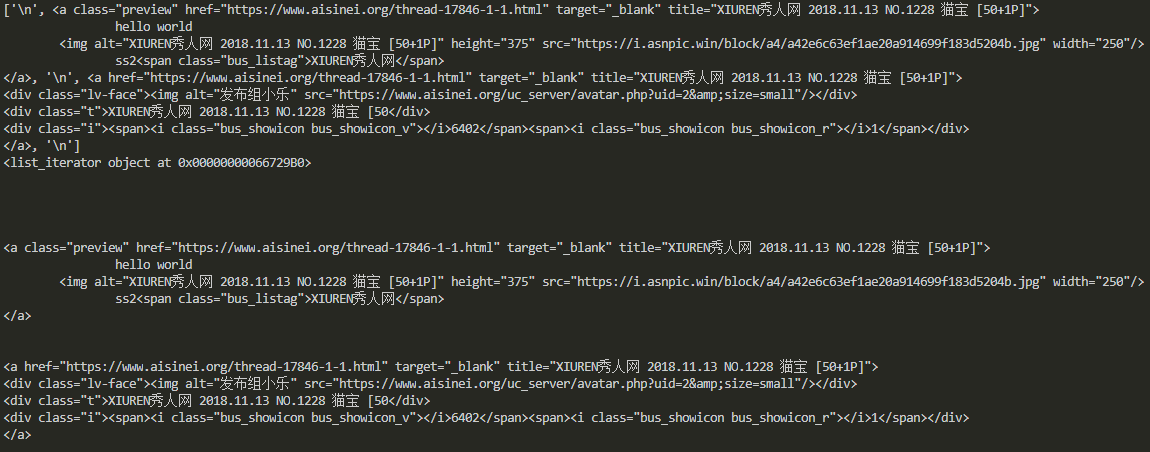
节点tag 就是li,a,div这类,可以看出通过属性访问,选择出第一个匹配的结果。节点Tag也有名字,通过.name访问。通过.attrs获取节点的属性。

获取节点文本通过.string即可,获取节点的子孙节点的文本可以通过text
print(s2.a.string)

print(s2.a.text)
节点的子孙节点
获取节点的子节点,可以用.contents,也可以用.children, .contents返回列表形式的直接子节点, .contents返回的是一个可迭代对象。
print(s2.div.contents)

print(s2.div.children)

print(s2.div.contents[0])

for i in s2.div.children:

    print(i)
前两个输出一样,后边的分别取第一个节点,以及遍历每一个节点。同样的道理,子孙节点,父节点,祖父节点,兄弟节点都采用这种方式获取
#孙子节点

print(s2.div.descendants)

#祖先节点

print(s2.div.parents)

#直接父节点

print(s2.div.parent)

#下一个兄弟节点

print(s2.a.next_sibling)

#前一个兄弟节点

print(s2.a.previous_sibling)
节点的属性获取
print(s2.a["href"])

print(s2.a.get("href"))
如上两种方式都能获取属性

方法选择
常用的筛选函数有find_all和find,findall返回所有匹配的结果,find返回匹配结果的
print(s2.find('a'))

print(s2.find_all('a'))

print(s2.find_all(re.compile("^div")))

print(s2.find_all(["div","li"]))
可以看出findall传递参数可以是字符串,正则表达式,列表等等,其他的方法类似属性访问一样,有find_parents(),find_next_siblings()等等,用的时候再查吧。
BeautifulSoup 支持CSS选择器
如果你熟悉css选择器的语法,BeautifulSoup同样支持,而且非常便利。
#查找节点为div的数据

print(s2.select('a'))

#查找class为bus_vtem的节点

print(s2.select('.bus_vtem'))

#查找id为ps的节点

print(s2.select('#ps'))
到目前为止基本的BeautifulSoup已经介绍完,下面实战抓取一段html,并用BeautifulSoup解析提取我们需要的数据,这里解析一段美女图更新首页,提取其中的资源地址。
#-*-coding:utf-8-*-

import requests

import re

import time

from lxml import etree

from bs4 import BeautifulSoup

USER_AGENT = 'Mozilla/5.0 (Windows NT 6.1; WOW64) AppleWebKit/537.36 (KHTML, like Gecko) Chrome/49.0.2623.221 Safari/537.36 SE 2.X MetaSr 1.0'

COOKIES = '__cfduid=d78f862232687ba4aae00f617c0fd1ca81537854419; bg5D_2132_saltkey=jh7xllgK; bg5D_2132_lastvisit=1540536781; bg5D_2132_auth=479fTpQgthFjwwD6V1Xq8ky8wI2dzxJkPeJHEZyv3eqJqdTQOQWE74ttW1HchIUZpgsyN5Y9r1jtby9AwfRN1R89; bg5D_2132_lastcheckfeed=7469%7C1541145866; bg5D_2132_ulastactivity=2bbfoTOtWWimnqaXyLbTv%2Buq4ens5zcXIiEAhobA%2FsWLyvpXVM9d; bg5D_2132_sid=wF3g17; Hm_lvt_b8d70b1e8d60fba1e9c8bd5d6b035f4c=1540540375,1540955353,1541145834,1541562930; Hm_lpvt_b8d70b1e8d60fba1e9c8bd5d6b035f4c=1541562973; bg5D_2132_lastact=1541562986%09home.php%09spacecp'

class AsScrapy(object):

    def __init__(self,pages=1):

        try:

            self.m_session = requests.Session()

            self.m_headers = {'User-Agent':USER_AGENT,

                        #'referer':'https://www.aisinei.org/',

                        }

            self.m_cookiejar = requests.cookies.RequestsCookieJar()

            for cookie in COOKIES.split(';'):

                key,value = cookie.split('=',1)

                self.m_cookiejar.set(key,value)

        except:

            print('init error!!!')

    def getOverView(self):

        try:

            req = self.m_session.get('https://www.aisinei.org/portal.php',headers=self.m_headers, cookies=self.m_cookiejar, timeout=5)

            classattrs={'class':'bus_vtem'}

            soup = BeautifulSoup(req.content.decode('utf-8'),'lxml')

            buslist = soup.find_all(attrs=classattrs)

            #print(len(buslist))

            for item in buslist:

                if(item.a.attrs['title'] ==  "紧急通知!紧急通知!紧急通知!"):

                    continue

                print(item.a.attrs['title'])

                print(item.a.attrs['href'])

            time.sleep(1)

            pass

        except:

            print('get over view error')

if __name__ == "__main__":

    asscrapy = AsScrapy()

    asscrapy.getOverView()
抓取并分析出地址如下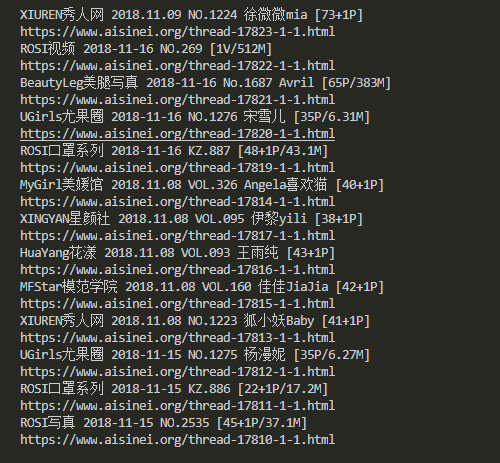
下一篇讲如何利用ajax分析动态网址,实战抓取今日头条的cosplay图片
谢谢关注我的公众号
python学习(25) BeautifulSoup介绍和实战的更多相关文章
- 深度学习框架Keras介绍及实战
Keras 是一个用 Python 编写的高级神经网络 API,它能够以 TensorFlow, CNTK, 或者 Theano 作为后端运行.Keras 的开发重点是支持快速的实验.能够以最小的时延 ...
- Python开发GUI工具介绍,实战:将图片转化为素描画!
欢迎添加华为云小助手微信(微信号:HWCloud002 或 HWCloud003),输入关键字"加群",加入华为云线上技术讨论群:输入关键字"最新活动",获取华 ...
- python学习之——splinter介绍
Splinter是什么: 是一个用 Python 编写的 Web 应用程序进行验收测试的工具. Splinter执行的时候会自动打开你指定的浏览器,访问指定的URL,然后你所开发的模拟的任何行为,都会 ...
- python学习之----BeautifulSoup的find()和findAll()及四大对象
BeautifulSoup 里的find() 和findAll() 可能是你最常用的两个函数.借助它们,你可以通 过标签的不同属性轻松地过滤HTML 页面,查找需要的标签组或单个标签. 这两个函数非常 ...
- Python学习之路:MINST实战第一版
1.项目介绍: 搭建浅层神经网络完成MNIST数字图像的识别. 2.详细步骤: (1)将二维图像转成一维,MNIST图像大小为28*28,转成一维就是784. (2)定义好神经网络的相关参数: # M ...
- Python开发GUI工具介绍,实战:将图片转化为素描画!【华为云技术分享】
版权声明:本文为博主原创文章,遵循CC 4.0 BY-SA版权协议,转载请附上原文出处链接和本声明. 本文链接:https://blog.csdn.net/devcloud/article/detai ...
- python学习之BeautifulSoup模块爬图
BeautifulSoup模块爬图学习HTML文本解析标签定位网上教程多是爬mzitu,此网站反爬限制多了.随意找了个网址,解析速度有些慢.脚本流程:首页获取总页数-->拼接每页URL--> ...
- GO学习-(25) Go操作Redis实战
Go操作Redis实战 安装Redis客户端 Go语言中使用第三方库https://github.com/go-redis/redis连接Redis数据库并进行操作.使用以下命令下载并安装: go ...
- Python学习(25):Python执行环境
转自 http://www.cnblogs.com/BeginMan/p/3191856.html 一.python特定的执行环境 在当前脚本继续进行 创建和管理子进程 执行外部命令或程序 执行需要输 ...
随机推荐
- Openresty(Lua+Nginx)实践
简介: OpenResty(也称为 ngx_openresty)是一个全功能的 Web 应用服务器.它打包了标准的 Nginx 核心,很多的常用的第三方模块,以及它们的大多数依赖项. OpenRest ...
- 王者荣耀交流协会final发布文案美工展示博客
logo: 我们的logo是蓝底白字,非常简洁大气的设计感,上面印有我们的软件名称,更好的直观的彰显了我们的主题.我们的软件就是要迎合使用者,给使用者更加方便快捷的工作体验,更好的衡量自己的时间分配. ...
- HDU 4405 Aeroplane chess 期望dp
题目链接: http://acm.hdu.edu.cn/showproblem.php?pid=4405 Aeroplane chess Time Limit: 2000/1000 MS (Java/ ...
- js获取浏览器窗口属性
网页可见区域宽: document.body.clientWidth;网页可见区域高: document.body.clientHeight;网页可见区域宽: document.body.offset ...
- 个人作业4——alpha阶段个人总结(201521123003 董美凤)
一.个人总结 在alpha 结束之后, 每位同学写一篇个人博客, 总结自己的alpha 过程: 请用自我评价表:http://www.cnblogs.com/xinz/p/3852177.html 有 ...
- 如何查看Maven项目的jar包依赖
问题 十年以前写java项目总会干这么一个事情: 调包. java项目往往依赖了很多第三方jar包,而这些jar包又有他自己依赖的第三方jar包,从而就能形成一个依赖树. 而程序运行要把这些所有的依赖 ...
- 安装mysql后遇到的一些问题
我们安装好了mysql(cnetos7上是安装mariadb)后,出现如下图所示的问题,我们可以用netstat -lntup查看以下服务器的端口,mysql的端口一般默认为 3306,查看服务是否启 ...
- Scrum 冲刺博客链接集合
DAY1 http://www.cnblogs.com/qiaokeliweibaba/p/8901187.html DAY2 http://www.cnblogs.com/qiaokeliweiba ...
- Apache优化之多路处理模块理解
前言: 当项目被多人访问时导致访问数度变慢,查了许多资料,了解到Apache的核心模块——MPM(多路处理访问模块).在此对MPM的一些知识点进行整理. MPM_WINNT模块 windows系统使用 ...
- 微信小程序 功能函数 密码验证*
//登录输入密码 userPasswordInput: function (e) { var that = this; this.setData({ userPassword: e.detail.va ...