
Hadoop生态圈-phoenix完全分布式部署以及常用命令介绍
Hadoop生态圈-phoenix完全分布式部署
作者:尹正杰
版权声明:原创作品,谢绝转载!否则将追究法律责任。
phoenix只是一个插件,我们可以用hive给hbase套上一个JDBC壳,但是你有没有体会到Hive执行SQL语句是很慢的,因此我们采用phoenix插件的方式给hbase套上JDBC的壳。
一.Phoenix简介
1>.其实Phoenix可以看成是在hbase的hive,它是使用SQL方式访问HBase数据;
2>.内置多种协处理器实现,轻松实现二级索引和聚合查询;
二.部署phoenix
1>.下载phoenix插件
下载地址:http://www.apache.org/dyn/closer.lua/phoenix/
2>.解压
[yinzhengjie@s101 data]$ tar zxf apache-phoenix-4.10.-HBase-1.2-bin.tar.gz  -C /soft/

[yinzhengjie@s101 data]$
3>.创建软连接
[yinzhengjie@s101 data]$ ln -s /soft/apache-phoenix-4.10.-HBase-1.2-bin/ /soft/phoenix

[yinzhengjie@s101 data]$
4>.配置环境变量并使之生效
[yinzhengjie@s101 data]$ sudo vi /etc/profile

[sudo] password for yinzhengjie:

[yinzhengjie@s101 data]$

[yinzhengjie@s101 data]$ tail - /etc/profile

#ADD PHOENIX

PHOENIX_HOME=/soft/phoenix

PATH=$PATH:$PHOENIX_HOME/bin

[yinzhengjie@s101 data]$

[yinzhengjie@s101 data]$ source /etc/profile

[yinzhengjie@s101 data]$
5>.将phoenix类库放置在hbase的lib目录,分发,并重启hbase
[yinzhengjie@s101 ~]$ cp /soft/phoenix/phoenix-4.10.-HBase-1.2-client.jar /soft/hbase/lib/

[yinzhengjie@s101 ~]$ xrsync.sh /soft/hbase/lib/phoenix-4.10.-HBase-1.2-client.jar

=========== s102 %file ===========

命令执行成功

=========== s103 %file ===========

命令执行成功

=========== s104 %file ===========

命令执行成功

=========== s105 %file ===========

命令执行成功

[yinzhengjie@s101 ~]$ more `which xrsync.sh`

#!/bin/bash

#@author :yinzhengjie

#blog:http://www.cnblogs.com/yinzhengjie

#EMAIL:y1053419035@qq.com

#判断用户是否传参

if [ $# -lt  ];then

    echo "请输入参数";

    exit

fi

#获取文件路径

file=$@

#获取子路径

filename=`basename $file`

#获取父路径

dirpath=`dirname $file`

#获取完整路径

cd $dirpath

fullpath=`pwd -P`

#同步文件到DataNode

for (( i=;i<=;i++ ))

do

    #使终端变绿色

    tput setaf

    echo =========== s$i %file ===========

    #使终端变回原来的颜色,即白灰色

    tput setaf

    #远程执行命令

    rsync -lr $filename `whoami`@s$i:$fullpath

    #判断命令是否执行成功

    if [ $? ==  ];then

        echo "命令执行成功"

    fi

done

[yinzhengjie@s101 ~]$ stop-hbase.sh

stopping hbase......................

[yinzhengjie@s101 ~]$ start-hbase.sh

starting master, logging to /soft/hbase/bin/../logs/hbase-yinzhengjie-master-s101.out

Java HotSpot(TM) -Bit Server VM warning: ignoring option PermSize=128m; support was removed in 8.0

Java HotSpot(TM) -Bit Server VM warning: ignoring option MaxPermSize=128m; support was removed in 8.0

s103: starting regionserver, logging to /soft/hbase/bin/../logs/hbase-yinzhengjie-regionserver-s103.out

s103: Java HotSpot(TM) -Bit Server VM warning: ignoring option PermSize=128m; support was removed in 8.0

s103: Java HotSpot(TM) -Bit Server VM warning: ignoring option MaxPermSize=128m; support was removed in 8.0

s104: starting regionserver, logging to /soft/hbase/bin/../logs/hbase-yinzhengjie-regionserver-s104.out

s102: starting regionserver, logging to /soft/hbase/bin/../logs/hbase-yinzhengjie-regionserver-s102.out

s104: Java HotSpot(TM) -Bit Server VM warning: ignoring option PermSize=128m; support was removed in 8.0

s102: Java HotSpot(TM) -Bit Server VM warning: ignoring option PermSize=128m; support was removed in 8.0

s104: Java HotSpot(TM) -Bit Server VM warning: ignoring option MaxPermSize=128m; support was removed in 8.0

s102: Java HotSpot(TM) -Bit Server VM warning: ignoring option MaxPermSize=128m; support was removed in 8.0

[yinzhengjie@s101 ~]$
6>.启动phoenix
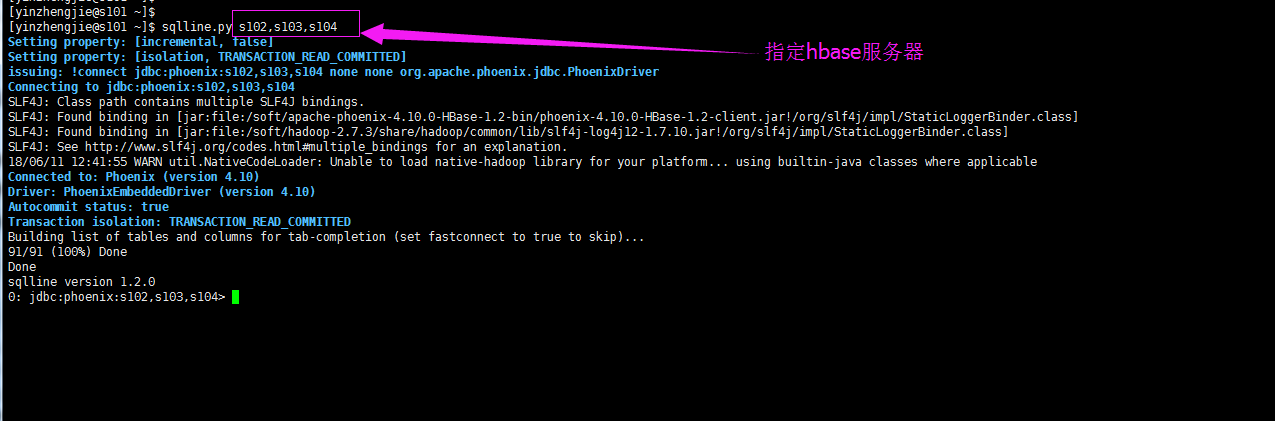
三.phoenix的常用命令介绍
Phoenix的数据类型请参考官网:http://phoenix.apache.org/language/datatypes.html
Phoenix的分析函数请参考官网:http://phoenix.apache.org/language/functions.html
1>.启动phoenix的命令行
 [yinzhengjie@s101 shell]$ sqlline.py s102,s103,s104

 Setting property: [incremental, false]

 Setting property: [isolation, TRANSACTION_READ_COMMITTED]

 issuing: !connect jdbc:phoenix:s102,s103,s104 none none org.apache.phoenix.jdbc.PhoenixDriver

 Connecting to jdbc:phoenix:s102,s103,s104

 SLF4J: Class path contains multiple SLF4J bindings.

 SLF4J: Found binding in [jar:file:/soft/apache-phoenix-4.10.-HBase-1.2-bin/phoenix-4.10.-HBase-1.2-client.jar!/org/slf4j/impl/StaticLoggerBinder.class]

 SLF4J: Found binding in [jar:file:/soft/hadoop-2.7./share/hadoop/common/lib/slf4j-log4j12-1.7..jar!/org/slf4j/impl/StaticLoggerBinder.class]

 SLF4J: See http://www.slf4j.org/codes.html#multiple_bindings for an explanation.

 // :: WARN util.NativeCodeLoader: Unable to load native-hadoop library for your platform... using builtin-java classes where applicable

 Connected to: Phoenix (version 4.10)

 Driver: PhoenixEmbeddedDriver (version 4.10)

 Autocommit status: true

 Transaction isolation: TRANSACTION_READ_COMMITTED

 Building list of tables and columns for tab-completion (set fastconnect to true to skip)...

 / (%) Done

 Done

 sqlline version 1.2.

 : jdbc:phoenix:s102,s103,s104>
[yinzhengjie@s101 shell]$ sqlline.py s102,s103,s104
2>.查看帮助信息
: jdbc:phoenix:s102,s103,s104> !help

!all                Execute the specified SQL against all the current

                    connections

!autocommit         Set autocommit mode on or off

!batch              Start or execute a batch of statements

!brief              Set verbose mode off

!call               Execute a callable statement

!close              Close the current connection to the database

!closeall           Close all current open connections

!columns            List all the columns for the specified table

!commit             Commit the current transaction (if autocommit is off)

!connect            Open a new connection to the database.

!dbinfo             Give metadata information about the database

!describe           Describe a table

!dropall            Drop all tables in the current database

!exportedkeys       List all the exported keys for the specified table

!go                 Select the current connection

!help               Print a summary of command usage

!history            Display the command history

!importedkeys       List all the imported keys for the specified table

!indexes            List all the indexes for the specified table

!isolation          Set the transaction isolation for this connection

!list               List the current connections

!manual             Display the SQLLine manual

!metadata           Obtain metadata information

!nativesql          Show the native SQL for the specified statement

!outputformat       Set the output format for displaying results

                    (table,vertical,csv,tsv,xmlattrs,xmlelements)

!primarykeys        List all the primary keys for the specified table

!procedures         List all the procedures

!properties         Connect to the database specified in the properties file(s)

!quit               Exits the program

!reconnect          Reconnect to the database

!record             Record all output to the specified file

!rehash             Fetch table and column names for command completion

!rollback           Roll back the current transaction (if autocommit is off)

!run                Run a script from the specified file

!save               Save the current variabes and aliases

!scan               Scan for installed JDBC drivers

!script             Start saving a script to a file

!set                Set a sqlline variable

Variable        Value      Description

=============== ========== ================================

autoCommit      true/false Enable/disable automatic

                           transaction commit

autoSave        true/false Automatically save preferences

color           true/false Control whether color is used

                           for display

fastConnect     true/false Skip building table/column list

                           for tab-completion

force           true/false Continue running script even

                           after errors

headerInterval  integer    The interval between which

                           headers are displayed

historyFile     path       File in which to save command

                           history. Default is

                           $HOME/.sqlline/history (UNIX,

                           Linux, Mac OS),

                           $HOME/sqlline/history (Windows)

incremental     true/false Do not receive all rows from

                           server before printing the first

                           row. Uses fewer resources,

                           especially for long-running

                           queries, but column widths may

                           be incorrect.

isolation       LEVEL      Set transaction isolation level

maxColumnWidth  integer    The maximum width to use when

                           displaying columns

maxHeight       integer    The maximum height of the

                           terminal

maxWidth        integer    The maximum width of the

                           terminal

numberFormat    pattern    Format numbers using

                           DecimalFormat pattern

outputFormat    table/vertical/csv/tsv Format mode for

                           result display

propertiesFile  path       File from which SqlLine reads

                           properties on startup; default is

                           $HOME/.sqlline/sqlline.properties

                           (UNIX, Linux, Mac OS),

                           $HOME/sqlline/sqlline.properties

                           (Windows)

rowLimit        integer    Maximum number of rows returned

                           from a query; zero means no

                           limit

showElapsedTime true/false Display execution time when

                           verbose

showHeader      true/false Show column names in query

                           results

showNestedErrs  true/false Display nested errors

showWarnings    true/false Display connection warnings

silent          true/false Be more silent

timeout         integer    Query timeout in seconds; less

                           than zero means no timeout

trimScripts     true/false Remove trailing spaces from

                           lines read from script files

verbose         true/false Show verbose error messages and

                           debug info

!sql                Execute a SQL command

!tables             List all the tables in the database

!typeinfo           Display the type map for the current connection

!verbose            Set verbose mode on

Comments, bug reports, and patches go to ???

: jdbc:phoenix:s102,s103,s104>
0: jdbc:phoenix:s102,s103,s104> !help
3>.退出phoenix命令行
: jdbc:phoenix:s102,s103,s104> !q

Closing: org.apache.phoenix.jdbc.PhoenixConnection

[yinzhengjie@s101 shell]$
0: jdbc:phoenix:s102,s103,s104> !q
4>.列出当前已经存在的表
: jdbc:phoenix:s102,s103,s104> !tables

+------------+--------------+-------------+---------------+----------+------------+----------------------------+-----------------+--------------+-----------------+---------------+---------------+------------+

| TABLE_CAT  | TABLE_SCHEM  | TABLE_NAME  |  TABLE_TYPE   | REMARKS  | TYPE_NAME  | SELF_REFERENCING_COL_NAME  | REF_GENERATION  | INDEX_STATE  | IMMUTABLE_ROWS  | SALT_BUCKETS  | MULTI_TENANT  | VIEW_STATE |

+------------+--------------+-------------+---------------+----------+------------+----------------------------+-----------------+--------------+-----------------+---------------+---------------+------------+

|            | SYSTEM       | CATALOG     | SYSTEM TABLE  |          |            |                            |                 |              | false           | null          | false         |            |

|            | SYSTEM       | FUNCTION    | SYSTEM TABLE  |          |            |                            |                 |              | false           | null          | false         |            |

|            | SYSTEM       | SEQUENCE    | SYSTEM TABLE  |          |            |                            |                 |              | false           | null          | false         |            |

|            | SYSTEM       | STATS       | SYSTEM TABLE  |          |            |                            |                 |              | false           | null          | false         |            |

+------------+--------------+-------------+---------------+----------+------------+----------------------------+-----------------+--------------+-----------------+---------------+---------------+------------+

: jdbc:phoenix:s102,s103,s104>
0: jdbc:phoenix:s102,s103,s104> !tables
5>.创建表(创建表时,TABLE_SCHEM和TABLE_NAME 默认均为大写,如果想要指定小写的话,需要加双引号)
: jdbc:phoenix:s102,s103,s104> create table yinzhengjie.t1(id integer primary key, name varchar, age integer);

No rows affected (1.258 seconds)

: jdbc:phoenix:s102,s103,s104> !tables

+------------+--------------+-------------+---------------+----------+------------+----------------------------+-----------------+--------------+-----------------+---------------+---------------+------------+

| TABLE_CAT  | TABLE_SCHEM  | TABLE_NAME  |  TABLE_TYPE   | REMARKS  | TYPE_NAME  | SELF_REFERENCING_COL_NAME  | REF_GENERATION  | INDEX_STATE  | IMMUTABLE_ROWS  | SALT_BUCKETS  | MULTI_TENANT  | VIEW_STATE |

+------------+--------------+-------------+---------------+----------+------------+----------------------------+-----------------+--------------+-----------------+---------------+---------------+------------+

|            | SYSTEM       | CATALOG     | SYSTEM TABLE  |          |            |                            |                 |              | false           | null          | false         |            |

|            | SYSTEM       | FUNCTION    | SYSTEM TABLE  |          |            |                            |                 |              | false           | null          | false         |            |

|            | SYSTEM       | SEQUENCE    | SYSTEM TABLE  |          |            |                            |                 |              | false           | null          | false         |            |

|            | SYSTEM       | STATS       | SYSTEM TABLE  |          |            |                            |                 |              | false           | null          | false         |            |

|            | YINZHENGJIE  | T1          | TABLE         |          |            |                            |                 |              | false           | null          | false         |            |

+------------+--------------+-------------+---------------+----------+------------+----------------------------+-----------------+--------------+-----------------+---------------+---------------+------------+

: jdbc:phoenix:s102,s103,s104>
0: jdbc:phoenix:s102,s103,s104> create table yinzhengjie.t1(id integer primary key, name varchar, age integer);
6>.删除表(删除表时,TABLE_SCHEM和TABLE_NAME 默认均为大写,如果想要指定小写的话,需要加双引号)
: jdbc:phoenix:s102,s103,s104> !tables

+------------+--------------+-------------+---------------+----------+------------+----------------------------+-----------------+--------------+-----------------+---------------+---------------+------------+

| TABLE_CAT  | TABLE_SCHEM  | TABLE_NAME  |  TABLE_TYPE   | REMARKS  | TYPE_NAME  | SELF_REFERENCING_COL_NAME  | REF_GENERATION  | INDEX_STATE  | IMMUTABLE_ROWS  | SALT_BUCKETS  | MULTI_TENANT  | VIEW_STATE |

+------------+--------------+-------------+---------------+----------+------------+----------------------------+-----------------+--------------+-----------------+---------------+---------------+------------+

|            | SYSTEM       | CATALOG     | SYSTEM TABLE  |          |            |                            |                 |              | false           | null          | false         |            |

|            | SYSTEM       | FUNCTION    | SYSTEM TABLE  |          |            |                            |                 |              | false           | null          | false         |            |

|            | SYSTEM       | SEQUENCE    | SYSTEM TABLE  |          |            |                            |                 |              | false           | null          | false         |            |

|            | SYSTEM       | STATS       | SYSTEM TABLE  |          |            |                            |                 |              | false           | null          | false         |            |

|            | YINZHENGJIE  | T1          | TABLE         |          |            |                            |                 |              | false           | null          | false         |            |

+------------+--------------+-------------+---------------+----------+------------+----------------------------+-----------------+--------------+-----------------+---------------+---------------+------------+

: jdbc:phoenix:s102,s103,s104> drop table YINZHENGJIE.T1;

No rows affected (3.513 seconds)

: jdbc:phoenix:s102,s103,s104> !tables

+------------+--------------+-------------+---------------+----------+------------+----------------------------+-----------------+--------------+-----------------+---------------+---------------+------------+

| TABLE_CAT  | TABLE_SCHEM  | TABLE_NAME  |  TABLE_TYPE   | REMARKS  | TYPE_NAME  | SELF_REFERENCING_COL_NAME  | REF_GENERATION  | INDEX_STATE  | IMMUTABLE_ROWS  | SALT_BUCKETS  | MULTI_TENANT  | VIEW_STATE |

+------------+--------------+-------------+---------------+----------+------------+----------------------------+-----------------+--------------+-----------------+---------------+---------------+------------+

|            | SYSTEM       | CATALOG     | SYSTEM TABLE  |          |            |                            |                 |              | false           | null          | false         |            |

|            | SYSTEM       | FUNCTION    | SYSTEM TABLE  |          |            |                            |                 |              | false           | null          | false         |            |

|            | SYSTEM       | SEQUENCE    | SYSTEM TABLE  |          |            |                            |                 |              | false           | null          | false         |            |

|            | SYSTEM       | STATS       | SYSTEM TABLE  |          |            |                            |                 |              | false           | null          | false         |            |

+------------+--------------+-------------+---------------+----------+------------+----------------------------+-----------------+--------------+-----------------+---------------+---------------+------------+

: jdbc:phoenix:s102,s103,s104>
0: jdbc:phoenix:s102,s103,s104> drop table YINZHENGJIE.T1;
7>.添加数据,和修改数据是同一个方法
: jdbc:phoenix:s102,s103,s104> select * from yinzhengjie.t1;

+-----+-------+------+

| ID  | NAME  | AGE  |

+-----+-------+------+

+-----+-------+------+

No rows selected (0.024 seconds)

: jdbc:phoenix:s102,s103,s104> upsert into yinzhengjie.t1 values (,'tom',);

 row affected (0.02 seconds)

: jdbc:phoenix:s102,s103,s104> select * from yinzhengjie.t1;

+-----+-------+------+

| ID  | NAME  | AGE  |

+-----+-------+------+

|    | tom   |    |

+-----+-------+------+

 row selected (0.04 seconds)

: jdbc:phoenix:s102,s103,s104>
0: jdbc:phoenix:s102,s103,s104> upsert into yinzhengjie.t1 values (1,'tom',20);
8>.删除数据
: jdbc:phoenix:s102,s103,s104> select * from yinzhengjie.t1;

+-----+-------+------+

| ID  | NAME  | AGE  |

+-----+-------+------+

|    | tom   |    |

+-----+-------+------+

 row selected (0.03 seconds)

: jdbc:phoenix:s102,s103,s104> delete from yinzhengjie.t1 where id=;

 row affected (0.011 seconds)

: jdbc:phoenix:s102,s103,s104> select * from yinzhengjie.t1;

+-----+-------+------+

| ID  | NAME  | AGE  |

+-----+-------+------+

+-----+-------+------+

No rows selected (0.024 seconds)

: jdbc:phoenix:s102,s103,s104>
0: jdbc:phoenix:s102,s103,s104> delete from yinzhengjie.t1 where id=1;
9>.查看表结构
: jdbc:phoenix:s102,s103,s104> !describe yinzhengjie.t1

+------------+--------------+-------------+--------------+------------+------------+--------------+----------------+-----------------+-----------------+-----------+----------+-------------+----------------+-+

| TABLE_CAT  | TABLE_SCHEM  | TABLE_NAME  | COLUMN_NAME  | DATA_TYPE  | TYPE_NAME  | COLUMN_SIZE  | BUFFER_LENGTH  | DECIMAL_DIGITS  | NUM_PREC_RADIX  | NULLABLE  | REMARKS  | COLUMN_DEF  | SQL_DATA_TYPE  | |

+------------+--------------+-------------+--------------+------------+------------+--------------+----------------+-----------------+-----------------+-----------+----------+-------------+----------------+-+

|            | YINZHENGJIE  | T1          | ID           |           | INTEGER    | null         | null           | null            | null            |          |          |             | null           | |

|            | YINZHENGJIE  | T1          | NAME         |          | VARCHAR    | null         | null           | null            | null            |          |          |             | null           | |

|            | YINZHENGJIE  | T1          | AGE          |           | INTEGER    | null         | null           | null            | null            |          |          |             | null           | |

+------------+--------------+-------------+--------------+------------+------------+--------------+----------------+-----------------+-----------------+-----------+----------+-------------+----------------+-+

: jdbc:phoenix:s102,s103,s104>
0: jdbc:phoenix:s102,s103,s104> !describe yinzhengjie.t1
10>.统计行号
: jdbc:phoenix:s102,s103,s104> select * from yinzhengjie.t1

. . . . . . . . . . . . . . . > ;

+-----+--------+------+

| ID  |  NAME  | AGE  |

+-----+--------+------+

|    | tom    |    |

|    | tomon  |    |

|    | danny  |    |

|    | jenny  |    |

|    | jay    |    |

+-----+--------+------+

 rows selected (0.647 seconds)

: jdbc:phoenix:s102,s103,s104> select count(*) from yinzhengjie.t1;

+-----------+

| COUNT()  |

+-----------+

|          |

+-----------+

 row selected (0.119 seconds)

: jdbc:phoenix:s102,s103,s104>
0: jdbc:phoenix:s102,s103,s104> select count(*) from yinzhengjie.t1;
11>.计算求和
: jdbc:phoenix:s102,s103,s104> select * from yinzhengjie.t1;

+-----+--------+------+

| ID  |  NAME  | AGE  |

+-----+--------+------+

|    | tom    |    |

|    | tomon  |    |

|    | danny  |    |

|    | jenny  |    |

|    | jay    |    |

+-----+--------+------+

 rows selected (0.119 seconds)

: jdbc:phoenix:s102,s103,s104> select sum(age) from yinzhengjie.t1;

+-----------+

| SUM(AGE)  |

+-----------+

|        |

+-----------+

 row selected (0.116 seconds)

: jdbc:phoenix:s102,s103,s104>
0: jdbc:phoenix:s102,s103,s104> select sum(age) from yinzhengjie.t1;
12>.生产一个0~1的随机数
: jdbc:phoenix:s102,s103,s104> select rand();

+----------------------+

|        RAND()        |

+----------------------+

| 0.44590536408194137  |

+----------------------+

 row selected (0.001 seconds)

: jdbc:phoenix:s102,s103,s104>
0: jdbc:phoenix:s102,s103,s104> select rand();
13>.截串操作
: jdbc:phoenix:s102,s103,s104> select substr('yinzhengjie',,);

+----------+

| 'zheng'  |

+----------+

| zheng    |

+----------+

 row selected ( seconds)

: jdbc:phoenix:s102,s103,s104>
0: jdbc:phoenix:s102,s103,s104> select substr('yinzhengjie',4,5);
14>.Phoenix与hbase表的映射关系
[yinzhengjie@s101 ~]$ hbase shell

SLF4J: Class path contains multiple SLF4J bindings.

SLF4J: Found binding in [jar:file:/soft/hbase-1.2./lib/phoenix-4.10.-HBase-1.2-client.jar!/org/slf4j/impl/StaticLoggerBinder.class]

SLF4J: Found binding in [jar:file:/soft/hbase-1.2./lib/slf4j-log4j12-1.7..jar!/org/slf4j/impl/StaticLoggerBinder.class]

SLF4J: Found binding in [jar:file:/soft/hadoop-2.7./share/hadoop/common/lib/slf4j-log4j12-1.7..jar!/org/slf4j/impl/StaticLoggerBinder.class]

SLF4J: Found binding in [jar:file:/soft/apache-hive-2.1.-bin/lib/log4j-slf4j-impl-2.4..jar!/org/slf4j/impl/StaticLoggerBinder.class]

SLF4J: See http://www.slf4j.org/codes.html#multiple_bindings for an explanation.

HBase Shell; enter 'help<RETURN>' for list of supported commands.

Type "exit<RETURN>" to leave the HBase Shell

Version 1.2., rUnknown, Mon May  :: CDT

hbase(main)::> create 'yinzhengjie:phoenix','f1','f2'

 row(s) in 1.4400 seconds

=> Hbase::Table - yinzhengjie:phoenix

hbase(main)::>
新建HBase表(hbase(main):001:0> create 'yinzhengjie:phoenix','f1','f2')
: jdbc:phoenix:s102,s103,s104> !tables

+------------+--------------+-------------+---------------+----------+------------+----------------------------+-----------------+--------------+-----------------+---------------+---------------+------------+

| TABLE_CAT  | TABLE_SCHEM  | TABLE_NAME  |  TABLE_TYPE   | REMARKS  | TYPE_NAME  | SELF_REFERENCING_COL_NAME  | REF_GENERATION  | INDEX_STATE  | IMMUTABLE_ROWS  | SALT_BUCKETS  | MULTI_TENANT  | VIEW_STATE |

+------------+--------------+-------------+---------------+----------+------------+----------------------------+-----------------+--------------+-----------------+---------------+---------------+------------+

|            | SYSTEM       | CATALOG     | SYSTEM TABLE  |          |            |                            |                 |              | false           | null          | false         |            |

|            | SYSTEM       | FUNCTION    | SYSTEM TABLE  |          |            |                            |                 |              | false           | null          | false         |            |

|            | SYSTEM       | SEQUENCE    | SYSTEM TABLE  |          |            |                            |                 |              | false           | null          | false         |            |

|            | SYSTEM       | STATS       | SYSTEM TABLE  |          |            |                            |                 |              | false           | null          | false         |            |

|            | YINZHENGJIE  | T1          | TABLE         |          |            |                            |                 |              | false           | null          | false         |            |

+------------+--------------+-------------+---------------+----------+------------+----------------------------+-----------------+--------------+-----------------+---------------+---------------+------------+

: jdbc:phoenix:s102,s103,s104> create table "yinzhengjie:phoenix"( "id" varchar primary key, "f1"."name" varchar, "f1"."age" unsigned_int );

No rows affected (6.134 seconds)

: jdbc:phoenix:s102,s103,s104> !tables

+------------+--------------+----------------------+---------------+----------+------------+----------------------------+-----------------+--------------+-----------------+---------------+---------------+---+

| TABLE_CAT  | TABLE_SCHEM  |      TABLE_NAME      |  TABLE_TYPE   | REMARKS  | TYPE_NAME  | SELF_REFERENCING_COL_NAME  | REF_GENERATION  | INDEX_STATE  | IMMUTABLE_ROWS  | SALT_BUCKETS  | MULTI_TENANT  | V |

+------------+--------------+----------------------+---------------+----------+------------+----------------------------+-----------------+--------------+-----------------+---------------+---------------+---+

|            | SYSTEM       | CATALOG              | SYSTEM TABLE  |          |            |                            |                 |              | false           | null          | false         |   |

|            | SYSTEM       | FUNCTION             | SYSTEM TABLE  |          |            |                            |                 |              | false           | null          | false         |   |

|            | SYSTEM       | SEQUENCE             | SYSTEM TABLE  |          |            |                            |                 |              | false           | null          | false         |   |

|            | SYSTEM       | STATS                | SYSTEM TABLE  |          |            |                            |                 |              | false           | null          | false         |   |

|            |              | yinzhengjie:phoenix  | TABLE         |          |            |                            |                 |              | false           | null          | false         |   |

|            | YINZHENGJIE  | T1                   | TABLE         |          |            |                            |                 |              | false           | null          | false         |   |

+------------+--------------+----------------------+---------------+----------+------------+----------------------------+-----------------+--------------+-----------------+---------------+---------------+---+

: jdbc:phoenix:s102,s103,s104>
创建映射关系(0: jdbc:phoenix:s102,s103,s104> create table "yinzhengjie:phoenix"( "id" varchar primary key, "f1"."name" varchar, "f1"."age" unsigned_int );)
: jdbc:phoenix:s102,s103,s104> upsert into "yinzhengjie:phoenix" values('row1','tom',);

 row affected (0.073 seconds)

: jdbc:phoenix:s102,s103,s104> select * from "yinzhengjie:phoenix";

+-------+-------+------+

|  id   | name  | age  |

+-------+-------+------+

| row1  | tom   |    |

+-------+-------+------+

 row selected (0.039 seconds)

: jdbc:phoenix:s102,s103,s104>
Phoenix插入数据并查看(0: jdbc:phoenix:s102,s103,s104> upsert into "yinzhengjie:phoenix" values('row1','tom',20);)
hbase(main)::> scan 'yinzhengjie:phoenix'

ROW                                                   COLUMN+CELL

 row1                                                 column=f1:_0, timestamp=, value=x

 row1                                                 column=f1:age, timestamp=, value=\x00\x00\x00\x14

 row1                                                 column=f1:name, timestamp=, value=tom

 row(s) in 0.1430 seconds

hbase(main)::> put 'yinzhengjie:phoenix','row2','f1:age',

 row(s) in 0.0720 seconds

hbase(main)::> scan 'yinzhengjie:phoenix'

ROW                                                   COLUMN+CELL

 row1                                                 column=f1:_0, timestamp=, value=x

 row1                                                 column=f1:age, timestamp=, value=\x00\x00\x00\x14

 row1                                                 column=f1:name, timestamp=, value=tom

 row2                                                 column=f1:age, timestamp=, value=

 row(s) in 0.0250 seconds

hbase(main)::>
HBase插入数据并查看(hbase(main):004:0> put 'yinzhengjie:phoenix','row2','f1:age',30)
15>.简单分析函数案例
hbase(main)::> create 'yinzhengjie:mapping2','f1','f2'

 row(s) in 1.2260 seconds

=> Hbase::Table - yinzhengjie:mapping2

hbase(main)::>
新建HBase表(hbase(main):029:0> create 'yinzhengjie:mapping2','f1','f2')
: jdbc:phoenix:s102,s103,s104> create table "yinzhengjie:mapping2"( "id" varchar primary key, "f1"."name" varchar, "f1"."age" unsigned_int );

No rows affected (5.901 seconds)

: jdbc:phoenix:s102,s103,s104>
创建映射关系(0: jdbc:phoenix:s102,s103,s104> create table "yinzhengjie:mapping2"( "id" varchar primary key, "f1"."name" varchar, "f1"."age" unsigned_int );)
: jdbc:phoenix:s102,s103,s104> upsert into "yinzhengjie:mapping2" values('row1','tom',);

 row affected (0.01 seconds)

: jdbc:phoenix:s102,s103,s104> upsert into "yinzhengjie:mapping2" values('row2','tom',);

 row affected (0.008 seconds)

: jdbc:phoenix:s102,s103,s104> upsert into "yinzhengjie:mapping2" values('row3','tom',);

 row affected (0.01 seconds)

: jdbc:phoenix:s102,s103,s104> upsert into "yinzhengjie:mapping2" values('row4','tom',);

 row affected (0.009 seconds)

: jdbc:phoenix:s102,s103,s104> select FIRST_VALUE("f1"."age") WITHIN GROUP(ORDER BY "f1"."age" desc) from "yinzhengjie:mapping2" ;

+--------------------------------------+

| null("f1"."age", false, "f1"."age")  |

+--------------------------------------+

|                                    |

+--------------------------------------+

 row selected (0.019 seconds)

: jdbc:phoenix:s102,s103,s104>
简单分析函数案例(0: jdbc:phoenix:s102,s103,s104> select FIRST_VALUE("f1"."age") WITHIN GROUP(ORDER BY "f1"."age" desc) from "yinzhengjie:mapping2" ;)
注意,数据在Phoenix端插入,建议不要在HBase端手动插入,否则会抛出异常:“Error: ERROR 201 (22000): Illegal data. Expected length of at least 4 bytes, but had 2 (state=22000,code=201)”
16>.
17>.
Hadoop生态圈-phoenix完全分布式部署以及常用命令介绍的更多相关文章
- Hadoop生态圈-zookeeper完全分布式部署
Hadoop生态圈-zookeeper完全分布式部署 作者:尹正杰 版权声明:原创作品,谢绝转载!否则将追究法律责任. 本篇博客部署是建立在Hadoop高可用基础之上的,关于Hadoop高可用部署请参 ...
- Hadoop 2.6.0分布式部署參考手冊
Hadoop 2.6.0分布式部署參考手冊 关于本參考手冊的word文档.能够到例如以下地址下载:http://download.csdn.net/detail/u012875880/8291493 ...
- Hadoop生态圈-CentOs7.5单机部署ClickHouse
Hadoop生态圈-CentOs7.5单机部署ClickHouse 作者:尹正杰 版权声明:原创作品,谢绝转载!否则将追究法律责任. 到了新的公司,认识了新的同事,生产环境也得你去适应新的集群环境,我 ...
- Hadoop生态圈-zookeeper本地搭建以及常用命令介绍
Hadoop生态圈-zookeeper本地搭建以及常用命令介绍 作者:尹正杰 版权声明:原创作品,谢绝转载!否则将追究法律责任. 一.下载zookeeper软件 下载地址:https://www.ap ...
- Hadoop生态圈-phoenix的视图(view)管理
Hadoop生态圈-phoenix的视图(view)管理 作者:尹正杰 版权声明:原创作品,谢绝转载!否则将追究法律责任.
- Hadoop生态圈-phoenix(HBase)的索引配置
Hadoop生态圈-phoenix(HBase)的索引配置 作者:尹正杰 版权声明:原创作品,谢绝转载!否则将追究法律责任. 创建索引是为了优化查询,我们可以在phoenix上配置索引方式. 一.修改 ...
- maven常用命令介绍
mvn 3.0.4 创建maven项目命令 mvn archetype:generate -DgroupId=damocles-autocredit -DartifactId=damocles ...
- 转:maven常用命令介绍
mvn 3.0.4 创建maven项目命令 mvn archetype:generate -DgroupId=damocles-autocredit -DartifactId=damocles ...
- Docker 安装与常用命令介绍
docker的镜像文件作用就是:提供container运行的文件系统层级关系(基于AUFS实现),所依赖的库文件.已经配置文件等等. 安装docker yum install -y docker 启动 ...
随机推荐
- Spring笔记⑥--整合struts2
Spring如何在web应用里面用 需要额外加入的jar包 Spring-web-4.0.0 Spring-webmvc-4.0.0 Spring的配置文件,没什么不同 需要在web.xml下配置 ...
- beta冲刺(5/7)
目录 组员情况 组员1(组长):胡绪佩 组员2:胡青元 组员3:庄卉 组员4:家灿 组员5:恺琳 组员6:翟丹丹 组员7:何家伟 组员情况 组员1(组长):胡绪佩 组员2:胡青元 组员3:庄卉 组员4 ...
- Internet History, Technology and Security (Week8)
Week 8 This week we start two weeks of Internet Security. It is a little technical but don't worry - ...
- angularJS1笔记-(9)-自定义指令(restrict/template/replace)
index.html: <!DOCTYPE html> <html lang="en"> <head> <meta charset=&qu ...
- 深入浅析JavaScript的API设计原则(转载)
一.接口的流畅性 好的接口是流畅易懂的,他主要体现如下几个方面: 1.简单 操作某个元素的css属性,下面是原生的方法: ? 1 document.querySelectorAll('#id').st ...
- 二叉查找树ADT--C语言描述
首先给出此ADT的声明: struct TreeNode; typedef struct TreeNode *Position; typedef struct TreeNode *SearchTree ...
- 关于对JSON.parse()与JSON.stringify()的理解
JSON.parse()与JSON.stringify()的区别 JSON.parse()[从一个字符串中解析出json对象] 例子: //定义一个字符串 var data='{"nam ...
- pycharm安装jpype报错及解决方法
安装jpype时发生报错: 按照提示去装了Microsoft visual C++,结果重新安装还是报错,根据https://blog.csdn.net/qq_38934189/article/det ...
- Hibernate 注解之 @Temporal
因为数据库中有个 Date类型的数据,在从数据库中获取数据[就是getXxx方法,当然,自动装配的时候可以直接写在字段上,但也只是针对getXxx方法,不会自动赋值]的时候可以利用这个 @Tempor ...
- DAY2-Python学习笔记
1.迭代器:可以直接作用于for循环的对象统称为可迭代对象:Iterable,使用isinstance()判断一个对象是否是Iterable对象: >>> from collecti ...