
实验1:c++简单程序设计(1)
//文中有格式错误请无视
//这个编辑器一言难尽
实验目的
1. 掌握c++中类c部分的编程知识: 数据类型,常量,变量,运算符,表达式,分支结构,循环结构
2. 掌握C++中数据输入和输出的基本方法
3. 熟练使用c++程序开发环境,掌握c++程序编写、编译、运行、调试的方法
实验准备
1. 简单的c++程序结构 学习/复习教材「2.1.3 C++程序实例」
2. c++中数据输入输出的基本方法 学习/复习教材2.3节,学习C++中I/O流、预定义的插入符<<和提取符>>的基本用法。
3. if语句、switch语句、while语句、do…while语句的用法 学习/复习教材2.4节,通过示例理解背后简单算法及c++分支语句、循环语句的用法
4. 自定义数据类型: typedef,枚举类型用法 学习/复习教材2.5节,结合示例理解枚举类型和int型在类型转换时的注意事项
实验内容
Part2: 编程练习
教材第2章习题2-28 简单的菜单程序
教材第2章习题2-29 穷举法求质数
教材第2章习题2-32 猜数
教材第2章习题2-34排列组合
实验结论
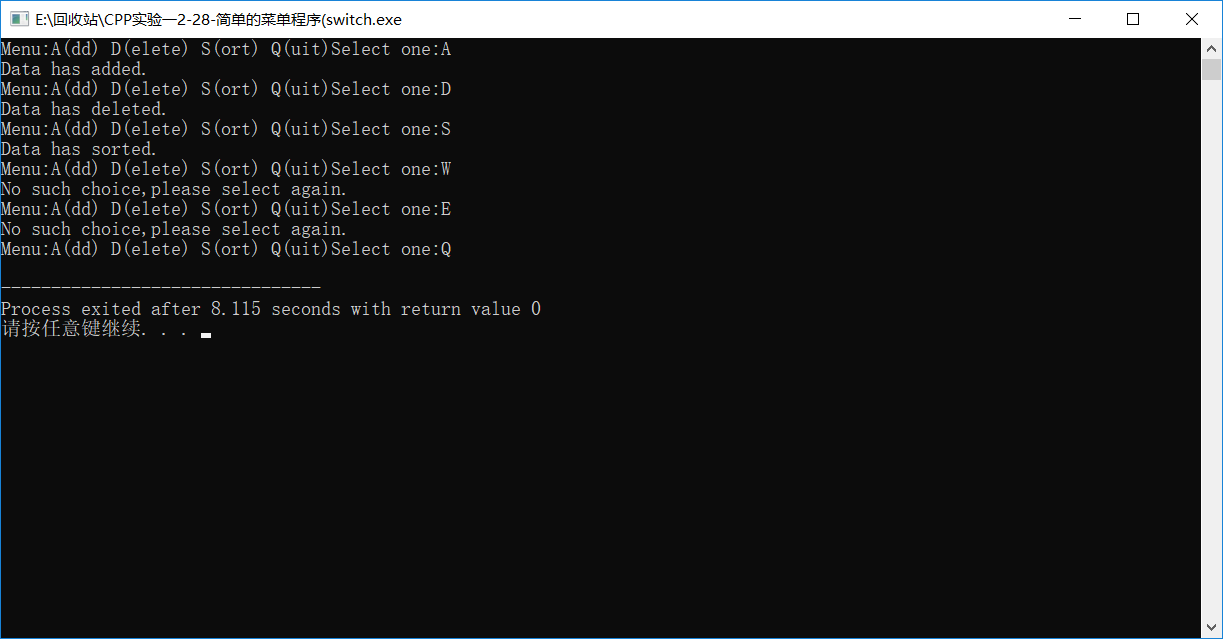
2-28简单的菜单程序(if-else
Code:
 #include<iostream>

 using namespace std;

 int main()

 {

     cout<<"Menu:A(dd) D(elete) S(ort) Q(uit)";

     cout<<"Select one:";

     char k;

     while(cin>>k)

     {

         if(k=='A')

             cout<<"Data has added.\n"<<"Menu:A(dd) D(elete) S(ort) Q(uit)"<<"Select one:";

         else if(k=='D')

             cout<<"Data has deleted.\n"<<"Menu:A(dd) D(elete) S(ort) Q(uit)"<<"Select one:";

         else if(k=='S')

             cout<<"Data has sorted.\n"<<"Menu:A(dd) D(elete) S(ort) Q(uit)"<<"Select one:";

         else if(k=='Q')

             break;

         else

             cout<<"No such choice,please select again.\n"<<"Menu:A(dd) D(elete) S(ort) Q(uit)"<<"Select one:";

     }

     return ;

 }
Screenshot:

(switch
Code:
 #include<iostream>

 using namespace std;

 int main()

 {

     cout<<"Menu:A(dd) D(elete) S(ort) Q(uit)";

     cout<<"Select one:";

     char k;

     while(cin>>k&&k!='Q')

     {

         switch(k)

         {

             case 'A':

                 cout<<"Data has added.\n"<<"Menu:A(dd) D(elete) S(ort) Q(uit)"<<"Select one:";

                 continue;

             case 'D':

                 cout<<"Data has deleted.\n"<<"Menu:A(dd) D(elete) S(ort) Q(uit)"<<"Select one:";

                 continue;

             case 'S':

                 cout<<"Data has sorted.\n"<<"Menu:A(dd) D(elete) S(ort) Q(uit)"<<"Select one:";

                 continue;

             default:cout<<"No such choice,please select again.\n"<<"Menu:A(dd) D(elete) S(ort) Q(uit)"<<"Select one:";

         }

     }

     return ;

 }
Screenshop:
2-29 穷举法求质数(while
Code:
 #include<iostream>

 #include<cmath>

 #include<iomanip>

 using namespace std;

 int main()

 {

     cout<<"1~100间的质数为:"<<endl;

     int x=;

     int a,b,c=;

     while(x<=)

     {

         a=sqrt(x);

         if(x!=)

         {

             b=;

             while(x%b!=&&b<=a)

                  b++;

             if(b>a)

             {

                 c++;

                 cout<<setw()<<x;

                 if(c%==)

                     cout<<"\n";

             }

         }

         x++;

     }

     return ;

  }
Screenshop:

(for
Code:
 #include<iostream>

 #include<cmath>

 #include<iomanip>

 using namespace std;

 int main()

 {

     cout<<"1~100间的质数为:"<<endl;

     int x;

     int a,b,c=;

     for(x=;x<=;x++)

     {

         a=sqrt(x);

         if(x==)

             continue;

         else

         {

             for(b=;b<=a;b++)

                 if(x%b==)

                     break;

             if(b>a)

             {

                 c++;

                 cout<<setw()<<x;

                 if(c%==)

                     cout<<"\n";

             }

         }

     }

     return ;

  }
Screenshop:

(do-while
Code:
 #include<iostream>

 #include<cmath>

 #include<iomanip>

 using namespace std;

 int main()

 {

     cout<<"1~100间的质数为:"<<endl;

     int x=;

     int a,b,c=;

     do

     {

         x++;

         a=sqrt(x);

         if(x!=)

         {

             b=;

             do

             {

                 b++;

             }while(x%b!=&&b<=a);

             if(b>a)

             {

                 c++;

                 cout<<setw()<<x;

                 if(c%==)

                     cout<<"\n";

             }

         }

     }while(x<);

     return ;

  }
Screenshop:

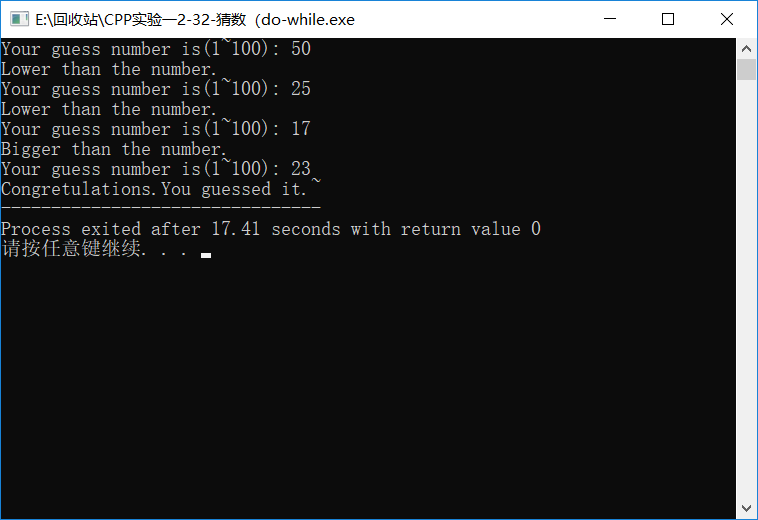
2-32 猜数(while
Code:
 #include<iostream>

 #include<ctime>

 #include<cstdlib>

 using namespace std;

 int main()

 {

     int x;

     int a;

     srand(time(NULL));

     x=+rand()%(-+);

     cout<<"Your guess number is(1~100): ";

     cin>>a;

     while(a!=x)

     {

         if(a<x)

         {

             cout<<"Bigger than the number."<<endl;

             cout<<"Your guess number is(1~100): ";

             cin>>a;

         }

         else

         {

             cout<<"Lower than the number. "<<endl;

             cout<<"Your guess number is(1~100): ";

             cin>>a;

         }

     }

     cout<<"Congretulations.You guessed it.~";

     return ;

  }
Screenshop:
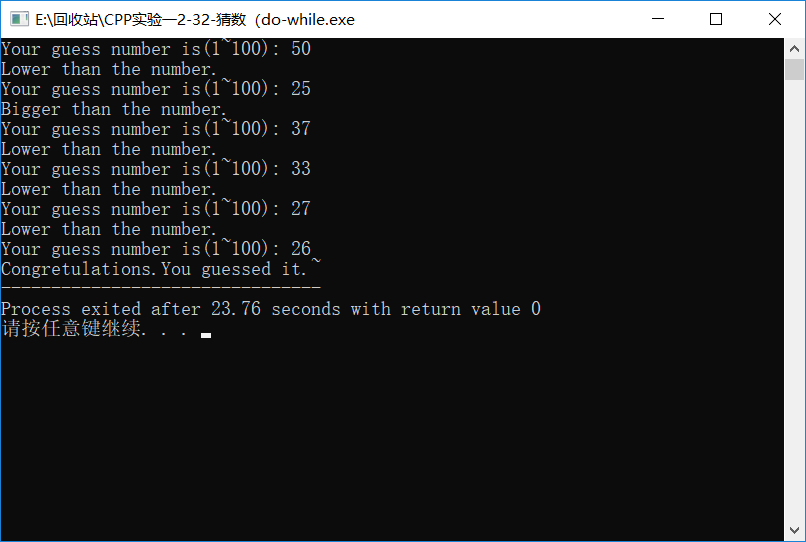
(do-while
Code:
 #include<iostream>

 #include<ctime>

 #include<cstdlib>

 using namespace std;

 int main()

 {

     int x;

     int a;

     srand(time(NULL));

     x=+rand()%(-+);

     cout<<"Your guess number is(1~100): ";

     do

     {

         cin>>a;

         if(a<x)

         {

             cout<<"Bigger than the number."<<endl;

             cout<<"Your guess number is(1~100): ";

         }

         else if(a>x)

         {

             cout<<"Lower than the number. "<<endl;

             cout<<"Your guess number is(1~100): ";

         }

     }while(a!=x);

     cout<<"Congretulations.You guessed it.~";

     return ;

  }
Screenshop:
//暴力循环
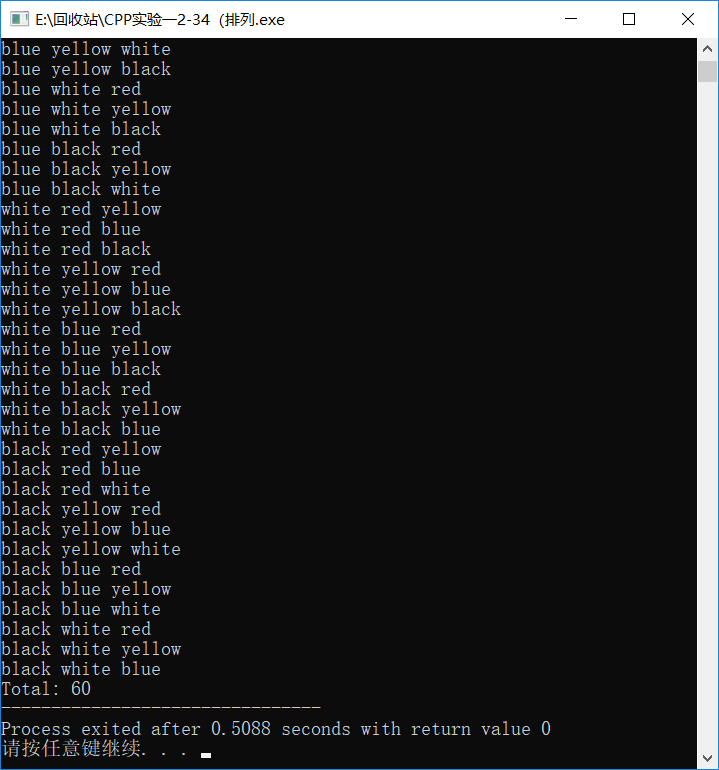
2-34排列组合(排列
Code:
 #include<iostream>

 #include<iomanip>

 using namespace std;

 int main()

 {

     int x[],k=,i;

     for(x[]=;x[]<=;x[]++)

     {

         for(x[]=;x[]<=;x[]++)

         {

             if(x[]==x[])

                 continue;

             else

             {

                 for(x[]=;x[]<=;x[]++)

                 {

                     if(x[]==x[]||x[]==x[])

                         continue;

                     else

                     {

                         k++;

                         for(i=;i<=;i++)

                         {

                             if(i!=)

                            {

                                 switch(x[i])

                                 {

                                     case :

                                         cout<<"red ";

                                         continue;

                                     case :

                                         cout<<"yellow ";

                                         continue;

                                     case :

                                         cout<<"blue ";

                                         continue;

                                     case :

                                         cout<<"white ";

                                         continue;

                                     case :

                                         cout<<"black ";

                                 }

                             }

                             else

                             {

                                 switch(x[i])

                                 {

                                     case :

                                         cout<<"red\n";

                                         continue;

                                     case :

                                         cout<<"yellow\n";

                                         continue;

                                     case :

                                         cout<<"blue\n";

                                         continue;

                                     case :

                                         cout<<"white\n";

                                         continue;

                                     case :

                                     cout<<"black\n";

                                 }

                             }

                         }

                     }

                 }

             }

         }

     }

     cout<<"Total: "<<k;

     return ;

  }
Screenshop:
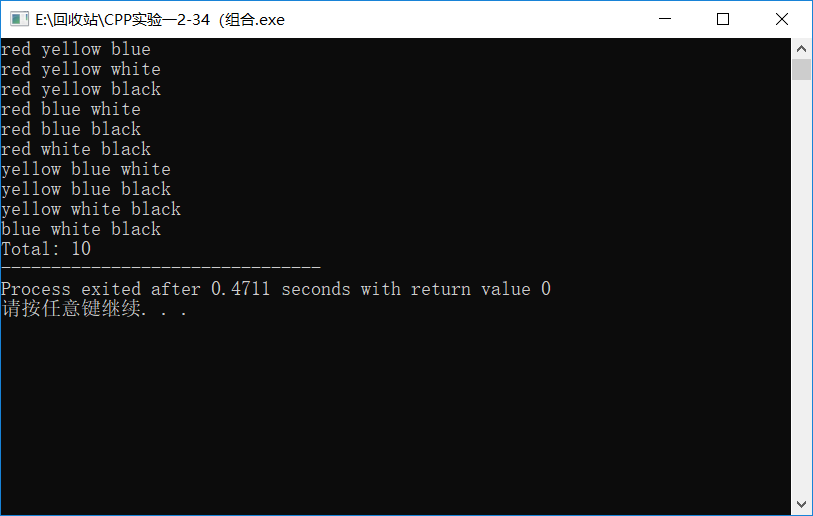
(组合
Code:
 #include<iostream>

 #include<iomanip>

 using namespace std;

 int main()

 {

     int x[],k=,i;

     for(x[]=;x[]<=;x[]++)

         for(x[]=x[]+;x[]<=;x[]++)

             for(x[]=x[]+;x[]<=;x[]++)

             {

                 k++;

                 for(i=;i<=;i++)

                 {

                     if(i!=)

                     {

                         switch(x[i])

                         {

                             case :

                                 cout<<"red ";

                                 continue;

                             case :

                                 cout<<"yellow ";

                                 continue;

                             case :

                                 cout<<"blue ";

                                 continue;

                             case :

                                 cout<<"white ";

                                 continue;

                             case :

                                 cout<<"black ";

                         }

                     }

                     else

                     {

                         switch(x[i])

                         {

                             case :

                                 cout<<"red\n";

                                 continue;

                             case :

                                 cout<<"yellow\n";

                                 continue;

                             case :

                                 cout<<"blue\n";

                                 continue;

                             case :

                                 cout<<"white\n";

                                 continue;

                             case :

                             cout<<"black\n";

                         }

                     }

                 }

             }

     cout<<"Total: "<<k;

     return ;

  }
Screenshop:
实验总结
这次试验主要是类C的部分,CPP的特性我还没有完全体会到(从I/O流已经可以看出些特点的程度)。
在进行多次判断时还是用switch更方便。
多数时候for循环较为好用。
写程序时尽量避免嵌套过多层循环,严重拖慢编译和运行速度。
srand(time(NULL));
x=1+rand()%(100-1+1);
以此来取一定范围内的随机数。
枚举数据类型不同于整型或字符型。
实验1:c++简单程序设计(1)的更多相关文章
- 实验一 c++简单程序设计
一.实验内容 1.ex 2_28 (1) 用if...else判断 #include<iostream> using namespace std; int main() { char i; ...
- 实验二 Java面向对象程序设计
实验二 Java面向对象程序设计 实验内容 1. 初步掌握单元测试和TDD 2. 理解并掌握面向对象三要素:封装.继承.多态 3. 初步掌握UML建模 4. 熟悉S.O.L.I.D原则 5. 了解设计 ...
- 160809209_李梦鑫_C语言程序设计实验3 循环结构程序设计
<C语言程序设计>实验报告 学 号 160809209 姓 名 李梦鑫 专业.班 计科16-2班 学 期 2016-2017 第1学期 指导教师 黄俊莲 吉吉老师 实验地点 C05 ...
- 20145206《Java程序设计》实验二Java面向对象程序设计实验报告
20145206<Java程序设计>实验二Java面向对象程序设计实验报告 实验内容 初步掌握单元测试和TDD 理解并掌握面向对象三要素:封装.继承.多态 初步掌握UML建模 熟悉S.O. ...
- 20145208 实验三 Java面向对象程序设计
20145208 实验三 Java面向对象程序设计 实验内容 初步掌握单元测试和TDD 理解并掌握面向对象三要素:封装.继承.多态 初步掌握UML建模 熟悉S.O.L.I.D原则 了解设计模式 实验步 ...
- 20162330 实验四 《Android程序设计》 实验报告
2016-2017-2 实验报告目录: 1 2 3 4 5 20162330 实验四 <Android程序设计> 实验报告 课程名称:<程序设计与数据结构> 学生班级:1623 ...
- 20162302 实验四《Android程序设计》实验报告
实 验 报 告 课程:程序设计与数据结构 姓名:杨京典 班级:1623 学号:20162302 实验名称:Android程序设计 实验器材:装有Android Studio的联想拯救者80RQ 实验目 ...
- java实验四《Android程序设计》实验报告
一.实验报告封面 课程:Java程序设计 班级:1653班 姓名:张士洋 学号:20165308 指导教师:娄嘉鹏 实验日期:2018年5月14日 实验时间:13:45 - 15:25 实验序号:08 ...
- 2017-2018-2 20165312 实验四《Android程序设计》实验报告
2017-2018-2 20165312 实验四<Android程序设计>实验报告 一.安装Android Studio并进行Hello world测试和调试程序 安装Android St ...
随机推荐
- JedisCluster模式尝试进行批量操作
搭建完redis集群后,可以通过jedis的JedisCluster来访问Redis集群,这里列出使用jedisCluster的spring bean配置方式: <bean id=" ...
- 浅析PHP7新功能及语法变化总结
标量类型声明 有两种模式: 强制 (默认) 和 严格模式. 现在可以使用下列类型参数(无论用强制模式还是严格模式): 字符串(string), 整数 (int), 浮点数 (float), 以及布尔值 ...
- JDK1.5多线程提高
1.名词: 1.任务的执行与任务的提交解耦 2.任务的执行策略-可中断,取消 2.线程封闭机制: 针对单线程池而言,提高任务执行的速度,但是无需锁定 3.饥饿死锁: 任务长期得不到执行,其实就是形成闭 ...
- [Python] numpy.nonzero
numpy.nonzero(a) Return the indices of the elements that are non-zero. Returns a tuple of arrays, on ...
- Eclipse变量名自动补全问题 自定义上屏按键为TAB
Eclipse空格等号等都可以上屏,这样有时候输入变量名再按空格就会自动补全,非常讨厌.那么怎么办呢? 1.首先你的Eclipse需要装有 Eclipse plug-in development en ...
- Jenkins邮件扩展(Email Extension插件 Windows环境)
1.Jenkins ver. 2.107.3版本自带Email Extension插件启动后即可看到系统设置里的 Extended E-mail Notification ,如果没有请安装 2.安装过 ...
- js 获取上传文件的字节数及内容
<!DOCTYPE html PUBLIC "-//W3C//DTD XHTML 1.0 Transitional//EN" "http://www.w3.org/ ...
- OpenACC 与 CUDA 的相互调用
▶ 按照书上的代码完成了 OpenACC 与CUDA 的相互调用,以及 OpenACC 调用 cuBLAS.便于过程遇到了很多问题,注入 CUDA 版本,代码版本,计算能力指定等,先放在这里,以后填坑 ...
- scala.XML处理
XML scala提供了对xml字面量的内建支持,我们可以很容易的在程序代码中生成xml片段, scala类库也包含了对xml常用处理的支持 有时候scala会错误识别出xml字面量 如x < ...
- tp5 redis 单例模式 转载
单例模式(Singleton Pattern 单件模式或单元素模式) 单例模式确保某个类只有一个实例,而且自行实例化并向整个系统提供这个实例. 单例模式有以下3个特点: 1 . 它必须有一个构造函数, ...