
四则运算《《《《SQL出题
设计思路:
这次要用数据库存储题目,我想到的是用SQL server数据库,用dataGridView控件读取数据。
具体实现:
DBCon.cs
 1 using System;

 2 using System.Collections.Generic;

 3 using System.Linq;

 4 using System.Text;

 5 using System.Data;

 6 using System.Data.SqlClient;

 7 using System.Windows.Forms;

 8 namespace Dataopear

 9 {

10     class DBCon

11     {

12

13         public string strCon = @"Data Source=.;Initial Catalog=aritemtic;Integrated Security=True";  //连接数据库

14         public SqlConnection sqlCon = new SqlConnection();

15         public SqlDataAdapter sda = new SqlDataAdapter();

16         public DataSet ds = new DataSet();

17         public DataTable dt = new DataTable(); //数据源

18         public SqlDataReader sdr; //数据阅读器

19         public void dbcon()

20         {

21             try

22             {

23                 sqlCon = new SqlConnection(strCon);

24             }

25             catch (Exception e)

26             {

27                 MessageBox.Show("数据库连接不成功:" + e.ToString());

28             }

29         }

30         public void dbFill(string selstr)

31         {

32             dt.Clear();  //清空

33             sda = new SqlDataAdapter(selstr, strCon);//填充数据集

34             sda.Fill(ds, "opear");

35             dt = ds.Tables["opear"];

36         }

37         public void dbSelect(string showInfo)  //查询的方法

38         {

39

40             sqlCon.Open();

41             SqlCommand sqlcmd = new SqlCommand(showInfo, sqlCon);

42             sdr = sqlcmd.ExecuteReader();

43

44         }

45         public void dbInsert(string insertInfo)  //插入的方法

46         {

47             sqlCon.Open();

48             SqlCommand sqlcmd = new SqlCommand(insertInfo, sqlCon);

49             try

50             {

51                 sqlcmd.ExecuteNonQuery();

52             }

53             catch (Exception e)

54             {

55                 MessageBox.Show("数据插入失败" + e.ToString());

56             }

57             sqlCon.Close();

58         }

59

60         public void dbUpdate(string updStr)  //修改的方法

61         {

62             sqlCon.Open();

63             SqlCommand sqlcmd = new SqlCommand(updStr, sqlCon);

64             try

65             {

66                 sqlcmd.ExecuteNonQuery();

67                 MessageBox.Show("数据修改成功!");

68             }

69             catch (Exception e)

70             {

71                 MessageBox.Show("数据库修改失败" + e.ToString());

72             }

73             sqlCon.Close();

74         }

75         public void dbDelete(string delStr)  //删除的方法

76         {

77             sqlCon.Open();

78             SqlCommand sqlcmd = new SqlCommand(delStr, sqlCon);

79             try

80             {

81                 sqlcmd.ExecuteNonQuery();

82                MessageBox.Show("数据删除成功!");

83             }

84             catch (Exception e)

85             {

86                 MessageBox.Show("数据删除失败" + e.ToString());

87             }

88             sqlCon.Close();

89         }

90     }

91

92

93         }

94

95
策略模式 arctor.cs
 using System;

 using System.Collections.Generic;

 using System.Linq;

 using System.Text;

 namespace Dataopear

 {

     class arictor

     {

          public interface Calculator        //声明计算接口

         {

             double Cal(double x, double y);

         }

         private double x;                //定义x变量;

         public double X                  //封装字段

         {

             get { return x; }

             set { x = value; }

         }

         private double y;               //定义y变量

         public double Y                  //封装字段

         {

             get { return y; }

             set { y = value; }

         }

         public class Add : Calculator            //接口法运算

         {

             public double Cal(double x, double y)

             {

                 double result = ;

                 result = x + y;

                 return result;

             }

         }

         public class Sub : Calculator

         {

             public double Cal(double x, double y)

             {

                 double result = ;

                 result = x - y;

                 return result;

             }

         }

         public class Mul : Calculator

         {

             public double Cal(double x, double y)

             {

                 double result = ;

                 result = x * y;

                 return result;

             }

         }

         public class Div : Calculator

         {

             public double Cal(double x, double y)

             {

                 double result = ;

                 result = x/ y;

                 return result;

             }

         }

         public class Opear                  //定义运算符

         {

             private Calculator calculate;

             public Opear(Calculator calculate)

             {

                 this.calculate = calculate;

             }

             public double Cal(double x, double y, String op)  //返回运算结果

             {

                 return this.calculate.Cal(x, y);

             }

         }

     }

 }
Form1.cs
 using System;

 using System.Collections.Generic;

 using System.ComponentModel;

 using System.Data;

 using System.Drawing;

 using System.Linq;

 using System.Text;

 using System.Windows.Forms;

 using System.Data.SqlClient;

 namespace Dataopear

 {

     public partial class Form1 : Form

     {

         public Form1()

         {

             InitializeComponent();

         }

         public static int Count = ;               //计算所做的题数

         public static int Right = ;               //回答正确的题数

         string seltStr = @"select numberID,number1,symbol,number2 from opear";

         DBCon db = new DBCon();

         private void Form1_Load(object sender, EventArgs e)  //窗体加载

         {

             db.dbcon();

             db.dbFill(seltStr);

             comboBox1.ValueMember = "numberID";

             comboBox1.DataSource = db.dt;

         }

         private void dbSelect_Click(object sender, EventArgs e) //调用查询的方法

         {

             db.dbcon();

             db.dbFill(seltStr);

             dataGridView1.DataSource = db.dt;

         }

         private void dbAdd_Click(object sender, EventArgs e) //调用插入的方法

         {

             db.dbcon();

             string insertInfo = "insert into opear(numberID,number1,symbol,number2)values('" + comboBox1.Text + "','" + textBox1.Text + "','" + textBox2.Text + "','" + textBox3.Text + "')";

             db.dbInsert(insertInfo);

             db.dbFill(seltStr);

             dataGridView1.DataSource = db.dt;

             MessageBox.Show("增加试题成功!");

         }

         private void dbUpdate_Click(object sender, EventArgs e) //调用修改的方法

         {

             db.dbcon();

             string strUpd = "update opear set number1='" + textBox1.Text.Trim() + "',symbol='" + textBox2.Text.Trim() + "',number2='" +

                 textBox3.Text.Trim() + "' where numberID='" + comboBox1.Text.Trim() + "'";

             db.dbUpdate(strUpd);

             db.dbFill(seltStr);

             dataGridView1.DataSource = db.dt;

             MessageBox.Show("修改成功!");

         }

         private void dbDelete_Click(object sender, EventArgs e) //调用删除的方法

         {

             db.dbcon();

             string strsUpd = "delete from opear where numberID='" + comboBox1.Text.Trim() + "'";

             db.dbDelete(strsUpd);

             db.dbFill(seltStr);

             dataGridView1.DataSource = db.dt;

         }

         private void dbClose_Click(object sender, EventArgs e) //关闭程序

         {

             Application.Exit();

         }

         private void comboBox1_SelectedIndexChanged(object sender, EventArgs e)   //numberID的事件

         {

             string selinfo = "select numberID,number1,symbol,number2 from opear where numberID='" + comboBox1.Text.ToString().Trim() + "'";

             db.dbcon();

             db.dbSelect(selinfo);

             if (db.sdr.Read())

             {

                 textBox1.Text = db.sdr["number1"].ToString();

                 textBox2.Text = db.sdr["symbol"].ToString();

                 textBox3.Text = db.sdr["number2"].ToString();

             }

         }

         private void textBox4_KeyDown(object sender, KeyEventArgs e)

         {

             arictor.Opear opear = null;

             double x = Convert.ToDouble(textBox1.Text); //为相关的变量赋值

             double y = Convert.ToDouble(textBox3.Text);

             string op = textBox2.Text;

             switch (op)

             {

                 case "+":

                     opear = new arictor.Opear(new arictor.Add()); //策略模式的引用

                     break;

                 case "-":

                     opear = new arictor.Opear(new arictor.Sub());

                     break;

                 case "*":

                     opear = new arictor.Opear(new arictor.Mul());

                     break;

                 case "÷":

                     opear = new arictor.Opear(new arictor.Div());

                     break;

                 default:

                     break;

             }

             if (e.KeyCode == Keys.Enter)

             {

                 string answer = opear.Cal(x, y, op).ToString();

                 if (textBox4.Text == answer.ToString())

                 {

                     MessageBox.Show("回答正确");

                     Count++;

                     Right++;

                     textBox1.Clear();

                     textBox2.Clear();

                     textBox3.Clear();

                     textBox4.Clear();

                 }

                 else

                 {

                     MessageBox.Show("回答错误");

                     Count++;

                     textBox1.Clear();

                     textBox2.Clear();

                     textBox3.Clear();

                     textBox4.Clear();

                 }

             }

         }

         private void end_Click(object sender, EventArgs e)

         {

             Form2 frm2 = new Form2();

             frm2.ShowDialog();

         }

     }

 }
Form2.cs
 using System;

 using System.Collections.Generic;

 using System.ComponentModel;

 using System.Data;

 using System.Drawing;

 using System.Linq;

 using System.Text;

 using System.Windows.Forms;

 namespace Dataopear

 {

     public partial class Form2 : Form

     {

         public Form2()

         {

             InitializeComponent();

         }

         private void Form2_Load(object sender, EventArgs e)

         {

             textBox1.Text = Form1.Count.ToString();

             textBox2.Text = Form1.Right.ToString();

             textBox3.Text = ((Form1.Right / (double)(Form1.Count)) * ).ToString() + "%";

         }

     }

 }
原始数据:
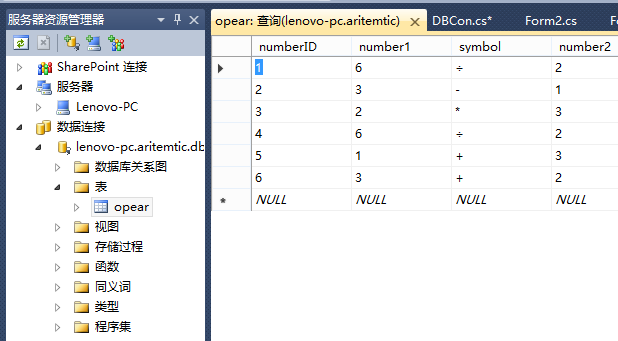
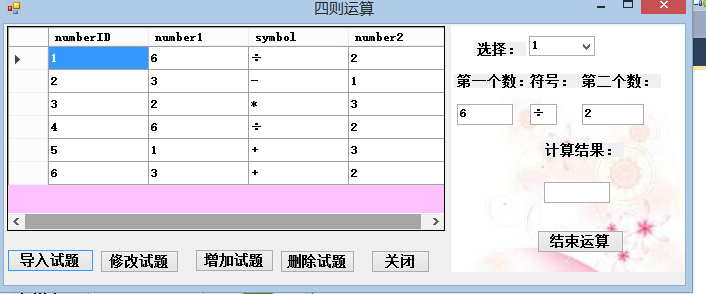
导入数据:
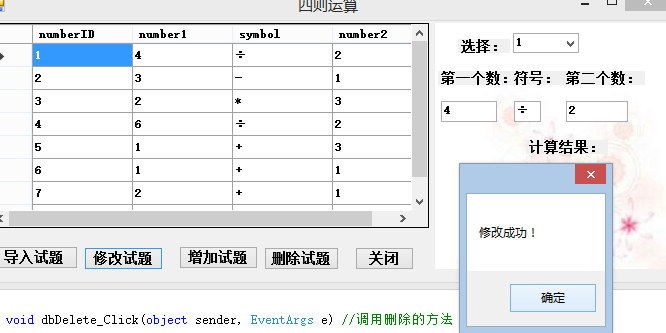
修改试题:
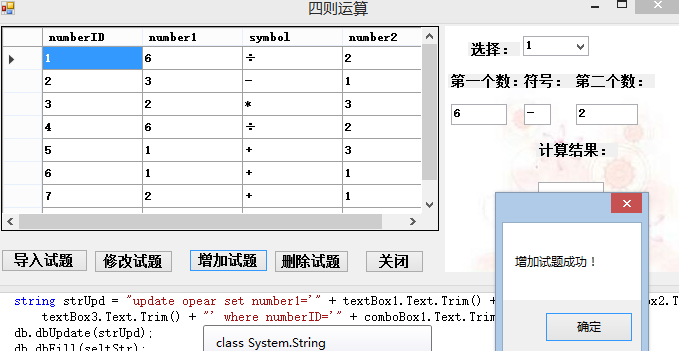
增加试题:
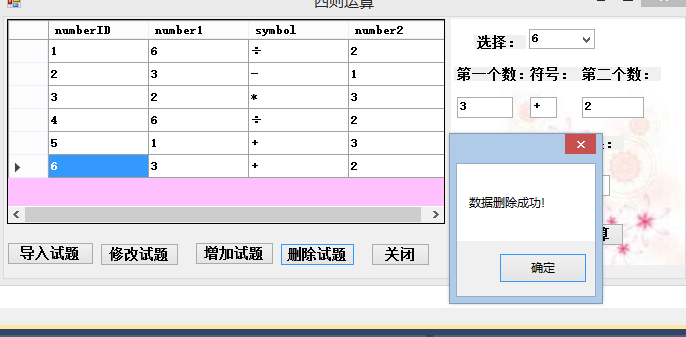
删除试题:
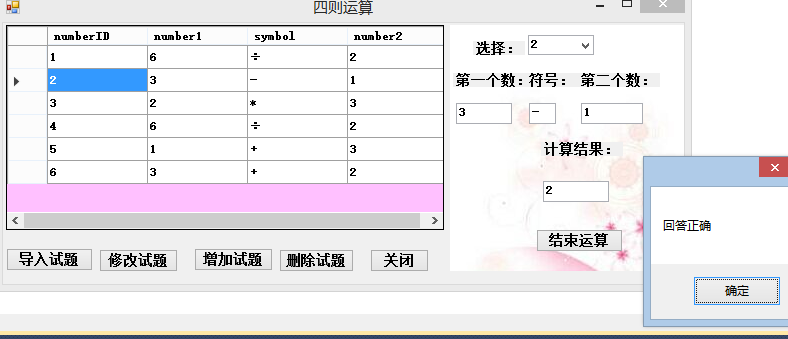
答题:
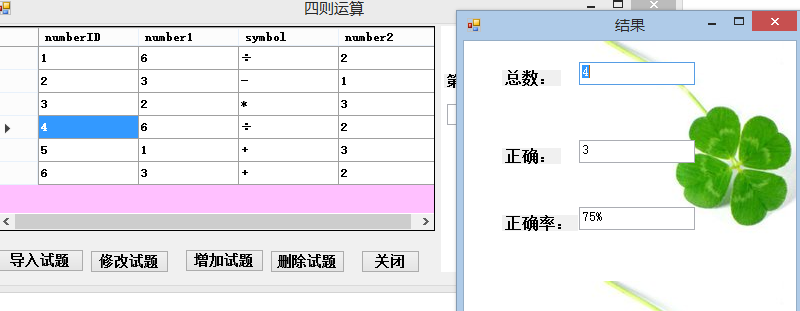
结束运算:
总结:
这次作业比之前的作业复杂一点,工厂模式暂时还没有弄清楚,所以用的策略模式实现的运算。
四则运算《《《《SQL出题的更多相关文章
- 介绍一款原创的四则运算算式生成器:CalculateIt2
家里小朋友读一年级了,最近每天都有一些10以内的加减法口算练习,作为程序员爸爸,自然也是想办法能够偷懒,让电脑出题,给小朋友做些练习.于是,自己在业余时间开发了一个四则运算算式生成器,名为:Calcu ...
- 作业二:个人编程项目——编写一个能自动生成小学四则运算题目的程序
1. 编写一个能自动生成小学四则运算题目的程序.(10分) 基本要求: 除了整数以外,还能支持真分数的四则运算. 对实现的功能进行描述,并且对实现结果要求截图. 本题发一篇随笔,内容包括: 题 ...
- 四则运算appNABCD模型
团队: 郭志豪:http://www.cnblogs.com/gzh13692021053/ 杨子健:http://www.cnblogs.com/yzj666/ 刘森松:http://www.cnb ...
- 第一章-第一题(小学生四则运算)--By郭青云
1.项目需求 a) 除了整数以外,还要支持真分数的四则运算. (例如: 1/6 + 1/8 = 7/24) b) 让程序能接受用户输入答案,并判定对错. 最后给出总共 对/错 的数量. c) 逐步扩 ...
- 一个简易的四则运算单元...(15.12.15 BUG更新)
网上找的, 没有作者信息, 只能在这里感谢一下了, 支持标准写法的四则运算 --2015-12-15 修改了一个内存泄漏的BUG - Pop方法没有释放申请的内存 unit Base.Calculat ...
- 利用ANTLR4实现一个简单的四则运算计算器
利用ANTLR4实现一个简单的四则运算计算器 ANTLR4介绍 ANTLR能够自动地帮助你完成词法分析和语法分析的工作, 免去了手写去写词法分析器和语法分析器的麻烦 它是基于LL(k)的, 以递归下降 ...
- 【实践】js实现简易的四则运算计算器
最近看了一个大神推荐的某公司面试程序员的js 面试题,题目是用js 做一个计算器于是跟着大神的思想自己做了一下 ps:功能还没有完善好毕竟自己还是一只菜鸟还在不断学习中. 闲话不多说先上css代码 & ...
- HDU 5938 Four Operations(四则运算)
p.MsoNormal { margin: 0pt; margin-bottom: .0001pt; text-align: justify; font-family: Calibri; font-s ...
- C语言实现四则运算
学生:宋丹丹 张潇裕 #include<iostream>#include<ctime>using namespace std;void main(){ int x1,x2,a ...
- 第五篇——C++实现四则运算
写一个能自动生成小学四则运算题目的命令行 “软件”, 分别满足下面的各种需求.下面这些需求都可以用命令行参数的形式来指定: a) 除了整数以外,还要支持真分数的四则运算. (例如: 1/6 + 1/8 ...
随机推荐
- CCF认证201712-1最小差值
问题描述 给定n个数,请找出其中相差(差的绝对值)最小的两个数,输出它们的差值的绝对值. 输入格式 输入第一行包含一个整数n. 第二行包含n个正整数,相邻整数之间使用一个空格分隔. 输出格式 输出一个 ...
- SharePoint document 右键菜单和【...】菜单不一致的解决办法
[问题]在sharepoint 2016环境中,当用户只有read权限,访问文档库,会发现文档的右键菜单和[…]菜单的内如是不一致的,而更高权限用户都是一致的. [分析]这个跟微软询问过,是个bug, ...
- 【CSS-进阶之元素:focus伪类模拟点击事件】
先放上我们最终实现的效果 注:这里建议插入codepen(临时使用图片代替) 我们想要实现当点击某个元素时,显示一个tip浮动框. html: <div class="wrapper& ...
- mysql/mariadb将选择查询的结果重新生成一张新表格
比如想要生成类似如下的表格 mysql> select student.*,sc.cno,course.cname,sc.grade,course.cpno,course.ccredit fro ...
- float浮动的一些基础常识
<!DOCTYPE html> <html lang="en"> <head> <meta charset="UTF-8&quo ...
- scala集合与java集合的转换应用
今天在业务开发中遇到需要Scala集合转为Java集合的场景: 因为业务全部是由Scala开发,但是也避免不了调用Java方法的场景,所以将此记录下来加深记忆: import scala.collec ...
- 深度学习框架caffe在ubuntu下的环境搭建
深度学习实验室服务器系统配置手册 目录: 一,显卡安装 二,U盘启动盘制作 三,系统安装 四,系统的基本配置 五,安装Nvidia驱动 六,安装cuda ...
- MySQL配置主主及主从备份
原文:https://www.cnblogs.com/ahaii/p/6307648.html MySQL主从备份配置实例 场景: 1.主服务器192.168.0.225.从服务器192.168.0. ...
- Playing audio from Node.js using Edge.js
http://tomasz.janczuk.org/2014/06/playing-audio-from-nodejs-using-edgejs.html
- 04 - django的路由层 1
1.路由控制简单配置 from django.conf.urls import url from . import views urlpatterns = [ url(r'^articles/2003 ...