
activemq.bat 在window7 x64下启动(安装)报错解决方案
在启动 apache-activemq-5.15.2/activemq.bat 时候报错,提示以下信息:
wrapper | --> Wrapper Started as Console
wrapper | Launching a JVM...
jvm 1 | Wrapper (Version 3.2.3) http://wrapper.tanukisoftware.org
jvm 1 | Copyright 1999-2006 Tanuki Software, Inc. All Rights Reserved.
jvm 1 |
jvm 1 | WrapperSimpleApp: Unable to locate the class org.apache.activemq.cons
ole.Main: java.lang.UnsupportedClassVersionError: org/apache/activemq/console/Ma
in : Unsupported major.minor version 52.0
jvm 1 |
jvm 1 | WrapperSimpleApp Usage:
jvm 1 | java org.tanukisoftware.wrapper.WrapperSimpleApp {app_class} [app_a
rguments]
jvm 1 |
jvm 1 | Where:
jvm 1 | app_class: The fully qualified class name of the application t
o run.
jvm 1 | app_arguments: The arguments that would normally be passed to the
jvm 1 | application.
wrapper | <-- Wrapper Stopped
请按任意键继续. . .

出现这个问题的原因主要是我安装的jdk1.7版本的,我用的apache-activemq-5.15.2 ,这个版本的activeMQ 要用jdk1.8,
运行activemq.bat 成功后提示:
wrapper | --> Wrapper Started as Console
wrapper | Launching a JVM...
jvm 1 | Wrapper (Version 3.2.3) http://wrapper.tanukisoftware.org
jvm 1 | Copyright 1999-2006 Tanuki Software, Inc. All Rights Reserved.
jvm 1 |
jvm 1 | Java Runtime: Oracle Corporation 1.8.0_152 C:\Program Files\Java\jdk1
.8.0_152\jre
jvm 1 | Heap sizes: current=125952k free=115962k max=932352k
jvm 1 | JVM args: -Dactivemq.home=../.. -Dactivemq.base=../.. -Djavax.net
.ssl.keyStorePassword=password -Djavax.net.ssl.trustStorePassword=password -Djav
ax.net.ssl.keyStore=../../conf/broker.ks -Djavax.net.ssl.trustStore=../../conf/b
roker.ts -Dcom.sun.management.jmxremote -Dorg.apache.activemq.UseDedicatedTaskRu
nner=true -Djava.util.logging.config.file=logging.properties -Dactivemq.conf=../
../conf -Dactivemq.data=../../data -Djava.security.auth.login.config=../../conf/
login.config -Xmx1024m -Djava.library.path=../../bin/win64 -Dwrapper.key=BWq1Owb
xFRTlG75B -Dwrapper.port=32000 -Dwrapper.jvm.port.min=31000 -Dwrapper.jvm.port.m
ax=31999 -Dwrapper.pid=16432 -Dwrapper.version=3.2.3 -Dwrapper.native_library=wr
apper -Dwrapper.cpu.timeout=10 -Dwrapper.jvmid=1
jvm 1 | Extensions classpath:
jvm 1 | [..\..\lib,..\..\lib\camel,..\..\lib\optional,..\..\lib\web,..\..\l
ib\extra]
jvm 1 | ACTIVEMQ_HOME: ..\..
jvm 1 | ACTIVEMQ_BASE: ..\..
jvm 1 | ACTIVEMQ_CONF: ..\..\conf
jvm 1 | ACTIVEMQ_DATA: ..\..\data
jvm 1 | Loading message broker from: xbean:activemq.xml
jvm 1 | INFO | Refreshing org.apache.activemq.xbean.XBeanBrokerFactory$1@742
40fe9: startup date [Wed Nov 22 10:34:02 CST 2017]; root of context hierarchy
jvm 1 | INFO | Using Persistence Adapter: KahaDBPersistenceAdapter[E:\中_个
人开发者\消息队列\apache-activemq-5.15.2-bin\apache-activemq-5.15.2\bin\win64\..
\..\data\kahadb]
jvm 1 | INFO | PListStore:[E:\中_个人开发者\消息队列\apache-activemq-5.15.2-
bin\apache-activemq-5.15.2\bin\win64\..\..\data\localhost\tmp_storage] started
jvm 1 | INFO | Apache ActiveMQ 5.15.2 (localhost, ID:DOS-PC-39028-1511318049
286-0:1) is starting
jvm 1 | INFO | Listening for connections at: tcp://DOS-PC:61616?maximumConne
ctions=1000&wireFormat.maxFrameSize=104857600
jvm 1 | INFO | Connector openwire started
jvm 1 | INFO | Listening for connections at: amqp://DOS-PC:5672?maximumConne
ctions=1000&wireFormat.maxFrameSize=104857600
jvm 1 | INFO | Connector amqp started
jvm 1 | INFO | Listening for connections at: stomp://DOS-PC:61613?maximumCon
nections=1000&wireFormat.maxFrameSize=104857600
jvm 1 | INFO | Connector stomp started
jvm 1 | INFO | Listening for connections at: mqtt://DOS-PC:1883?maximumConne
ctions=1000&wireFormat.maxFrameSize=104857600
jvm 1 | INFO | Connector mqtt started
jvm 1 | WARN | ServletContext@o.e.j.s.ServletContextHandler@1d32255a{/,null,
STARTING} has uncovered http methods for path: /
jvm 1 | INFO | Listening for connections at ws://DOS-PC:61614?maximumConnect
ions=1000&wireFormat.maxFrameSize=104857600
jvm 1 | INFO | Connector ws started
jvm 1 | INFO | Apache ActiveMQ 5.15.2 (localhost, ID:DOS-PC-39028-1511318049
286-0:1) started
jvm 1 | INFO | For help or more information please see: http://activemq.apac
he.org
jvm 1 | WARN | Store limit is 102400 mb (current store usage is 0 mb). The d
ata directory: E:\中_个人开发者\消息队列\apache-activemq-5.15.2-bin\apache-activ
emq-5.15.2\bin\win64\..\..\data\kahadb only has 81473 mb of usable space. - rese
tting to maximum available disk space: 81473 mb
jvm 1 | INFO | No Spring WebApplicationInitializer types detected on classpa
th
jvm 1 | INFO | ActiveMQ WebConsole available at http://0.0.0.0:8161/
jvm 1 | INFO | ActiveMQ Jolokia REST API available at http://0.0.0.0:8161/ap
i/jolokia/
jvm 1 | INFO | Initializing Spring FrameworkServlet 'dispatcher'
jvm 1 | INFO | No Spring WebApplicationInitializer types detected on classpa
th
jvm 1 | INFO | jolokia-agent: Using policy access restrictor classpath:/jolo
kia-access.xml
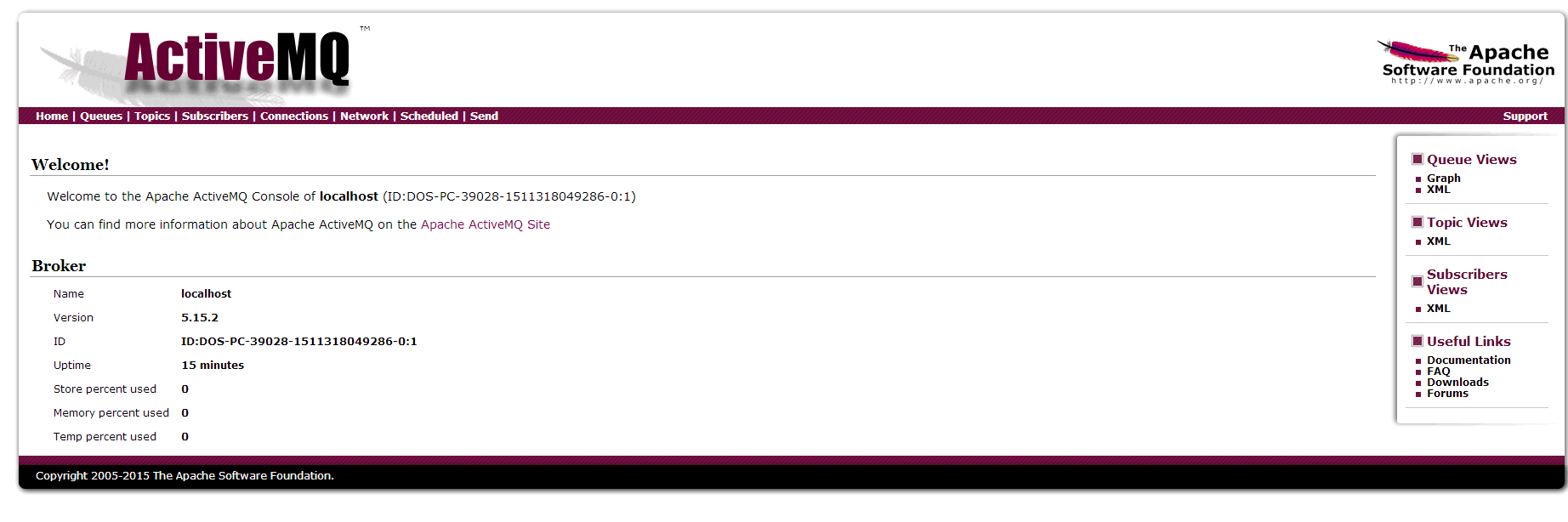
启动成功之后浏览器输入:http://127.0.0.1:8161/admin/ 默认账号密码是:admin/admin,到此为止,就安装ActiveMQ成功啦!
activemq.bat 在window7 x64下启动(安装)报错解决方案的更多相关文章
- Linux系统下启动MySQL报错:Neither host 'localhost.localdomain' nor 'localhost' could be looked up with
Linux系统下启动MySQL报错:Neither host 'localhost.localdomain' nor 'localhost' could be looked up with 摘要 Li ...
- 【转】Eclipse下启动tomcat报错:/bin/bootstrap.jar which is referenced by the classpath, does not exist.
转载地址:http://blog.csdn.net/jnqqls/article/details/8946964 1.错误: 在Eclipse下启动tomcat的时候,报错为:Eclipse下启动to ...
- Jenkins - Linux下启动Jenkins报错hudson.WebAppMain#contextDestroyed: Shutting down a Jenkins instance that was still starting up
报错截图 在Linux下直接运行jenkins.war报错,导致启动失败 报错原因 运行端口已被其他进程占用 解决方法 换个启动端口就可以啦!
- Windows环境下启动Redis报错:Could not create server TCP listening socket 127.0.0.1:6379: bind: 操作成功完成。(已解决)
问题描述: 今天在windows环境下启动Redis时启动失败报错: 解决方案: ①运行命令:redis-cli.exe ②退出Redis ③运行命令:redis-server.exe redis.w ...
- linux下mysql安装报错及修改密码登录等等
1:下载 [root@localhost soft]# wget https://cdn.mysql.com//Downloads/MySQL-5.7/mysql-5.7.19-linux-glibc ...
- Python在Linux下编译安装报错:Makefile:1141:install
正常情况下执行:./configuremake && make install可以直接安装python,但是在在更新了乌版图后居然报错了!!!检查了一圈,发现乌版图安装了python3 ...
- Centos6 下启动httpd报错 Could not reliably determine the server's解决方法
在启动httpd的时候报错: 修改/etc/httpd/conf/httpd.conf 配置,去掉ServerName 前的#(或者手动添加ServerName localhost:80)然后重启ht ...
- Ubuntu 14.04下Redis安装报错:“You need tcl 8.5 or newer in order to run the Redis test”问题解决
Redis简介: Redis是一个开源的使用ANSI C语言编写.支持网络.可基于内存亦可持久化的日志型.Key-Value数据库,并提供多种语言的API.从2010年3月15日起,Redis的开发工 ...
- Windows下启动Solr报错:Nothing to start,exiting...
如果用java -jar start.jar命令启动Solr时报错:Nothing to start,exiting...,可尝试: 百度jetty,上官网下载压缩包并解压(下载页面地址:http:/ ...
随机推荐
- 49. jdk-6u45-linux-i586.bin安装步骤
# chmod u+x ./jdk-6u45-linux-i586.bin 1.# ./jdk-6u45-linux-i586.bin 在按提示输入yes后,jdk被解压到./jdk1.6.0_45目 ...
- xe7 Unresolved external CSPIN.OBJ
工程里打开使用了CSPIN控件的界面窗体,再编译就好了 [ilink32 Error] Error: Unresolved external 'Vcl::Controls::TControl::Set ...
- 使用SimpleXML 解析xml
最近搞解析XML搞的我是水深火热的,所以打算对PHP5解析XML做个学习小结.今天介绍下与PHP5捆绑在一起的SimpleXML扩展,这个用于可读写XML的新的API,让解析XML不再繁琐和困难,用起 ...
- re(正则)模块
import re # re 存在5种使用方式 #1. macth #2.search #3.findall #4.split #5 sub re.match('^chen', 'chenhua123 ...
- SpringBoot 常用注解(持续更新)
SpringBoot 常用注解 @SpringBootApplication @Bean @ComponentScan @ControllerAdvice @ExceptionHandler @Res ...
- ABAP-ITS Mobile
ITS Mobile是14年开发EWM项目时用到的技术方案,本文主要记录下ITS Mobile的整个实现过程. 1.ITS Mobile介绍 ITS Mobile:Internet Transacti ...
- C# 事件 event 【转】
C#事件(event)解析 事件(event),这个词儿对于初学者来说,往往总是显得有些神秘,不易弄懂.而这些东西却往往又是编程中常用且非常重要的东西.大家都知道windows消息处理机制的重要, ...
- Java时间操作常用api
- 如何取得年月日.小时分钟秒?- 如何取得从1970年1月1日0时0分0秒到现在的毫秒数?- 如何取得某月的最后一天?- 如何格式化日期?答:问题1:创建java.util.Calendar 实例, ...
- Conductor Server
安装 要求 数据库:Dynomite https://github.com/Netflix/dynomite 索引后端: Elasticsearch 2.x http ...
- vs2013和vs2010的配置
win10下vs2013和vs2010的相关配置 ------made by siwuxie095 主要是推荐一些vs2013和vs2010的好用的插件和配色方案,下面主要是以vs2013示例 1.首 ...