
MEF(Managed Extensibility Framework)有选择性地使用扩展组件
在"MEF(Managed Extensibility Framework)使用全部扩展组件"中,客户端应用程序调用了所有的扩展组件,而且如果有新的扩展组件加入,必须先关闭程序,再重新启动才可以调用所有组件。
本篇体验使用MEF的ExportMetadata特性,有选择性地使用某些扩展组件,使用Lazy<>,让客户端程序延迟动态加载组件,即使不关闭应用程序,也能调用所有组件。
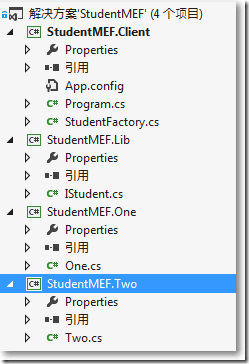
● StudentMEF.Lib, 类库,包含接口IStudent.cs
● StudentMEF.One,类库,包含实现IStudent的类One.cs
● StudentMEF.Two,类库,包含实现IStudent的类One.cs
● StudentMEF.Client,控制台程序
□ 所有扩展满足的约定是
namespace StudentMEF.Lib
{
public interface IStudent
{
string GetName();
int GetScore();
}
}
□ StudentMEF.One类库
→ 需引用StudentMEF.Lib组件
→ 需引用System.ComponentModel.Composition组件
using System.ComponentModel.Composition;
using StudentMEF.Lib;
namespace StudentMEF.One
{
[Export(typeof(IStudent))]
[ExportMetadata("Type","ONE")]
public class One : IStudent
{
private string _Name;
private int _Score;
public One()
{
_Name = "jack";
_Score = 80;
}
public string GetName()
{
return _Name;
}
public int GetScore()
{
return _Score;
}
}
}
□ StudentMEF.Two类库
→ 需引用StudentMEF.Lib组件
→ 需引用System.ComponentModel.Composition组件
using System.ComponentModel.Composition;
using StudentMEF.Lib;
namespace StudentMEF.Two
{
[Export(typeof(IStudent))]
[ExportMetadata("Type","TWO")]
public class Two : IStudent
{
private string _Name;
private int _Score;
public Two()
{
_Name = "Bob";
_Score = 90;
}
public string GetName()
{
return _Name;
}
public int GetScore()
{
return _Score;
}
}
}
□ StudentMEF.Client控制台程序
→ 需引用StudentMEF.Lib组件
→ 需引用System.ComponentModel.Composition组件
→ 需在可执行程序所在目录,即生成路径下,创建Extensions文件夹
需要一个帮助类StudentFactory,他的职责包括:
1、为了动态加载Extensions文件夹的所有扩展组件,可以使用Lazy<>来动态实现延迟加载,即只有当客户端程序使用到Extensions文件夹中组件的时候,再去加载这些扩展组件。
2、把扩展组件放到Catalog中,在CompositionContainer构建Part等,这些常规操作,也都需要。
3、提供一个方法,根据元数据ExportMetadata来获取对应的组件。
using System;
using System.Collections.Generic;
using System.ComponentModel.Composition;
using System.ComponentModel.Composition.Hosting;
using StudentMEF.Lib;
namespace StudentMEF.Client
{
public class StudentFactory
{
[ImportMany]
private Lazy<IStudent, IDictionary<string, object>>[] Students { get; set; }
public StudentFactory()
{
var catalog = new AggregateCatalog();
catalog.Catalogs.Add(new DirectoryCatalog(@".\Extensions"));
var container = new CompositionContainer(catalog);
container.ComposeParts(this);
}
public List<IStudent> GetStudents(string c)
{
List<IStudent> result = new List<IStudent>();
foreach (var student in Students)
{
if ((string)student.Metadata["Type"] == c)
{
result.Add(student.Value);
}
}
return result;
}
}
}
Lazy<IStudent, IDictionary<string, object>>中,第二个参数IDictionary<string, object>与ExportMetadata("Type","TWO")对应。
static void Main(string[] args)
{
string c = "";
while (true)
{
Console.WriteLine("输入学生类型:");
c = Console.ReadLine();
StudentFactory studentFactory = new StudentFactory();
List<IStudent> students = studentFactory.GetStudents(c.ToUpper());
if (students.Count == 0)
{
Console.WriteLine("没有此类型学生~");
}
else
{
foreach (IStudent student in students)
{
Console.WriteLine(string.Format("姓名:{0},分数:{1}",student.GetName(),student.GetScore()));
}
}
}
Console.ReadKey();
}
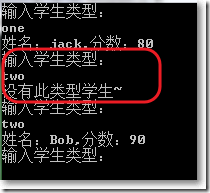
当Extensions文件夹中只有StudentMEF.One.dll组件,输入one,找到匹配,输入two找不到匹配;不关闭控制台程序,把StudentMEF.Two.dll也放入 Extensions文件夹,再输入two,找到匹配。
MEF(Managed Extensibility Framework)有选择性地使用扩展组件的更多相关文章
- MEF(Managed Extensibility Framework)使用全部扩展组件
MEF(Managed Extensibility Framework),所在命名空间是System.ComponentModel.Composition.dll.简单来说,MEF是将符合约定(一般是 ...
- MEF(Managed Extensibility Framework) 微软平台插件化开发
体验Managed Extensibility Framework精妙的设计 MEF(Managed Extensibility Framework)是.NET Framework 4.0一个重要 ...
- MEF(Managed Extensibility Framework)依赖注入学习
MSDN官方资料,并且微软还提供了SimpleCalculator sample学习样例 http://msdn.microsoft.com/en-us/library/dd460648(v=vs.1 ...
- MEF(Managed Extensibility Framework )的入门介绍
1.什么是MEF MEF是一个来自于微软协作构建扩展应用的新框架,它的目的是在运行中的应用中添加插件.MEF继承于.NET 4.0 Framework平台,存在于各种应用平台的系统程序集中 2.程序集 ...
- 使用Managed Extensibility Framework方便的扩展应用程序
概述 Managed Extensibility Framework(MEF)是.NET平台下的一个扩展性管理框架,它是一系列特性的集合,包括依赖注入(DI)以及Duck Typing等.MEF为开发 ...
- .Net中的插件框架Managed Extensibility Framework
Managed Extensibility Framework(MEF)是微软的一个用来扩展.NET应用程序的框架,它最初为了满足Visual Studio里的编辑器的需求,比如说,延迟加载所有东西和 ...
- 体验Managed Extensibility Framework精妙的设计
MEF(Managed Extensibility Framework)是.NET Framework 4.0一个重要的库,Visual Studio 2010 Code Editor的扩展支持也是基 ...
- 实战MEF(1)一种不错的扩展方式
在过去,我们完成一套应用程序后,如果后面对其功能进行了扩展或修整,往往需要重新编译代码生成新的应用程序,然后再覆盖原来的程序.这样的扩展方式对于较小的或者不经常扩展和更新的应用程序来说是可以接受的,而 ...
- Extjs 5 可选择日期+时间的组件DateTimeField
我们都知道ExtJs有日期组件DateField,但直到ExtJs 5.0版本该日期组件也只能选择日期,不能选择时间(具体到时.分.秒),而实际工作中又常常会有需要日期和时间同时选择的需求,我们只能自 ...
随机推荐
- opencv(0)安装与配置
1.windows下 1.1 exe安装 windows下可以安装opencv的exe版本,已经编译好了,很省事. 到https://opencv.org/releases.html下载需要的open ...
- centos 6.x 部署uwsgi+flask项目
一.项目背景 1. 公司需求要做一个在线统计页面; 2. 统计在线人数,进行人数数据展示; 3. 类似QQ官网在线人数 二.测试环境 [root@linux-node2 ~]# cat /etc/*r ...
- SQL Case when 的使用方法 (转)
Case具有两种格式.简单Case函数和Case搜索函数. --简单Case函数 CASE sex WHEN '1' THEN '男' WHEN '2' THEN '女' ELSE '其他' END ...
- MySQL 连接本地数据库、远程数据库命令
一.MySQL 连接本地数据库,用户名为“root”,密码“123”(注意:“-p”和“123” 之间不能有空格) C:/>mysql -h localhost -u root -p123 二. ...
- 怎么能让json_decode解析带斜杠的字符串
比如前台一个js object:{ aa: "cc\dd"}$d = '{\"aa\": \"cc\\dd\"}';这时候用 json_d ...
- Java学习(异常类练习题)
练习题: 1.计算圆的面积,半径不能为零和负数 package com.oracle.Demo01; public class Demo02 { // 写一个计算圆的面积的方法,传一个半径,返回面积 ...
- 【Codechef】Chef and Bike(二维多项式插值)
something wrong with my new blog! I can't type matrixs so I come back. qwq 题目:https://www.codechef.c ...
- kylin加载hive表错误:ERROR [http-bio-7070-exec-10] controller.TableController:189 : org/apache/hadoop/hive/conf/HiveConf java.lang.NoClassDefFoundError: org/apache/hadoop/hive/conf/HiveConf 解决办法
一.问题背景 在kylin中加载hive表时,弹出提示框,内容是“oops!org/apache/hadoop/hive/conf/HiveConf”,无法加载hive表,查找kylin的日志时发现, ...
- hdoj2159 FATE(完全背包)
题目链接 http://acm.hdu.edu.cn/showproblem.php?pid=2159 思路 每种怪都有无限个,所以使用完全背包来解决.这题比普通完全背包多了一个条件,就是杀怪的个数不 ...
- 全面兼容的Iframe 与父页面交互操作
父页面 Father.htm 源码如下: <!DOCTYPE html PUBLIC "-//W3C//DTD XHTML 1.0 Transitional//EN" & ...