
警告: [SetPropertiesRule]{Server/Service/Engine/Host/Context} Setting property 'source' to 'org.eclipse.jst.jee.server:fhcq-oa' did not find a matching property.
当你在使用Eclipse运行web项目时,你可能会看到控制台出现:
警告: [SetPropertiesRule]{Server/Service/Engine/Host/Context} Setting property 'source' to 'org.eclipse.jst.jee.server:fhcq-oa' did not find a matching property.
这样的字样,说的是server.xml的Service标签里的Engine标签里的Host标签里的Context标签配置了一个'source'属性,属性值是'org.eclipse.jst.jee.server:fhcq-oa'.
但问题是Context标签是不支持source这个属性的,所以跳出了警告,所以大家也发现的是,尽管有警告,但是大部分人的程序是依然可以运行没有问题的,但少部分人的可能不能够运行。
也许你已经在网上查到很多像这样的问题,而且也给出了解决办法,但是你照着解决的方法去做了,警告依然存在!那现在就请你跟着我的步骤来做,这里有你可能忽视的几个细节:
在开始之前,我们先来说一下网上别人所说的步骤:
1、双击Servers里的Tomcat v8.5 Server at localhost

(图1)
2、然后跳出了如下的界面,在Server Options选项卡里有个Publish module contexts to separate XML files的选项,到这里我们也一样把框勾上,把框勾上以后记得保存。不过问题不是这样就一定解决了,如果这个步骤你照做了,警告依然存在,那就请跟着我继续往下看。
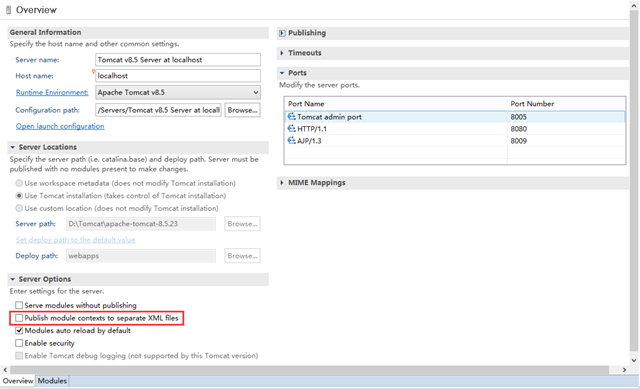
(图2)
3、你可能发现,下图中标记处的设置可能与你的不同,你默认的选项应该是Use workspace metadata,只不过是笔者我改为了Tomcat 的安装路径罢了,因为Use workspace的路径文件夹不方便后面的讲解中要找的文件,所以笔者使用了Tomcat 安装目录来操作,而Deploy path:你如果没有改过的话,是叫做wtpwebapps,因为在Tomcat 服务器中的项目默认是存放在其安装目录下的 webapps 里,为了与之相一致,将 Deploy path 的默认值 wtpwebapps 修改为了 webapps。
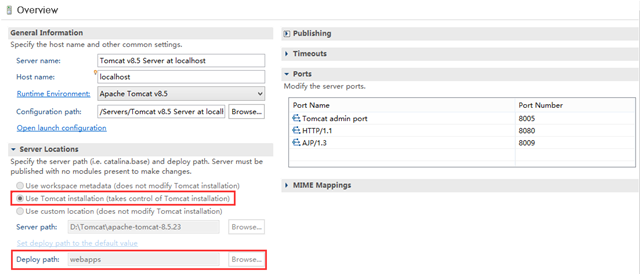
(图3)
准备工作差不多了,那么现在重点来了!为什么好多人做了1、2步操作后问题就解决了,而你自己的却问题依然存在?原因是,在做1、2 步操作之前,你可能已经修改过Servers配置并运行过程序,而运行以后程序就会在Tomcat 下产生一个backup文件夹。里面的文件也即是从Tomcat 目录里conf文件夹下配置文件的备份。
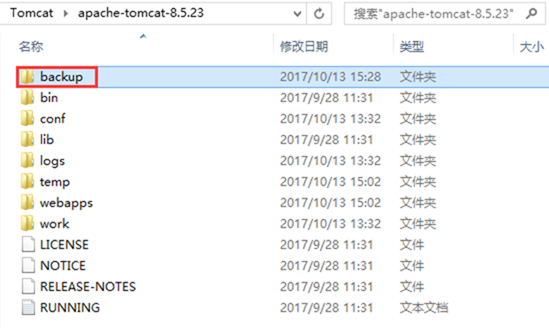
(图4)
4、接下来直接说操作好了,删除图4中的backup文件夹。因为笔者使用的是Tomcat 安装目录,所以在目录下就可以轻松发现。但如果你设置的是图3中 Use workspace metadata 这个选项的话,你就在\workspace\.metadata\.plugins\org.eclipse.wst.server.core 路径下可以看到里面有很多的文件。Eclipse就把项目发布到了这里,里面的目录结构和Tomcat 安装目录里面的差不多,总之把\workspace\.metadata\.plugins\org.eclipse.wst.server.core 里面的文件全部删除。
5、在Tomcat 安装目录下根据文件路径conf\Catalina\localhost\,把localhost文件夹里面的文件全部删除。
6、此处告诉大家,3、4、5步骤纯属是Eclipse发布的一个细节,删除上面的文件其实不用那么麻烦:
在Servers下Tomcat v8.5 Server at localhost里,首先右键—>Remove(移除里面已经添加的所有工程),然后再右键—>Clean Module Work Directory…(清理模块工作目录里的文件),最后重新运行你的程序就可以了。
注意:如果有人想和我一样在第3步的图3中 Server Locations 里修改项目发布目录的话,只要发布过一次项目,你会发现 Server Locations 里面的选项是灰色的,不可更改。此时就需要照着第6步里面的流程,移除项目—>清空文件,然后你就惊奇的发现,Server Locations 下的配置可以修改了。
警告: [SetPropertiesRule]{Server/Service/Engine/Host/Context} Setting property 'source' to 'org.eclipse.jst.jee.server:fhcq-oa' did not find a matching property.的更多相关文章
- 警告: [SetPropertiesRule]{Server/Service/Engine/Host/Context} Setting property 'source' to
警告: [SetPropertiesRule]{Server/Service/Engine/Host/Context} Setting property 'source' to 警告: [SetPro ...
- tomcat日志警告WARNING: [SetPropertiesRule]{Server/Service/Engine/Host/Context} Setting property 'debug' to '0' did not find a matching property.
日志中有警告: [SetPropertiesRule]{Server/Service/Engine/Host/Context} Setting property 'debug' to '0' did ...
- 警告: [SetPropertiesRule]{Server/Service/Engine/Host/Context}Setting property 'source' to 'org.eclipse
当你用Eclipse运行web项目的时候,你就会看到控制台出现:WARNING: [SetPropertiesRule]{Server/Service/Engine/Host/Context} Set ...
- 警告: [SetPropertiesRule]{Server/Service/Engine/Host/Context} Setting property 'source' to 'org.eclipse.jst.jee.server:Weixin' did not find a matching property.
警告: [SetPropertiesRule]{Server/Service/Engine/Host/Context} Setting property 'source' to 'org.eclips ...
- 警告: [SetPropertiesRule]{Server/Service/Engine/Host/Context} Setting property 'source' to 'org.eclips
警告: [SetPropertiesRule]{Server/Service/Engine/Host/Context} Setting property 'source' to 'org.eclips ...
- [SetPropertiesRule]{Server/Service/Engine/Host/Context} Setting property 'source' to 'org.eclipse.jst.j2ee.server:lovemu' did not find a matching property.
[SetPropertiesRule]{Server/Service/Engine/Host/Context} Setting property 'source' to 'org.eclipse.js ...
- 警告: [SetContextPropertiesRule]{Context} Setting property 'source' to 'org.eclipse.jst.jee.server:
当你用Eclipse运行web项目的时候,你就会看到控制台出现: 警告: [SetContextPropertiesRule]{Context} Setting property 'source' t ...
- 警告: [SetContextPropertiesRule]{Context} Setting property 'source' to 'org.eclipse.jst.jee.server:esignmanage' did not find a matching property.解决
1.开发环境: 环境:myeclipse2015+tomcat7+win10 2.异常: 偶尔在部署项目的时候回发现tomcat7部署后配置文件按照路径居然找不到自己的项目.httP://localh ...
- 警告: [SetContextPropertiesRule]{Context} Setting property 'source' to 'org.eclipse.jst.jee.server:JsonBlog' did not find a matching property.
这个问题困扰很久了,逛了很多论坛,终于得以解决 我的控制台错误如下: 五月 , :: 下午 org.apache.catalina.startup.VersionLoggerListener log ...
随机推荐
- 洛谷 P3382 【模板】三分法
https://www.luogu.org/problem/show?pid=3382 题目描述 如题,给出一个N次函数,保证在范围[l,r]内存在一点x,使得[l,x]上单调增,[x,r]上单调减. ...
- BFS:八数码问题
#include <iostream> #include <cstdlib> #include <cstdio> #include <cstring> ...
- WCF: Retry when service is in fault state.
Service Host: using System; using System.Configuration; using System.ServiceModel; using System.Serv ...
- Sparse AutoEncoder简介
1. AutoEncoder AutoEncoder是一种特殊的三层神经网络, 其输出等于输入:\(y^{(i)}=x^{(i)}\), 如下图所示: 亦即AutoEncoder想学到的函数为\(f_ ...
- 当python模式遇见cedet
TAG: emacs, python, cedet, semantic, ctags DATE: 2013-08-20 我用Emacs 24写python程序. 发现屏幕不时有些闪动,MiniBuff ...
- 20155330 2016-2017-2 《Java程序设计》第七周学习总结
20155330 2016-2017-2 <Java程序设计>第七周学习总结 教材学习内容总结 学习目标 了解Lambda语法 了解方法引用 了解Fucntional与Stream API ...
- 【leetcode 简单】 第九十九题 字符串相加
给定两个字符串形式的非负整数 num1 和num2 ,计算它们的和. 注意: num1 和num2 的长度都小于 5100. num1 和num2 都只包含数字 0-9. num1 和num2 都不包 ...
- 【数据库】SQL经典面试题 - 数据库查询 - 子查询应用二
上节课我们通过子查询,完成了查询的最高分学生的需求,今天我们来学习子查询的分类,以及通过子查询来完成工作中经常遇到一些个性化需求. 子查询概念: 一个SELECT语句嵌套在另一个SELECT语句中,子 ...
- for-of循环和for-in循环的区别
基本上for in用于大部分常见的由key-value对构成的对象上以遍历对象内容. 但是for in在遍历数组对象时并不方便,这时候用for of会很方便.
- 使用隐藏form表单下载文件,解决url方式下载,由于环境问题而限制url长度,满足不了所有的需求!
一 对于某些环境导出是直接用wiondow.href=url直接导出下载,有些业务需求,如员工档案等字段比较多的时候,全选导出就会引发异常,由于Nginx转发长度限制的问题, 如果运维不愿意改变环境, ...