
maven 打包报错
[INFO] Scanning for projects...

[INFO]

[INFO] ------------------------------------------------------------------------

[INFO] Building doctor-web-single 1.0.0

[INFO] ------------------------------------------------------------------------

[INFO]

[INFO] --- maven-resources-plugin:2.6:resources (default-resources) @ doctor-web-single ---

[INFO] Using 'UTF-8' encoding to copy filtered resources.

[INFO] Copying 55 resources

[INFO] Copying 0 resource

[INFO]

[INFO] --- maven-compiler-plugin:2.3.1:compile (default-compile) @ doctor-web-single ---

[INFO] Compiling 19 source files to D:\work\work_zhicall_mobile_for_IV\mhospital-doctor\doctor-web-single\target\classes

[INFO] -------------------------------------------------------------

[ERROR] COMPILATION ERROR :

[INFO] -------------------------------------------------------------

[ERROR] Unable to locate the Javac Compiler in:

  C:\Program Files\Java\jre1.8.0_144\..\lib\tools.jar

Please ensure you are using JDK 1.4 or above and

not a JRE (the com.sun.tools.javac.Main class is required).

In most cases you can change the location of your Java

installation by setting the JAVA_HOME environment variable.

[INFO] 1error

[INFO] -------------------------------------------------------------

[INFO] ------------------------------------------------------------------------

[INFO] BUILD FAILURE

[INFO] ------------------------------------------------------------------------

[INFO] Total time: 1.449 s

[INFO] Finished at: 2018-03-29T09:38:35+08:00

[INFO] Final Memory: 12M/307M

[INFO] ------------------------------------------------------------------------

[ERROR] Failed to execute goal org.apache.maven.plugins:maven-compiler-plugin:2.3.1:compile (default-compile) on project doctor-web-single: Compilation failure

[ERROR] Unable to locate the Javac Compiler in:

[ERROR] C:\Program Files\Java\jre1.8.0_144\..\lib\tools.jar

[ERROR] Please ensure you are using JDK 1.4 or above and

[ERROR] not a JRE (the com.sun.tools.javac.Main class is required).

[ERROR] In most cases you can change the location of your Java

[ERROR] installation by setting the JAVA_HOME environment variable.

[ERROR] -> [Help 1]

[ERROR]

[ERROR] To see the full stack trace of the errors, re-run Maven with the -e switch.

[ERROR] Re-run Maven using the -X switch to enable full debug logging.

[ERROR]

[ERROR] For more information about the errors and possible solutions, please read the following articles:

[ERROR] [Help 1] http://cwiki.apache.org/confluence/display/MAVEN/MojoFailureException
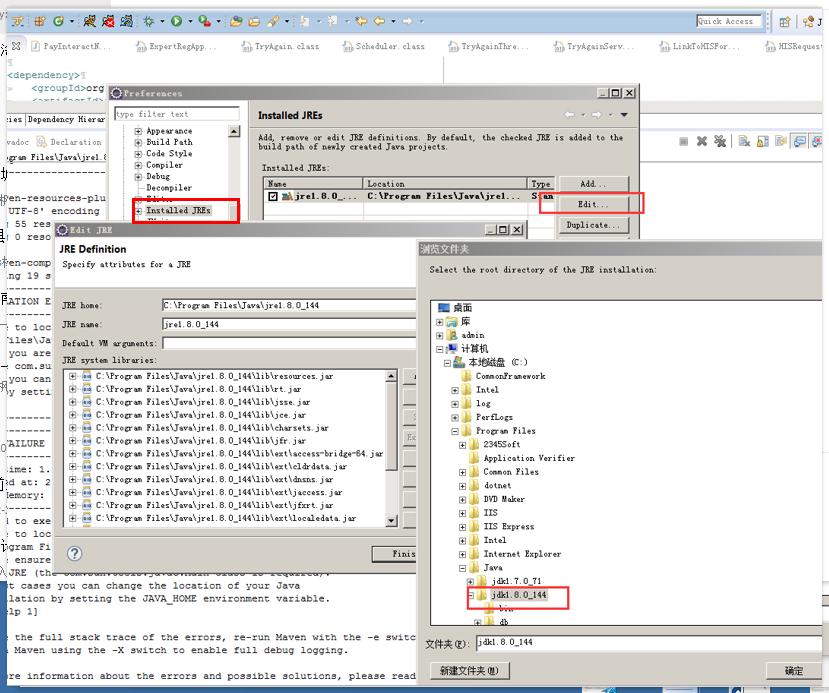
解决办法:
maven 打包报错的更多相关文章
- maven打包报错 Fatal error compiling: tools.jar not found: C:\Program Files\Java\jre1.8.0_151\..\lib\tool
maven 打包报错 [ERROR] Failed to execute goal org.apache.maven.plugins:maven-compiler-plugin:2.5.1:comp ...
- No compiler is provided in this environment. Perhaps you are running on a JRE rather than a JDK? idea maven 打包报错问题解决
mvn clean install -X -Dmaven.test.skip=true -P dev 打包报错:No compiler is provided in this environment. ...
- 设置Maven默认的JDK为1.7,解决Update Maven Project默认为1.5和Maven打包报错2个问题
1.之前,一直遇到这个问题. Update Maven Project的时候,JDK变成了1.5的. 如果项目中有使用"@overdide",程序就会报错,需要手动修改JRE ...
- Maven 打包报错,log4j版本导致
# 在执行打包的时候 mvn clean assembly:assembly # 发生上面的错误 ------------------------------ [INFO] Total time: 2 ...
- Maven打包报错:[WARNING] The POM for xxx is missing, no dependency inform
maven install 或 package 时 ,执行警告报错: [WARNING] The POM for com.xx-base:jar:1.0 is missing, no dependen ...
- [转]maven打包报错:Failed to execute goal org.apache.maven.plugins:maven-surefire-plugin:2.5:test
源文URL:http://blog.csdn.net/caiwenfeng_for_23/article/details/44514947 mvn compile 没有问题,mvn package的 ...
- MAVEN打包报错:com.sun.net.ssl.internal.ssl;sun.misc.BASE64Decoder;程序包 javax.crypto不存在处理办法
以下是pom.xml里面的完整配置,重点是红色的部分,原因是引用的jar是jre下边的,而打包环境用的是jdk下边的jar,所以引用下就OK了.<build> <plugins> ...
- maven打包报错:Failed to execute goal org.apache.maven.plugins:maven-surefire-plugin:2.5:test
mvn package的时候报如下错误: Failed to execute goal org.apache.maven.plugins:maven-surefire-plugin:2.5:test ...
- maven打包报错:在类路径或引导类路径中找不到程序包 java.lang
刚下了个新项目,跑了下maven报错了: E:\workspace\portalframe>mvn clean install [INFO] Scanning for projects... [ ...
- maven打包报错问题解析
1. 场景描述 Failed to execute goal org.apache.maven.plugins:maven-clean-plugin:3.1.0:clean (default-clea ...
随机推荐
- Java 1.7 ReentrantReadWriteLock源代码解析
因为本人水平与表达能力有限,有错误的地方欢迎交流与指正. 1 简单介绍 可重入读写锁时基于AQS实现的,典型的用法如JDK1.7中的演示样例: class RWDictionary { private ...
- 深入理解C/C++ [Deep C (and C++)] (2)
好.接着深入理解C/C++之旅.我在翻译第一篇的时候.自己是学到不不少东西,因此打算将这整个ppt翻译完成. 请看以下的代码片段: #include <stdio.h> void foo( ...
- ColorSchemer Studio 2 破解
软件介绍: ColorSchemer Studio 2 is a professional color matching application for anyone from hobbyists t ...
- Django——如何使用Template以及如何向template传递变量
如何使用模板系统 在Python代码中使用Django模板的最基本方式如下: 可以用原始的模板代码字符串创建一个 Template 对象, Django同样支持用指定模板文件路径的方式来创建 Temp ...
- dedecms上传图片相对路径改成绝对路径方法
很多朋友使用dedecms的时候都用了二级域名的功能,所以造成很多文章中图片不显示的问题. 解决方案如下: 1. 进入dede后台"系统"-"系统基本参数"-& ...
- 10张思维导图带你学习【JavaScript】
思维导图小tips:思维导图又叫心智图.是表达发射性思维的有效的图形思维工具 ,它简单却又极其有效,是一种革命性的思维工具.思维导图运用图文并重的技巧.把各级主题的关系用相互隶属与相关的层级图表现出来 ...
- Atitit.cateService分类管理新特性与设计文档说明v1
Atitit.cateService分类管理新特性与设计文档说明v1 1. V2 新特性规划1 2. 分类管理1 3. 分类增加与修改维护2 4. Js控件分类数据绑定2 1. V2 新特性规划 增加 ...
- PHP预定义常量DIRECTORY_SEPARATOR
PHP预定义常量DIRECTORY_SEPARATOR BY 天涯 · // DIRECTORY_SEPARATOR是一个显示系统分隔符的命令,DIRECTORY_SEPARATOR是PHP的内部常量 ...
- centos配置IP地址
1. vi /etc/sysconfig/network-scripts/ifcfg-eth0 2. DEVICE=eth1HWADDR=00:0C:29:D2:9A:F5TYPE=EthernetU ...
- Irrelevant Elements UVA - 1635 二项式定理+组合数公式+素数筛+唯一分解定理
/** 题目:Irrelevant Elements UVA - 1635 链接:https://vjudge.net/problem/UVA-1635 题意:給定n,m;題意抽象成(a+b)^(n- ...