
maven 打包报错
[INFO] Scanning for projects...

[INFO]

[INFO] ------------------------------------------------------------------------

[INFO] Building doctor-web-single 1.0.0

[INFO] ------------------------------------------------------------------------

[INFO]

[INFO] --- maven-resources-plugin:2.6:resources (default-resources) @ doctor-web-single ---

[INFO] Using 'UTF-8' encoding to copy filtered resources.

[INFO] Copying 55 resources

[INFO] Copying 0 resource

[INFO]

[INFO] --- maven-compiler-plugin:2.3.1:compile (default-compile) @ doctor-web-single ---

[INFO] Compiling 19 source files to D:\work\work_zhicall_mobile_for_IV\mhospital-doctor\doctor-web-single\target\classes

[INFO] -------------------------------------------------------------

[ERROR] COMPILATION ERROR :

[INFO] -------------------------------------------------------------

[ERROR] Unable to locate the Javac Compiler in:

  C:\Program Files\Java\jre1.8.0_144\..\lib\tools.jar

Please ensure you are using JDK 1.4 or above and

not a JRE (the com.sun.tools.javac.Main class is required).

In most cases you can change the location of your Java

installation by setting the JAVA_HOME environment variable.

[INFO] 1error

[INFO] -------------------------------------------------------------

[INFO] ------------------------------------------------------------------------

[INFO] BUILD FAILURE

[INFO] ------------------------------------------------------------------------

[INFO] Total time: 1.449 s

[INFO] Finished at: 2018-03-29T09:38:35+08:00

[INFO] Final Memory: 12M/307M

[INFO] ------------------------------------------------------------------------

[ERROR] Failed to execute goal org.apache.maven.plugins:maven-compiler-plugin:2.3.1:compile (default-compile) on project doctor-web-single: Compilation failure

[ERROR] Unable to locate the Javac Compiler in:

[ERROR] C:\Program Files\Java\jre1.8.0_144\..\lib\tools.jar

[ERROR] Please ensure you are using JDK 1.4 or above and

[ERROR] not a JRE (the com.sun.tools.javac.Main class is required).

[ERROR] In most cases you can change the location of your Java

[ERROR] installation by setting the JAVA_HOME environment variable.

[ERROR] -> [Help 1]

[ERROR]

[ERROR] To see the full stack trace of the errors, re-run Maven with the -e switch.

[ERROR] Re-run Maven using the -X switch to enable full debug logging.

[ERROR]

[ERROR] For more information about the errors and possible solutions, please read the following articles:

[ERROR] [Help 1] http://cwiki.apache.org/confluence/display/MAVEN/MojoFailureException
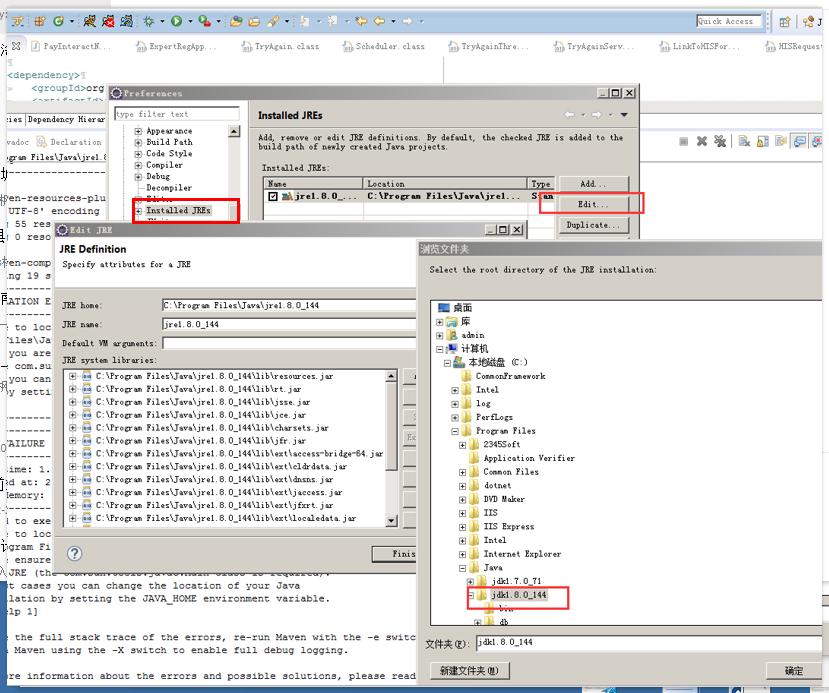
解决办法:
maven 打包报错的更多相关文章
- maven打包报错 Fatal error compiling: tools.jar not found: C:\Program Files\Java\jre1.8.0_151\..\lib\tool
maven 打包报错 [ERROR] Failed to execute goal org.apache.maven.plugins:maven-compiler-plugin:2.5.1:comp ...
- No compiler is provided in this environment. Perhaps you are running on a JRE rather than a JDK? idea maven 打包报错问题解决
mvn clean install -X -Dmaven.test.skip=true -P dev 打包报错:No compiler is provided in this environment. ...
- 设置Maven默认的JDK为1.7,解决Update Maven Project默认为1.5和Maven打包报错2个问题
1.之前,一直遇到这个问题. Update Maven Project的时候,JDK变成了1.5的. 如果项目中有使用"@overdide",程序就会报错,需要手动修改JRE ...
- Maven 打包报错,log4j版本导致
# 在执行打包的时候 mvn clean assembly:assembly # 发生上面的错误 ------------------------------ [INFO] Total time: 2 ...
- Maven打包报错:[WARNING] The POM for xxx is missing, no dependency inform
maven install 或 package 时 ,执行警告报错: [WARNING] The POM for com.xx-base:jar:1.0 is missing, no dependen ...
- [转]maven打包报错:Failed to execute goal org.apache.maven.plugins:maven-surefire-plugin:2.5:test
源文URL:http://blog.csdn.net/caiwenfeng_for_23/article/details/44514947 mvn compile 没有问题,mvn package的 ...
- MAVEN打包报错:com.sun.net.ssl.internal.ssl;sun.misc.BASE64Decoder;程序包 javax.crypto不存在处理办法
以下是pom.xml里面的完整配置,重点是红色的部分,原因是引用的jar是jre下边的,而打包环境用的是jdk下边的jar,所以引用下就OK了.<build> <plugins> ...
- maven打包报错:Failed to execute goal org.apache.maven.plugins:maven-surefire-plugin:2.5:test
mvn package的时候报如下错误: Failed to execute goal org.apache.maven.plugins:maven-surefire-plugin:2.5:test ...
- maven打包报错:在类路径或引导类路径中找不到程序包 java.lang
刚下了个新项目,跑了下maven报错了: E:\workspace\portalframe>mvn clean install [INFO] Scanning for projects... [ ...
- maven打包报错问题解析
1. 场景描述 Failed to execute goal org.apache.maven.plugins:maven-clean-plugin:3.1.0:clean (default-clea ...
随机推荐
- 使用Unity3D的50个技巧:Unity3D最佳实践
转自:http://www.tuicool.com/articles/buMz63I 刚开始学习unity3d时间不长,在看各种资料.除了官方的手册以外,其他人的经验也是非常有益的.偶尔看到老外这篇 ...
- Linux Ubuntu 开机自动启动项设置方法 例:svn服务
在init.d目录建立一个脚本文件svnd.sh # cd /etc/init.d # vim svnd.sh 输入svnd.sh内容如下(/kaifa/svn 为svn仓库目录): #!/bin/b ...
- CentOS 加载/挂载光驱
1.mkdir /mnt/cdrom 2.mount /dev/cdrom /mnt/cdrom 3.挂载 umount /dev/cdrom /mnt/cdrom
- Atitit.nosql api 标准化 以及nosql数据库的实现模型分类差异
Atitit.nosql api 标准化 以及nosql数据库的实现模型分类差异 1. 常用的nosql数据库MongoDB Cassandra1 1.1. 查询> db.blogposts. ...
- 史上最简单的springcloud微服务入门实例,满足企业日常需求,开箱即用,工资翻倍不是梦
在传统的IT行业软件大多都是各种独立系统的堆砌,这些系统的问题总结来说就是扩展性差,可靠性不高,维护成本高.到后面引入了SOA服务化,但是,由于 SOA 早期均使用了总线模式,这种总线模式是与某种技术 ...
- php-fpm用socket连接
总结:在最新nginx.php下实践如下: 第一步:添加php5-fpm.sock文件 cd /var/run sudo vim php5-fpm.sock //啥也不写入,只要这个文件就可以了~ ...
- ARM处理器的运行模式
ARM处理器的7种运行模式 用户模式( usr ):ARM处理器正常的程序执行状态: 快速中断模式( fiq ):用于高速数据传输或通道处理: 外部中断模式( irq):用于通常的中断处理: 管理模式 ...
- Linux学习之tune2fs
这是Linux系统用于文件系统自检的工具. 常用选项 -l 查看文件系统信息 -c max-mount-counts 设置强制自检的挂载次数,如果开启,每挂载一次mount conut就会加1,超过次 ...
- 浅谈一致性hash
相信做过互联网应用的都知道,如何很好的做到横向扩展,其实是个蛮难的话题,缓存可横向扩展,如果采用简单的取模,余数方式的部署,基本是无法做到后期的扩展的,数据迁移及分布都是问题,举个例子: 假设采用取模 ...
- python抓取新浪首页的小例子
参考 廖雪峰的python教程:http://www.liaoxuefeng.com/wiki/001374738125095c955c1e6d8bb493182103fac9270762a000/0 ...