
Android——Activity生命周期
启动: 触发 onCreate() onStart() onResume()
Home键: 触发 onPause() onStop()
back键退出: 触发 onPause() onStop() onDestroy()
Home键退出再进去: 触发 onRestart() onStart() onResume()
启动:

Home键:

再次进入:

退出:

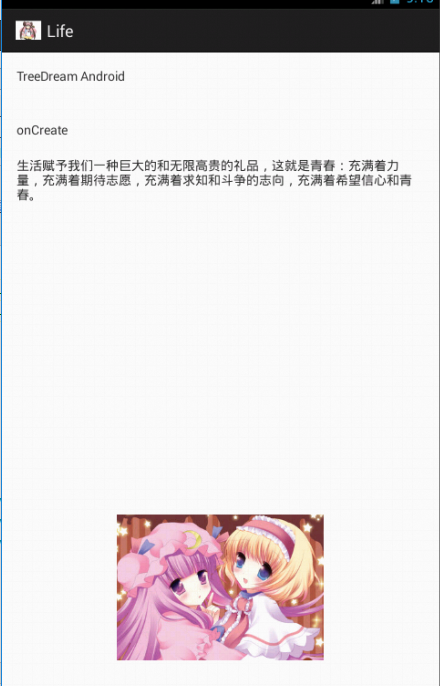
Source:
package com.TreeDream.life;

import android.os.Bundle;

import android.app.Activity;

import android.view.Menu;

import android.widget.TextView;

public class MainActivity extends Activity {

    private TextView textView;

    @Override

    protected void onCreate(Bundle savedInstanceState) {

        super.onCreate(savedInstanceState);

        setContentView(R.layout.activity_main);

        System.out.println("onCreate");

        textView = (TextView)findViewById(R.id.textView1);

        textView.setText("onCreate");

    }

    @Override

    protected void onStart() {

        super.onStart();

        System.out.println("onStart");

    }

    @Override

    protected void onResume() {

        super.onResume();

        System.out.println("onResume");

    }

    @Override

    protected void onPause() {

        super.onPause();

        System.out.println("onPause");

    }

    @Override

    protected void onStop() {

        super.onStop();

        System.out.println("onStop");

    }

    @Override

    protected void onDestroy() {

        super.onDestroy();

        System.out.println("onDestroy");

    }

    @Override

    protected void onRestart() {

        super.onRestart();

        System.out.println("onRestart");

        textView = (TextView)findViewById(R.id.textView1);

        textView.setText("onReStart");

    }

}
<RelativeLayout xmlns:android="http://schemas.android.com/apk/res/android"

    xmlns:tools="http://schemas.android.com/tools"

    android:layout_width="match_parent"

    android:layout_height="match_parent"

    android:paddingBottom="@dimen/activity_vertical_margin"

    android:paddingLeft="@dimen/activity_horizontal_margin"

    android:paddingRight="@dimen/activity_horizontal_margin"

    android:paddingTop="@dimen/activity_vertical_margin"

    tools:context=".MainActivity" >

    <TextView

        android:id="@+id/textView2"

        android:layout_width="wrap_content"

        android:layout_height="wrap_content"

        android:text="@string/Tree" />

    <TextView

        android:id="@+id/textView1"

        android:layout_width="wrap_content"

        android:layout_height="wrap_content"

        android:layout_alignLeft="@+id/textView2"

        android:layout_below="@+id/textView2"

        android:layout_marginTop="40dp"

        android:text="" />

    <TextView

        android:id="@+id/textView3"

        android:layout_width="wrap_content"

        android:layout_height="wrap_content"

        android:layout_alignLeft="@+id/textView1"

        android:layout_below="@+id/textView1"

        android:layout_marginTop="20dp"

        android:text="生活赋予我们一种巨大的和无限高贵的礼品,这就是青春:充满着力量,充满着期待志愿,充满着求知和斗争的志向,充满着希望信心和青春。" />

    <ImageView

        android:id="@+id/imageView1"

        android:layout_width="wrap_content"

        android:layout_height="wrap_content"

        android:layout_alignParentBottom="true"

        android:layout_centerHorizontal="true"

        android:layout_marginBottom="44dp"

        android:src="@drawable/x" />

</RelativeLayout>
activity_main.xml
<?xml version="1.0" encoding="utf-8"?>

<resources>

    <string name="app_name">Life</string>

    <string name="action_settings">Settings</string>

    <string name="hello_world">Hello world!</string>

    <string name="Tree">TreeDream Android</string>

</resources>
string.xml
Android——Activity生命周期的更多相关文章
- [转]: 两分钟彻底让你明白Android Activity生命周期(图文)!
转自:http://blog.csdn.net/android_tutor/article/details/5772285 大家好,今天给大家详解一下Android中Activity的生命周期,我在前 ...
- Android Activity生命周期
从android api文档摘抄出来的activity生命周期图如下: Activity有如下四种状态 a.活动状态 activity处于屏幕前台,获取到了焦点可以和用户进行交互,同一时刻只有一个a ...
- Android Activity生命周期详讲
管理 Activity 生命周期 通过实现回调方法管理 Activity 的生命周期对开发强大而又灵活的应用至关重要. Activity 的生命周期会直接受到 Activity 与其他 Activit ...
- android Activity生命周期(设备旋转、数据恢复等)与启动模式
1.Activity生命周期 接下来将介绍 Android Activity(四大组件之一) 的生命周期, 包含运行.暂停和停止三种状态,onCreate.onStart.onResume.o ...
- Android Activity生命周期以及Fragment生命周期的区别与分析
Android Fragment生命周期图: Activity生命周期图: 对照图: Fragment生命周期分析: 1. 当一个fragment被创建的时候,它会经历以下状态. onAttach() ...
- Android Activity 生命周期详解
学习android开发这么久对于activity的生命周期还没有仔细思考过,所以,我大致的把这些东西整理一下,希望通过这使自己理解的更透彻点吧! 首先看一下Activity生命周期图和它的的四个阶段 ...
- xamarin Android activity生命周期详解
学Xamarin我为什么要写这样一篇关于Android 的activity生命周期的文章 已经学Xamarin android有一段时间了,现在想起当初Xamarin也走了不少的弯路.当然Xamari ...
- Android——Activity生命周期(转)
Activity生命周期 子曰:溫故而知新,可以為師矣.<論語> 学习技术也一样,对于技术文档或者经典的技术书籍来说,指望看一遍就完全掌握,那基本不大可能,所以我们需要经常回过头再仔细 ...
- Android Activity生命周期的几个问题
每一个Android开发者都应该知道,android系统有四个重要的基本组件,即Activity(活动).Service(服务).Broadcast Receive(广播接收器)和Content ...
- android --Activity生命周期具体解释
一. 再探Activity生命周期 为了研究activity的生命周期,简单測试代码例如以下. package com.example.testactivity; import android.app ...
随机推荐
- PIE SDK中值滤波
1.算法功能简介 中值滤波是一种最常用的非线性平滑滤波器,它将窗口内的所有像素值按高低排序后,取中间值作为中心像素的新值. 中值滤波对噪声有良好的滤除作用,特别是在滤除噪声的同时,能够保护信号的边缘, ...
- 《阿里如何实现秒级百万TPS?搜索离线大数据平台大数据平台架构解读》读后感
在使用淘宝时发现搜索框很神奇,它可以将将我们想要的商品全部查询出来,但是我们并感觉不到数据库查询的过程,速度很快.通过阅读这篇文章让我知道了搜索框背后包含着很多技术,对我以后的学习可能很有借鉴. 平时 ...
- mongoDB--万能的$关键字
之前哥的博客写了增删改查的基本用法,其中$set是关键字用来修改值的,但是不关只有set这一个关键字,下面我们就来说一个万能的$关键字 1.常见的等于 大于 小于 大于等于 小于等于 #等于---&g ...
- (转)PEP 8——Python编码风格指南
PEP 8——Python编码风格指南标签(空格分隔): Python PEP8 编码规范原文:https://lizhe2004.gitbooks.io/code-style-guideline-c ...
- 计算机网络相关知识(http状态码 && 首部字段)
计算机网络相关知识 计算机网络的知识还是非常重要的, 这里做一个简单的总结. 推荐阅读文章:http://www.cnblogs.com/TankXiao/archive/2012/02/13/234 ...
- 关于EF更新数据库,更新指定字段的设置
1.关于EF跟新数据库更新指定字段的设置 在EF提交到数据库的时候或许某些字段不想更新.或者自己更新一个模型到数据库去! 1.更新数据不更新一些字段 /// <summary> /// 数 ...
- Java web service 异常
1.org/apache/commons/discovery/tools/DiscoverSingleton Exception in thread "main" java.lan ...
- php自建静态博客步骤
进入博客目录新建index.php页面 <?php require “XXXX/index.html”;//引入html页面 是否能进入localhost/xxx/index.php 注意,ph ...
- sort属性
学习文章---链接 总结笔记 ①sort是Array.prototype的属性, ②如果不写入参数,则按照转换为的字符串的每个字符的unicode位点进行排序, ③如果传入一个比较函数sort(fun ...
- JavaScript简易动画
<p id="s">fly</p> <script> function move(){ var id=document.getElementBy ...