
TensorFlow 解决“ImportError: Could not find 'cudnn64_6.dll'”
解决“ImportError: Could not find 'cudnn64_6.dll'”
1. 问题描述
运行一个基于Tensorflow的代码时报错,如下所示:
ImportError: Could not find 'cudnn64_6.dll'. TensorFlow requires that this DLL be installed in a directory that is named in your %PATH% environment variable. Note that installing cuDNN is a separate step from installing CUDA, and this DLL is often found in a different directory from the CUDA DLLs. You may install the necessary DLL by downloading cuDNN 6 from this URL: https://developer.nvidia.com/cudnn
- 1
2. 解决方法
S1. 根据自己CUDA的版本和操作系统,下载cuDNN v6.0文件,地址:https://developer.nvidia.com/rdp/cudnn-archive
S2. 解压cuDNN,把里面的bin、include和lib这三个文件夹拷贝到CUDA的安装目录中,如下图所示: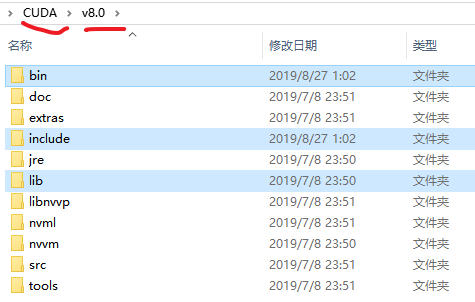
TensorFlow 解决“ImportError: Could not find 'cudnn64_6.dll'”的更多相关文章
- tensorflow遇到ImportError: Could not find 'cudart64_100.dll'错误解决
在安装tensorflow的时候,使用import tensorflow出现了找不到dll文件的错误,参考了很多博客和stackflow的解决方案,发现其中只说了版本号不匹配,但是没有具体说明什么样的 ...
- 彻底解决tensorflow:ImportError: Could not find 'cudart64_90.dll' tensorflow安装
今天装tensorflow-gpu出现了很多问题 1.pip install tensorflow-gpu下载过慢 解决办法可查看 Python机器学习常用模块 2.安装完tensorflow以后,运 ...
- PyQt5遇到的一个坑 "ImportError: unable to find Qt5Core.dll on PATH" 及解决办法
最近再实现一个功能,主要是将自动化测试界面化 环境组合为:Windows 64bit + PyCharm + Python + PyQt5 + Pyinstaller + Inno Setup PS ...
- 导入tensorflow.出现importError: DLL load failed: 找不到指定的模块。
导入tensorflow.出现importError: DLL load failed: 找不到指定的模块. 原因 这是由于windows上没有相应的动态链接库导致的,tensorflow依赖很多c+ ...
- ImportError: unable to find Qt5Core.dll on PATH
一.实验环境 1.Windows7x32_SP1 2.python3.7.4 3.pyinstaller3.5 二.问题描述 1.一直都是在Windows10x64上使用pyinstaller打包ex ...
- 解决 ImportError: No module named _internal
参考: My pip is broken. _internal module cannot be imported. #5253 解决 ImportError: No module named _in ...
- 深入浅出TensorFlow(二):TensorFlow解决MNIST问题入门
2017年2月16日,Google正式对外发布Google TensorFlow 1.0版本,并保证本次的发布版本API接口完全满足生产环境稳定性要求.这是TensorFlow的一个重要里程碑,标志着 ...
- 解决 ImportError: cannot import name 'initializations' from 'keras' (C:\Users\admin\AppData\Roaming\Python\Python37\site-packages\keras\__init__.py)
解决 ImportError: cannot import name 'initializations' from 'keras' : [原因剖析] 上述代码用的是 Keras version: '1 ...
- 解决 ImportError: No module named 'pip._internal'问题
pip错误 ImportError: No module named 'pip_internal' 解决 ImportError: No module named 'pip._internal' 问 ...
随机推荐
- windows 安装php
php各个版本下载地址:https://www.apachelounge.com/viewtopic.php?t=6359 https://museum.php.net/ https://www.fu ...
- kettle imestamp : Unable to get timestamp from resultset at index 22
在做ETL的时候,连接MySQL读取含有timestamp类型的表,出现如下错误: 经Google,据说是MySQL自身的问题.解决方法也很简单,在Spoon的数据库连接中,打开选项,加入一行命令参数 ...
- sql视频学习关键笔记(自用记单词与学习用)
sql字段类型 numeric(18,3)-18位整数加3位小数点(货币计量最好选这类型) sql关键字 insert. update. delete alter grant 授权. revoke 回 ...
- 基于flask的可视化动漫分析网站【python入门必学】
课程设计项目名称:基于flask的可视化动漫分析网站,如果你在学习Python的过程中,往往因为没有好的教程或者没人指导从而导致自己容易放弃,为此我建了个Python交流.裙 :一久武其而而流一思(数 ...
- jquery +点击按钮,切换div内容,按钮加高亮
html: <div class="dw4"> <span class="dw">单位(次)</span> <div ...
- 2,Executor线程池
一,Executor框架简介 在Java 5之后,并发编程引入了一堆新的启动.调度和管理线程的API.Executor框架便是Java 5中引入的,其内部使用了线程池机制,它在java.util.co ...
- PHP入门培训教程 php中的时间处理
php中的时间处理 PHP入门培训教程 兄弟连PHP培训 小编整理的 php中的时间处理: <? /** * 转换为UNIX时间戳 */ function gettime($d) { if(is ...
- 好用的jQuery分页插件
插件源代码: (function ($) { $.fn.extend({ smartpaginator: function (options) { var settings = $.extend({ ...
- CodeForces 1198C 1199E Matching vs Independent Set
Time limit 1000 ms Memory limit 262144 kB 这题是一场cf里,div1的第三题,div2的第5题 中文题意 给一张无向图,没说连通性,要你选出一个大小为n的匹配 ...
- express 和 pm2 建立博客
前置知识 node.js 相关 服务器相关 在本地参照 express 官网的例子写成后, 上传服务器. 服务器安装 pm2 ,实用 pm2 保护进程. 注意静态文件实用的方法 app.use(exp ...