
Linux Centos7.5中的RocketMQ集群部署
系统环境 Docker > centos7.5 此镜像已经安装了jdk1.8和maven3.6.0
如果你想知道这个基础镜像的具体情况, 参考此文: https://www.cnblogs.com/imyjy/p/10100712.html
第一件事, 造一个包含rocketmq的docker容器镜像
运行基础镜像: docker run -itd -p 19876:9876 --name docker <基础镜像id> /bin/bash
查看容器列表: docker ps -a
进入Docker容器: docker exec -it <容器id> /bin/bash
下载RocketMQ源码
方式1:
安装Git: yum install -y git
查看Git是否安装成功: git --version
下载源码: git clone -b release-4.3.2 https://github.com/apache/rocketmq.git
方式2:
打开rocketmq的github地址: https://github.com/apache/rocketmq
选择合适的版本分支,并下载源码文件
将源码文件拷贝到/home目录
从源码安装RocketMQ
进入源码文件夹: cd rocketmq/
编译安装: mvn -Prelease-all -DskipTests clean install -U
喝个茶, 散个步
安装完成,进入构建文件夹: cd distribution/target/
将rocketmq移动至/usr/local/并重命名: mv ./apache-rocketmq/ /usr/local/rocketmq4.3.2
修改脚本的jvm配置( (默认的内存配置太大了, 容器根本跑不起来)):
vi /usr/local/rocketmq4.3.2/bin/runbroker.sh
vi /usr/local/rocketmq4.3.2/bin/runserver.sh
vi /usr/local/rocketmq4.3.2/bin/tools.sh
退出容器终端: exit
查看容器列表: docker ps -a
保存容器为镜像, 命名为rocketmq: docker commit -m '已安装rocketmq' -a 'yjy' <容器id> rocketmq:1.0
(上面的步骤可能很慢, 并且构建出来的镜像文件非常大, 优化请看此)
查看镜像列表: docker images
现在我们已经拥有了一个包含rocketmq服务的centos系统
第二件事,配置并启动rocketmq集群
查看宿主机ip(后面再集群配置文件中有用到): ifconfig -a (我的宿主机是虚拟机, 所以这里选择 ens33的ip, 反正192.168打头的就没错了)
关闭宿主机的防火墙: service firewalld stop
启动两个容器作为集群(每个容器部署 1个nameserver + 1master + 1slave):
docker run -dit -v /etc/localtime:/etc/localtion:ro --privileged=true -p 9876:9876 -p 10909:10909 -p 10907:10907 -p 10920:10920 -p 10918:10918 -p 11909:11909 -p 11920:11920 --name rocketmq1 <镜像id> /bin/bash
docker run -dit -v /etc/localtime:/etc/localtion:ro --privileged=true -p 9877:9876 -p 10919:10919 -p 10917:10917 -p 10910:10910 -p 10908:10908 -p 11919:11919 -p 11910:11910 --name rocketmq2 <镜像id> /bin/bash
命令解释:
-v /etc/localtime:/etc/localtion:ro: 将宿主机的本地时间挂载到容器中, 保证时间同步, ro表示只读
--privileged=true: 给容器特权, 否则无法访问挂载文件
-p 9876:9876 ...: 绑定宿主机与容器的端口, namesrv会用到1个端口, master和slave分别会用到3个端口(listenPort / haListenPort / fastListenPort)
--name rocketmq1: 指定容器的名字, 好做区分
进入rocketmq1 容器: docker exec -it <容器id> /bin/bash
进入rocketmq配置文件目录: cd /usr/local/rocketmq4.3.2/conf
安装zip工具: yum install zip
安装lrzsz: yum install lrzsz
压缩2m-2s-async配置目录: zip -r ./async.zip ./2m-2s-async/
下载到windows本地修改(比较方便): sz ./async.zip
在本地解压修改4个配置文件(里面的ip根据自己的来):
# Licensed to the Apache Software Foundation (ASF) under one or more

# contributor license agreements.  See the NOTICE file distributed with

# this work for additional information regarding copyright ownership.

# The ASF licenses this file to You under the Apache License, Version 2.0

# (the "License"); you may not use this file except in compliance with

# the License.  You may obtain a copy of the License at

#

#     http://www.apache.org/licenses/LICENSE-2.0

#

# Unless required by applicable law or agreed to in writing, software

# distributed under the License is distributed on an "AS IS" BASIS,

# WITHOUT WARRANTIES OR CONDITIONS OF ANY KIND, either express or implied.

# See the License for the specific language governing permissions and

# limitations under the License.

brokerClusterName=DefaultCluster

brokerName=broker-a

brokerId=0

deleteWhen=04

fileReservedTime=48

brokerRole=ASYNC_MASTER

flushDiskType=ASYNC_FLUSH

# 这里的ip为宿主机的ip

namesrvAddr=192.168.25.30:9876;192.168.25.30:9877

brokerIP1=192.168.25.30

brokerIP2=192.168.25.30

listenPort=10909

haListenPort=11909

# fastListenPort = listenPort - 2

autoCreateTopicEnable=true

storePathRootDir=/usr/local/rocketmq4.3.2/store-a

storePathCommitLog=/usr/local/rocketmq4.3.2/store/commitlog-a

storePathConsumeQueue=/usr/local/rocketmq4.3.2/store/consumequeue-a

storePathIndex=/usr/local/rocketmq4.3.2/store/index-a

storeCheckpoint=/usr/local/rocketmq4.3.2/store/checkpoint-a

abortFile=/usr/local/rocketmq4.3.2/store/abort-a
broker-a.properties
# Licensed to the Apache Software Foundation (ASF) under one or more

# contributor license agreements.  See the NOTICE file distributed with

# this work for additional information regarding copyright ownership.

# The ASF licenses this file to You under the Apache License, Version 2.0

# (the "License"); you may not use this file except in compliance with

# the License.  You may obtain a copy of the License at

#

#     http://www.apache.org/licenses/LICENSE-2.0

#

# Unless required by applicable law or agreed to in writing, software

# distributed under the License is distributed on an "AS IS" BASIS,

# WITHOUT WARRANTIES OR CONDITIONS OF ANY KIND, either express or implied.

# See the License for the specific language governing permissions and

# limitations under the License.

brokerClusterName=DefaultCluster

brokerName=broker-b

brokerId=0

deleteWhen=04

fileReservedTime=48

brokerRole=ASYNC_MASTER

flushDiskType=ASYNC_FLUSH

namesrvAddr=192.168.25.30:9876;192.168.25.30:9877

brokerIP1=192.168.25.30

brokerIP2=192.168.25.30

listenPort=10919

haListenPort=11919

autoCreateTopicEnable=true

storePathRootDir=/usr/local/rocketmq4.3.2/store-b

storePathCommitLog=/usr/local/rocketmq4.3.2/store/commitlog-b

storePathConsumeQueue=/usr/local/rocketmq4.3.2/store/consumequeue-b

storePathIndex=/usr/local/rocketmq4.3.2/store/index-b

storeCheckpoint=/usr/local/rocketmq4.3.2/store/checkpoint-b

abortFile=/usr/local/rocketmq4.3.2/store/abort-b
broker-b.properties
# Licensed to the Apache Software Foundation (ASF) under one or more

# contributor license agreements.  See the NOTICE file distributed with

# this work for additional information regarding copyright ownership.

# The ASF licenses this file to You under the Apache License, Version 2.0

# (the "License"); you may not use this file except in compliance with

# the License.  You may obtain a copy of the License at

#

#     http://www.apache.org/licenses/LICENSE-2.0

#

# Unless required by applicable law or agreed to in writing, software

# distributed under the License is distributed on an "AS IS" BASIS,

# WITHOUT WARRANTIES OR CONDITIONS OF ANY KIND, either express or implied.

# See the License for the specific language governing permissions and

# limitations under the License.

brokerClusterName=DefaultCluster

brokerName=broker-a

brokerId=1

deleteWhen=04

fileReservedTime=48

brokerRole=SLAVE

flushDiskType=ASYNC_FLUSH

namesrvAddr=192.168.25.30:9876;192.168.25.30:9877

brokerIP1=192.168.25.30

brokerIP2=192.168.25.30

listenPort=10910

haListenPort=11910

autoCreateTopicEnable=true

storePathRootDir=/usr/local/rocketmq4.3.2/store-a-s

storePathCommitLog=/usr/local/rocketmq4.3.2/store/commitlog-a-s

storePathConsumeQueue=/usr/local/rocketmq4.3.2/store/consumequeue-a-s

storePathIndex=/usr/local/rocketmq4.3.2/store/index-a-s

storeCheckpoint=/usr/local/rocketmq4.3.2/store/checkpoint-a-s

abortFile=/usr/local/rocketmq4.3.2/store/abort-a-s
broker-a-s.properties
# Licensed to the Apache Software Foundation (ASF) under one or more

# contributor license agreements.  See the NOTICE file distributed with

# this work for additional information regarding copyright ownership.

# The ASF licenses this file to You under the Apache License, Version 2.0

# (the "License"); you may not use this file except in compliance with

# the License.  You may obtain a copy of the License at

#

#     http://www.apache.org/licenses/LICENSE-2.0

#

# Unless required by applicable law or agreed to in writing, software

# distributed under the License is distributed on an "AS IS" BASIS,

# WITHOUT WARRANTIES OR CONDITIONS OF ANY KIND, either express or implied.

# See the License for the specific language governing permissions and

# limitations under the License.

brokerClusterName=DefaultCluster

brokerName=broker-b

brokerId=1

deleteWhen=04

fileReservedTime=48

brokerRole=SLAVE

flushDiskType=ASYNC_FLUSH

namesrvAddr=192.168.25.30:9876;192.168.25.30:9877

brokerIP1=192.168.25.30

brokerIP2=192.168.25.30

listenPort=10920

haListenPort=11920

autoCreateTopicEnable=true

storePathRootDir=/usr/local/rocketmq4.3.2/store-b-s

storePathCommitLog=/usr/local/rocketmq4.3.2/store/commitlog-b-s

storePathConsumeQueue=/usr/local/rocketmq4.3.2/store/consumequeue-b-s

storePathIndex=/usr/local/rocketmq4.3.2/store/index-b-s

storeCheckpoint=/usr/local/rocketmq4.3.2/store/checkpoint-b-s

abortFile=/usr/local/rocketmq4.3.2/store/abort-b-s
broker-b-s.properties
回到容器命令行: cd 2m-2s-async
删除原来的4个配置文件: rm -f ./*
上传本地修改过的配置文件: rz
转到bin目录: cd ../../bin
启动 nameserver1: nohup sh mqnamesrv > ../logs/console-namesrv.log &
启动 master1: nohup sh mqbroker -c ../conf/2m-2s-async/broker-a.properties > ../logs/console-master1.log &
启动 slave2: nohup sh mqbroker -c ../conf/2m-2s-async/broker-b-s.properties > ../logs/console-slave2.log &
查看是否启动成功: cat ~/logs/rocketmqlogs/broker.log
回到宿主机: exit
进入rocketmq2容器: docker exec -it <容器id> /bin/bash
到配置文件目录: cd /usr/local/rocketmq4.3.2/conf/2m-2s-async
删除原4个文件: rm -f ./*
上传本地修改过的4个文件: rz (如果提示没有rz命令则先安装: yum install lrzsz)
到bin目录: cd ../../bin/
启动 nameserver2: nohup sh mqnamesrv > ../logs/console-namesrv.log &
启动 master2: nohup sh mqbroker -c ../conf/2m-2s-async/broker-b.properties > ../logs/console-master2.log &
启动 slave1: nohup sh mqbroker -c ../conf/2m-2s-async/broker-a-s.properties > ../logs/console-slave1.log &
查看是否启动成功: cat ~/logs/rocketmqlogs/broker.log
到目前为止我们已经启动了2个nameserver + 2组master + slave
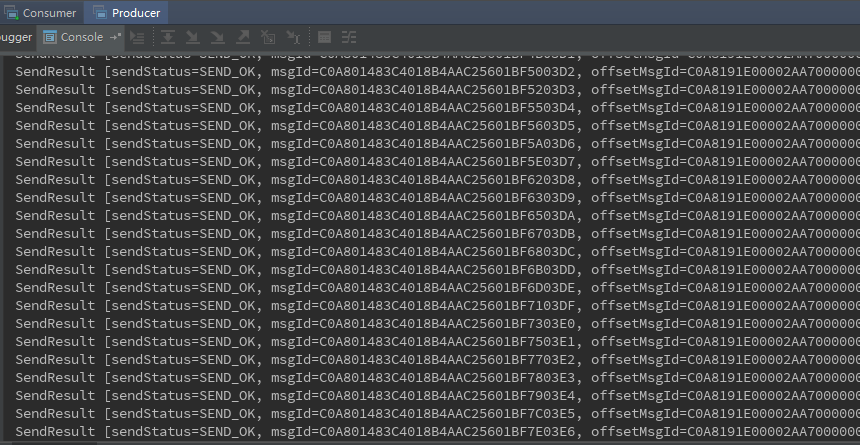
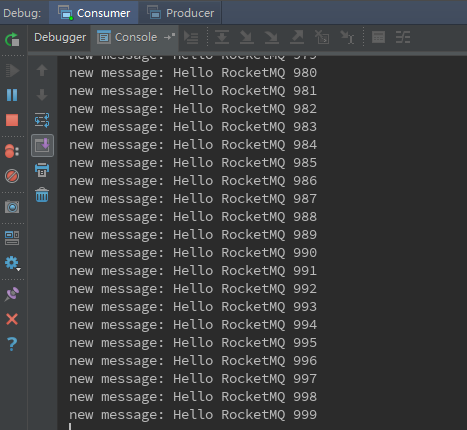
现在回到本地编辑器中, clone rocketMq源码, 使用example模块来测试一下生产者与消费者
生产者:
消费者:
大功告成!
我勒个去, 看看这么简单的步骤, 搞了我3天! 我真蠢
Linux Centos7.5中的RocketMQ集群部署的更多相关文章
- CentOS7.4上搭建rocketMQ集群
一.rocketMQ集群部署方案优缺点对比: 多Master模式(2m-noslave) : 一个集群无Slave,全是Master,例如2个Master或者3个Master 优点:配置简单,单个Ma ...
- RocketMQ集群部署记录
RocketMQ集群部署记录 #引用 https://cloud.tencent.com/developer/article/1147765 一.RocketMQ基础知识介绍 A ...
- rocketmq学习(二) rocketmq集群部署与图形化控制台安装
1.rocketmq图形化控制台安装 虽然rocketmq为用户提供了使用命令行管理主题.消费组以及broker配置的功能,但对于不够熟练的非运维人员来说,命令行的管理界面还是较难使用的.为此,我们可 ...
- Redis 中常见的集群部署方案
Redis 的高可用集群 前言 几种常用的集群方案 主从集群模式 全量同步 增量同步 哨兵机制 什么是哨兵机制 如何保证选主的准确性 如何选主 选举主节点的规则 哨兵进行主节点切换 切片集群 Redi ...
- Linux(Centos7)下redis5缓存服务集群分布式搭建
注意:可以查看Redis官网查看集群搭建方式,连接如下 https://redis.io/topics/cluster-tutorial 集群中应该至少有三个节点,每个节点有一备份节点.需要6台服务器 ...
- RocketMQ集群部署配置
目标,使用2台机器部署RocketMQ多Master多Slave模式,异步复制集群模式. 第一步,修改/etc/hosts文件 192.168.116.115 rocketmq1 192.168.11 ...
- RocketMQ集群部署安装
RcoketMQ:[ 1.低延时:在高压下,1毫秒内超过99.6%的反应延迟. 2.面向金融:具有跟踪和审计功能的高可用性. 3.行业可持续发展:保证了万亿级的消息容量. 4.厂商中立:一个新的开放的 ...
- Rocketmq 集群部署
10.1.0.178 配置文件 broker-a-m.properties brokerClusterName=PaymentClusterbrokerName=broker-anamesrvAddr ...
- RocketMQ 简单梳理 及 集群部署笔记【转】
一.RocketMQ 基础知识介绍Apache RocketMQ是阿里开源的一款高性能.高吞吐量.队列模型的消息中间件的分布式消息中间件. 上图是一个典型的消息中间件收发消息的模型,RocketMQ也 ...
随机推荐
- js中如何向json数组添加元素
//1. var jsonstr="[{'name':'a','value':1},{'name':'b','value':2}]"; var jsonarray = eval(' ...
- Android Intent 传递数据注意事项
不要通过 Intent 在 Android 基础组件之间传递大数据(binder transaction缓存为 1MB),可能导致 OOM.
- [SHOI2007]善意的投票
题目描述 幼儿园里有n个小朋友打算通过投票来决定睡不睡午觉.对他们来说,这个问题并不是很重要,于是他们决定发扬谦让精神.虽然每个人都有自己的主见,但是为了照顾一下自己朋友的想法,他们也可以投和自己本来 ...
- 关于python深浅拷贝的个人浅见
起初,关于python的深浅拷贝,总是习惯去用传值传址的方式去考虑,发现总是get不到规律,容易记混. python有着高度自治的内存管理,而不可变对象的内存分配,则是能省则省,就是说,无论用什么拷贝 ...
- FTP文件上传 支持断点续传 并 打印下载进度(二) —— 单线程实现
这个就看代码,哈哈哈哈哈 需要用到的jar包是: <dependency> <groupId>commons-net</groupId> <artifact ...
- Django 中的static文件的设置
STATIC_URL = '/static/' STATICFILES_DIRS = [ os.path.join(BASE_DIR, 'static'), ('article',os.path.jo ...
- vue base64
安装 cnpm install js-base64 --save 使用 let base64 = require('js-base64').Base64 base64.encode('要加密的内容') ...
- 通过Hack方式实现SDC中Stage配置联动刷新
目录 问题描述 如何从外部获取下拉列表参数 如何实现根据下拉列表选项动态刷新 总结 问题描述 最近项目组准备开发一个IoT平台项目,需要使用到StreamSets DataCollector组件进行数 ...
- mysql 关联表修改数据
UPDATE t1 INNER JOIN t2 ON t1.c1=t2.c1 SET t1.c2=value WHERE t1`removed`=0 AND t2`removed`=0 AND t1 ...
- Exp4 恶意代码分析 20164314
一.实践目标 1.是监控你自己系统的运行状态,看有没有可疑的程序在运行. 2.是分析一个恶意软件,就分析Exp2或Exp3中生成后门软件:分析工具尽量使用原生指令或sysinternals,systr ...