
springboot+mybatis+dubbo+aop日志第二篇
本篇主要介绍dubbo-demo-api接口层和dubbo-demo-service层,以及如何通过dubbo把服务发布出去,介绍代码前,咱们先来回顾一下整个demo工程的结构,如下图所示:

1.dubbo-demo-api
这里面主要是定义所有的接口,这些接口是可以被其他工程引用的,demo工程里就定义了一个测试接口,接口里定义了三个方法,看一下该层的代码结构
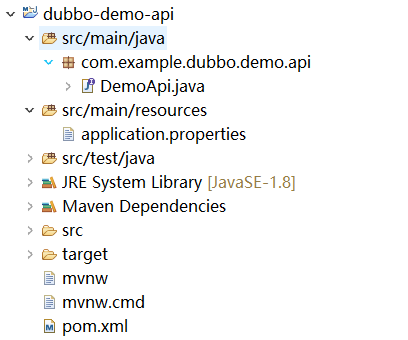
DemoApi.java代码
sayHello:是测试方法
add:添加一条学生信息到数据库
getAll:获取所有学生信息
package com.example.dubbo.demo.api;

import java.util.List;

import dubbo.demo.model.entity.Student;

/**

 * Demo 接口定义

 * @author

 *

 */

public interface DemoApi {

    String sayHello(String name);

    void add(Student student);

    List<Student> getAll();

}
2.dubbo-demo-service
该层主要实现api的接口,实现业务逻辑,访问数据库,并且把服务通过dubbo注册到zookeeper上,对外提供服务, pom文件的依赖如下
<dependency>

            <groupId>com.example.dubbo</groupId>

            <artifactId>dubbo-demo-api</artifactId>

            <version>0.0.-SNAPSHOT</version>

        </dependency>
说明:需要在api层执行install的maven命令,把api的jar包生打包到本地.m2仓库,这样就可以引用到了。
该层代码结构如下:
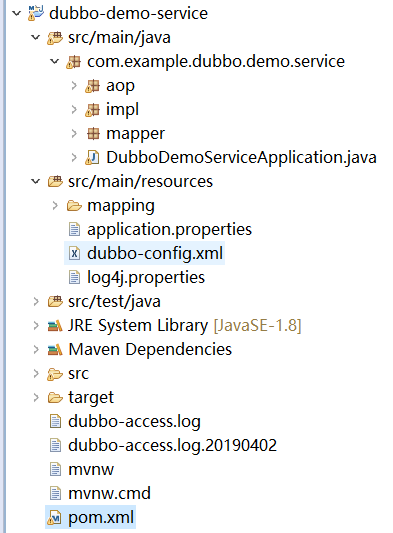
aop包主要是记录每一个service方法调用时的入参,返回值,执行时间、接口的全名称等信息。
impl包实现api的接口逻辑
mapper包是mybatis与数据库交互的方法,与mapper.xml对应
mapping文件夹下保存所有mapper.xml文件
dubbo-config.xml 是dubbo暴露服务的配置文件
impl/DemoApiImpl.java代码
这里面实现了所有api的接口
package com.example.dubbo.demo.service.impl;

import com.example.dubbo.demo.api.DemoApi;

import com.example.dubbo.demo.service.mapper.StudentMapper;

import dubbo.demo.model.entity.Student;

import java.util.List;

import org.apache.dubbo.config.annotation.Service;

import org.springframework.beans.factory.annotation.Autowired;

/**

 *

 * @author chenlong12

 *

 */

@Service

public class DemoApiImpl implements DemoApi {

  @Autowired

  private StudentMapper studentMapper;

  /**

   * 实现 sayHello 接口

   *

   * @param name

   * @return

   */

  @Override

  public String sayHello(String name) {

    return "Hello, " + name + " (from Spring Boot with dubbo-2.7.1)";

  }

  @Override

  public void add(Student student) {

    // TODO Auto-generated method stub

    studentMapper.add(student);

  }

  @Override

  public List<Student> getAll() {

    // TODO Auto-generated method stub

    return studentMapper.getAll();

  }

}
mapper/StudentMapper.java代码
这里面定义的接口方法名,与mapper.xml中的定义的SQL语句的Id对应,且mapper.xml文件中的namespace路径为该类的全路径
package com.example.dubbo.demo.service.mapper;

import java.util.List;

import dubbo.demo.model.entity.Student;

public interface StudentMapper {

  void add(Student student);

  List<Student> getAll();

}
mapping/StudentMapper.xml代码
这里面定义所有与数据库交互的SQL语句,SQL语句中的 #{}代表是占位符,可以防止sql注入
<?xml version="1.0" encoding="UTF-8"?>

<!DOCTYPE mapper PUBLIC "-//mybatis.org//DTD Mapper 3.0//EN" "http://mybatis.org/dtd/mybatis-3-mapper.dtd">

<mapper namespace="com.example.dubbo.demo.service.mapper.StudentMapper">

  <resultMap id="StudentResultMap" type="dubbo.demo.model.entity.Student">

    <result column="id" jdbcType="INTEGER" property="id" />

    <result column="num" jdbcType="VARCHAR" property="num" />

    <result column="name" jdbcType="VARCHAR" property="name" />

    <result column="age" jdbcType="INTEGER" property="age" />

    <result column="sex" jdbcType="VARCHAR" property="sex" />

  </resultMap>

  <insert id="add" parameterType="dubbo.demo.model.entity.Student">

    insert into student (num, name, age,sex)

    values (#{num},#{name},#{age},#{sex})

  </insert>

  <!--我自己加的方法-->

  <select id="getAll" resultType="dubbo.demo.model.entity.Student">

    select * from student

  </select>

</mapper>
application.properties
dubbo-config.xml会引用该配置文件里的内容
spring.config.name=application

# spring 的环境配置

spring.profiles.active=dev

# 服务启动端口,即内置 tomcat 启动时占用的端口

server.port=8087

spring.aop.auto=true

spring.datasource.driver-class-name=com.mysql.jdbc.Driver

spring.datasource.url=jdbc:mysql://127.0.0.1:3306/school?useSSL=false&useUnicode=true&characterEncoding=UTF-8

spring.datasource.username=

spring.datasource.password=

mybatis.mapper-locations=classpath:mapping/*.xml

mybatis.type-aliases-package=dubbo.demo.model.entity

# dubbo config

# 应用定义了提供方应用信息,用于计算依赖关系;在 dubbo-admin 或 dubbo-monitor 会显示这个名字,方便辨识

my.dubbo.application.name=dubbo-demo-service

# 应用所属者

my.dubbo.application.owner=ll

# 应用所属组织

my.dubbo.application.organization=ll

# 使用 zookeeper 注册中心暴露服务,注意要先开启 zookeeper

# 注册中心id

my.dubbo.registry.id=zookeeper-registry

# 注册中心协议

my.dubbo.registry.protocol=zookeeper

# 注册中心地址

my.dubbo.registry.address=127.0.0.1:2181

# dubbo协议在20880端口暴露服务

# 协议名称

my.dubbo.protocol.name=dubbo

# 协议端口

my.dubbo.protocol.port=20880

# 协议访问log

my.dubbo.protocol.accesslog=dubbo-access.log

# 重试次数

my.dubbo.provider.retries=0

# 超时时间

my.dubbo.provider.timeout=3000

# 注册监控中心

my.dubbo.monitor.protocol=registry
dubbo-config.xml
这dubbo的配置文件,所有的服务都是通过这个配置文件发布出去,定义了dubbo的服务,端口,注册中心,以及需要发布出去的服务等,该demo使用的是dubbo协议,zookeeper注册中心,官方推荐使用xml配置文件定义dubbo服务
<?xml version="1.0" encoding="UTF-8"?>

<beans xmlns="http://www.springframework.org/schema/beans"

       xmlns:xsi="http://www.w3.org/2001/XMLSchema-instance"

       xmlns:dubbo="http://code.alibabatech.com/schema/dubbo"

       xsi:schemaLocation="

        http://code.alibabatech.com/schema/dubbo

        http://code.alibabatech.com/schema/dubbo/dubbo.xsd

        http://www.springframework.org/schema/beans http://www.springframework.org/schema/beans/spring-beans-3.0.xsd">

    <!-- 定义了提供方应用信息,用于计算依赖关系;在 dubbo-admin 或 dubbo-monitor 会显示这个名字 -->

    <dubbo:application name="${my.dubbo.application.name}" owner="ll" organization="ll"  />

    <!-- 使用 zookeeper 注册中心暴露服务,注意要先开启 zookeeper-->

    <dubbo:registry id="zookeeper-registry" protocol="${my.dubbo.registry.protocol}" address="${my.dubbo.registry.address}"  />

    <!-- dubbo协议在20880端口暴露服务 -->

    <dubbo:protocol name="${my.dubbo.protocol.name}" port="${my.dubbo.protocol.port}" accesslog="dubbo-access.log"/>

    <dubbo:provider retries="0" timeout="30000"/>

    <dubbo:monitor protocol="registry"/>

  <bean id="demoApiImpl" class="com.example.dubbo.demo.service.impl.DemoApiImpl"></bean>

    <!-- 使用 dubbo 协议实现定义好的 Service Api 接口-->

    <dubbo:service interface="com.example.dubbo.demo.api.DemoApi" ref="demoApiImpl" retries="0" timeout="60000">

      <dubbo:method name="add" timeout="10000" retries="0" loadbalance="leastactive" actives="5" />

    </dubbo:service>

</beans>
详细的配置说明请参见dubbo官方文档
http://dubbo.apache.org/zh-cn/docs/user/references/xml/dubbo-service.html
DubboDemoServiceApplication.java
项目启动main方法,项目启动前需要先把zookeeper启动,通过@ImportResource把dubbo的配置文件加载进来,MapperScan扫描所有的mapp接口
package com.example.dubbo.demo.service;

import org.apache.dubbo.config.spring.context.annotation.DubboComponentScan;

import org.apache.dubbo.config.spring.context.annotation.EnableDubboConfig;

import org.mybatis.spring.annotation.MapperScan;

import org.springframework.boot.SpringApplication;

import org.springframework.boot.autoconfigure.SpringBootApplication;

import org.springframework.context.annotation.ImportResource;

//@EnableDubboConfig

//@DubboComponentScan("com.example.dubbo.demo.service.impl")

@MapperScan("com.example.dubbo.demo.service.mapper")

@SpringBootApplication

@ImportResource(locations="classpath:dubbo-config.xml")

public class DubboDemoServiceApplication {

  public static void main(String[] args) {

    SpringApplication.run(DubboDemoServiceApplication.class, args);

  }

}
下一篇咱们介绍怎么用aop获取每一个service服务的入参、出参、执行时间等信息
出处:https://www.cnblogs.com/lc-chenlong
如果喜欢作者的文章,请关注“写代码的猿”订阅号以便第一时间获得最新内容。本文版权归作者所有,欢迎转载

springboot+mybatis+dubbo+aop日志第二篇的更多相关文章
- springboot+mybatis+dubbo+aop日志第一篇
本篇文章主要讲述项目搭建过程,不会涉及过多的基础知识,本项目是作者对前段时间学习的一个总结,主要使用到技术有:maven父子工程.springboot.mybatis.dubbo.zookeeper. ...
- springboot+mybatis+dubbo+aop日志终结篇
之前的几篇文章把dubbo服务层都介绍完毕,本篇文章咱们主要写web层如何调用服务层的方法.文章底部附带源码. 启动服务 服务启动时,会向zk注册自己提供的服务,zk则会记录服务提供者的IP地址以及暴 ...
- springboot+mybatis+dubbo+aop日志第三篇
AOP称为面向切面编程,在程序开发中主要用来解决一些系统层面上的问题,比如日志,事务,权限等等. Spring AOP模块提供截取拦截应用程序的拦截器,例如,当执行方法时,可以在执行方法之前或之后添加 ...
- Springboot+Mybatis+Pagehelper+Aop动态配置Oracle、Mysql数据源
本文链接:https://blog.csdn.net/wjy511295494/article/details/78825890 Springboot+Mybatis+Pagehelper+Aop ...
- SpringBoot系列之集成logback实现日志打印(篇二)
SpringBoot系列之集成logback实现日志打印(篇二) 基于上篇博客SpringBoot系列之集成logback实现日志打印(篇一)之后,再写一篇博客进行补充 logback是一款开源的日志 ...
- Springboot项目使用aop切面保存详细日志到ELK日志平台
上一篇讲过了将Springboot项目中logback日志插入到ELK日志平台,它只是个示例.这一篇来看一下实际使用中,我们应该怎样通过aop切面,拦截所有请求日志插入到ELK日志系统.同时,由于往往 ...
- 第九章 springboot + mybatis + 多数据源 (AOP实现)
在第八章 springboot + mybatis + 多数据源代码的基础上,做两点修改 1.ShopDao package com.xxx.firstboot.dao; import org.spr ...
- Springboot中使用AOP统一处理Web请求日志
title: Springboot中使用AOP统一处理Web请求日志 date: 2017-04-26 16:30:48 tags: ['Spring Boot','AOP'] categories: ...
- springboot+mybatis日志显示SQL的最简单方法
在springBoot+Mybatis日志显示SQL的执行情况的最简单方法就是在properties新增:logging.level.cn.piesat.mapper=debug 注意:其中cn.pi ...
随机推荐
- BZOJ.2054.疯狂的馒头(并查集)
BZOJ 倒序处理,就是并查集傻题了.. 并查集就是确定下一个未染色位置的,直接跳到那个位置染.然而我越想越麻烦=-= 以为有线性的做法,发现还是要并查集.. 数据随机线段树也能过去. //18400 ...
- Katalon Studio之接口测试中token处理
前言 最近抽时间接触了一下Katalon Studio(后面简称KS),并且利用KS做了一些接口测试的试验,感觉还不错,不过其中接口授权中缺少通过token动态验证的方案,虽然KS支持Authoriz ...
- cadence元件放置方法
在导入网表之后,需要放置元件,介绍几种常见的放置元件的方法和常用的几种元件操作方法.
- git mvn 使用
git 更换远程仓库地址: stps:先删除远程仓库地址,然后再添加 [git remote rm origin] 删除现有远程仓库 [git remote add origin url]添加新远程仓 ...
- 浅拷贝 &&&深拷贝 实现
1.浅拷贝 //1.直接赋值给一个变量 //浅拷贝 //2.Object.assign() //浅拷贝 let obj4={} let obj5={money:50000} obj4.__proto_ ...
- R语言之Apriori算法
---恢复内容开始--- 1.概念 关联分析:用于发现隐藏在大型数据集中的有意义的联系 项集:0或多个项的集合.例如:{啤酒,尿布,牛奶,花生} 是一个4-项集,意义想象成爸爸去超市买啤酒和花生,给儿 ...
- JavaMail技术实现邮件发送转【】
1.导入2个jar包,mail.jar,activation.jar 2.导入的jar包与myeclipse中自带的javaee 中的javaee.jar中的javax.activation包及jav ...
- 企业IT管理员IE11升级指南【12】—— 兼容视图列表介绍
企业IT管理员IE11升级指南 系列: [1]—— Internet Explorer 11增强保护模式 (EPM) 介绍 [2]—— Internet Explorer 11 对Adobe Flas ...
- [Swift]LeetCode19. 删除链表的倒数第N个节点 | Remove Nth Node From End of List
Given a linked list, remove the n-th node from the end of list and return its head. Example: Given l ...
- [Swift]LeetCode365. 水壶问题 | Water and Jug Problem
You are given two jugs with capacities x and y litres. There is an infinite amount of water supply a ...