
shell脚本if语句的多种条件参数
if语句有多种写法
[root@shell-yankerp sh]# [ -f file ] && echo "yes" || echo "no"
yes
修改如下:
if [ -f file ]
then
echo "yes"
else
echo "no"
fi
简写:
[ -f file ] && echo "yes"
表示if条件成立时返回yes
[ -f file ] || echo "no"
表示if条件不成立时,返回no
可以用if判断如下条件:
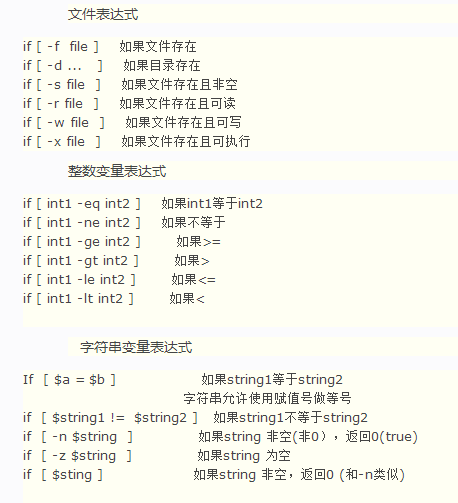

实际上if的条件就是test命令的参数
[omcr@lnltedmr3 ~]$ man test
TEST(1) User Commands TEST(1)
NAME
test - check file types and compare values
SYNOPSIS
test EXPRESSION
test
[ EXPRESSION ]
[ ]
[ OPTION
DESCRIPTION
Exit with the status determined by EXPRESSION.
--help display this help and exit
--version
output version information and exit
An omitted EXPRESSION defaults to false. Otherwise, EXPRESSION is true or false and sets exit status. It is one of:
( EXPRESSION )
EXPRESSION is true
! EXPRESSION
EXPRESSION is false
EXPRESSION1 -a EXPRESSION2
both EXPRESSION1 and EXPRESSION2 are true
EXPRESSION1 -o EXPRESSION2
either EXPRESSION1 or EXPRESSION2 is true
-n STRING
the length of STRING is nonzero
STRING equivalent to -n STRING
-z STRING
the length of STRING is zero
STRING1 = STRING2
the strings are equal
STRING1 != STRING2
the strings are not equal
INTEGER1 -eq INTEGER2
INTEGER1 is equal to INTEGER2
INTEGER1 -ge INTEGER2
INTEGER1 is greater than or equal to INTEGER2
INTEGER1 -gt INTEGER2
INTEGER1 is greater than INTEGER2
INTEGER1 -le INTEGER2
INTEGER1 is less than or equal to INTEGER2
INTEGER1 -lt INTEGER2
INTEGER1 is less than INTEGER2
INTEGER1 -ne INTEGER2
INTEGER1 is not equal to INTEGER2
FILE1 -ef FILE2
FILE1 and FILE2 have the same device and inode numbers
FILE1 -nt FILE2
FILE1 is newer (modification date) than FILE2
FILE1 -ot FILE2
FILE1 is older than FILE2
-b FILE
FILE exists and is block special
-c FILE
FILE exists and is character special
-d FILE
FILE exists and is a directory
-e FILE
FILE exists
-f FILE
FILE exists and is a regular file
-g FILE
FILE exists and is set-group-ID
-G FILE
FILE exists and is owned by the effective group ID
-h FILE
FILE exists and is a symbolic link (same as -L)
-k FILE
FILE exists and has its sticky bit set
-L FILE
FILE exists and is a symbolic link (same as -h)
-O FILE
FILE exists and is owned by the effective user ID
-p FILE
FILE exists and is a named pipe
-r FILE
FILE exists and read permission is granted
-s FILE
FILE exists and has a size greater than zero
-S FILE
FILE exists and is a socket
-t FD file descriptor FD is opened on a terminal
-u FILE
FILE exists and its set-user-ID bit is set
-w FILE
FILE exists and write permission is granted
-x FILE
FILE exists and execute (or search) permission is granted
Except for -h and -L, all FILE-related tests dereference symbolic links. Beware that parentheses need to be escaped
(e.g., by backslashes) for shells. INTEGER may also be -l STRING, which evaluates to the length of STRING.
NOTE: [ honors the --help and --version options, but test does not. test treats each of those as it treats any other
nonempty STRING.
NOTE: your shell may have its own version of test and/or [, which usually supersedes the version described here. Please
refer to your shell's documentation for details about the options it supports.
GNU coreutils online help: <http://www.gnu.org/software/coreutils/> Report test translation bugs to <http://translation‐
project.org/team/>
AUTHOR
Written by Kevin Braunsdorf and Matthew Bradburn.
COPYRIGHT
Copyright © 2013 Free Software Foundation, Inc. License GPLv3+: GNU GPL version 3 or later
<http://gnu.org/licenses/gpl.html>.
This is free software: you are free to change and redistribute it. There is NO WARRANTY, to the extent permitted by law.
SEE ALSO
The full documentation for test is maintained as a Texinfo manual. If the info and test programs are properly installed
at your site, the command
info coreutils 'test invocation'
should give you access to the complete manual.
GNU coreutils 8.22 June 2018 TEST(1)
shell脚本if语句的多种条件参数的更多相关文章
- shell脚本if语句后面的中括号[]与java的if后面的小括号不同(),实际上[左中括号相当于test命令
四.shell 中的条件判断命令 test 和 [ test 命令可以处理 shell 脚本中的各类工作.它产生的不是一般的输出,而是可使用的退出状态.test 命令通过接受各种不同的参数,来控制 ...
- shell脚本编程(一) 变量、条件判断、循环
目录 1. shell脚本编程 2. 运行 Shell 脚本有两种方法 3. 变量 4. 本地变量 5. 环境变量 6. 参数变量 7. 多行注释 8. if条件判断 ...
- kettle文件自动化部署(shell脚本执行):命令行参数传入
shell脚本中调用kitchen 和 pan去执行,job和transformation文件.分 windows和 dos系统两种. 举个简单的小例子 shell脚本: export JAVA_HO ...
- Shell脚本case语句
case语句格式 case 变量 in PAT1) 执行语句 ;; PAT2) 执行语句 ;; *) 默认执行语句 ;; esac 使用示例: 编写一个shell脚本,通过提示用户输入信息,输出cpu ...
- 通过Shell脚本读取properties文件中的参数时遇到\r换行符的问题
今天在编写微服务程序启动脚本的时候,遇到一个比较奇葩的问题,下面给出具体描述: 目标:通过读取maven插件打包时生成的pom.properties文件,获取里面的应用名称和应用版本号,然后拼接得到s ...
- Shell 脚本中 '$' 符号的多种用法
通常情况下,在工作中用的最多的有如下几项: $0:Shell 的命令本身 $1 到 $9:表示 Shell 的第几个参数 $? :显示最后命令的执行情况 $#:传递到脚本的参数个数 $$:脚本运行的当 ...
- Linux Shell脚本编程-语句控制
过程式编程语言bash脚本编程面向过程的编程 顺序执行:默认法则,按照顺序一条一条语句执行 选择执行:分支,条件判断,符合条件的分支予以执行 循环执行:将同一段代码反复执行有限次,所以循环必须有 ...
- linux shell脚本常用语句
linux shell 指令 诸如-d, -f, -e之类的判断表达式: 文件比较运算符-e filename 如果 filename存在,则为真 [ -e /var/log/syslog ]-d ...
- shell脚本判断语句和循环语句
if判断语句 exit跳出判读语句 不加exit的结果 read -n(不换行) 判断是否输入的是数字 read age[[ $age =~ ^[0-9]+$ ]]if [ $? -ne 0 ]; t ...
随机推荐
- codeforces 1017C - Cloud Computing 权值线段树 差分 贪心
https://codeforces.com/problemset/problem/1070/C 题意: 有很多活动,每个活动可以在天数为$[l,r]$时,提供$C$个价格为$P$的商品 现在从第一天 ...
- SpringCloud+ZUUL跨域请求中的OPTIONS请求处理
目前项目结构是VUE做前端,后端采用微服务架构,在开发时前端需要跨域请求数据,通过CorsConfig配置解决了简单跨域请求需要.但当需要在请求的header中增加token信息时,出现了请求失败的情 ...
- 使用Elasticsearch-dump迁移ES数据
1. Elasticsearch-dump 安装 1) yum install epel-release 2) yum install nodejs 3) yum install nodejs npm ...
- 列表生成式,迭代器&生成器
python3中range(10)就 是迭代器 列表生成式 #列表生成式 a=[0,1,2,3,4,5] b=[] for index,i in enumerate(a): a[index]+1 pr ...
- Java_修饰符
目录 访问控制修饰符 非访问修饰符 在java中修饰符主要分为两类:++访问修饰符++和++非访问修饰符++ 访问控制修饰符 修饰符 当前类 同一包内 子孙类 其他包 其他包子孙类 public Y ...
- 论文阅读笔记四十:Deformable ConvNets v2: More Deformable, Better Results(CVPR2018)
论文源址:https://arxiv.org/abs/1811.11168 摘要 可变形卷积的一个亮点是对于不同几何变化的物体具有适应性.但也存在一些问题,虽然相比传统的卷积网络,其神经网络的空间形状 ...
- Consideration about improving mathematics study
In this article, I’ll present my ideas about how to improve mathematics study, which are the forewor ...
- cookie报错
错误: java.lang.IllegalArgumentException: An invalid character [32] was present in the Cookie value 原因 ...
- js中一个对象中遇到一个相同的key所对应的value值相加
如图: 变成: js原生如下: var abc=[ {typeid:1,ade:1}, {typeid:2,ade:1}, {typeid:1,ade:2}, {typeid:1,ade:2}, {t ...
- vue.cli脚手架初次使用图文教程
vue-cli作用 vue-cli作为vue的脚手架,可以帮助我们在实际开发中自动生成vue.js的模板工程. vue-cli使用 !!前提:需要vue和webpack 安装全局vue-cli npm ...