
控制台程序(C#)不弹出认证窗口连接到Dynamics CRM Online的Web API
摘要: 本人微信和易信公众号: 微软动态CRM专家罗勇 ,回复271或者20180602可方便获取本文,同时可以在第一间得到我发布的最新的博文信息,follow me!我的网站是 www.luoyong.me 。
Dynamics CRM的组织服务(Organization Service) 将会逐渐的退出历史舞台,取而代之的是Web API.
很多时候会有需求,特别是集成或者开发App,通过代码连接到Dynamics CRM的Web API,不要弹出窗口要求用户输入用户名和密码。
如何做,本文介绍,主要内容来自ansrikanth 的 Connect to Dynamics CRM WebApi from Console Application (Without Authentication popup) ,原文是英文的,我这里更新了一些界面,并将主要内容提炼下做成一个比较简单的介绍。
首先以有权限的账号(最好是具有Global administrator角色的账户)登录 https://portal.office.com ,点击左边的 Admin Centers,选择Azure AD,就会打开新版的Azure AD管理站点: Azure Active Directory admin Center ,也就是Azure AD管理中心。

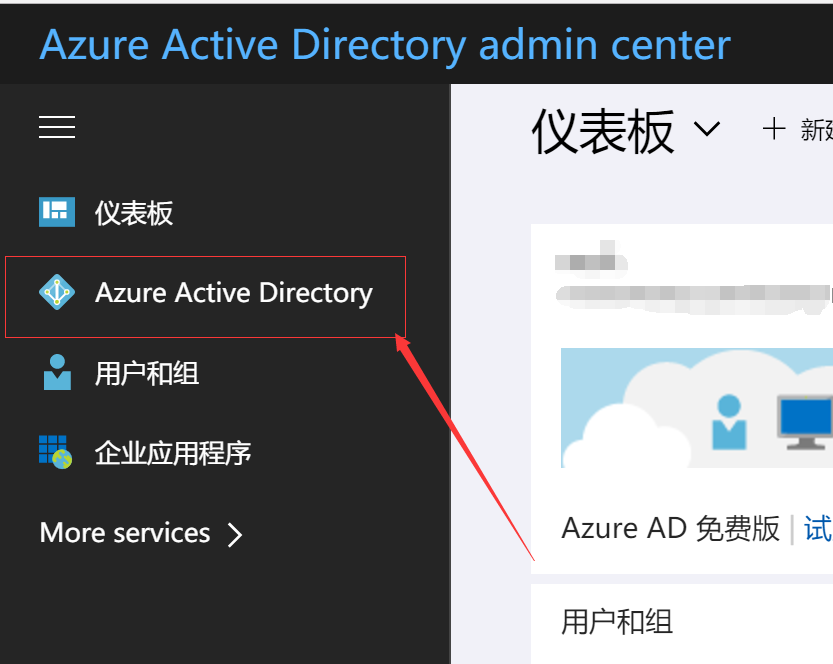
在Azure AD管理中心站点中点击左侧的 Azure Active Directory。
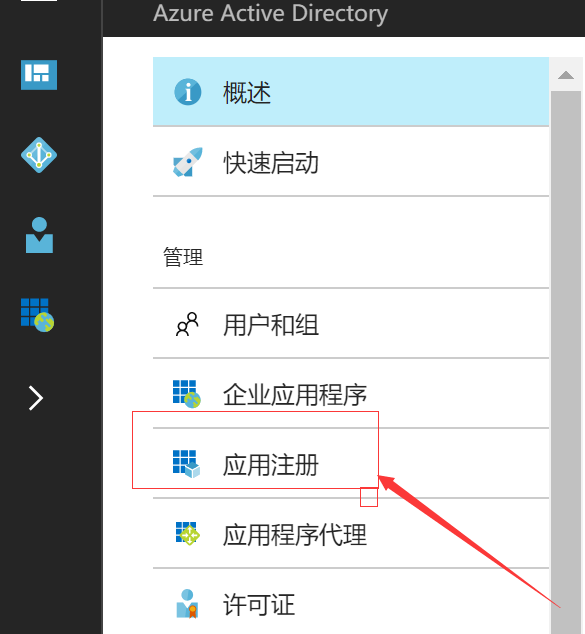
然后点击 应用注册。
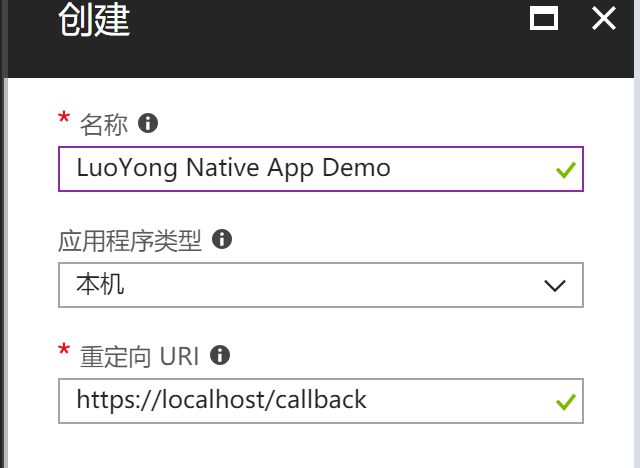
再点击 新应用注册。输入如下所示,名字自己定义,应用程序类型一定要选择本机 (英文版本的话这里是Native),重定向URI如果没有特别要求的话设置为 http://localhost/callback 就可以。
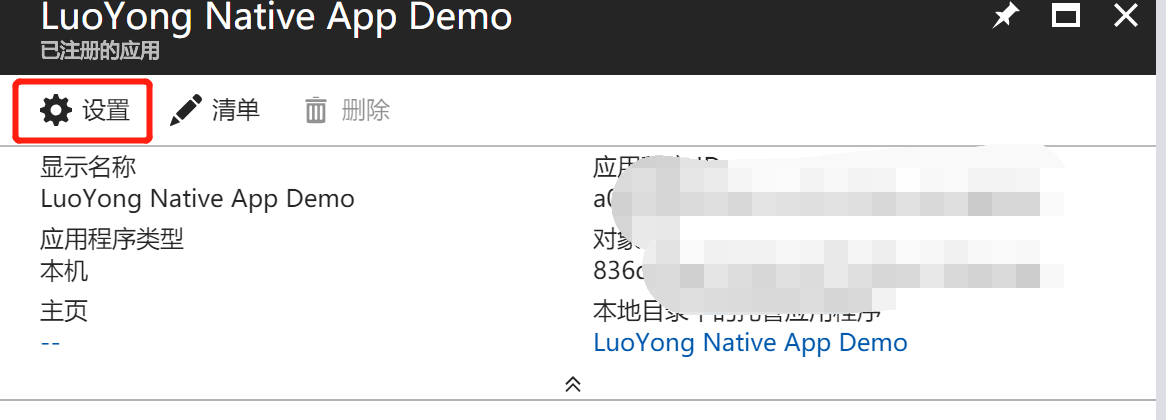
创建成功后点击 【设置】
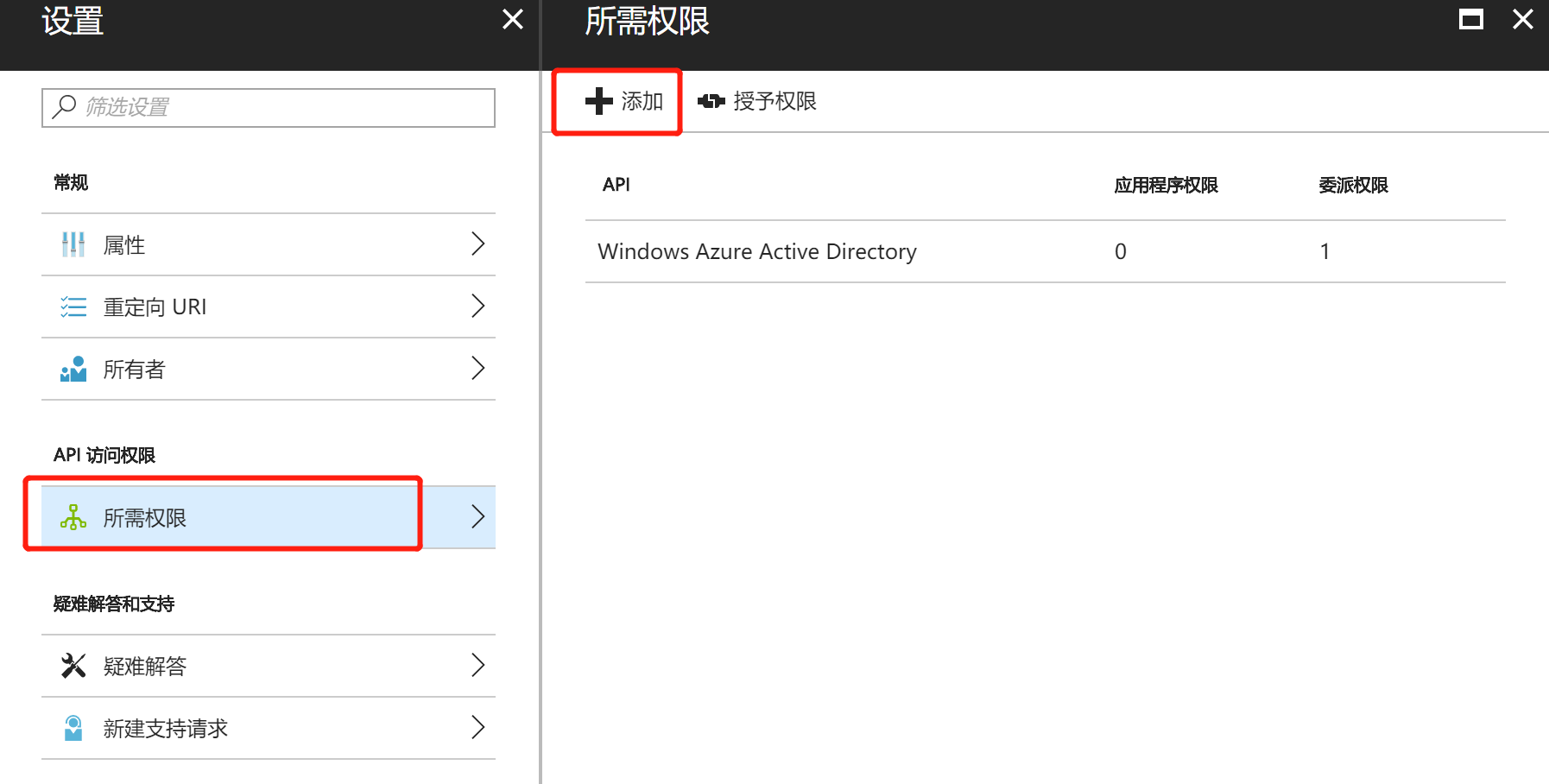
点击【所需权限】,再点击 【添加】
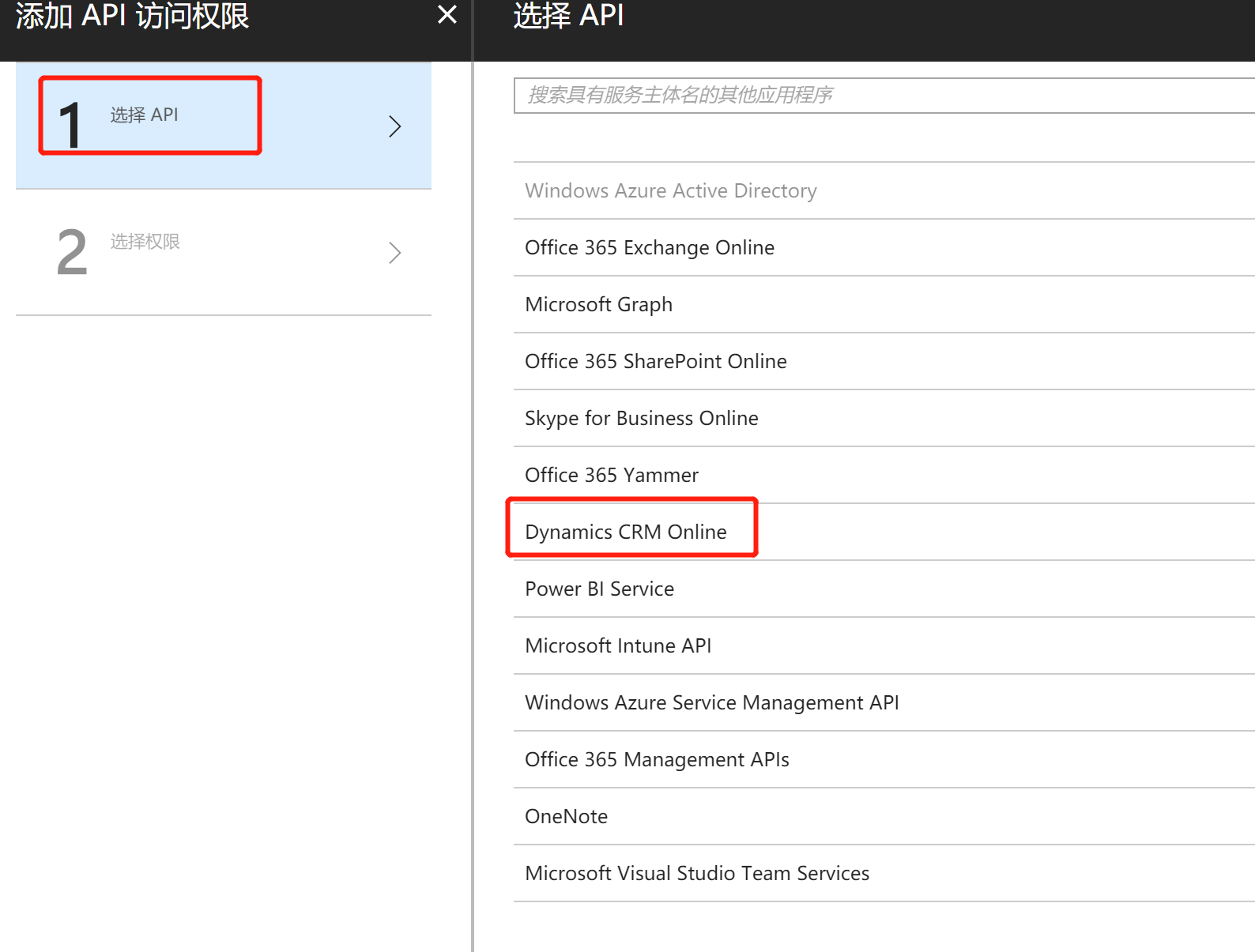
第一步【选择API】,选择 【Dynamics CRM Online】,
第二步【选择权限】,只有 Access Dynamics 365 as organization users 一个可选,选择它,要求管理员这个选项保持默认为否即可。

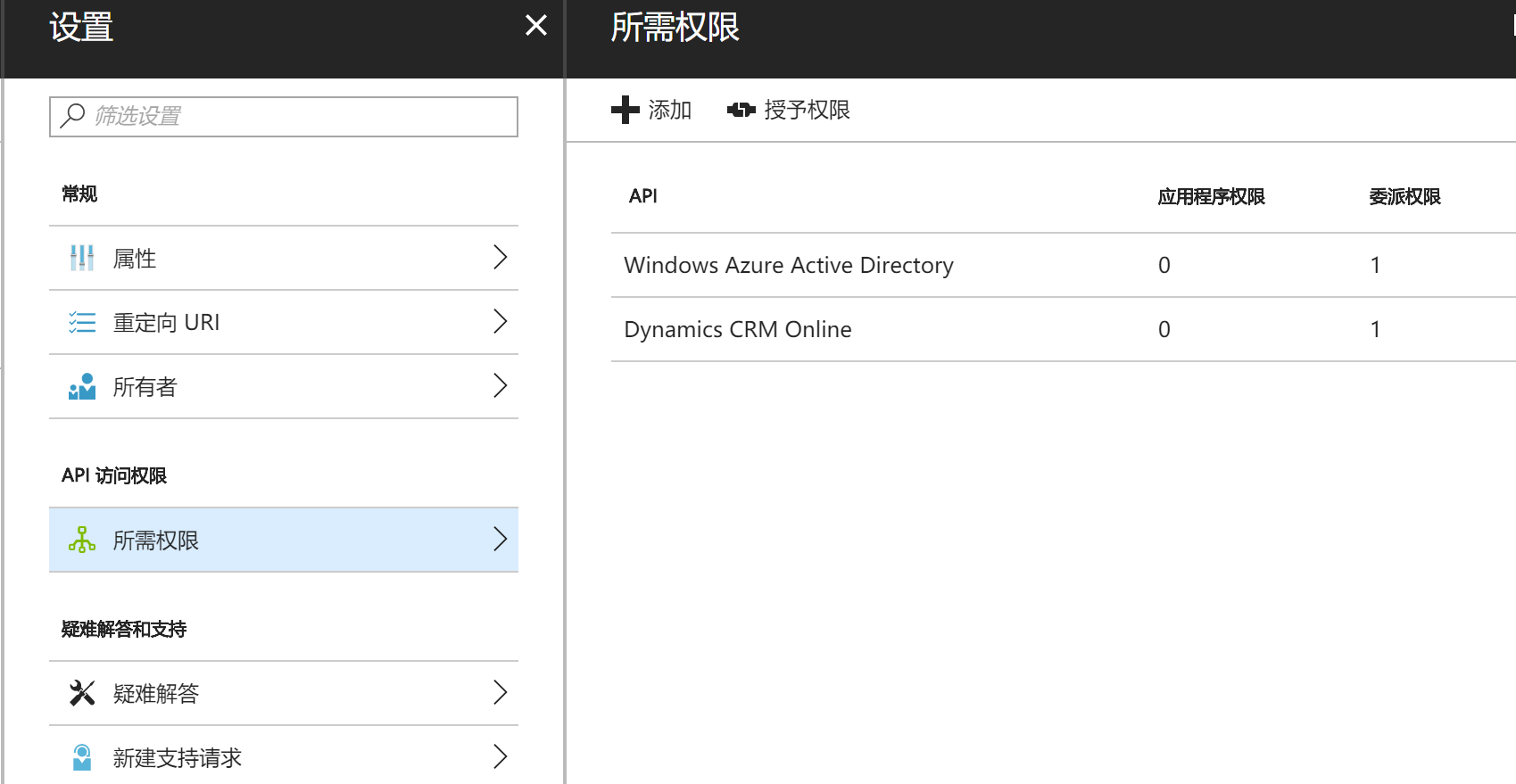
完成后的所需权限如下所示:
准备工作做完后,下面我们新建一个控制台应用程序,首先通过NuGet添加对 Microsoft.IdentityModel.Clients.ActiveDirectory 的引用,安装最新稳定版即可。

下面上代码,重要的是GetToken 和 GetData 两个方法。可以看到获取Token很简单,因为ADAL已经帮我们封装好了。大家运行我这个代码的时候要改动红色地方为自己的,这里我已经模糊了,你直接运行是跑不起来的。
using Microsoft.IdentityModel.Clients.ActiveDirectory;

using System;

using System.Net.Http;

using System.Net.Http.Headers;

using static System.Console;

namespace UsingWebAPI

{

    class Program

    {

        /// <summary>

        /// Holds the Authentication context based on the Authentication URL

        /// </summary>

        static AuthenticationContext authContext;

        /// <summary>

        /// Holds the actual authentication token once after successful authentication

        /// </summary>

        static AuthenticationResult authToken;

        static string apiUrl = "https://luoyongdemo.api.crm5.dynamics.com/api/data";

        /// <summary>

        /// Client ID or Application ID of the App registration in Azure

        /// </summary>

        static string clientId = "892F3A98-AA7C-4433-AE88-933A1401320F";

        /// <summary>

        /// The Redirect URL which we defined during the App Registration

        /// </summary>

        static string redirectUrl = "http://localhost/callback";

        static string userId = "username@sugege.onmicrosoft.com";

        static string password = "password";

        static void Main(string[] args)

        {

            GetToken();

            ReadLine();

        }

        internal static async void GetToken()

        {

            AuthenticationParameters ap = AuthenticationParameters.CreateFromResourceUrlAsync(new Uri(apiUrl)).Result;

            string resourceUrl = ap.Resource;

            string authorityUrl = ap.Authority;

            authContext = new AuthenticationContext(authorityUrl, false);

            UserCredential credentials =

            new UserPasswordCredential(userId, password);

            //Genertae the AuthToken by using Credentials object.

            authToken = await authContext.AcquireTokenAsync

            (resourceUrl, clientId, credentials);

            WriteLine("Got the authentication token, Getting data from Webapi !!");

            GetData(authToken.AccessToken);

        }

        internal static async void GetData(string token)

        {

            using (HttpClient httpClient = new HttpClient())

            {

                httpClient.Timeout = new TimeSpan(, , );  // 2 minutes time out period.

                // Pass the Bearer token as part of request headers.

                httpClient.DefaultRequestHeaders.Authorization =

                new AuthenticationHeaderValue("Bearer", token);

                var data = await httpClient.GetAsync("https://luoyongdemo.api.crm5.dynamics.com/api/data/v8.2/accounts?$select=name");

                if (data.StatusCode == System.Net.HttpStatusCode.OK)

                {

                    WriteLine(await data.Content.ReadAsStringAsync());

                }

                else

                {

                    WriteLine($"Some thing went wrong with the data retrieval. Error code : {data.StatusCode} ");

                }

                ReadLine();

            }

        }

    }

}
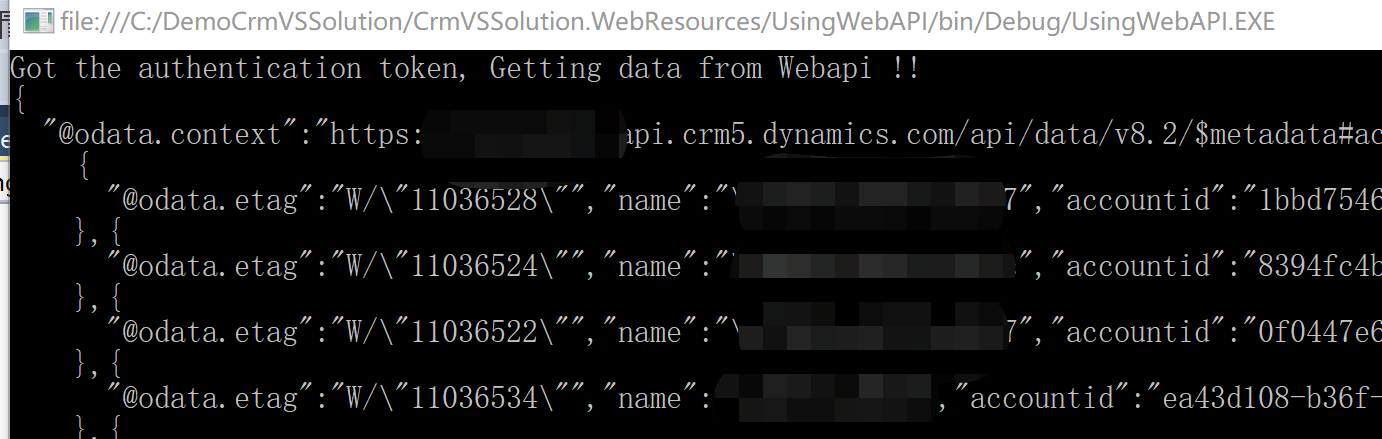
我展示一个运行成功的例子:
如果是本地部署的做了IFD的Dynamics 365,请参考这篇文章: https://www.cnblogs.com/WJvsToo/p/Dynamics365-WebAPI-ADFS-token.html
控制台程序(C#)不弹出认证窗口连接到Dynamics CRM Online的Web API的更多相关文章
- 控制台程序(C#)不弹出登录窗口连接到Dynamics CRM Online的Web API
微软动态CRM专家罗勇 ,回复331或者20190505可方便获取本文,同时可以在第一间得到我发布的最新博文信息,follow me! 我之前的文章 控制台程序(C#)不弹出认证窗口连接到Dynami ...
- ***小程序wx.getUserInfo不能弹出授权窗口后的解决方案
微信更新api后,wx.getUserInfo在开发和体验版本都不能弹出授权窗口.微信文档说明: 注意:此接口有调整,使用该接口将不再出现授权弹窗,请使用 <button open-type=& ...
- c#自动关闭 MessageBox 弹出的窗口
我们都知道,MessageBox弹出的窗口是模式窗口,模式窗口会自动阻塞父线程的.所以如果有以下代码: MessageBox.Show("内容',"标题"); 则只有关闭 ...
- QUI操作超时弹出登录窗口登录的处理方式
在使用QUI开发的业务系统中,如果长时间没操作,session过期后,再次操作系统超时会自动跳转到登陆页面,如果当前有一些操作没有保存,需要重新登录后再次填写信息,用户体验很不好! 为了避免超时后页面 ...
- pyqt5对用qt designer设计的窗体实现弹出子窗口的示例
pyqt5对用qt designer设计的窗体实现弹出子窗口的示例 脚本专栏 python 1. 用qt designer编写主窗体,窗体类型是MainWindow,空白窗口上一个按钮.并转换成mai ...
- SpringBooot- 访问时,默认有弹出认证
SpringBooot- 访问时,默认有弹出认证 springboot启动成功后,访问请求时,默认弹出窗口,需登录认证. 原因: 是由于使用了springsecurity的默认安全策略,解决方案:启动 ...
- JS弹出模态窗口下拉列表特效
效果体验:http://hovertree.com/texiao/js/20/ 或者扫描二维码在手机体验: 点击选择城市后,在弹出的层中的输入框,输入英文字母 h,会有HoverTree和Hewenq ...
- JS设置弹出小窗口。
经常上网的朋友可能会到过这样一些网站,一进入首页立刻会弹出一个窗口,或者按一个连接或按钮弹出,通常在这个窗口里会显示一些注意事项.版权信息.警告.欢迎光顾之类的话或者作者想要特别提示的信息.其实制作这 ...
- JS 弹出模态窗口解决方案
最近在项目中使用弹出模态窗口,功能要求: (1)模态窗口选择项目 (2)支持选择返回事件处理 在IE中有showModalDialog 方法,可以很好的解决该问题,但是在Chrome中和FF中就有问题 ...
随机推荐
- Mesos源码分析(8): Mesos-Slave的初始化
Mesos-Slave的初始化在文件src/slave/slave.cpp里面 首先初始化资源预估器 初始化attributes 初始化hostname 初始化status ...
- MySQL常用存储引擎及如何选择
一.MySQL的存储引擎 完整的引擎说明还是看官方文档:http://dev.mysql.com/doc/refman/5.6/en/storage-engines.html 这里介绍一些主要的引擎 ...
- HTTP协议概念与特点,HTTP的状态码,HTTPS是什么?
很多人在打开网页的时候,在浏览器地址栏里都会看到http ,在Java WEB里,HTTP也是个重点内容,今天我们就来详细了解和学习HTTP . HTTP是Hyper Text Transfer P ...
- [Swift]LeetCode871. 最低加油次数 | Minimum Number of Refueling Stops
A car travels from a starting position to a destination which is target miles east of the starting p ...
- [Swift]LeetCode915.将分区数组分成不相交的间隔 | Partition Array into Disjoint Intervals
Given an array A, partition it into two (contiguous) subarrays left and right so that: Every element ...
- Python内置函数(66)——vars
英文文档: vars([object]) Return the __dict__ attribute for a module, class, instance, or any other objec ...
- VR开发相关资源
1. VRTK(StreamVR TOOLKIT):https://github.com/thestonefox/VRTK 2. StrangeIoc 专为c#和Unity写的框架 3. Frame ...
- 带着萌新看springboot源码8(spring ioc源码 完)
上一节说到实例化了所有的单实例Bean,后面还有一步遍历 12.完成容器刷新(finishRefresh();) 那个和生命周期有关的后置处理器类型是LifecycleProcessor:监听器原理我 ...
- maven-代码风格检查工具
目录 checkstyle findbugs pmd 其他 checkstyle checkstyle 用于对代码风格进行检查 checkstyle-maven插件 操作示例 mvn clean co ...
- Java开发知识之XML文档使用,解析
目录 XML文件详解 一丶XML简介 1.文档结构 2.XML中的元素(Element)或者叫做标签(Tab).属性 文本内容. 节点(Node) 3.XML语法规则 二丶XML文档解析 三丶使用XP ...