
Lab 10-2
The file for this lab is Lab10-02.exe.
Questions and Short Answers
Does this program create any files? If so, what are they?
A: The program creates the file C:\Windows System32 Mlwx486.sys. You can use procmon or another dynamic monitoring tool to see the file being created, but you cannot see the file on disk because it is hidden.
Does this program have a kernel component?
A: The program has a kernel component. It is stored in the file’s resource section, and then written to disk and loaded into the kernel as a service.
What does this program do?
A: The program is a rootkit designed to hide files. It uses SSDT hooking to overwrite the entry to
NtQueryDirectoryFile, which it uses to prevent the display of any files beginning with Mlwx (case-sensitive) in directory listings.
Detailed Analysis
Looking at the imports section of this executable, we see imports for CloseServiceHandle, CreateServiceA, OpenSCManagerA, and StartServiceA, which tell us that this program will create and start a service. Because the program also calls CreateFile and WriteFile, we know that it will write to a file at some point. We also see calls to LoadResource and SizeOfResource, which tell us that this program will do something with the resource section of Lab10-02.exe.
Recognizing that the program accesses the resource section, we use Resource Hacker to examine the resource section. There, we see that the file contains another PE header within the resource section, as shown in Figure 10-1L. This is probably another file of malicious code that Lab10-02.exe will use.
Next, we run the program and find that it creates a file and a service. Using procmon, we see that the program creates a file in C:\Windows\System32, and that it creates a service that uses that file as the executable. That file contains the kernel code that will be loaded by the OS.
We should next find the file that the program creates in order to analyze it and determine what the kernel code is doing. However, when we look in C:\Windows\System32, we find that there’s nothing there. We can see in procmon that the file is created, and there are no calls that would delete the file. Based on the facts that the file doesn’t appear but we don’t see how it was deleted and that a driver is involved, we should be suspicious that we’re dealing with a rootkit.
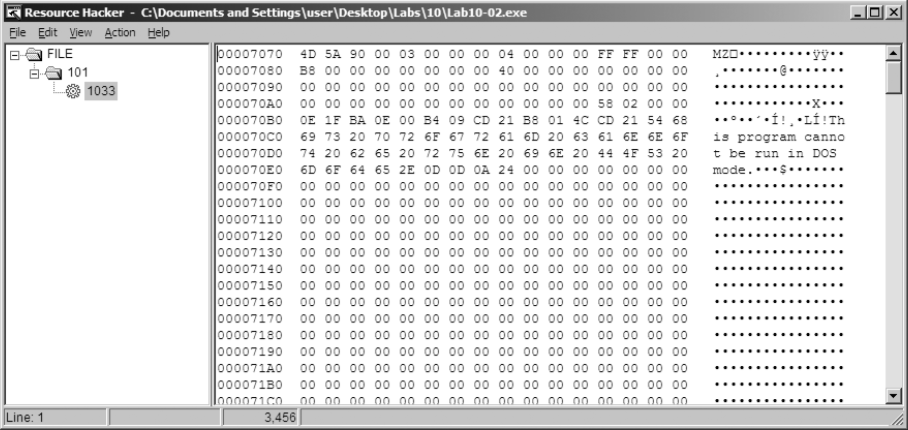
Figure 10-1L: An executable file stored in the resource section of Lab10-02.exe
Finding the Rootkit
In order to continue investigating, we want to check to see if our kernel driver is loaded. To do that, we use the sc command to check on the status of the service that is running our kernel driver, as shown in Listing 10-8L.
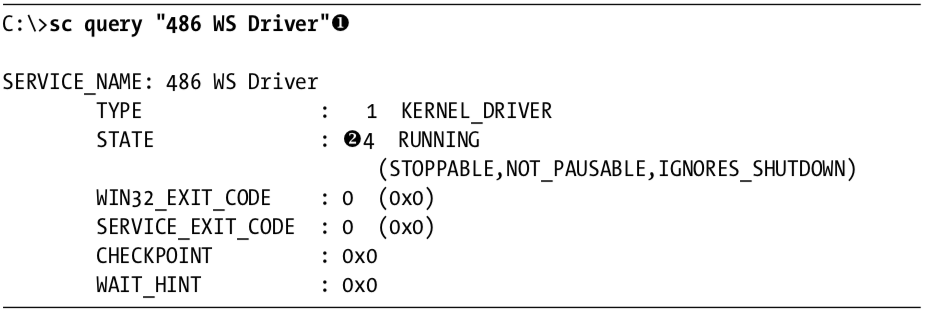
Listing 10-8L: Using the sc command to get information about a service
We query for the service name 486 WS Driver at \({\color{red}1}\), which was specified in the call to CreateServiceA. We see at \({\color{red}2}\) that the service is still running, which tells us that the kernel code is in memory. Something fishy is going on because the driver is still running, but it’s not on disk. Now, to determine what’s going on, we connect the kernel debugger to our virtual machine, and we check to see if the driver was actually loaded using the lm command. We see an entry that matches the filename that was created by Lab10-02.exe:

We are now certain that the driver is loaded into memory with the filename Mlwx486.sys, but the file does not appear on disk, suggesting that this might be a rootkit.
Next, we check the SSDT for any modified entries, as shown in Listing 10-9L.

Listing 10-9L: An excerpt from the SSDT with one entry that has been modified by a rootkit
We see that the entry at \({\color{red}1}\) is in a memory location that is clearly outside the bounds of the ntoskrnl module but within the loaded Mlwx486.sys driver. To determine which normal function is being replaced, we revert our virtual machine to before the rootkit was installed to see which function was stored at the offset into the SSDT that was overwritten. In this case, the function is NtQueryDirectoryFile, which is a versatile function that retrieves information about files and directories used by FindFirstFile and FindNextFile to traverse directory structures. This function is also used by Windows Explorer to display files and directories. If the rootkit is hooking this function, it could be hiding files, which would explain why we can’t find Mlwx486.sys. Now that we’ve found a function that is hooking the SSDT, we must analyze what that function is doing.
Examining the Hook Function
We now look more closely at the function called instead of NtQueryDirectoryFile, which we’ll call PatchFunction. The malicious PatchFunction must work with the same interface as the original function, so we first check the documentation of the original function. We find that NtQueryDirectoryFile is technically undocumented according to Microsoft, but a quick Internet search will provide all the information we need. The NtQueryDirectoryFile function is a very flexible one with a lot of different parameters that determine what will be returned.
Now, we want to look at the malicious function to see what is being done with the requests. We set a breakpoint on PatchFunction and discover that the first thing it does is call the original NtQueryDirectoryFile with all of the original parameters, as shown in Listing 10-10L.

Listing 10-10L: Assembly listing of PatchFunction
NOTE
It’s probably not completely clear from Listing 10-10L that the function being called is
NtQueryDirectoryFile. However, if we single-step over the call function, we see that it goes to another section of the file that jumps toNtQueryDirectoryFile. In IDA Pro, this call would have been labeledNtQueryDirectoryFile, but the disassembler included in WinDbg is much less sophisticated. Ideally, we would have the file to view in IDA Pro while we are debugging, but we can’t find this file because it’s hidden.
The PatchFunction checks the eighth parameter, FileInformationClass, and if it is any value other than 3, it returns NtQueryDirectoryFile’s original return value. It also checks the return value from NtQueryDirectoryFile and the value of the ninth parameter, ReturnSingleEntry. PatchFunction is looking for certain parameters. If the parameters don’t meet the criteria, then the functionality is exactly the same as the original NtQueryDirectoryFile. If the parameters do meet the criteria, PatchFunction will change the return value, which is what we’re interested in. To examine what happens during a call to PatchFunction with the correct parameters, we set a breakpoint on PatchFunction.
If we set a breakpoint on PatchFunction, it will break every time the function is called, but we’re interested in only some of the function calls. This is the perfect time to use a conditional breakpoint so that the breakpoint is hit only when the parameters to PatchFunction match our criteria. We set a breakpoint on PatchFunction, but the breakpoint will be hit only if the value of ReturnSingleEntry is 0, as follows:
kd> bp f7c4d486 ".if dwo(esp+0x24)==0 {} .else {gc}"NOTE
If you have Windows Explorer open in a directory, you might see this breakpoint hit over and over again in different threads, which could be annoying while you’re trying to analyze the function. To make it easier to analyze, you should close all of your Windows Explorer windows and use the
dircommand at a command line to trigger the breakpoint.
Once the code filters out interesting calls, we see another function stored at offset 0xf7c4d590. Although it isn’t automatically labeled by WinDbg, we can determine that it is RtlCompareMemory by looking at the disassembly or stepping into the function call. The code in Listing 10-11L shows the call to RtlCompareMemory at \({ \color {red} 1 }\).
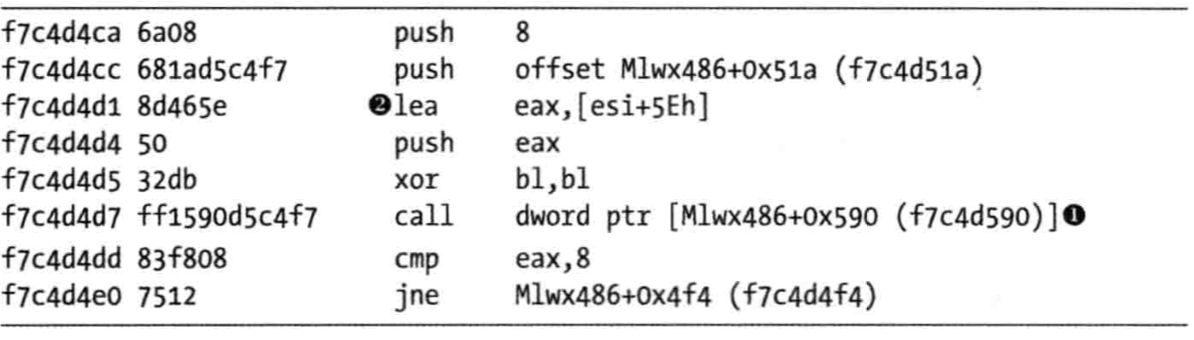
Listing 10-11L: Comparison of the filename to determine whether the rootkit will modify the returned information from NtQueryDirectoryFile
We can now see what PatchFunction is comparing. As shown in Listing 10-11L, the first parameter to RtlCompareMemory is eax, which stores the offset at esi+5eh at \({ \color {red} 2 }\), which is the offset to a filename. Earlier in our disassembly, we saw that esi was FileInformation, which contains the information filled in by NtQueryDirectoryFile. Examining the documentation for NtQueryDirectoryFile, we see that this is a FILE_BOTH_DIR_INFORMATION structure, and that an offset of 0x5E is where the filename is stored as a wide character string. (We could also use WinDbg to tell us what is stored there.)
To see what is stored at location esi+5eh, we use the db command, as shown in Listing 10-12L. This reveals that the filename is Installer.h.

Listing 10-12L: Examining the first argument to RtlCompareMemory
The other operand of the comparison is the fixed location f7c4d51a, and we can use the db command to view that as well. Listing 10-13L shows that the second parameter to RtlCompareMemory stores the letters Mlwx, which reminds us of the driver Mlwx486.sys.

Listing 10-13L: Examining the second argument to RtlCompareMemory
The call to RtlCompareMemory specifies a size of 8 bytes, which represents four characters in wide character strings. The code is comparing every file to see if it starts with the four characters Mlwx. We now have a pretty good idea that this driver is hiding files that begin with Mlwx.
Hiding Files
Having discovered which filenames PatchFunction will operate on, we analyze how it will change the return values of NtQueryDirectoryFile. Examining the documentation for NtQueryDirectoryFile, we see the FileInformation structure with a series of FILE_BOTH_DIR_INFORMATION structures. The first field in the FILE_BOTH_DIR_INFORMATION structure is the offset that points to the next FILE_BOTH_DIR_INFORMATION. As shown in Figure 10-2L, PatchFunction manipulates this field to hide certain files from the directory listing by moving the offset forward to point to the next entry if the current entry has a filename beginning with Mlwx.
Figure 10-2L shows what the return value of NtQueryDirectoryFile looks like for a directory that contains three files. There is one FILE_BOTH_DIR_INFORMATION structure for each file. Normally, the first structure would point to the second, and the second would point to the third, but the rootkit has modified the structure so that the first structure points to the third, thereby hiding the middle structure. This trick ensures that any files that begin with Mlwx are skipped and hidden from directory listings.
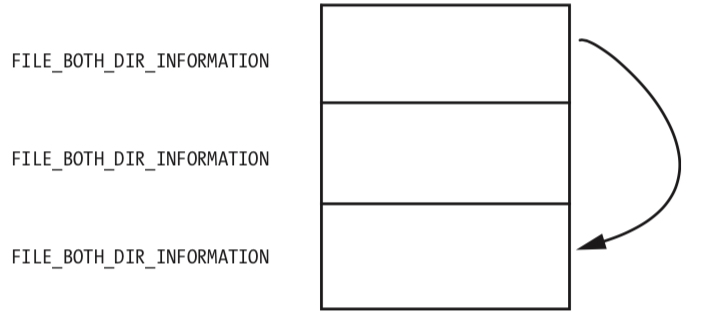
Figure 10-2L: A series of FILE_BOTH_DIR_INFORMATION structures being modified so that the middle structure is hidden
Recovering the Hidden File
Having identified the program that is hiding files, we can try to obtain the original file used by the driver in order to perform additional analysis. There are several ways to do this:
- Disable the service that starts the driver and reboot. When you reboot, the code won’t be running and the file won’t be hidden.
- Extract the file from the resource section of the executable file that installed it.
- Access the file even though it’s not available in the directory listing. The hook to
NtQueryDirectoryFileprevents the file from being shown in a directory listing, but the file still exists. For example, you could copy the file using the DOS commandcopy Mlwx486.sys NewFilename.sys. The NewFilename.sys file would not be hidden.
All of these options are simple enough, but the first is the best because it disables the driver. With the driver disabled, you should first search your system for files beginning with Mlwx in case there are other files being hidden by the Mlwx486.sys driver. (There are none in this case.)
Opening Mlwx486.sys in IDA Pro, we see that it is very small, so we should analyze all of it to make sure that the driver isn’t doing anything else that we’re not aware of. We see that the DriverEntry routine calls RtlInitUnicodeString with KeServiceDescriptorTable and NtQueryDirectoryFile, and then calls MmGetSystemRoutineAddress to find the offsets for those two addresses. It next looks for the entry in the SSDT for NtQueryDirectoryFile and overwrites that entry with the address of the PatchFunction. It doesn’t create a device, and it doesn’t add any function handlers to the driver object.
Preference
PRACTICAL MALWARE ANALYSIS: KERNEL DEBUGGING WITH WINDBG (LAB 10-02)
Lab 10-2的更多相关文章
- RH033读书笔记(9)-Lab 10 Understanding the Configuration Tools
Lab 10 Understanding the Configuration Tools Sequence 1: Configuring the Network with system-config- ...
- RH133读书笔记(10)-Lab 10 Exploring Virtualization
Lab 10 Exploring Virtualization Goal: To explore the Xen virtualization environment and the creation ...
- 7 天玩转 ASP.NET MVC — 第 3 天
目录 第 1 天 第 2 天 第 3 天 第 4 天 第 5 天 第 6 天 第 7 天 0. 前言 我们假定你在开始学习时已经阅读了前两天的学习内容.在第 2 天我们完成了关于显示 Employee ...
- 网络编程:基于C语言的简易代理服务器实现(proxylab)
本文记录了一个基于c socket的简易代理服务器的实现.(CS:APP lab 10 proxy lab) 本代理服务器支持keep-alive连接,将访问记录保存在log文件. Github: h ...
- vmware目录2
http://www.globalknowledge.com/training/course.asp?pageid=9&courseid=17880&country=United+St ...
- 很好的vmware目录
http://www.globalknowledge.com/training/course.asp?pageid=9&courseid=18023&country=United+St ...
- python迭代器生成器
1.生成器和迭代器.含有yield的特殊函数为生成器.可以被for循环的称之为可以迭代的.而可以通过_next()_调用,并且可以不断返回值的称之为迭代器 2.yield简单的生成器 #迭代器简单的使 ...
- Cygwin Run in the Windows(Simulation of UNIX)
Preface Environment Cygwin Run in the Windows(Simulation of UNIX) Resource Cygwin Install:http://cyg ...
- Ionic Cordova 环境配置window
1.安装java jdk http://www.oracle.com/technetwork/java/javase/downloads/jdk8-downloads-2133151.html 2.安 ...
- Java标签学习
今天早上看Java编程思想第四章控制执行流程,本来很简单的一些东西,但是突然看到了goto发现自己以前还真的没怎么用过,不过Java中对goto作为保留关键字,而是提供了一个叫标签的东西,我们一起来看 ...
随机推荐
- Mybatis下的sql注入
以前只知道mybatis框架下,order by后面接的是列名是不能用#{},这样不起效果,只能用${},这样的话就可能产生sql注入.后来发现其实还有另外两种情况也是类似的: 1.order by ...
- HDFS组件性能调优:数据平衡
生产系统中什么情况下会添加一个节点呢? 1 增加存储能力 disk 2 增加计算能力 cpu mem 如果增加是的是存储能力,说明存储已接近饱和或者说过段时间就会没有剩余的空间给作业来用.新加的节点存 ...
- sersync客户端搭建及配置
首先需要自行下载sersync包,地址如下: 谷歌项目地址:https://code.google.com/archive/p/sersync/ 64位下载地址:https://storage.goo ...
- vue的计算属性computed和监听器watch
<template> <div> this is A.vue <br> <!--计算属性--> <label for="msg" ...
- 微信小程序中的rpx与移动设备物理像素
如下图: pt也称逻辑像素点,px物理像素点,1pt等于2px或者3px或更多; iphone6下面0.5pt=1px=1rpx; 使用rpx,小程序在不同设备分辨率下自行转换: PPI=物理像素开根 ...
- Json常用序列化工具包大比拼
一.前言 Json已成为计算机编程中最常用的数据传输和存储格式之一,所以对Json的序列化和反序列化工具的选择也是互联网系统中比较重要的环节,尤其在高并发下的执行效率,可能会直接影响系统的吞吐率.本文 ...
- jdk5升8问题记录-Spring2升4
Spring2.x升4.x Hibernate3.x升5.0 jdbcOperations.queryForInt 替换为 queryForObject(sql, parameters, Intege ...
- 在windows+eclipse+git遇到的未修改文件被标记为已修改的问题
最近遇到2个具体的问题: 1.我们有个工程里面有几个外部jar包,这几个jar包经常会更新,更新的时候如果是在eclipse中执行的,由于windows文件机制,所以会报错无法覆盖这几个jar包.虽然 ...
- IP通信基础学习第七周(下)
H3C的配置指令包括:基本配置,查看指令,接口配置. 基本配置包括:查看可用指令:进入系统视图,全局配置模式:给设备命名:退回上一层模式:直接退回到用户模式. 查看指令包括:显示设备系统版本信息:显示 ...
- 996.icu,不加班的程序员有前途吗?
一.有没有不加班的程序员? 有,我就是. 我目前工作与一家500强外企(欧美),职称为高级软件开发专家. 我在这家公司(500强外企)已经服务了10年,所有加班次数合起来不超过10天,最近3年则一次都 ...