
【转】WPF 单选的Checkbox
今天同事要在DataGrid里用单选的Checkbox,我感觉很多余,因为正常DataGrid就可以单选,为什么还要加一列Checkbox,但是人家要求再那里,我就告诉他,可以用RadioButton,然后写个Checkbox的样式就可以了。
因为本人不太会写样式,因此在网上搜到了前辈的一篇帖子,拿来应用,效果着实不错,感谢法的空间大神
RadioButton页面的XAML代码
<RadioButton x:Class="CheckBoxRadioButton.SingleCheckBox"

             xmlns="http://schemas.microsoft.com/winfx/2006/xaml/presentation"

             xmlns:x="http://schemas.microsoft.com/winfx/2006/xaml"

             xmlns:mc="http://schemas.openxmlformats.org/markup-compatibility/2006"

             xmlns:d="http://schemas.microsoft.com/expression/blend/2008"

             mc:Ignorable="d" Style="{DynamicResource SingleCheckBox}" Click="RadioButton_Click_1" Unchecked="RadioButton_Unchecked_1">

        <RadioButton.Resources>

            <Style x:Key="RadioButtonFocusVisual">

                <Setter Property="Control.Template">

                    <Setter.Value>

                        <ControlTemplate>

                            <Border>

                                <Rectangle

            Margin="15,0,0,0"

            StrokeThickness="1"

            Stroke="#60000000"

            StrokeDashArray="1 2"/>

                            </Border>

                        </ControlTemplate>

                    </Setter.Value>

                </Setter>

            </Style>

            <SolidColorBrush x:Key="DisabledForegroundBrush" Color="#888" />

            <SolidColorBrush x:Key="DisabledBorderBrush" Color="#AAA" />

            <SolidColorBrush x:Key="DisabledBackgroundBrush" Color="#EEE" />

            <SolidColorBrush x:Key="Normalborderbrush" Color="#5d7fad" />

            <Style x:Key="SingleCheckBox"  TargetType="{x:Type RadioButton}">

                <Setter Property="GroupName" Value="Single"/>

                <Setter Property="SnapsToDevicePixels" Value="true"/>

                <Setter Property="OverridesDefaultStyle" Value="true"/>

                <Setter Property="Foreground" Value="#071f3b"/>

                <Setter Property="FontFamily" Value="Arial"></Setter>

                <Setter Property="FontSize" Value="14"></Setter>

                <Setter Property="FocusVisualStyle"    Value="{StaticResource RadioButtonFocusVisual}"/>

                <Setter Property="Template">

                    <Setter.Value>

                        <ControlTemplate TargetType="{x:Type RadioButton}">

                            <BulletDecorator Background="Transparent">

                                <BulletDecorator.Bullet>

                                    <Border x:Name="Border"  Width="20" Height="20" CornerRadius="4" Background="#ffffff" BorderThickness="1" BorderBrush="{StaticResource Normalborderbrush}">

                                        <Path Width="14" Height="11" Margin="5,2,0,0" x:Name="CheckMark" SnapsToDevicePixels="False" Stroke="#173e78" StrokeThickness="2" Data="M 0 5 L 3 10 10 0" />

                                    </Border>

                                </BulletDecorator.Bullet>

                                <ContentPresenter

            Margin="4,0,0,0"

            VerticalAlignment="Center"

            HorizontalAlignment="Left"

            RecognizesAccessKey="True"/>

                            </BulletDecorator>

                            <ControlTemplate.Triggers>

                                <Trigger Property="IsChecked" Value="false">

                                    <Setter TargetName="CheckMark" Property="Visibility" Value="Collapsed"/>

                                </Trigger>

                                <Trigger Property="IsChecked" Value="{x:Null}">

                                    <Setter TargetName="CheckMark" Property="Data" Value="M 0 7 L 7 0" />

                                </Trigger>

                                <Trigger Property="IsMouseOver" Value="true">

                                    <Setter TargetName="Border" Property="Background" Value="#ffffff" />

                                </Trigger>

                                <Trigger Property="IsPressed" Value="true">

                                    <Setter TargetName="Border" Property="Background" Value="#ffffff" />

                                </Trigger>

                                <Trigger Property="IsEnabled" Value="false">

                                    <Setter TargetName="Border" Property="Background" Value="{StaticResource DisabledBackgroundBrush}" />

                                    <Setter TargetName="Border" Property="BorderBrush" Value="{StaticResource DisabledBorderBrush}" />

                                    <Setter Property="Foreground" Value="{StaticResource DisabledForegroundBrush}"/>

                                </Trigger>

                            </ControlTemplate.Triggers>

                        </ControlTemplate>

                    </Setter.Value>

                </Setter>

            </Style>

        </RadioButton.Resources>

    </RadioButton>
RadioButton页面的CS代码
using System;

using System.Collections.Generic;

using System.Linq;

using System.Text;

using System.Threading.Tasks;

using System.Windows;

using System.Windows.Controls;

using System.Windows.Data;

using System.Windows.Documents;

using System.Windows.Input;

using System.Windows.Media;

using System.Windows.Media.Imaging;

using System.Windows.Navigation;

using System.Windows.Shapes;

namespace CheckBoxRadioButton

{

    /// <summary>

    /// SingleCheckBox.xaml 的交互逻辑

    /// </summary>

    public partial class SingleCheckBox : RadioButton

    {

        public SingleCheckBox()

        {

            InitializeComponent();

        }

        private bool hasCheck;

        public bool HasCheck

        {

            get { return hasCheck; }

            set { hasCheck = value; }

        }

        private void RadioButton_Click_1(object sender, RoutedEventArgs e)

        {

            if (this.HasCheck == false)

            {

                this.HasCheck = true;

                this.IsChecked = true;

            }

            else

            {

                this.HasCheck = false;

                this.IsChecked = false;

            }

        }

        private void RadioButton_Unchecked_1(object sender, RoutedEventArgs e)

        {

            this.HasCheck = false;

        }

    }

}
主页面调用
<Window x:Class="CheckBoxRadioButton.MainWindow"

        xmlns="http://schemas.microsoft.com/winfx/2006/xaml/presentation"

        xmlns:x="http://schemas.microsoft.com/winfx/2006/xaml"

        xmlns:local="clr-namespace:CheckBoxRadioButton"

        Title="MainWindow" Height="350" Width="525">

    <Grid>

        <StackPanel Orientation="Vertical">

            <local:SingleCheckBox Content="我是一"/>

            <local:SingleCheckBox Content="我是二"/>

        </StackPanel>

    </Grid>

</Window>
效果
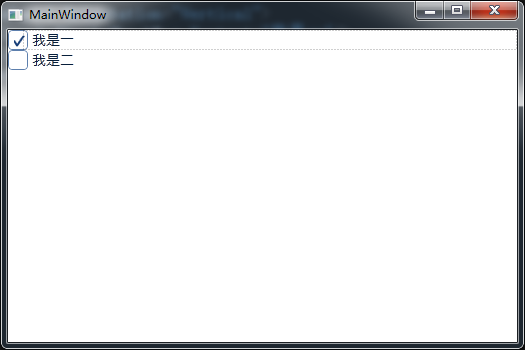
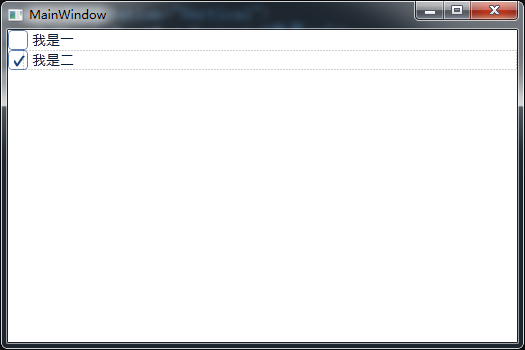
【转】WPF 单选的Checkbox的更多相关文章
- WPF:定制Checkbox样式,让“正确”绿得好看,让“错误”红的显眼
WPF提供了样式.模板.触发器.状态管理.矢量形状等方式,让我们不需要背景图片,也可以轻松定制控件的风格样式.下面是笔者针对Checkbox进行的样式定制,让“正确”绿得好看,让“错误”红的显眼. ...
- WPF中的CheckBox的_ (underscore / 下划线)丢失
今天在项目中遇到check box的Content的内容缺少'_', 原因是WPF的ContentPresenter默认会把'_'作为加速键的转义字符. 比方CheckBox的content为&qu ...
- radio(单选框)/checkbox(复选框) 美化
由于某种原因,可能需要对单选框(radio)或复选框(checkbox)进行美化,那么直接修改样式是行不通,要实现就需要添加js,以下js依赖于jquery radio.js: function ra ...
- 【WPF】一组CheckBox的全选/全不选功能
需求:给一组CheckBox做一个全选/全不选的按钮. 思路:CheckBox不像RadioButton那样拥有GroupName属性来分组,于是我想的方法是将这组CheckBox放到一个布局容器中, ...
- WPF listbox中Checkbox横向排列
<ListBox Height="220" Margin="0" ItemsSource="{Binding RightCollection}& ...
- RadioButton与CheckBox
笔者长期从事于数据库的开发,算了,不提当年了,因为一直用的是小语种(PowerBuilder),还是来说说这两个最常见的控件吧! RadioButton(单选)和CheckBox(多选) 先来看看继承 ...
- WPF点滴
1 设置窗体的最大化,而且无边框 <Style x:Key="WindowsStyle" TargetType="Window"> <Sett ...
- WPF Template模版之DataTemplate与ControlTemplate【一】
WPF Template模版之DataTemplate与ControlTemplate[一] 标签: Wpf模版 2015-04-19 11:52 510人阅读 评论(0) 收藏 举报 分类: -- ...
- WPF模板(一)详细介绍
本次随笔来源于电子书,人家的讲解很好,我就不画蛇添足了. 图形用户界面应用程序较之控制台界面应用程序最大的好处就是界面友好.数据显示直观.CUI程序中数据只能以文本的形式线性显示,GUI程序则允许数据 ...
随机推荐
- Ubuntu 树莓派2b交叉编译环境
在一个平台上生成另一个平台上的可执行代码.为什么要大费周折的进行交叉编译呢?一句话:不得已而为之.有时是因为目的平台上不允许或不能够安装所需要的编译器,而又需要这个编译器的某些特征:有时是因为目的平台 ...
- BZOJ 2048 题解
2048: [2009国家集训队]书堆 Time Limit: 10 Sec Memory Limit: 259 MBSubmit: 1076 Solved: 499[Submit][Status ...
- Java 应该跨四个平台
编程语言从属于操作系统,要统一,就要在根本处统一,要统一的是操作系统,而不是编程语言.你认为是苹果决定苹果树,还是苹果树决定苹果? 编程语言跨操作系统是错误的道路,你见过苹果长在桔子树上的吗?苹果长得 ...
- Jsonp原理就是这么简单
原理就是:包裹数据的js数据文件,自动执行,找到目标函数,通过传参,把数据注入进去. 当你打开本篇博文,证明你已经大体知道了Jsonp的作用了. 但如果需要我介绍一下,我也可以简单介绍: 简单说,就是 ...
- arm,iptables: No chain/target/match by that name.
最近由于项目需要,需要打开防火墙功能. 公司有 arm linux 3.0x86 linux 3.2x86 linux 2.4 的三个嵌入式.都需要打开防火墙功能. 执行“whereis iptabl ...
- Flex DataGrid可编辑对象实现Enter跳转
来源:http://blog.sina.com.cn/s/blog_5ed17a730100vrja.html 在Flex DataGrid中实现点击Enter键可编辑对象跳转<?xml ver ...
- About_全在里面
分享·地址:http://www.itxueyuan.org/view/6254.html
- Spring MVC篇一、搭建Spring MVC框架
本项目旨在搭建一个简单的Spring MVC框架,了解Spring MVC的基础配置等内容. 一.项目结构 本项目使用idea intellij创建,配合maven管理.整体的目录结构如图: 其中ja ...
- 输入/输出系统的四种不同工作方式对CPU利用率比较
程序控制工作方式:输入/输出完全由CPU控制,整个I/O过程中CPU必须等待其完成,因此对CPU的能力限制很大,利用率较低 程序中断工作方式:CPU不再定期查询I/O系统状态,而是当需要I/O处理时再 ...
- HttpFox
HttpFox是Firefox的插件,可以用于HTTP分析. https://addons.mozilla.org/en-US/firefox/addon/httpfox/ 安装 1. 打开F ...