
编写who命令
第一个版本:
/* who1.c - a first version of the who program* open, read UTMP file, and show results.*/#include <stdio.h>#include <utmp.h>#include <fcntl.h>#include <utmp.h>#include <stdlib.h>#include <unistd.h>#define SHOWHOST /* include remote machine on output */void show_info( struct utmp *utbufp );int main(int argc, char *argv[]){struct utmp current_record; /* read info into here */int utmpfd; /* read from this file descriptor */int reclen = sizeof(current_record);if ( (utmpfd = open(UTMP_FILE, O_RDONLY)) == -1 ){perror( UTMP_FILE ); /* UTMP_FILE is in utmp.h */exit(1);}while( read(utmpfd, ¤t_record, reclen) == reclen){show_info(¤t_record);}close(utmpfd);return 0;}/* show_info()* displays contents of the utmp struct in human readable form.* *note* these sizes should not be hardwird.*/void show_info( struct utmp *utbufp ){printf("%-8.8s", utbufp->ut_name); /* the logname */printf("\t");printf("%-8.8s", utbufp->ut_line); /* the tty */printf("\t");printf("%-10ld", utbufp->ut_time); /* login time */printf("\t");#ifdef SHOWHOSTprintf("(%s)", utbufp->ut_host); /* the host */#endifprintf("\n");}
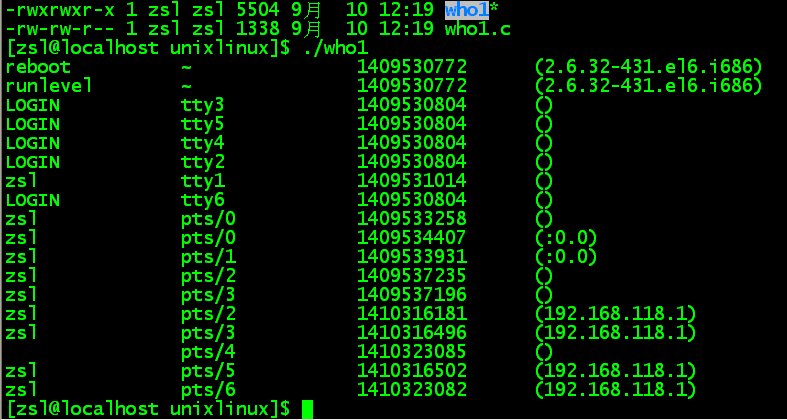
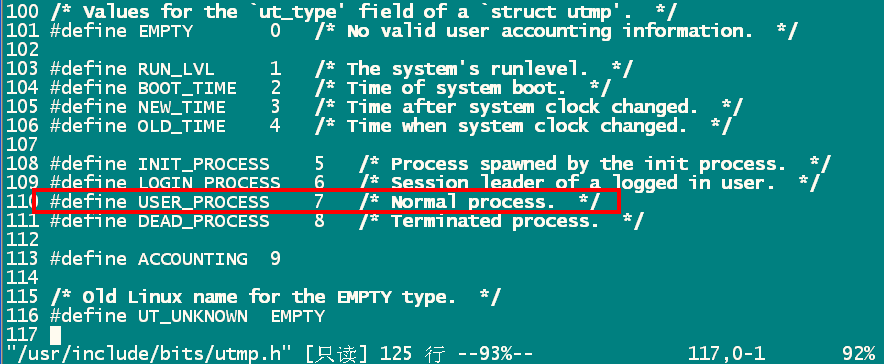

char* ctime(const time_t *timep)
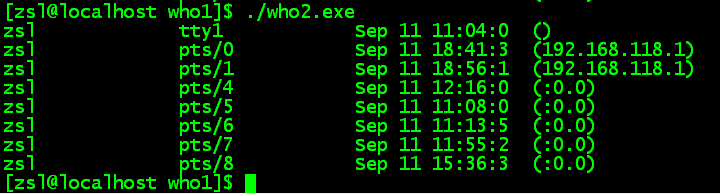
printf("%12.12s",ctime(&t)+4);
/* who1.c - a first version of the who program* open, read UTMP file, and show results.*/#include <stdio.h>#include <utmp.h>#include <fcntl.h>#include <utmp.h>#include <stdlib.h>#include <unistd.h>#define SHOWHOST /* include remote machine on output */void show_info( struct utmp *utbufp );void show_time(const time_t *timep);int main(int argc, char *argv[]){struct utmp current_record; /* read info into here */int utmpfd; /* read from this file descriptor */int reclen = sizeof(current_record);if ( (utmpfd = open(UTMP_FILE, O_RDONLY)) == -1 ){perror( UTMP_FILE ); /* UTMP_FILE is in utmp.h */exit(1);}while( read(utmpfd, ¤t_record, reclen) == reclen){show_info(¤t_record);}close(utmpfd);return 0;}/* show_time() - transform long time to human readable.*/void show_time(const time_t *timep){printf("%14.14s", ctime(timep) + 4);}/* show_info()* displays contents of the utmp struct in human readable form.* *note* these sizes should not be hardwird.*/void show_info( struct utmp *utbufp ){if (utbufp->ut_type != USER_PROCESS)return;printf("%-8.8s", utbufp->ut_name); /* the logname */printf("\t");printf("%-8.8s", utbufp->ut_line); /* the tty */printf("\t");//printf("%-10ld", utbufp->ut_time); /* login time */show_time(&(utbufp->ut_time));printf("\t");#ifdef SHOWHOSTprintf("(%s)", utbufp->ut_host); /* the host */#endifprintf("\n");}
编写who命令的更多相关文章
- 编写linux 命令行实用工具 shell命令
今天我想以带着问题的方法学习新的技术. 问题1: 编写一个命令 语法: command options path expressions
- Linux系统编程【3.1】——编写ls命令
ls命令简介 老规矩,直接在终端输入:man ls (有关于man命令的简介可以参考笔者前期博客:Linux系统编程[1]--编写more命令) 可以看到,ls命令的作用是显示目录中的文件名,它带有可 ...
- Linux系统编程【2】——编写who命令
学到的知识点 通过实现who命令,学到了: 1.使用man命令寻找相关信息 2.基于文件编程 3.体会到c库函数与系统调用的不同 4.加深对缓冲技术的理解 who命令的作用 who命令的使用 在控制终 ...
- 编写who命令:文件操作,缓冲区与联机帮助
最近阅读UULP(Understanding Unix/Linux Programming),按照书中介绍对Unix/Linux系统编程进行学习梳理,总结如下. 1. who命令能做什么 who命令用 ...
- 编写批处理命令来执行JAVA文件
http://baobeituping.iteye.com/blog/802543 1. JAVA工程路径结构 Project ------lib ------src ------W ...
- 让你如绅士般基于描述编写 Python 命令行工具的开源项目:docopt
作者:HelloGitHub-Prodesire HelloGitHub 的<讲解开源项目>系列,项目地址:https://github.com/HelloGitHub-Team/Arti ...
- CMakeLists.txt编写常用命令
目录 1. 设置cmake最小版本 2. 设置项目名称 3. 设置编译目标类型 4. 指定编译包含的源文件 1. 明确指明包含的源文件 2. 搜索指定目录的所有的cpp文件 3. 自定义搜索规则 4. ...
- docker Dockerfile文件的编写部分命令
镜像的构建过程:编写dockerfile文件,执行docker build 进行构建镜像,最后docker run 运行容器镜像实例. docker build -t mycentos:1.01 . ...
- Linux系统编程【1】——编写more命令
背景介绍 笔者知识背景 笔者接触Linux快一年了.理论知识方面:学习了操作系统基础知识,了解进程调度.内存分配.文件管理.磁盘I/O这些基本的概念. 实操方面:会使用Linux简单命令,在嵌入式系统 ...
- django “如何”系列2:如何编写django-admin 命令
应用可以使用manage.py注册自己的动作,例如,你可能想要为你即将发布的应用添加一个manage.py 操作.这节我们将为polls应用添加一个closepoll的命令 添加一个managemen ...
随机推荐
- c++编译常见错误原因集中
1 c++ compiler error c4430 "c++ doesn't support default int" 1.1 可能的原因之一 我用了在一个头文件中定义的宏,但是 ...
- 【Bzoj2260】【Bzoj4349】商店购物 & 最小树形图
目录 List Bzoj 2260 商店购物 Description Input Output Sample Input Sample Output Bzoj 4349 最小树形图 Descripti ...
- IDEA Spark Streaming 操作(套接字流)-----make socket数据源
import java.io.PrintWriter import java.net.ServerSocket import scala.io.Source object DStream_makeSo ...
- Centos搭建图形界面VNC
#!/bin/sh unset SESSION_MANAGER unset DBUS_SESSION_BUS_ADDRESS exec /etc/X11/xinit/xinitrc
- HTML--使用下拉列表框进行多选
下拉列表也可以进行多选操作,在<select>标签中设置multiple="multiple"属性,就可以实现多选功能,在 widows 操作系统下,进行多选时按下Ct ...
- 如何读取 Json 格式文件
Json 源文件代码: [ { "Id": "0", "Name": "书籍", "Detail": ...
- windows怎么进如debug调试
主要说一下64位Win7使用debug程序的方法 首先你要下载一个DOSBOX程序 这个程序是一个dos模拟器 这个程序的制作目的是运行经典的DOS游戏 -.- 下载地址:http://www.dos ...
- python常见的加密方式
1.前言 我们所说的加密方式都是对二进制编码的格式进行加密,对应到python中,则是我妈们的bytes. 所以当我们在Python中进行加密操作的时候,要确保我们的操作是bytes,否则就会报错. ...
- 6CSS之文本
CSS文本:文本缩进(text-indent).文本对齐(text-align).文本修饰(text-decoration).文本大小写(text-transform).字符距离(letter-spa ...
- Elasticsearch集群状态健康值处于red状态问题分析与解决(图文详解)
问题详情 我的es集群,开启后,都好久了,一直报red状态??? 问题分析 有两个分片数据好像丢了. 不知道你这数据怎么丢的. 确认下本地到底还有没有,本地要是确认没了,那数据就丢了,删除索引 ...