
FastDFS的简单使用
互联网中有海量的文件,比如电商网站有海量的图片文件,视频网站有海量的视频文件,如果使用传统的模式上传文件,肯定是不可取的。因此需要使用第三方服务器来存储图片 。
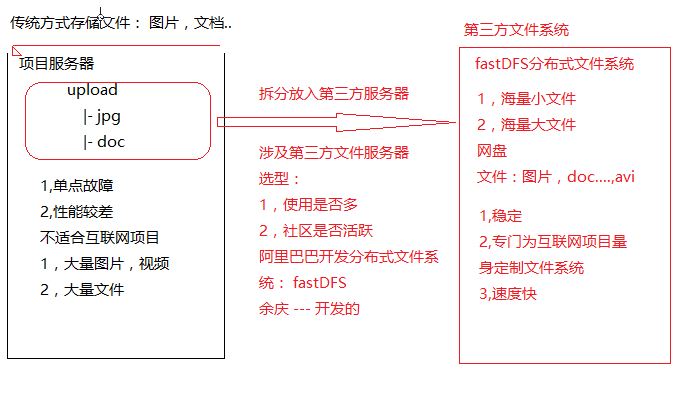
一.FastDFS简介
FastDFS 是用 c 语言编写的一款开源的分布式文件系统。FastDFS 为互联网量身定制,充分考虑了冗余备份、负载均衡、线性扩容等机制,并注重高可用、高性能等指标,使用 FastDFS很容易搭建一套高性能的文件服务器集群提供文件上传、下载等服务。
FastDFS 架构包括 Tracker server 和 Storage server。客户端请求 Tracker server 进行文件上传、下载,通过 Tracker server 调度最终由 Storage server 完成文件上传和下载。
Tracker server 作用是负载均衡和调度,通过 Tracker server 在文件上传时可以根据一些策略找到 Storage server 提供文件上传服务。可以将 tracker 称为追踪服务器或调度服务器。
Storage server 作用是文件存储,客户端上传的文件最终存储在 Storage 服务器上,Storageserver 没有实现自己的文件系统而是利用操作系统 的文件系统来管理文件。可以将storage称为存储服务器。
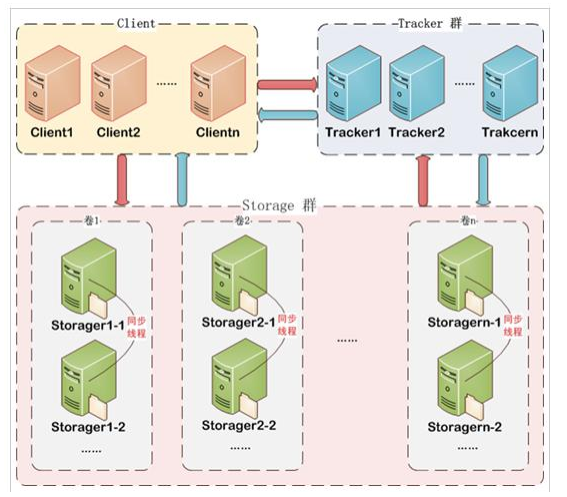
服务端两个角色:
Tracker:管理集群,tracker 也可以实现集群。每个 tracker 节点地位平等。收集 Storage 集群的状态。
Storage:实际保存文件 Storage 分为多个组,每个组之间保存的文件是不同的。每个组内部可以有多个成员, 组成员内部保存的内容是一样的,组成员的地位是一致的,没有主从的概念。
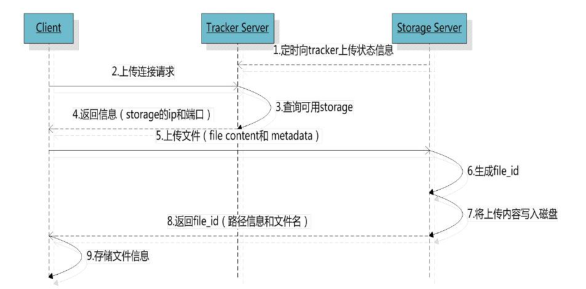
文件上传流程 :
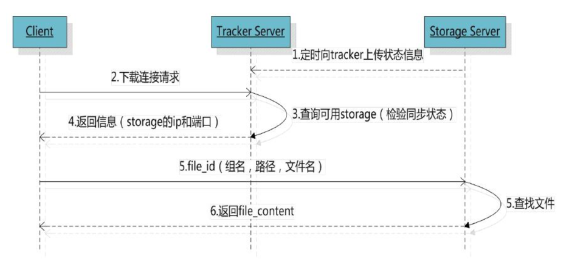
文件下载流程:
二.FastDFS的入门
使用FastDFS上传文件,我们以图片的上传为例(ssm环境)
第一步:在Spring项目中导入FastDFS的坐标
<!-- 分布式文件系统 -->

<dependency>

    <groupId>org.csource.fastdfs</groupId>

    <artifactId>fastdfs</artifactId>

    <version>1.2</version>

</dependency>

<!-- 文件上传组件 -->

<dependency>

    <groupId>commons-fileupload</groupId>

    <artifactId>commons-fileupload</artifactId>

    <version>1.3.1</version>

</dependency>
第二步:导入FastDFS的配置(resources/config/fdfs_client.conf)
# connect timeout in seconds

# default value is 30s

connect_timeout=30

# network timeout in seconds

# default value is 30s

network_timeout=60

# the base path to store log files

base_path=/home/fastdfs

# tracker_server can ocur more than once, and tracker_server format is

#  "host:port", host can be hostname or ip address

tracker_server=192.168.25.133:22122

#standard log level as syslog, case insensitive, value list:

### emerg for emergency

### alert

### crit for critical

### error

### warn for warning

### notice

### info

### debug

log_level=info

# if use connection pool

# default value is false

# since V4.05

use_connection_pool = false

# connections whose the idle time exceeds this time will be closed

# unit: second

# default value is 3600

# since V4.05

connection_pool_max_idle_time = 3600

# if load FastDFS parameters from tracker server

# since V4.05

# default value is false

load_fdfs_parameters_from_tracker=false

# if use storage ID instead of IP address

# same as tracker.conf

# valid only when load_fdfs_parameters_from_tracker is false

# default value is false

# since V4.05

use_storage_id = false

# specify storage ids filename, can use relative or absolute path

# same as tracker.conf

# valid only when load_fdfs_parameters_from_tracker is false

# since V4.05

storage_ids_filename = storage_ids.conf

#HTTP settings

http.tracker_server_port=80

#use "#include" directive to include HTTP other settiongs

##include http.conf
第三步:编写UploadController
/**

 * 图片上传的处理器

 * @author Mr.song

 * @date 2019/06/09 20:07

 */

@RestController

public class UploadController {

    // FastDFS服务器的ip地址

    private String server_url = "http://192.168.25.133/";

    @RequestMapping("/upload")

    public Result uploadFile(MultipartFile uploadFile) {

        //把file存到fastDFS上

        try {

            String fileName = uploadFile.getOriginalFilename();

            //获取文件扩展名称

            String exeName = fileName.substring(fileName.lastIndexOf(".") + 1);

            //创建上传客户端(封装的工具,见第六步)

            FastDFSClient client = new FastDFSClient("classpath:config/fdfs_client.conf");

            //完成上传,获得fileId

            String fileId = client.uploadFile(uploadFile.getBytes(), exeName);

            //拼接文件的访问路径并返回到前端页面

            String filePath = server_url + fileId;

            return new Result(true, filePath);

        } catch (Exception e) {

            e.printStackTrace();

            return new Result(false, "上传失败!");

        }

    }

}
第四步:在SpringMVC中添加文件解析器的配置
<!-- 配置文件上传解析器 -->

<bean id="multipartResolver"

      class="org.springframework.web.multipart.commons.CommonsMultipartResolver">

    <property name="defaultEncoding" value="UTF-8"></property>

    <!-- 设定文件上传的最大值 5MB, 5*1024*1024 -->

    <property name="maxUploadSize" value="5242880"></property>

</bean>
第五步:页面文件上传的方法(这里是AngularJS)
//在前端service层中

app.service("uploadService",function ($http) {

    this.uploadFile=function () {

        var formData = new FormData();//上传文件的数据模型

        //第一个参数:相当于表单的name,第二个参数需和文件上传框的id一致

        formData.append("uploadFile",file.files[0]);

        return $http({

            method:'post',

            url:'../upload.do',

            data:formData,

            //文件上传,类型必须是undefined,因为默认是text/plain(有默认值angularJS就不处理了)

            headers:{'Content-type':undefined},

            transformRequest:angular.identity //对整个表单进行二进制序列化

        })

    }

})
第六步:编写FastDFS的简单封装工具
/**

 * FastDFS使用的简单封装

 */

public class FastDFSClient {

    private TrackerClient trackerClient = null;

    private TrackerServer trackerServer = null;

    private StorageServer storageServer = null;

    private StorageClient1 storageClient = null;

    public FastDFSClient(String conf) throws Exception {

        if (conf.contains("classpath:")) {

            conf = conf.replace("classpath:", this.getClass().getResource("/").getPath());

        }

        ClientGlobal.init(conf);

        trackerClient = new TrackerClient();

        trackerServer = trackerClient.getConnection();

        storageServer = null;

        storageClient = new StorageClient1(trackerServer, storageServer);

    }

    /**

     * 上传文件方法

     * <p>Title: uploadFile</p>

     * <p>Description: </p>

     * @param fileName 文件全路径

     * @param extName 文件扩展名,不包含(.)

     * @param metas 文件扩展信息

     * @return

     * @throws Exception

     */

    public String uploadFile(String fileName, String extName, NameValuePair[] metas) throws Exception {

        String result = storageClient.upload_file1(fileName, extName, metas);

        return result;

    }

    public String uploadFile(String fileName) throws Exception {

        return uploadFile(fileName, null, null);

    }

    public String uploadFile(String fileName, String extName) throws Exception {

        return uploadFile(fileName, extName, null);

    }

    /**

     * 上传文件方法

     * <p>Title: uploadFile</p>

     * <p>Description: </p>

     * @param fileContent 文件的内容,字节数组

     * @param extName 文件扩展名

     * @param metas 文件扩展信息

     * @return

     * @throws Exception

     */

    public String uploadFile(byte[] fileContent, String extName, NameValuePair[] metas) throws Exception {

        String result = storageClient.upload_file1(fileContent, extName, metas);

        return result;

    }

    public String uploadFile(byte[] fileContent) throws Exception {

        return uploadFile(fileContent, null, null);

    }

    public String uploadFile(byte[] fileContent, String extName) throws Exception {

        return uploadFile(fileContent, extName, null);

    }

}
关注微信公众号,随时随地学习

FastDFS的简单使用的更多相关文章
- 分布式文件系统 fastDFS 安装步骤
安装 fastDFS 很简单. 先安装 libevent, 安装成功后,安装fastDFS. ./make.sh ./make.sh install 我使用一台tracker服务器 192.168. ...
- (转)分布式文件存储FastDFS(二)FastDFS安装
http://blog.csdn.net/xingjiarong/article/details/50559761 在前面的一篇中,我们分析了FastDFS的架构,知道了FastDFS是由客户端,跟踪 ...
- 23.app后端如何架设文件系统
现在app展现内容的形式多种多样的,有文字,图片,声音,视频等等,其中文件占了一个很大的比重.随着app不断运营,文件会越来越多,占用的磁盘空间也不断增大,架设一套高效的文件系统,对于整个app架构有 ...
- Hadoop小文件存储方案
原文地址:https://www.cnblogs.com/ballwql/p/8944025.html HDFS总体架构 在介绍文件存储方案之前,我觉得有必要先介绍下关于HDFS存储架构方面的一些知识 ...
- SeaweedFS上手使用指南
SeaweedFS是基于go语言开发的高可用文件存储系统,主要特性 1.成存储上亿的文件(最终受制于你的硬盘大小)2.速度快,内存占用小 上手使用比fastDFS要简单很多,自带Rest API. S ...
- 分布式文件系统 - FastDFS 简单了解一下
别问我在哪里 也许我早已不是我自己,别问我在哪里,我一直在这里. 突然不知道说些什么了... 初识 FastDFS 记得那是我刚毕业后进入的第一家公司,一个技术小白进入到当时的项目组后,在开发中上传用 ...
- dubbo 图片服务器(FastDFS) redis solr ActiveMQ等简单配置使用
一.dubbo 项目基于soa的架构,表现层和服务层是不同的工程.所以要实现商品列表查询需要两个系统之间进行通信. 1.1如何实现远程通信? 1.Webservice:效率不高基于soap协议.项目中 ...
- Nginx|构建简单的文件服务器(mac) 续-FastDFS安装(mac)|文件存储方案
目录 Nginx|构建简单的文件服务器(mac) 1 所需安装包 2 安装fastdfs-nginx-module-master 3 安装Nginx Nginx|构建简单的文件服务器(mac) 续上文 ...
- 分布式文件存储:FastDFS简单使用与原理分析
引言 FastDFS 属于分布式存储范畴,分布式文件系统 FastDFS 非常适合中小型项目,在我接手维护公司图片服务的时候开始接触到它,本篇文章目的是总结一下 FastDFS 的知识点. 用了 2 ...
随机推荐
- OpenCV实践之路——Python的安装和使用
本文由@星沉阁冰不语出品,转载请注明作者和出处. 文章链接:http://blog.csdn.net/xingchenbingbuyu/article/details/50936076 微博:http ...
- Android 中间人攻击
0x00 Android中间人攻击的思路就是劫持局域网中被攻击机器和server间的对话.被攻击机器和server表面上工作正常,实际上已经被中间人劫持.能够从一张图来明确这个过程. 受攻击主机发送的 ...
- [办公应用]让WORD自动显示到四级目录
一般情况下,word的目录默认显示到三级目录.如果需要显示到四级目录,你会怎么操作呢? 只要按下图所示,单击“插入”-“引用”-“索引和目录” 然后单击“目录”选项卡,将“显示级别”处的3改为4即可. ...
- HBase 数据迁移
最近两年负责 HBase,经常被问到一些问题, 本着吸引一些粉丝.普及一点HBase 知识.服务一点阅读人群的目的,就先从 HBase 日常使用写起,后续逐渐深入数据设计.集群规划.性能调优.内核源码 ...
- kernel: audit: printk limit exceeded
问题: 小长假的第一天早上8:18一个数据,被定时任务中的脚本漏处理: 查定时任务的日志,发现调度异常 查var messages-20171231 日志信息,排查问题. http://man7.or ...
- file结构体中private_data指针的疑惑【转】
本文转载自:http://www.cnblogs.com/pengdonglin137/p/3328984.html hi all and barry, 最近在学习字符设备驱动,不太明白private ...
- YTU 2596: 编程题B-日期格式
2596: 编程题B-日期格式 时间限制: 1 Sec 内存限制: 128 MB 提交: 981 解决: 74 题目描述 注:本题只需要提交编写的函数部分的代码即可. 将输入的日期格式 月/日/年 ...
- mac系统下如何删除银行安全插件
要分类解决了,一般safair插件都是pkg包安装的 如果:1.制作者够良心,PKG安装包中植入了删除卸载功能,那就好办了,打开当时安装的pkg包,执行删除选项 2.没良心的,装了不好删的,我目前个人 ...
- 【HDU 2196】 Computer
[题目链接] 点击打开链接 [算法] 我们知道,一棵树上离某个节点最远的节点,可能是经过它的祖先,再到那个祖先的某个孩子,或者,是它的那颗子树中,离它最远的一个节点,就不难想到以下算法 : 第一遍DF ...
- .NET MVC API返回JSON对象
方法多种,自己目前采用的是自定义返回格式的方法,不需要修改配置文件. 辅助类: public class ApiResponseHelper { public static HttpResponseM ...