
vue+VeeValidate 校验范围(部分校验,全部校验)
搜索很久,没有发现有关于vue+VeeValidate部分校验的。自己写一个。
主要是两个场景: 1. 校验范围内,所有的字段。 2. 校验全局所有字段。主要方法: 1.validate(fields, scope) 2. validateAll(fields)
场景: 遍历得到多个列表,每一个列表都可以独立保存当前列表。在保存当前列表的时候,需要校验当前列表输入框的合法性。
代码:
   <div class=" col-xs-12 col-md-6 col-lg-4" v-for="(p1,index) in carList" :key="index">

        <div class="box box-success" style="margin-top: 15px;overflow: hidden;" >

          <div class="col-xs-7" style="border-right:1px solid #eee;padding-top: 10px;">

            <label class="col-xs-12 " style="padding: 5px 0;">车牌号: <span style="font-weight: normal;word-break:break-all;">{{p1.planLicenseNo}}</span></label>

            <label class="col-xs-12" style="padding: 5px 0;;">司机:<span style="font-weight: normal;word-break:break-all;">{{p1.planDriver}}</span></label>

          </div>

          <div class="col-xs-5" style="padding-top: 10px;">

            <div class="form-group" :class="{'has-error': errors.has('licenseNo' + index, 'newsletter' + index)}">

              <label >实际车牌号 <i class="errMsg">*</i></label>

              <input type="text" class="form-control" v-model.trim="p1.licenseNo"

                     v-validate="{required: true}" :data-vv-scope="'newsletter' + index"

                     :name="'licenseNo' + index" :data-vv-as="$t('pagefield.purchase.carCode')">

              <span v-show="errors.has('licenseNo' + index, 'newsletter' + index)" class="help-block">{{ errors.first('licenseNo' + index, 'newsletter' + index) }}</span>

            </div>

            <div class="form-group" :class="{'has-error': errors.has('actualQty' + index, 'newsletter' + index)}">

              <label >实际数量(头)<i class="errMsg">*</i></label>

              <input type="text" class="form-control" v-model.trim="p1.actualQty" :data-vv-scope="'newsletter' + index"

                     v-validate="{required: true, decimal:2, min_value: 0, max_value: p1.planQty}"

                     :name="'actualQty' + index" :data-vv-as="$t('message.quantity')">

              <span v-show="errors.has('actualQty' + index, 'newsletter' + index)" class="help-block">{{ errors.first('actualQty' + index, 'newsletter' + index) }}</span>

            </div>

            <div class="form-group" :class="{'has-error': errors.has('actualWgh' + index, 'newsletter' + index)}">

              <label>总重(kg) <i class="errMsg">*</i></label>

              <input type="text" class="form-control" v-model.trim="p1.actualWgh" :data-vv-scope="'newsletter' + index"

                     v-validate="{required: true, decimal:2, min_value: 0, max_value: p1.planWgh}"

                     :name="'actualWgh' + index" :data-vv-as="$t('message.weight')">

              <span v-show="errors.has('actualWgh' + index, 'newsletter' + index)" class="help-block">{{ errors.first('actualWgh' + index, 'newsletter' + index) }}</span>

            </div>

            <div class="form-group">

              <label>过磅单</label>

              <input type="text" class="form-control" v-model.trim="p1.weightNo">

            </div>

          </div>

          <div class="col-xs-12 text-right" style="border-top: 1px solid #eee;padding: 10px 15px;">

            <button class="btn btn-warning" @click="doSave(p1, index)">保存</button>

          </div>

        </div>

      </div>
* carList: [{}, {}]
* data-vv-scope: [type='string'] 属性的值的类型是 string,表示定义了一个区域,在校验的时候,通过属性值 让validator 可以找到当前应该校验的区域。
此时通过 验证器提供的方法validate(scopeName)就可以校验当前区域了。
doSave (obj, i) {

        var _self = this

        var validateScope = 'newsletter' + i

        this.$validator.validate(validateScope + '.*').then((result) => {

          if (result) {

            //  提交数据

            _self.doSaveAfterCheck()

          }

        })

      }
/*
errors.has(field, scope) 返回一个true / false
errors.has('actualWgh' + index, 'newsletter' + index)}"  表示验证区域是 data-vv-scope = 'newsletter' + index  验证的字段是属性 name ='actualWgh' + index
first(field,scope) 返回与特定字段关联或由选择器指定的第一条错误消息,前提是作用域将查找该范围内的消息,
*/
<div class="form-group" :class="{'has-error': errors.has('actualWgh' + index, 'newsletter' + index)}">
  <label>总重(kg) <i class="errMsg">*</i></label>
  <input type="text" class="form-control" v-model.trim="p1.actualWgh" :data-vv-scope="'newsletter' + index"
         v-validate="{required: true, decimal:2, min_value: 0, max_value: p1.planWgh}"
         :name="'actualWgh' + index" :data-vv-as="$t('message.weight')">
  <span v-show="errors.has('actualWgh' + index, 'newsletter' + index)" class="help-block">{{ errors.first('actualWgh' + index, 'newsletter' + index) }}</span>
</div>

场景2 : 页面有多个校验。当保存的时候,需要全部校验。这个场景官方提供2种方法.
this.$validator.validate().then((result) => {

        if (result) {

          //  提交数据。
      //   result是一个boolean值。true 表示没有触发错误规则,false 表示页面有非法值,触发错误

          _self.doSaveAfterCheck()

        }

      })
this.$validator.validateAll().then((result) => {

        if (result) {

          //  提交数据。

          _self.doSaveAfterCheck()

        }

      })
上述两种校验全部的方法不同点在于适用场景:
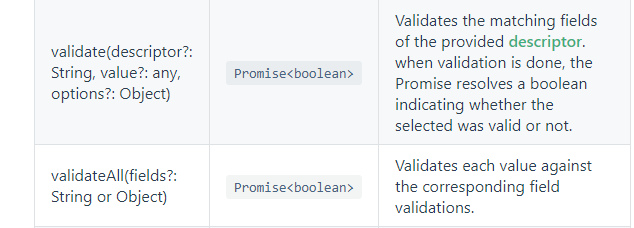
validate() 可以指定校验范围内,或者是全局的 字段。而validateAll() 只能校验全局。
官方示例:
// validate all fields.

//  校验全局范围所有字段

validator.validate(); === validateAll() 两个方法完全一样。

// validate a field that has a matching name with the provided selector.

//  校验哪个字段? field 取name的值。

validator.validate('field');

// validate a field within a scope.

// 校验 某个域内 的某个字段。

validator.validate('scope.field');

// validate all fields within this scope.

// 校验 某个域内的所有字段。   上述例子就是用的这个。   *_*

validator.validate('scope.*');

// validate all fields without a scope.

// 校验没有定义域内的 字段。适用场景: 校验场景分为两种: 定义域的,没有定义域。
//  当页面所有需要校验的字段,都定义了域,则这个方法会导致没有可校验的值,直接返回true

validator.validate('*');
vue+VeeValidate 校验范围(部分校验,全部校验)的更多相关文章
- vue 中 使用 element-ui 发送请求前 校验全部表单,报警告: [Element Warn][Form]model is required for validate to work!
WEB先生 2020-07-14 20:01:45 754 收藏 分类专栏: vue 文章标签: vue js 版权 报这种错可能有以下两种情况 1.属性绑定错误,确保绑定的是 :model ...
- 点分十进制IP校验、转换,掩码校验
/***************************************************************************** * 点分十进制IP校验.转换,掩码校验 * ...
- Struts2 对Action中所有方法进行输入校验、单个方法进行校验
index.jsp: <body> <s:fielderror /> <form action="${pageContext.request.contextPa ...
- 更加灵活的参数校验,Spring-boot自定义参数校验注解
上文我们讨论了如何使用@Min.@Max等注解进行参数校验,主要是针对基本数据类型和级联对象进行参数校验的演示,但是在实际中我们往往需要更为复杂的校验规则,比如注册用户的密码和确认密码进行校验,这个时 ...
- [Vue]vee-validate的使用——自定义校验规则及校验message
1.安装vee-validate npm install vee-validate --save 2.main.js里引用vee-validate插件 import Vue from 'vue' im ...
- vue单页面前端做非空校验
form表单 确定按钮 js部分 确定按钮的方法
- jQuery Validate 表单验证插件----在class属性中添加校验规则进行简单的校验
一.下载插件包. 网盘下载:https://yunpan.cn/cryvgGGAQ3DSW 访问密码 f224 二.jQuery表单验证插件----添加class属性形式的校验 <!DOCTY ...
- Struts2的输入校验(2)——客户端校验
Struts2的输入校验(2) --客户端校验 Struts2客户端校验的使用: (1)使用Struts2的标签生成输入页面的表单: (2)为该<s:form>元素添加validate=& ...
- Springboot 使用 JSR 303 对 Controller 控制层校验及 Service 服务层 AOP 校验,使用消息资源文件对消息国际化
导包和配置 导入 JSR 303 的包.hibernate valid 的包 <dependency> <groupId>org.hibernate.validator< ...
随机推荐
- appium学习【五】【转】appium实现屏幕向左滑动
转自http://www.cnblogs.com/testhub/p/5949668.html 前些日子写一个滑动手机页面的小脚本,看到大家给的内容都是swipe方法,这里对swipe方法做一个小介绍 ...
- 洛谷 P4009 汽车加油行驶问题 【最小费用最大流】
分层图,建k层,设(i,j,0)为点(i,j)的满油状态,全图的流量都是1,因为重复走到一个点没有意义.如果当前点是加油站,那么它向它上左的点连费用为a的边,向下右连费用为a+b的边: 否则,这个点的 ...
- (2)css的复合选择器与特性
css的复合选择器与特性 在本篇学习资料中,将深入了解css的相关概念,上一篇介绍的3种基本选择器的基础上,学习3种由基本选择器复合构成的选择器,然后再介绍css的两个重要的特性. 1.复合选择器 复 ...
- 利用动态扫描和定时器1在数码管上显示出从765432开始以1/10秒的速度往下递减 直至765398并保持此数,与此同时利用定时器0以500MS速度进行流水灯从上至下移动 ,当数码管上数减到停止时,实验板上流水灯出停止然后全部开始闪烁,3秒后(用 T0定时)流水灯全部关闭,数码管上显示出“HELLO”,到此保持住
#include <reg52.h> #include <intrins.h> #define uchar unsigned char #define uint unsigne ...
- [POI2007]石头花园SKA
Description Blue Mary是一个有名的石头收藏家.迄今为止,他把他的藏品全部放在他的宫殿的地窖中.现在,他想将他的藏品陈列在他的花园中.皇家花园是一个边长为1000000000单位的平 ...
- 题解报告:hdu 1098 Ignatius's puzzle
题目链接:http://acm.hdu.edu.cn/showproblem.php?pid=1098 题目中文是这样的: 伊格内修斯在数学上很差,他遇到了一个难题,所以他别无选择,只能上诉埃迪. 这 ...
- JSON(2)JSONObject解析Josn和创建Jsonf示例
1.解析Json /* * test.josn内容如下: { "languages":[ {"id":"1","name" ...
- JAVA面试题最全集
JAVA面试题最全集 2009-01-19 15:40 3458人阅读 评论(0) 收藏 举报 java面试ejbservletstringhashmap 一.Java基础知识1.Java有那些基 ...
- pycharm的使用小技巧111
如果你想快速敲出if __name__ == '__main__':只需你敲个main 然后回车就ok了 import和from xx模块 import *的区别是前者使用时要加模块名加点,后者可以直 ...
- Quartz~关于cron表达式要说的
每20秒执行一次