
java 使用OpenOffice文件实现预览
1.安装OpenOffice软件
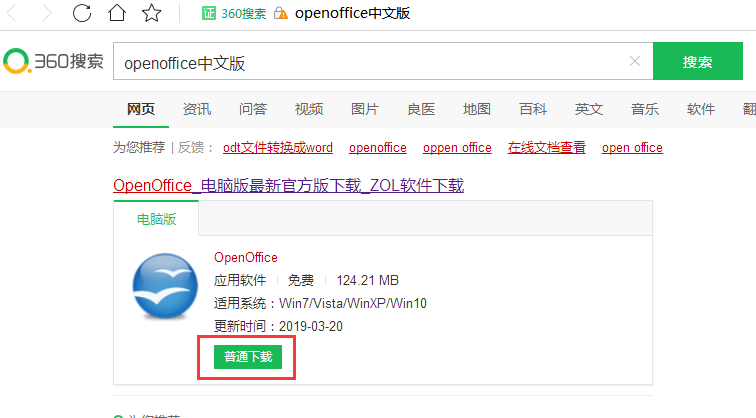
安装教程:https://jingyan.baidu.com/article/c275f6ba12c07ce33d756732.html
2.安装完成后,创建项目,pom重要的jar包
 <!-- https://mvnrepository.com/artifact/org.jodconverter/jodconverter-core -->

 <dependency>

     <groupId>org.jodconverter</groupId>

     <artifactId>jodconverter-core</artifactId>

     <version>4.0.0-RELEASE</version>

 </dependency>
3.核心代码
项目启动:
 package com.example.demo;

 import org.springframework.boot.SpringApplication;

 import org.springframework.boot.autoconfigure.SpringBootApplication;

 @SpringBootApplication

 public class DemoApplication {

     public static void main(String[] args) {

         SpringApplication.run(DemoApplication.class, args);

     }

 }
控制层代码:
 package com.example.demo;

 import com.example.util.FileUtil;

 import com.example.util.Office2PDF;

 import org.springframework.beans.factory.annotation.Value;

 import org.springframework.context.annotation.ComponentScan;

 import org.springframework.stereotype.Controller;

 import org.springframework.web.bind.annotation.PathVariable;

 import org.springframework.web.bind.annotation.RequestMapping;

 import javax.servlet.http.HttpServletResponse;

 import java.io.FileInputStream;

 import java.io.InputStream;

 import java.io.OutputStream;

 @ComponentScan

 @Controller

 @RequestMapping("/test")

 public class ReadAndDownLoad {

     //base路径

     @Value("${BASE_PATH}")

     private  String BASE_PATH ;

     /**

      *

      * @return choose页面

      */

     @RequestMapping("/choose")

     public String chooseFile(){

         return "ShowChoose";

     }

     /**

      *

      * @param res 响应对象

      * @param fileName 请求预览文件名

      * @throws Exception

      */

     @RequestMapping("/read/{fileName}")

     public void readFile(HttpServletResponse res , @PathVariable String fileName) throws Exception{

         InputStream in = null;

         OutputStream out = null;

         String filePath =  fileHandler(fileName);

         //判断是pdf还是word还是excel

         //若是pdf直接读 否则转pdf 再读  //

        try{

            if(filePath != null){

                in = new FileInputStream(filePath);

            }

            res.setContentType("application/pdf");

            out = res.getOutputStream();

            byte[] b = new byte[1024];

            int len = 0;

            while((len = in.read(b)) != -1){

                out.write(b);

            }

        }catch (Exception e){

            e.printStackTrace();

        }finally {

            if(in != null){

                in.close();

            }

            if(out != null){

                out.close();

            }

        }

     }

     /**

      * 文件处理

      * @param fileName

      * @return

      */

     public String fileHandler(String fileName){

         String fileSuffix = FileUtil.getFileSuffix(fileName);

         System.out.println(fileSuffix);

         if("pdf".equals(fileSuffix))

         {

             return BASE_PATH + fileName;

         }

         else

         {

             return Office2PDF.openOfficeToPDF(BASE_PATH + fileName).getAbsolutePath();

         }

     }

 }
文件转换核心代码:
 package com.example.util;

 import org.jodconverter.OfficeDocumentConverter;

 import org.jodconverter.office.DefaultOfficeManagerBuilder;

 import org.jodconverter.office.OfficeException;

 import org.jodconverter.office.OfficeManager;

 import java.io.File;

 import java.util.regex.Pattern;

 public  class Office2PDF {

     //文件转换pdf成功后保存的地址

     private static   String SAVE_PATH = "E:/pdfFile/";

     private Office2PDF(){}

     /**

      * 将office格式的文件转为pdf

      * @param sourceFilePath 源文件路径

      * @return

      */

     public static   File openOfficeToPDF(String sourceFilePath){

         return office2pdf(sourceFilePath);

     }

     /**

      * 将office文档转换为pdf文档

      * @param sourceFilePath 原文件路径

      * @return

      */

     public static   File office2pdf(String sourceFilePath){

         OfficeManager officeManager = null;

         try{

             if(StringUtil.isEmpty(sourceFilePath))

             {

                 //打印日志...

                 return null;

             }

             File sourceFile = new File(sourceFilePath);

             if(!sourceFile.exists())

             {

                 //打印日志...

                 return null;

             }

             String after_convert_file_path = getAfterConverFilePath(sourceFilePath);

             //启动openOffice

             officeManager = getOfficeManager();

             OfficeDocumentConverter converter = new OfficeDocumentConverter(officeManager);

             return convertFile(sourceFile,after_convert_file_path,sourceFilePath,converter);

         }catch (Exception e){

             e.printStackTrace();

             System.out.println("转换异常");

         }finally {

            if(officeManager != null){

                try {

                    officeManager.stop();

                } catch (OfficeException e) {

                    e.printStackTrace();

                }

            }

         }

         return null;

     }

     /**

      * 转换文件

      * @param sourceFile 原文件

      * @param after_convert_file_path 转换后存放位置

      * @param sourceFilePath 原文件路径

      * @param converter 转换器

      * @return

      */

     public static File convertFile(File sourceFile,

                            String after_convert_file_path,String sourceFilePath,OfficeDocumentConverter converter) throws OfficeException {

         File outputFile = new File(after_convert_file_path);

         if(!outputFile.getParentFile().exists()){

             //如果上级目录不存在也就是E:/pdfFile这个文件夹不存在则创建一个

             outputFile.getParentFile().mkdirs();

         }

             converter.convert(sourceFile,outputFile);

         return outputFile;

     }

     public static OfficeManager getOfficeManager(){

         DefaultOfficeManagerBuilder builder = new DefaultOfficeManagerBuilder();

         builder.setOfficeHome(getOfficeHome());

         OfficeManager officeManager = builder.build();

         try {

             officeManager.start();

         } catch (OfficeException e) {

             //打印日志

             System.out.println("start openOffice Fail!");

             e.printStackTrace();

         }

         return officeManager;

     }

     /**

      * 获取转换后文件存放的路径

      * @param sourceFilePath 源文件

      * @return

      */

     public static   String getAfterConverFilePath(String sourceFilePath){

         //截取源文件文件名

         String sourceFileName = sourceFilePath.substring(sourceFilePath.lastIndexOf("/") + 1);

         return SAVE_PATH + sourceFileName.replaceAll("\\."+FileUtil.getFileSuffix(sourceFileName),".pdf");

     }

     /**

      * 获取openOffice的安装目录

      * @return

      */

     public static String getOfficeHome(){

         String osName = System.getProperty("os.name");

         if(Pattern.matches("Windows.*",osName))

         {

             return "C:/Program Files (x86)/OpenOffice 4";

         }

         else if(Pattern.matches("Linux.*",osName))

         {

             return "/usr/temp";

         }

         else if (Pattern.matches("Mac.*",osName))

         {

             return "/Application/openOfficeSoft";

         }

         return null;

     }

 }
工具类:
 package com.example.util;

 public final  class FileUtil {

     private FileUtil(){}

     /**

      * 获取后缀

      * @param fileName 文件名

      * @return 后缀名

      */

     public static String getFileSuffix(String fileName){

         if(StringUtil.isEmpty(fileName) || fileName.lastIndexOf(".")<0 ){

             return "error";

         }

         return fileName.substring(fileName.lastIndexOf(".")+1);

     }

 }
 package com.example.util;

 public final class StringUtil {

     private StringUtil(){}

     public static boolean isEmpty(String target){

         return "".equals(target) || null ==target;

     }

 }
页面代码:
 <!DOCTYPE html>

 <html lang="en">

 <head>

     <meta charset="UTF-8">

     <title>文件预览</title>

 </head>

 <body>

     <p>文件预览:</p><button id="show1">点击预览</button>

     <script src="https://code.jquery.com/jquery-3.1.1.min.js"></script>

     <script>

         $("#show1").click(function(){

             window.open("http://localhost:8080/test/read/"+"qqq.ppt");

         });

     </script>

 </body>

 </html>
配置文件:
 #返回的前缀   目录对应src/main/webapp下

 spring.mvc.view.prefix=/

 #返回的后缀

 spring.mvc.view.suffix=.html

 #预览文件的地址

 BASE_PATH=C:/Users/Administrator/Desktop/
pom文件:
 <?xml version="1.0" encoding="UTF-8"?>

 <project xmlns="http://maven.apache.org/POM/4.0.0" xmlns:xsi="http://www.w3.org/2001/XMLSchema-instance"

     xsi:schemaLocation="http://maven.apache.org/POM/4.0.0 http://maven.apache.org/xsd/maven-4.0.0.xsd">

     <modelVersion>4.0.0</modelVersion>

     <groupId>com.example</groupId>

     <artifactId>demo</artifactId>

     <version>0.0.1-SNAPSHOT</version>

     <packaging>jar</packaging>

     <name>demo</name>

     <description>Demo project for Spring Boot</description>

     <parent>

         <groupId>org.springframework.boot</groupId>

         <artifactId>spring-boot-starter-parent</artifactId>

         <version>2.0.4.RELEASE</version>

         <relativePath/> <!-- lookup parent from repository -->

     </parent>

     <properties>

         <project.build.sourceEncoding>UTF-8</project.build.sourceEncoding>

         <project.reporting.outputEncoding>UTF-8</project.reporting.outputEncoding>

         <java.version>1.8</java.version>

     </properties>

     <dependencies>

         <dependency>

             <groupId>org.springframework.boot</groupId>

             <artifactId>spring-boot-starter-web</artifactId>

         </dependency>

         <dependency>

             <groupId>org.springframework.boot</groupId>

             <artifactId>spring-boot-starter-test</artifactId>

             <scope>test</scope>

         </dependency>

         <!-- https://mvnrepository.com/artifact/org.jodconverter/jodconverter-core -->

         <dependency>

             <groupId>org.jodconverter</groupId>

             <artifactId>jodconverter-core</artifactId>

             <version>4.0.0-RELEASE</version>

         </dependency>

     </dependencies>

     <build>

         <plugins>

             <plugin>

                 <groupId>org.springframework.boot</groupId>

                 <artifactId>spring-boot-maven-plugin</artifactId>

             </plugin>

         </plugins>

     </build>

 </project>
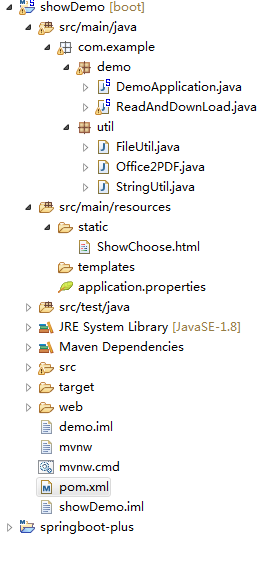
项目结构如下:
java 使用OpenOffice文件实现预览的更多相关文章
- Java实现文件的预览
最近项目需要用到文件的预览功能,就开始在网上收集资料,学习了几种文件预览的方法.我集成到我项目内测试的有以下三种,最后使用的是第三种: 直接使用别人提供的服务 例如:office web 365 使用 ...
- 关于confluence上传文件附件预览查看时出现乱码的问题解决办法
在confluence上传excel文件,预览时发现乱码问题主要是因为再上传文件的时候一般是Windows下的文件上传,而预览的时候,是linux下的环境,由于linux下没有微软字体,所以预览的时候 ...
- 文件在线预览doc,docx转换pdf(一)
文件在线预览doc,docx转换pdf(一) 1. 前言 文档转换是一个是一块硬骨头,但是也是必不可少的,我们正好做的知识库产品中,也面临着同样的问题,文档转换,精准的全文搜索,知识的转换率,是知识库 ...
- confluence上传文件附件预览乱码问题(linux服务器安装字体操作)
在confluence上传excel文件,预览时发现乱码问题主要是因为再上传文件的时候一般是Windows下的文件上传,而预览的时候,是linux下的环境,由于linux下没有微软字体,所以预览的时候 ...
- kkfileview v2.0 发布,文件在线预览项目方案
kkfileview文件在线预览 此项目为文件文档在线预览项目解决方案,项目使用流行的spring boot搭建,易上手和部署,部署好后可以独立提供预览服务,使用http接口访问,不需要和应用集成,具 ...
- 基于开源方案构建统一的文件在线预览与office协同编辑平台的架构与实现历程
大家好,又见面了. 在构建业务系统的时候,经常会涉及到对附件的支持,继而又会引申出对附件在线预览.在线编辑.多人协同编辑等种种能力的诉求. 对于人力不是特别充裕.或者项目投入预期规划不是特别大的公司或 ...
- JS代码实用代码实例(输入框监听,点击显示点击其他地方消失,文件本地预览上传)
前段时间写前端,遇到一些模块非常有用,总结以备后用 一.input框字数监听 <!DOCTYPE html> <html lang="en"> <he ...
- asp.net word ecxel类型文件在线预览
asp.net word ecxel类型文件在线预览 首先得引用COM: Microsoft Excel 10 Object Library Microsoft Word 10 Object Libr ...
- office文件的预览
使用FlexPaper实现office文件的预览(C#版) 需求很简单,用户上传office文件(word.excel.ppt)后,可以预览上传的这些文件.搜索的相关的资料后.整理如下: Step1. ...
随机推荐
- uva10828
https://vjudge.net/problem/UVA-10828 裸高斯消元... 但是要判无解和无穷解. 当出现一个环时会无解,环上每个点只有一个出边. #include<bits/s ...
- CentOS下实现Flask + Virtualenv + uWSGI + Nginx部署
一.项目简介 在本文中,将一步一步搭建一个简单的Flask + Virtualenv + uWSGI + Nginx 架构的Web服务,可以作为新手的学习也可作为记录备忘. 如果你安装好了环境并有一定 ...
- html表格合并单元格
th标签 合并列 colspan="k" 合并行 rowspan="k" 例子<th colspan="2", rowspan=& ...
- 17年day3
/* 嗯,又一天. 时日无多了,还能蹦哒几天? 上午依旧考试,日常挂T1,读错题.还是好困. 兔子说明天晚上要请我们吃水饺~~~~去年就没这待遇. 下午打开邮箱一看,咦?嗯. 昨晚做噩梦NOIP考了状 ...
- GG_Logs 日志类库封装使用说明
3.6.GG_Logs 日志类库封装使用说明 GG_Logs类库项目,Nuget安装log4net 添加代码配置代码: [assembly: log4net.Config.XmlConfigurato ...
- c++ strcmp函数
用法:加头文件 #include <string.h> 功能:比较字符串s1和s2. 一般形式:strcmp(字符串1,字符串2) 返回值: 当s1<s2时,返回值<0 当s1 ...
- ACM_蛇形矩阵
蛇行矩阵 Time Limit: 4000/2000ms (Java/Others) Problem Description: 蛇形矩阵是由1开始的自然数依次排列成的一个矩阵上三角形. Input: ...
- ACM_Fibonacci数(同余)
Fibonacci数 Time Limit: 2000/1000ms (Java/Others) Problem Description: 斐波那契数列定义如下:f(0)=0,f(1)=1,f(n+2 ...
- CF816B Karen and Coffee
思路: 有点类似于区间修改点查询的树状数组. 实现: #include <iostream> #include <cstdio> using namespace std; ; ...
- Framework7首页隐藏navbar
f7首页隐藏navbar其他页面显示navbar 帮别人解决问题,自己也记录一下, 首页.navbar加.navbar-hidden, 首页.page加.no-navbar, 如果首页有.navbar ...