
tab切换案例
做个简单的tab切换效果,分别于jquery和js操作
(1)jQuery操作
先看下效果:
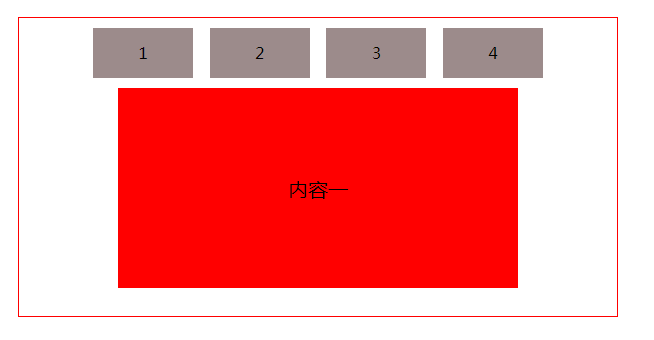
<!DOCTYPE html>

<html lang="en">

<head>

    <meta charset="UTF-8">

    <title>Title</title>

    <style type="text/css">

        *{box-sizing:border-box;padding: 0;margin: 0}

        ul{width: 100%;height: 50px;text-align: center;margin: 10px 0;}

        ul li{list-style: none;height: 100%;width: 100px;

          line-height: 50px;text-align: center;background-color: #9c8b8b;

          margin: 0 6px;display: inline-block;cursor: pointer;}

        section{width: 600px;height: 300px;border: 1px solid red;margin: 100px auto;}

        #area{width: 400px;height: 200px;margin: 10px auto;border: 1px solid red;}

        .child{width: 100%;height: 100%;float: left;display: none;text-align: center;line-height: 200px;font-size: 20px;color: black;}

        .active{display: block}

        #area .child:nth-child(1){

          background-color: red;

        }

        #area .child:nth-child(2){

          background-color: green;

        }

        #area .child:nth-child(3){

          background-color: blue;

        }

        #area .child:nth-child(4){

          background-color: yellow;

        }

    </style>

</head>

<body>

<section>

  <ul>

    <li>1</li>

    <li>2</li>

    <li>3</li>

    <li>4</li>

  </ul>

  <div id="area">

    <div class="child active">

      内容一

    </div>

    <div class="child">

      内容二

    </div>

    <div class="child">

      内容三

    </div>

    <div class="child">

      内容四

    </div>

  </div>

</section>

<script src="https://cdn.bootcss.com/jquery/3.3.1/jquery.js"></script>

<script>

    $(function(){

      $("ul li").on('click',function(){

        var index = $(this).index();

        $(".child").each(function() {

          if (index == $(this).index()) {

            $(this).siblings().removeClass('active');

            $(this).addClass('active');

          }

        })

      })

    })

</script>

</body>

</html>
(2)js操作
<!DOCTYPE html>

<html>

<head>

<meta http-equiv="Content-Type" content="text/html; charset=utf-8" />

<style>

*{

 padding: 0;

 margin: 0;

}

li{

 list-style: none;

 float:left;

}

#tabCon {

 clear: both;

}

#tabCon div {

 display:none;

}

#tabCon div.fdiv {

 display:block;

}

</style>

</head>

<body>

<div id="tanContainer">

   <div id="tab">

     <ul>

      <li>标题一</li>

      <li>标题二</li>

      <li>标题三</li>

      <li>标题四</li>

     </ul>

   </div>

   <div id="tabCon">

     <div class="fdiv">内容一</div>

     <div>内容二</div>

     <div>内容三</div>

     <div>内容四</div>

  </div>

</div>

</body>

<script>

var tabs=document.getElementById("tab").getElementsByTagName("li");

var divs=document.getElementById("tabCon").getElementsByTagName("div");

for(var i=0;i<tabs.length;i++){

  tabs[i].onclick=function(){

    change(this);

  }

}

function change(obj){

  for(var i=0;i<tabs.length;i++){

    console.log(tabs[i])

    if(tabs[i]==obj){

      divs[i].className="fdiv";

    }else{

      divs[i].className="";

    }

  }

}

</script>

</html>
.
tab切换案例的更多相关文章
- Angular——tab切换案例
基本介绍 angular框架下的tab切换,相比较于之前的纯js写的代码,有一个很大的特点就是以数据为驱动,基本上不用搜索dom元素就可以实现效果 基本使用 (1)导航部分使用的是的状态使用的是ng- ...
- JS---DOM---tab切换案例实现---排他
tab切换案例实现 <!DOCTYPE html> <html> <head lang="en"> <meta charset=" ...
- WPF案例(-)模拟Windows7 Win+Tab切换
原文:WPF案例(-)模拟Windows7 Win+Tab切换 一个使用Wpf模拟Windows7 Win+Tab页面切换的小程序,使用快捷键Ctrl+Down或Ctrl+Up在示例程序各个页面元素之 ...
- Android Studio精彩案例(二)《仿微信动态点击底部tab切换Fragment》
转载本专栏文章,请注明出处,尊重原创 .文章博客地址:道龙的博客 现在很多的App要么顶部带有tab,要么就底部带有tab.用户通过点击tab从而切换不同的页面(大部分情况时去切换fragment). ...
- 案例(拖拽对话框、高清放大镜、自制滚动条、元素的隐藏方式、表格隔行变色、tab切换效果、字符串拼接、刷新评论)
一.拖拽对话框 <style> .of{ width: 500px; } #link,#close{ text-decoration: none; margin: 0 10px; font ...
- Js 实现tab切换效果
今天商城系统的后台要添加一个Tab切换的效果,一开始没有思路想要自己去实践这个效果 从网上找jquery 已经有了很好看的案例,实现之后我来学习下思路是如何完成的
- bootstrap tab切换如何让鼠标移动自动切换内容
bootstrap集成了很多功能,比如nav-tabs组件,可以将相似的内容集中在一个区块中展示.bootstrap tab切换默认是要点击才会切换的,如何实现鼠标移动就自动切换呢?如下图所示,光标移 ...
- 原生JS实现tab切换--web前端开发
tab切换非常常见,应用非常广泛,比较实用,一般来说是一个网站必不可少的一个效果.例如:https://123.sogou.com/中的一个tab部分: 1.案例源代码 <!DOCTYPE ht ...
- echarts tab 切换问题整理
一.bootstrap tabs 解决方案 方式一 tab切换echarts无法正常显示 https://blog.csdn.net/cjs68/article/details/78072382 ta ...
随机推荐
- Windows 文件夹修改为exe的原理和解决办法
有关文件夹后缀改为exe的病毒 该病毒之前出现过,不过没多长时间便消失了,最新的这个应该是变种,下面解决一下该病毒在移动存储设备中的问题: 该病毒并不具备能够将文件夹改为文件的能力,只是将原有文件夹全 ...
- HDU 4005 The war(双连通好题)
HDU 4005 The war pid=4005" target="_blank" style="">题目链接 题意:给一个连通的无向图.每条 ...
- iOS 文字属性字典
iOS开发过程中相信大家常常遇到当须要给字体,颜色,下划线等属性的时候參数是一个NSDictionary 字典 可是字典里面究竟有哪些键值对了 我们把经常使用的总结一下 首先我们创建一个最简单的.设置 ...
- 模板小程序】求小于等于N范围内的质数
xiaoxi666 联系邮箱: xiaoxi666swap@163.com 博客园 首页 新随笔 联系 订阅 管理 [模板小程序]求小于等于N范围内的质数 1 //筛法求N以内的素数(普通法+优化 ...
- Hibernate基于注解的双向one-to-many映射关系的实现
在项目中用到了一对多的实体类关系映射,之前接触的都是基于配置文件的映射实现.可是公司的大部分都是基于注解的.因此自己參考之前的代码捣鼓了基于注解的一对多的映射关系实现. 背景: 一的一端:QingAo ...
- UVA 11748 - Rigging Elections(dfs)
UVA 11748 - Rigging Elections option=com_onlinejudge&Itemid=8&page=show_problem&category ...
- vijos - P1302连续自然数和 (公式推导 + python)
P1302连续自然数和 Accepted 标签:[显示标签] 描写叙述 对一个给定的自然数M,求出所有的连续的自然数段(连续个数大于1).这些连续的自然数段中的所有数之和为M. 样例:1998+199 ...
- HBase无法连接ZooKeeper问题
上次搭建HBase环境后,运行登陆server时,报以下的错误: hadoop@gpmaster logs]$ hbase shell SLF4J: Class path contains multi ...
- Codeforces Round #273 (Div. 2)D. Red-Green Towers DP
D. Red-Green Towers There are r red and g green blocks for construction of the red-green tower. Re ...
- research plan