
添加tomcat开机启动服务时报错:Neither the JAVA_HOME nor the JRE_HOME enviromment variable is defined
首先,参考的 https://blog.csdn.net/wabil/article/details/78818249 的方式添加 tomcat 开机启动,这种方式不需要添加 setenv.sh 文件,轻量级,非常方便,具体方式如下:
1. 创建一个服务文件
vim /lib/systemd/system/tomcat.service

复制如下内容,修改后保存:
[Unit]
Description=tomcat
After=network.target

[Service]
Type=oneshot
ExecStart=/home/apache-tomcat-7.0.70/bin/startup.sh // 自已的tomcat目录
ExecStop=/home/apache-tomcat-7.0.70/bin/shutdown.sh // 自已的tomcat目录
ExecReload=/bin/kill -s HUP $MAINPID
RemainAfterExit=yes

[Install]
WantedBy=multi-user.target
2. 启动服务
systemctl start tomcat.service
执行这步的时候,始终报启动失败,执行下面步骤查看失败原因。
3. 查看服务状态
systemctl status tomcat.service
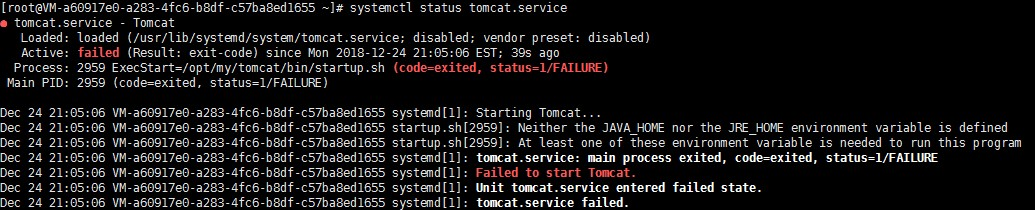
没理由 JAVA_HOME 和 JRE_HOME 不存在啊,明明是存在的,检查一下发现确实是存在的:

解决方法:
方法1. 在 tomcat/bin/setclasspath.sh 中添加 JAVA_HOME 和 JRE_HOME 的指向(试了一下,不知道什么原因没搞成功)
 # -----------------------------------------------------------------------------

 #  Set JAVA_HOME or JRE_HOME if not already set, ensure any provided settings

 #  are valid and consistent with the selected start-up options and set up the

 #  endorsed directory.

 # -----------------------------------------------------------------------------
 #
24 # JAVA_HOME=/usr/java/jdk1.8.0_171
25 # JRE_HOME=/usr/java/jdk1.8.0_171/jre
方法2. 在 tomcat.service 中添加 JAVA_HOME 和 JRE_HOME 的指向(推荐)
Environment='JAVA_HOME=/usr/java/jdk1.8.0_171'

Environment='JRE_HOME=/usr/java/jdk1.8.0_171/jre'
此时再次执行服务启动命令 systemctl start tomcat.service 成功,服务运行状态如下:
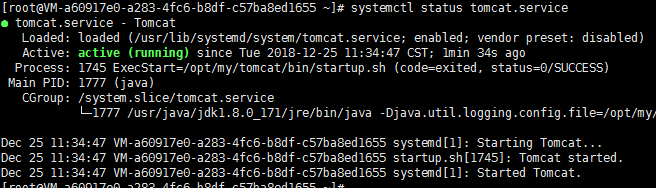
附完整的 tomcat.service 文件
[Unit]

Description=Tomcat

After=network.target

[Service]

Type=forking

Environment='JAVA_HOME=/usr/java/jdk1.8.0_171'

Environment='JRE_HOME=/usr/java/jdk1.8.0_171/jre'

ExecStart=/opt/my/tomcat/bin/startup.sh

ExecReload=/bin/kill -s HUP $MAINPID

ExecStop=/opt/my/tomcat/shutdown.sh

RemainAfterExit=yes

[Install]

WantedBy=multi-user.target
4. 设置为开机启动
systemctl enable tomcat.service
添加tomcat开机启动服务时报错:Neither the JAVA_HOME nor the JRE_HOME enviromment variable is defined的更多相关文章
- 普通用户操作tomcat项目时报:Neither the JAVA_HOME nor the JRE_HOME environment variable is defined At least one of these environment variable is needed to run this program
在使用普通用户更新tomcat项目适合出现这个信息,Neither the JAVA_HOME nor the JRE_HOME environment variable is defined At ...
- python paramiko ssh.exec_command()启动tomcat服务器应用进程失败问题解决方法- Neither the JAVA_HOME nor the JRE_HOME environment variable is defined At least one of these environment variable is needed to run this progr
问题说明:
- Tomcat9+JDK 13报错Neither the JAVA_HOME nor the JRE_HOME environment variable is defined At least one of these environment variable is needed to run this program
Tomcat使用的是https://tomcat.apache.org/download-90.cgi Tomcat9 之前安装的JDK 13,有JAVA_HOME环境变量地址(C:\Program ...
- 启动tomcat 报错:Neither the JAVA_HOME nor the JRE_HOME environment variable is defined
[root@localhost META-INF]# systemctl start tomcat Job for tomcat.service failed because the control ...
- tomcat启动报错:Neither the JAVA_HOME nor the JRE_HOME environment variable is defined At least one of these environment variable
linux 下 启动tomcat 报: Neither the JAVA_HOME nor the JRE_HOME environment variable is definedAt least o ...
- tomcat启动报错:Neither the JAVA_HOME nor the JRE_HOME environment variable is defined
windows系统: 部署了一个Tomcat8.5.15,bin目录下startup.bat执行,结果提示Neither the JAVA_HOME nor the JRE_HOME enviro ...
- Jenkins启动Tomcat时提示Neither the JAVA_HOME nor the JRE_HOME environment variable is defined
Jenkins构建提示: [SSH] executing...Neither the JAVA_HOME nor the JRE_HOME environment variable is defi ...
- linux安装tomcat Neither the JAVA_HOME nor the JRE_HOME environment variable is defined
这两天我们的开发机重启了好几次,发现每次重启后我的tomcat总是没有启动.检查java路径,配置正确,后来拿普通账号启动tomcat时报如下的错: Neither the JAVA_HOME nor ...
- Java项目启动时候报Neither the JAVA_HOME nor the JRE_HOME environment variable is defined 解决办法
今天在发布Java项目的时候又遇到 Neither the JAVA_HOME nor the JRE_HOME environment variable is defined At leas ...
随机推荐
- 59. Spring Boot Validator校验【从零开始学Spring Boot】
大纲: (1) 入门例子: (2) 国际化: (3) 在代码中添加错误信息: (1) 入门例子: Validator主要是校验用户提交的数据的合理性的,比如是否为空了,密码长度是否大于6位,是否是纯数 ...
- 测试各种低价VPS
1) dream.jp 540多的日元一个VPS,是全日本最低的VPS,但是用了以后发现最大问题是受限很多,不好用,如果你打算用作建ss或者其它***功能,对不起,请找其它VPS了 在日本dream. ...
- [luoguP1944] 最长括号匹配_NOI导刊2009提高(1)
传送门 非常傻的DP. f[i]表示末尾是i的最长的字串 #include <cstdio> #include <cstring> #define N 1000001 int ...
- JDK源码解析(一)ArrayList源码解析
这里为了方便写注释,我是把ArrayList的源码复制下来放到自己创建的类里面的 这个变量则指向具体存放数据的数组 看下构造函数吧 点进去看下LinkedList是怎么数组化的 很弱智吧,就是创建一个 ...
- 在mysql数据库中,文章表设计有啥好的思路
Q: 用mysql设计一张文章表,不知道有啥好的思路! 我是这样的,应为考虑附件和图片,所以我的文章表除了有varchar(1000)的文章内容,还设置了个Bolb接收附件和图片. 我用的是mysql ...
- Writing Code-Codeforces511C**
http://codeforces.com/problemset/problem/544/C 完全背包 dp[i][j]表示第i行有j个bug #include<stdio.h> #inc ...
- Mycat集群方案收集(待实践)
先收集,后续再实践. 我想,市面上开源方案中,涉及到高可用和负载均衡的部署,无论是哪一个产品应用,都基本离不开LVS+Keepalived+HAProxy+Nginx等等. 下面是收集的教程: htt ...
- 【VBA研究】工作表自己主动筛选模式检測
作者:iamlaosong 用VBA程序处理Excel数据文件.用户的数据文件有时处于自己主动筛选模式,往往导致数据处理不对.为此,须要检測工作表是否处于该模式,假设是,则去掉自己主动筛选.语句例如以 ...
- Gulp安装及使用
測试环境 Mac:10.10.4 Gulp:3.9.0 时间:2015年08月15日18:07:08 安装Gulp sudo npm install --global gulp npm install ...
- ASP.NET MVC不可或缺的部分——DI(IOC)容器及控制器重构的剖析
ASP.NET MVC不可或缺的部分——DI(IOC)容器及控制器重构的剖析 IoC框架最本质的东西:反射或者EMIT来实例化对象.然后我们可以加上缓存,或者一些策略来控制对象的生命周期,比如是否 ...