
【Azure Storage Account】利用App Service作为反向代理, 并使用.NET Storage Account SDK实现上传/下载操作
问题描述
在使用Azure上的存储服务 Storage Account 的时候,有时需要代替 它原本提供的域名进行访问,比如默认的域名为:mystorageaccount.blob.core.chinacloudapi.cn, 想转变为 myservice.file.com 。

如果使用App Service作为反向代理,我们现在有如下三个疑问:
第一:如何来设置方向代理呢?
第二:是否还能成功访问Storage Account服务呢?
第三:.NET Storage Account SDK中如何使用自定义的域名连接服务呢?
问题解答
根据问题中的三个疑问,我们一一测试及解答。
第一问,在App Service服务中如何实现反向代理呢?
参考之前的文章:
- 【Azure 应用服务】在App Service for Windows中实现反向代理 : https://www.cnblogs.com/lulight/p/17120713.html
- 【应用服务 App Service】 App Service Rewrite 实例 - 反向代理转发功能 : https://www.cnblogs.com/lulight/p/13875393.html
第一步:applicationhost.xdt 启用IIS代理功能
选择一个 Windows 平台的App Service,进入Kudu站点,在 Site 目录下创建 applicationhost.xdt 文件并复制下面的内容
<?xml version="1.0"?>

    <configuration xmlns:xdt=http://schemas.microsoft.com/XML-Document-Transform>

    <system.webServer>

        <proxy xdt:Transform="InsertIfMissing" enabled="true" preserveHostHeader="false" reverseRewriteHostInResponseHeaders="false" />

    </system.webServer>

</configuration>
xdt:Transform="InsertIfMissing"表示如果代理配置不存在,则插入这一配置。enabled="true"表示启用代理功能。preserveHostHeader="false"表示不保留原始请求的主机头信息。reverseRewriteHostInResponseHeaders="false"表示在响应头中不反向重写主机头信息。
第二步:web.config 配置 rewrite rule
第一步完成后,点击 WWWROOT 目录,添加新文件 web.config 并复制下面的内容
<configuration>

    <system.webServer>

        <rewrite>

            <rules>

                <rule name="root" stopProcessing="true">

                    <match url="^/?(.*)" />

                    <action type="Rewrite" url="https://<stroage account name>.blob.core.chinacloudapi.cn/{R:1}" />

                </rule>

                <!-- 需要对根目录的请求进行反向代理,否则对POST/PUT等操作会报错404无法找到Blob Containers -->

                <!-- <rule name="sa" stopProcessing="true">   -->

                    <!-- <match url="^sa/?(.*)" />   -->

                    <!-- <action type="Rewrite" url="https://<storage account name>.blob.core.chinacloudapi.cn/{R:1}" />   -->

                <!-- </rule>   -->

            </rules>

        </rewrite>

    </system.webServer>

</configuration>
第二问,是否还能成功访问Storage Account服务呢?
完成App Service的反向代理配置后,重启服务。然后进入Storage Account的共享访问签名生成页面。
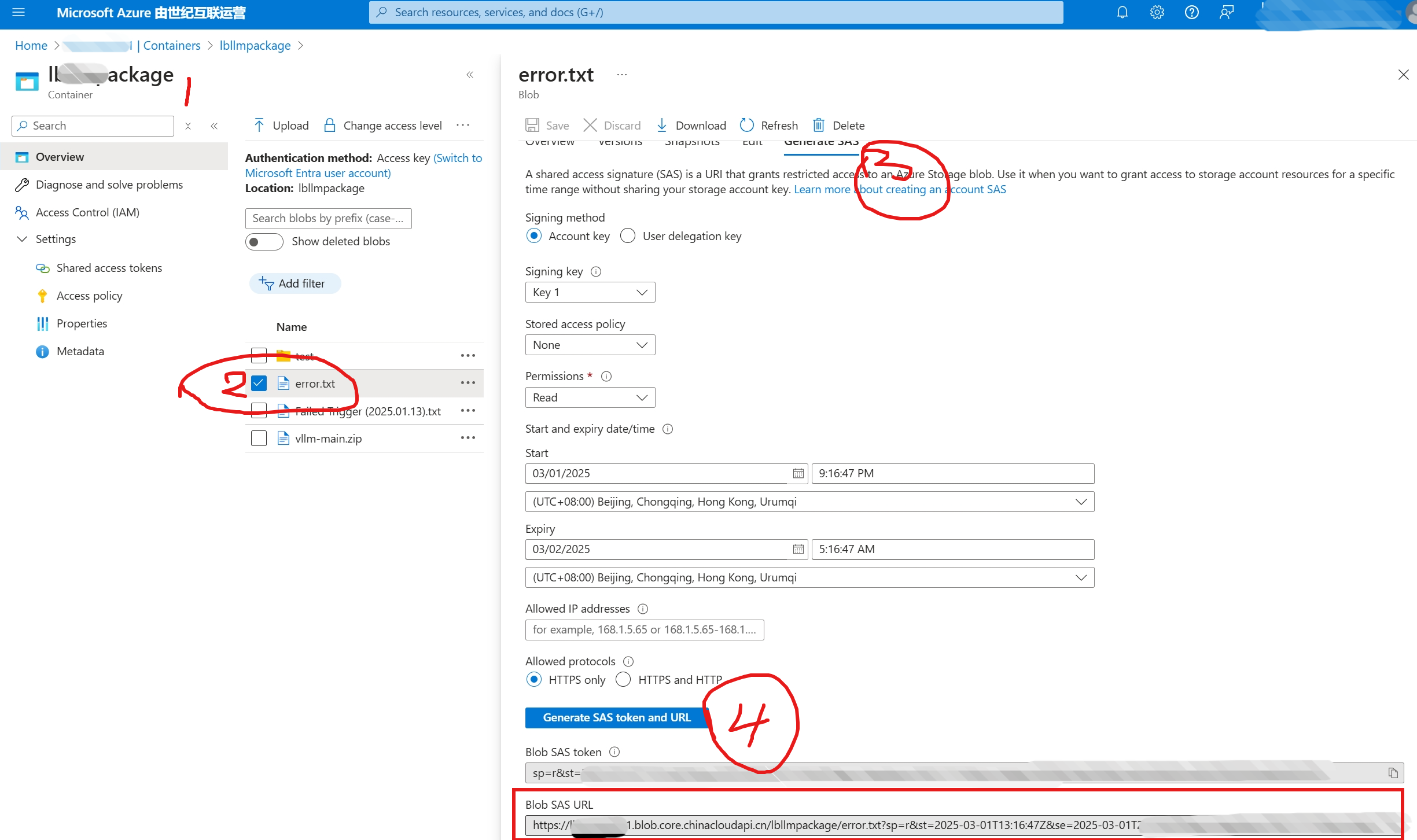
第一步:使用原生的 SAS URL访问Blob文件
原生的URL为:
https://< your storage account >.blob.core.chinacloudapi.cn/<your container name>/<filename>.txt?
sp=r&st=2025-03-01T13:16:47Z&se=2025-03-01T21:16:47Z&spr=https&sv=2022-11-02&sr=b&sig=xxxx%xxxx%3D
第二步:用App Service的域名替换原生的Storage Account域名访问
替换后的URL为:
https://<your app service custom domain name>.chinacloudsites.cn/<your container name>/<filename>.txt?
sp=r&st=2025-03-01T13:16:47Z&se=2025-03-01T21:16:47Z&spr=https&sv=2022-11-02&sr=b&sig=xxxx%xxxx%3D
测试验证,两种域名均可访问。证明,反向代理配置成功!

第三问:.NET Storage Account SDK中如何使用自定义的域名连接服务呢?
是的,在默认的.NET Storage Account SDK中,默认使用的是连接字符串(Connection String)。
DefaultEndpointsProtocol=https;AccountName=storagesample;AccountKey=<account-key>;EndpointSuffix=core.chinacloudapi.cn
以上的格式,无法修改EndpointSuffix为自定义的域名。所以,使用连接字符串肯定是不可以的。
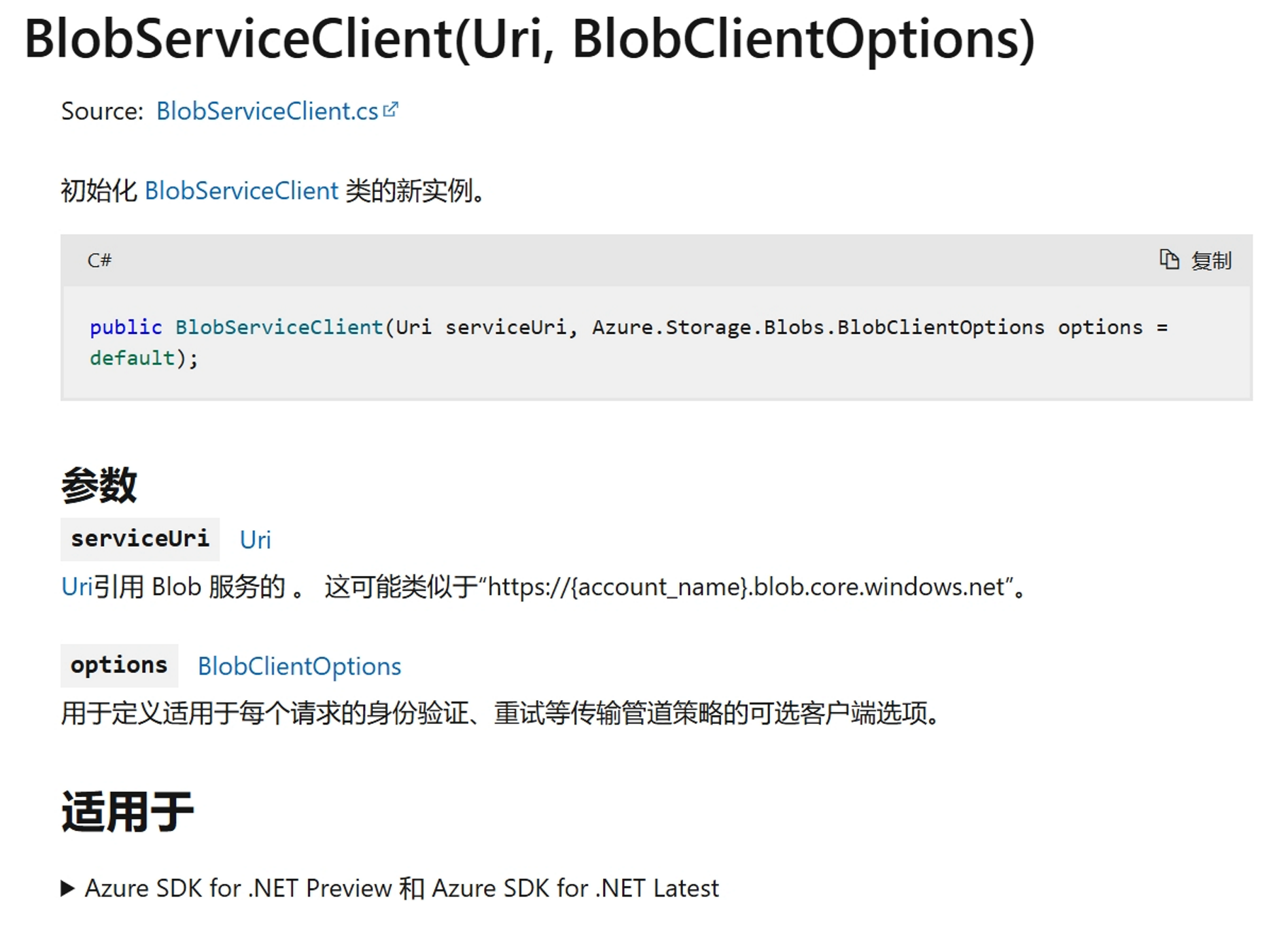
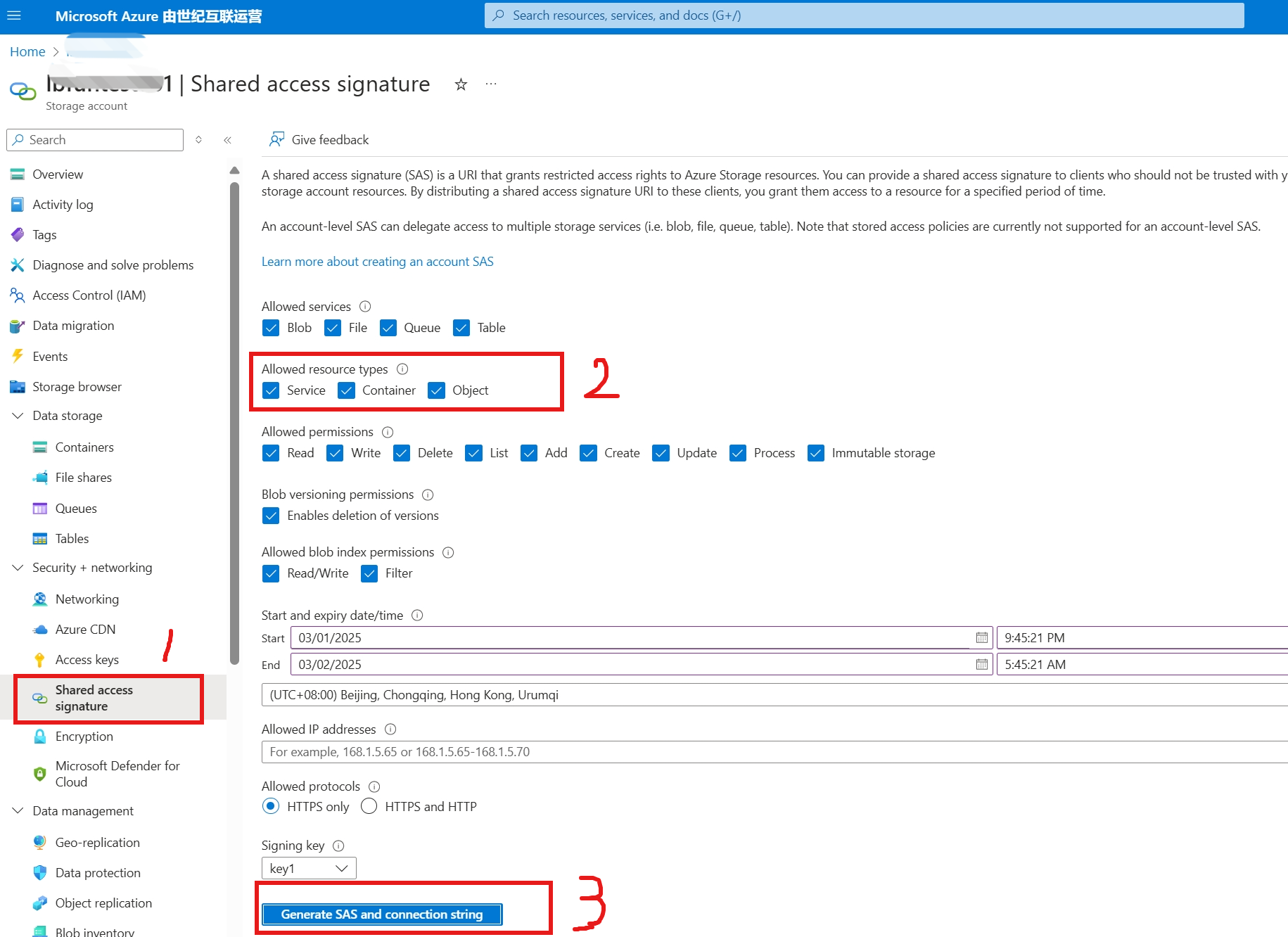
代替的方案就是使用共享访问签名(SAS URL)来初始化BlobServiceClient对象。
参考“快速入门:适用于 .NET 的 Azure Blob 存储客户端库” 文章中的代码,只需要修改初始化 Blob Service Client对象的那一段代码就可以,改动量非常小。
//Use SAS URL

string accountsas = "https://<the app gateway domain name>/?sv=2022-11-02&ss=bfqt&srt=sco&sp=rwdlacupitfx&se=2025-02-28T13:55:27Z&st=2025-02-28T05:55:27Z&spr=https&sig=PxxxxxxxxxxxxxxxxxxxxxxxxxxxxxxxxxxxxxxxxxxxxxxD";

Uri sasuri = new Uri(accountsas);

// Create a BlobServiceClient object which will be used to create a container client

BlobServiceClient blobServiceClient = new BlobServiceClient(sasuri);
注意:代码中使用的共享访问签名SAS URL是Storage Account级别的,不能使用第二问中的一个blob文件的SAS URL,否则会出现权限不够报错。
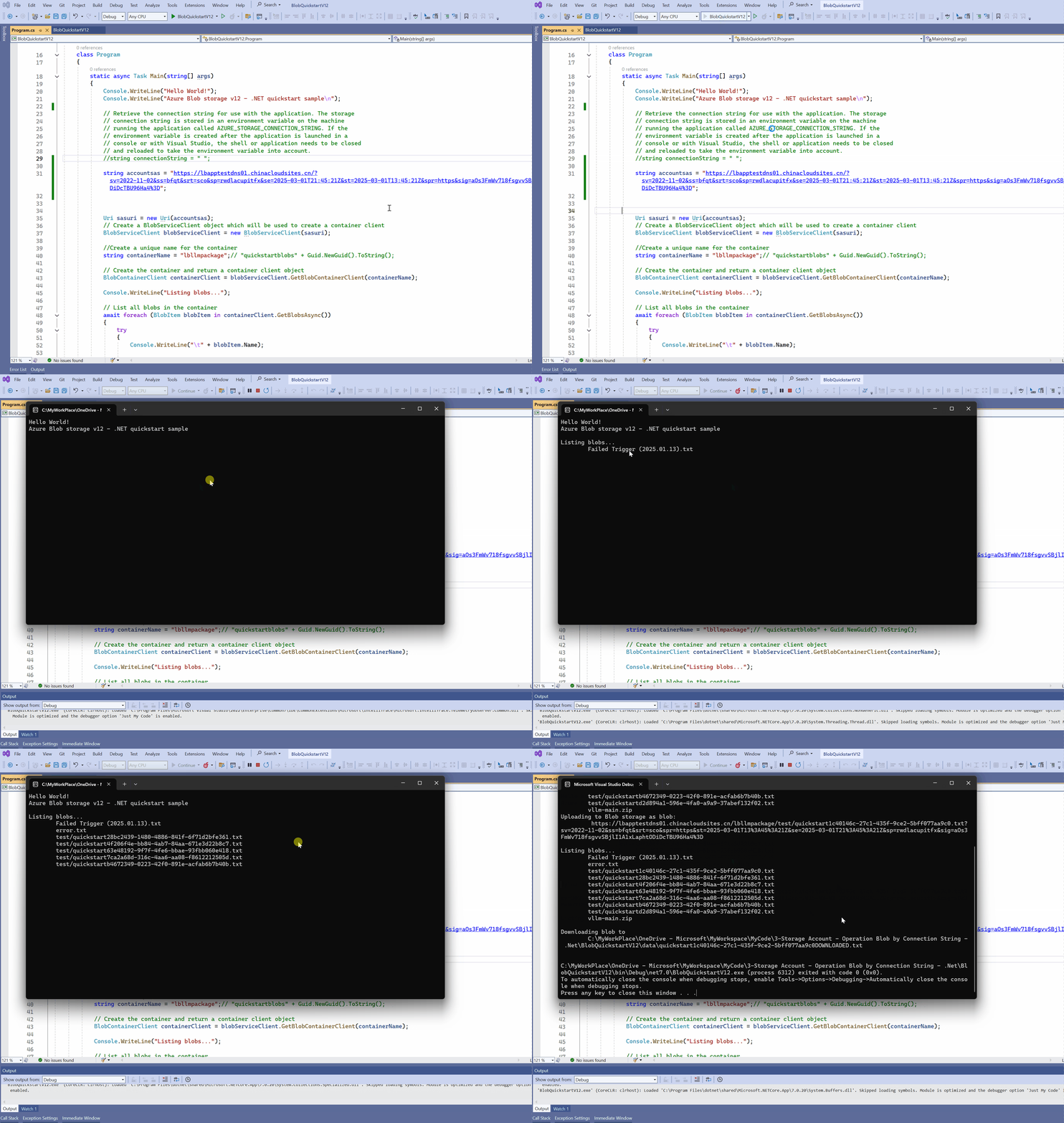
运行效果展示:
参考资料
- 在App Service for Windows中实现反向代理 : https://www.cnblogs.com/lulight/p/17120713.html
- App Service Rewrite 实例 - 反向代理转发功能 : https://www.cnblogs.com/lulight/p/13875393.html
- BlobServiceClient 构造函数 : https://learn.microsoft.com/zh-cn/dotnet/api/azure.storage.blobs.blobserviceclient.-ctor?view=azure-dotnet#azure-storage-blobs-blobserviceclient-ctor(system-uri-azure-storage-storagesharedkeycredential-azure-storage-blobs-blobclientoptions)
- 快速入门:适用于 .NET 的 Azure Blob 存储客户端库 : https://docs.azure.cn/zh-cn/storage/blobs/storage-quickstart-blobs-dotnet?tabs=visual-studio%2Cconnection-string%2Croles-azure-portal%2Csign-in-azure-cli%2Cidentity-visual-studio
附录:如果在设置反向代理的时候,没有从根目录跳转,就会遇见如下错误:
The specified container does not exist.
RequestId:000000
Time:2025-02-28T05:57:16.7457335Z
Status: 404 (The specified container does not exist.)
ErrorCode: ContainerNotFoundContent:
<?xml version="1.0" encoding="utf-8"?><Error><Code>ContainerNotFound</Code><Message>The specified container does not exist. RequestId:00000 Time:2025-02-28T05:57:16.7457335Z</Message></Error>Headers:
Date: Fri, 28 Feb 2025 05:57:16 GMT
Server: Windows-Azure-Blob/1.0,Microsoft-HTTPAPI/2.0
Set-Cookie: REDACTED
x-ms-request-id: e000000
x-ms-client-request-id: 5e
x-ms-version: 2020-08-04
x-ms-error-code: ContainerNotFound
X-Powered-By: REDACTED
Content-Length: 225
Content-Type: application/xml
附录:完整代码参考
using Azure;

using Azure.Identity;

using Azure.Storage.Blobs;

using Azure.Storage.Blobs.Models;

using System;

using System.IO;

using System.Text;

using System.Threading.Tasks;

namespace BlobQuickstartV12

{

    class Program

    {

        static async Task Main(string[] args)

        {

            Console.WriteLine("Hello World!");

            Console.WriteLine("Azure Blob storage v12 - .NET quickstart sample\n");

            // Retrieve the connection string for use with the application. The storage

            // connection string is stored in an environment variable on the machine

            // running the application called AZURE_STORAGE_CONNECTION_STRING. If the

            // environment variable is created after the application is launched in a

            // console or with Visual Studio, the shell or application needs to be closed

            // and reloaded to take the environment variable into account.

            //string connectionString = "Connection String";

            string accountsas = " SAS URL ";

            Uri sasuri = new Uri(accountsas);

            // Create a BlobServiceClient object which will be used to create a container client

            BlobServiceClient blobServiceClient = new BlobServiceClient(sasuri);

            //Create a unique name for the container

            string containerName = "lbllmpackage";// "quickstartblobs" + Guid.NewGuid().ToString();

            // Create the container and return a container client object

            BlobContainerClient containerClient = blobServiceClient.GetBlobContainerClient(containerName);

            Console.WriteLine("Listing blobs...");

            // List all blobs in the container

            await foreach (BlobItem blobItem in containerClient.GetBlobsAsync())

            {

                try

                {

                    Console.WriteLine("\t" + blobItem.Name);

                    BlobClient bclient = containerClient.GetBlobClient(blobItem.Name);

                    await bclient.CreateSnapshotAsync();

                }

                catch (Exception ex)

                {

                    Console.WriteLine(ex.Message);

                }

            }

            var prp = containerClient.GetProperties();

            // Create a local file in the ./data/ directory for uploading and downloading

            string localPath = @".\data\";

            string fileName = "quickstart" + Guid.NewGuid().ToString() + ".txt";

            string localFilePath = Path.Combine(localPath, fileName);

            // Write text to the file

            await File.WriteAllTextAsync(localFilePath, "Hello, World! the message from .net");

            // Get a reference to a blob

            BlobClient blobClient = containerClient.GetBlobClient("/test/" + fileName);

            Console.WriteLine("Uploading to Blob storage as blob:\n\t {0}\n", blobClient.Uri);

            // Open the file and upload its data

            using FileStream uploadFileStream = File.OpenRead(localFilePath);

            await blobClient.UploadAsync(uploadFileStream, true);

            uploadFileStream.Close();

            Console.WriteLine("Listing blobs...");

            // List all blobs in the container

            await foreach (BlobItem blobItem in containerClient.GetBlobsAsync())

            {

                Console.WriteLine("\t" + blobItem.Name);

            }

            // Download the blob to a local file

            // Append the string "DOWNLOADED" before the .txt extension

            // so you can compare the files in the data directory

            string downloadFilePath = localFilePath.Replace(".txt", "DOWNLOADED.txt");

            Console.WriteLine("\nDownloading blob to\n\t{0}\n", downloadFilePath);

            // Download the blob's contents and save it to a file

            BlobDownloadInfo download = await blobClient.DownloadAsync();

            using (FileStream downloadFileStream = File.OpenWrite(downloadFilePath))

            {

                await download.Content.CopyToAsync(downloadFileStream);

                downloadFileStream.Close();

            }

        }

    }

}
[END]
【Azure Storage Account】利用App Service作为反向代理, 并使用.NET Storage Account SDK实现上传/下载操作的更多相关文章
- 【Azure 应用服务】在 App Service for Windows 中自定义 PHP 版本的方法
问题描述 在App Service for Windows的环境中,当前只提供了PHP 7.4 版本的选择情况下,如何实现自定义PHP Runtime的版本呢? 如 PHP Version 8.1.9 ...
- 如何利用京东云的对象存储(OSS)上传下载文件
作者:刘冀 在公有云厂商里都有对象存储,京东云也不例外,而且也兼容S3的标准因此可以利用相关的工具去上传下载文件,本文主要记录一下利用CloudBerry Explorer for Amazon S3 ...
- 【WCF】利用WCF实现上传下载文件服务
引言 前段时间,用WCF做了一个小项目,其中涉及到文件的上传下载.出于复习巩固的目的,今天简单梳理了一下,整理出来,下面展示如何一步步实现一个上传下载的WCF服务. 服务端 1.首先新建一个名 ...
- Xshell5下利用sftp上传下载传输文件
sftp是Secure File Transfer Protocol的缩写,安全文件传送协议.可以为传输文件提供一种安全的加密方法.sftp 与 ftp 有着几乎一样的语法和功能.SFTP 为 SSH ...
- java web service 上传下载文件
1.新建动态web工程youmeFileServer,新建包com,里面新建类FileProgress package com; import java.io.FileInputStream; imp ...
- 【ARM-LInux开发】利用scp 远程上传下载文件/文件夹
利用scp 远程上传下载文件/文件夹 scp [-1246BCpqrv] [-c cipher] [-F ssh_config] [-i identity_file] [-l limit] [-o s ...
- 【Azure 应用服务】一个 App Service 同时部署运行两个及多个 Java 应用程序(Jar包)
问题描述 如何在一个AppService下同时部署运行多个Java 应用程序呢? 问题解答 因为App Service的默认根目录为 wwwroot.如果需要运行多个Java 应用程序,需要在 www ...
- app与jvm 反向代理时config的设置(用于在web页面显示npm(就如tomcat)产生的页面)
dev: { // Various Dev Server settings contentBase: ROOT, host: ip, port: 8084, //此端口为任意设置,不重复即可,为 ...
- nginx利用lua实现nginx反向代理proxy_store缓存文件自删除
标题有点绕口.我尽量把关键词都贴进去.之前因为自己的nginx安装了ngx_lua模块,但是又需要引入 但是安装luafilesystem又需要先安装luarocks,比较繁琐.这里就想记录一下安装过 ...
- 利用scp 远程上传下载文件/文件夹和ssh远程执行命令
利用scp传输文件 1.从服务器下载文件scp username@servername:/path/filename /tmp/local_destination例如scp codinglog@192 ...
随机推荐
- Python中所有子图标签Legend显示详解
在数据可视化中,图例(legend)是一个非常重要的元素,它能够帮助读者理解图表中不同元素的含义.特别是在使用Python进行可视化时,matplotlib库是一个非常强大的工具,能够轻松创建包含多个 ...
- 【Javaweb】【Maven】Use IDEA and Maven create a Java Web Application
Open This Url :https://mvnrepository.com/ Search Servlet Select the latest version Copy it! Paste An ...
- docker容器间互相访问 docker bridge网络
方式一.虚拟ip访问安装docker时,docker会默认创建一个内部的桥接网络docker0,每创建一个容器分配一个虚拟网卡,容器之间可以根据ip互相访问. [root@33fcf82ab4dd / ...
- "有邻"创始人:APP覆盖杭州千余小区 却还没认真想过赚钱的事
"远亲不如近邻",常被社区经济"掘金者"拿来做开场语. 在杭州,有不少互联网创业企业在深挖社区经济,例如社区O2O服务平台.杨仁斌也看中了"社区&qu ...
- .NET 9 中的 多级缓存 HybridCache
HybridCache是什么 在 .NET 9 中,Microsoft 将 HybridCache 带入了框架体系. HybridCache 是一种新的缓存模型,设计用于封装本地缓存和分布式缓存,使用 ...
- Qt/C++视频监控Onvif工具/组播搜索/显示监控画面/图片参数调节/OSD管理/祖传原创
一.前言 能够写出简单易用而又不失功能强大的组件,一直是我的追求,简单主要体现在易用性,不能搞一些繁琐的流程和一些极难使用的API接口,或者一些看不懂的很难以理解的函数名称,一定是要越简单越好.功能强 ...
- Qt编写linux上视频流播放器(支持海康大华宇视等各种网络摄像机)
一.前言 在windows上的视频流播放器有很多,而且各个监控厂家无论大厂还是小厂,基本上都提供了客户端,甚至很多第三方的监控平台软件厂商,也都提供了windows的版本,基本的都没有提供linux版 ...
- Qt 5.15.6 发布
一.前言 我们今天为商业许可证持有者发布了 Qt 5.15.6 LTS.作为补丁版本,Qt 5.15.6 没有添加任何新功能,但提供了错误修复和其他改进. 您可以使用维护工具在现有的在线安装中添加 Q ...
- 【OpenCV】features2d_converters.cpp:2:10: fatal error: common.h: 没有那个文件或目录
Linux环境下使用opencv的dnn模块调用yolov4遇到的坑(纯CPU)一.问题描述Ubuntu安装opencv4.4,第一次编译完成安装成功,发现编译时少加了几个选项,于是重新编译,结果报如 ...
- 开源即时通讯IM框架MobileIMSDK的微信小程序端开发快速入门
一.理论知识准备 您需要对微信小程序开发有所了解: 1)真正零基础入门学习笔记系列 2)从零开始的微信小程序入门教程 3)最全教程:微信小程序开发入门详解 您需要对WebSocket技术有所了解: 1 ...