
ABAQUS 中的一些约定
自由度notation
除轴对称元件和电磁元件外,自由度通常表示为:
1 ---> x-displacement
2 ---> y-displacement
3 ---> z-displacement
4 ---> Rotation about the x-axis, in radians
5 ---> Rotation about the y-axis, in radians
6 ---> Rotation about the z-axis, in radians
7 ---> Warping amplitude (for open-section beam elements)
8 ---> Pore pressure, hydrostatic fluid pressure, or acoustic pressure
9 ---> Electric potential
10 ---> Connector material flow (units of length)
11 ---> Temperature (or normalized concentration in mass diffusion analysis)
12 ---> Second temperature (for shells or beams)
13 ---> Third temperature (for shells or beams)
14 ---> Etc.
Here the x-, y-, and z-directions coincide with the global X-, Y-, and Z-directions, respectively; however, if a local transformation is defined at a node (see Transformed coordinate systems), they coincide with the local directions defined by the transformation.
A maximum of 20 temperature values (degrees of freedom 11 through 30) can be defined for shell or beam elements in Abaqus/Standard.
Axisymmetric elements
轴对称单元的位移和转动自由度表示为:
1 ---> r-displacement
2 ---> z-displacement
5 ---> Rotation about the z-axis (for axisymmetric elements with twist), in radians
6 ---> Rotation in the r–z plane (for axisymmetric shells), in radians
这里的r和z方向分别与全局的X和y方向重合;然而,如果在节点上定义了局部转换(请参阅转换坐标系统),则它们与转换定义的局部方向一致.
Activation of degrees of freedom
Abaqus/Standard and Abaqus/Explicit activate only those degrees of freedom needed at a node. Thus, some of the degrees of freedom listed above may not be used at all nodes in a model, because each element type uses only those degrees of freedom that are relevant. For example, two-dimensional solid (continuum) stress/displacement elements use only degrees of freedom 1 and 2. The degrees of freedom actually used at any node are the envelope of those needed in each element that shares the node.
Internal variables in Abaqus/Standard
In addition to the degrees of freedom listed above, Abaqus/Standard uses internal variables (such as Lagrange multipliers to impose constraints) for some elements. Normally you need not be concerned with these variables, but they may appear in error and warning messages and are checked for satisfaction of nonlinear constraints during iteration. Internal variables are always associated with internal nodes, which have negative numbers to distinguish them from user-defined nodes.
Coordinate systems
Abaqus中默认的基本坐标系是右手直角笛卡尔坐标系.也可以自定义其他坐标系,但必须满足右手定则.
参见:坐标系说明
Symbols used in Abaqus for units
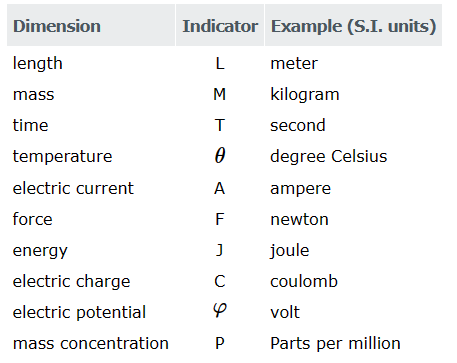
Time measures
Abaqus有两个时间:
- 分析步长时间
- 总时间.
除某些 linear perturbation procedures外,分析步时间从每一step的开始算.总时间从0开始,是所有 general analysis steps 累积的总时间( including restart steps).在线性扰动步骤中,总时间不累积.
Convention used for stress and strain components
在定义材料属性时,Abaqus中应力和应变分量的约定是排序:
σ11 --> Direct stress in the 1-direction
σ22 --> Direct stress in the 2-direction
σ33 --> Direct stress in the 3-direction
τ12 --> Shear stress in the 1–2 plane
τ13 --> Shear stress in the 1–3 plane
τ23 --> Shear stress in the 2–3 plane
例如,对于一个fully anisotropic, linear elasticity matrix:
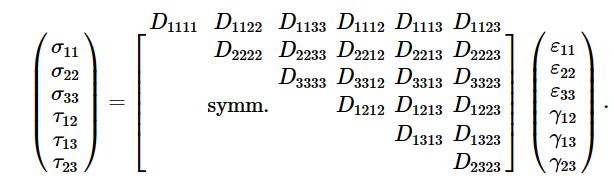
1-、2-和3-方向取决于所选择的元素类型.对于实体元素,这些方向的默认值是全局空间方向.对于壳和膜元素,默认的1-和2-方向是壳或膜表面的局部方向,as defined in About the element library.
在这两种情况下,1-、2-和3-方向都可以改变,as described in Orientations.
For geometrically nonlinear analysis with solid elements, the default (global) directions do not rotate with the material. However, user-defined orientations do rotate with the material.
Abaqus/Explicit stores the stress and strain components internally in a different order: σ11, σ22, σ33, τ12, τ23, τ13.
For geometrically nonlinear analysis, the internally stored components rotate with the material, regardless of whether or not a user-defined orientation is used. This distinction is important when a user subroutine (such as VUMAT) is used.
Nonisotropic material behavior
When nonisotropic material behavior is defined in continuum elements, a user-defined orientation is necessary for the anisotropic behavior to be associated with material directions. See State storage for a description of how material directions rotate.
Zero-valued stress components
Stress components that are always zero are omitted from storage. For example, in plane stress Abaqus stores only the two direct components and one shear component of stress and strain in the plane where the stress values are nonzero.
Shear strains
Abaqus always reports shear strain as engineering shear strain, γ :
γij = εij +εji .
参考资料
- 转换坐标系统; Transformed coordinate systems
- Boundary conditions # Prescribing boundary conditions in a time-harmonic eddy current analysis
- Boundary conditions
ABAQUS 中的一些约定的更多相关文章
- python flask中的代码约定
在Python社区中有许多关于代码风格的约定.如果你写过一段时间Python了,那么也许对此已经有些了解. 我会简单介绍一下,同时给你一些URL链接,从中你可以找到关于这个话题的详细信息. 让我们提出 ...
- abaqus中的约束
1.tie -绑定约束:作用是将模型的两部分区域绑定在一起,二者之间不发生相对运动,相当于焊在一起. 2.rigid body--刚体约束--使一个模型区域刚体化,这个区域可以是一系列节点,单元等,刚 ...
- Abaqus中的单位制
量纲 SI SI/mm US/ft US/inct 长度 m mm ft in 载荷 N N lbf lbf 质量 kg kg3 slug lbfs2/in 时间 s s s s 量纲 SI SI/m ...
- asp.net -mvc框架复习(4)-ASP.NET MVC中的约定规则
1.路由规则 using System;using System.Collections.Generic;using System.Linq;using System.Web;using System ...
- 这就涉及到ABAQUS历史输出中各能量变量的意义
ABAQUS中,对于很多动态问题,尤其像高速冲击模拟中,对结果评价很重要的一点就是要保证模型能量守恒,这就涉及到ABAQUS历史输出中各能量变量的意义,下面最各简单整理: ALLAE:人工伪应变能,六 ...
- 19.翻译系列:EF 6中定义自定义的约定【EF 6 Code-First约定】
原文链接:https://www.entityframeworktutorial.net/entityframework6/custom-conventions-codefirst.aspx EF 6 ...
- C/C++/动态链接库DLL中函数的调用约定与名称修饰
参见:http://blog.twofei.com/cc/impl/calling-convension.html 调用约定(Calling Convention)是指在程序设计语言中为了实现函数调用 ...
- c++中的几种函数调用约定(转)
C++中的函数调用约定(调用惯例)主要针对三个问题: 1.参数传递的方式(是否采用寄存器传递参数.采用哪个寄存器传递参数.参数压桟的顺序等): 参数的传递方式,最常见的是通过栈传递.函数的调用方将参数 ...
- ASP.NET Core 中文文档 第四章 MVC(3.3)布局视图
原文:Layout 作者:Steve Smith 翻译:娄宇(Lyrics) 校对:孟帅洋(书缘) 视图(View)经常共享视觉元素和编程元素.在本篇文章中,你将学习如何在你的 ASP.NET 应用程 ...
- Unity3.0基于约定的自动注册机制
前文<Unity2.0容器自动注册机制>中,介绍了如何在 Unity 2.0 版本中使用 Auto Registration 自动注册机制.在 Unity 3.0 版本中(2013年),新 ...
随机推荐
- Log4j2的JNDI注入漏洞(CVE-2021-44228)原理分析与思考
https://www.freebuf.com/vuls/316143.html 前言 最近Log4j2的JNDI注入漏洞(CVE-2021-44228)可以称之为"核弹"级别.L ...
- 【转载】基于timestamp和nonce的防重放攻击
https://www.cnblogs.com/mymelody/p/7325325.html 以前总是通过timestamp来防止重放攻击,但是这样并不能保证每次请求都是一次性的.今天看到了一篇 ...
- Docker 容器运行一个 web 应用
Docker 容器安装和基础使用请看上一篇 Docker 容器运行一个 web 应用 使用 docker 构建一个 web 应用程序. docker pull training/webapp # 载入 ...
- Qt编写物联网管理平台43-告警短信转发
一.前言 系统在运行过程中,会实时采集设备的数据,当采集到的数据发生报警后,可以将报警信息以短信的形式发送给指定的管理员(可以是多个),这样管理员就算不在现场,也能第一时间知道哪里发生了报警,可以紧急 ...
- WW中文地名标注:输出*.wwp和*.wpl文件
链接1:WW中文地名标注工具----3月4日更新增加OZI航点航迹读入 链接2:中文地标库终结者---------WW中的地名/地标中文化(含40万条中文地名)3月4日更新 链接3:地图浏览器
- IM通讯协议专题学习(二):快速理解Protobuf的背景、原理、使用、优缺点
本文由vivo技术团队Li Guanyun分享,为了提升阅读体验,进行了较多修订和重新排版. 1.引言 Protobuf 作为一种跨平台.语言无关.可扩展的序列化结构数据通讯协议,已广泛应用于网络数据 ...
- Event-Stream技术
服务端 websocket和event-stream的优缺点 WebSocket和Event-Stream(Server-Sent Events)都是实现实时通信的技术,但是它们各自有不同的优缺点. ...
- 用领域驱动DDD的方式实现购物车-基于abp一代6.2
废话 之前七七八八看了些DDD相关概念,充血模型.领域事件.领域服务.应用服务等,大致能理解但从未实践.最近在用ABP做个电商模块,尝试用DDD方式来实现购物车功能,感觉还行,下面做个记录. 业务分析 ...
- Mongodb 基础与安装
官网链接:https://docs.mongodb.com/ 参考链接:https://www.runoob.com/mongodb/mongodb-linux-install.html 1.什么是M ...
- w3cschool-Spring Security
https://www.w3cschool.cn/springsecurity/na1k1ihx.html Spring Security,这是一种基于 Spring AOP 和 Servlet 过滤 ...