
11月8日PHP练习《留言板》
一、要求

二、示例页面


三、网页代码及网页显示
1.denglu.php 登录页面
<!DOCTYPE html PUBLIC "-//W3C//DTD XHTML 1.0 Transitional//EN" "http://www.w3.org/TR/xhtml1/DTD/xhtml1-transitional.dtd">

<html xmlns="http://www.w3.org/1999/xhtml">

<head>

<meta http-equiv="Content-Type" content="text/html; charset=utf-8" />

<title>无标题文档</title>

<style type="text/css">

*{ margin:0px auto; padding:0px}

#aa{ width:400px; height:89px; font-size:36px; color:#39F; text-align:center; line-height:89px; vertical-align:middle; border-bottom:1px solid #999}

.bb{ width:400px; height:59px}

.cc{ width:159px; height:59px; float:left; font-size:20px; text-align:right; line-height:59px; vertical-align:middle}

.dd{ width:200px; height:59px; float:left}

.ee{ width:150px; height:30px; text-align:center; margin-top:15px}

.ff{ width:80px; height:30px}

</style>

</head>

<body>

<form action="dengluchuli.php" method="post">

<div style="width:400px; height:259px; margin-top:100px; border:1px solid #999">

    <div id="aa">汉企网络0904留言板</div>

    <div class="bb">

        <div class="cc">用户名:</div>

        <div class="dd"><input id="yonghuming" class="ee" type="text" name="uid" /></div>

    </div>

    <div class="bb">

        <div class="cc">密码:</div>

        <div class="dd"><input class="ee" type="password" name="pwd" /></div>

    </div>

    <div style="width:400px; height:50px; text-align:center; margin-top:10px">

        <input class="ff" type="submit" value="登录" />

        <input class="ff" type="button" value="复位" onclick="Fuwei()" />

    </div>

</div>

</form>

</body>

<script type="text/javascript">

function Fuwei()

{

    document.getElementById("yonghuming").value = "";

}

</script>

</html>
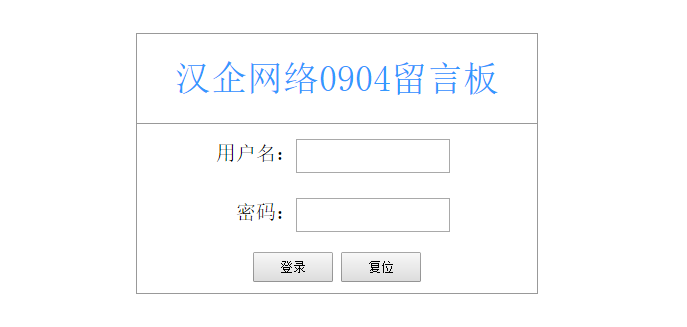
2.dengluchili.php 登录处理页面
<?php

session_start();

$UserName = $_POST["uid"];

$PassWord = $_POST["pwd"];

include("DBDA.class.php");

$db = new DBDA();

$sql = "select PassWord from yuangong where UserName='$UserName'";

$mm = $db->StrQuery($sql);

if($PassWord !="" && $PassWord==$mm)

{

    $_SESSION['views']=$UserName;

    header("location:main.php");

}

else

{

    echo "用户名或密码输入错误";

}
3.main.php 主页面,显示所有的信息。
<?php

session_start();

?>

<!DOCTYPE html PUBLIC "-//W3C//DTD XHTML 1.0 Transitional//EN" "http://www.w3.org/TR/xhtml1/DTD/xhtml1-transitional.dtd">

<html xmlns="http://www.w3.org/1999/xhtml">

<head>

<meta http-equiv="Content-Type" content="text/html; charset=utf-8" />

<title>无标题文档</title>

</head>

<body>
<?php

include("DBDA.class.php");

$db = new DBDA();

$sall = "select count(*) from liuyan";

$total = $db->StrQuery($sall);

include("../page.class.php");

$page = new Page($total,20);

$sql = "select * from liuyan ".$page->limit;

$result = $db->Query($sql);

foreach($result as $v)

{

}

?>
<br />
<div><a href="fabuxinxi.php">发布信息</a> <a href="tuichuchuli.php">退出系统</a></div>
<br />
<table width="50%" border="1" cellpadding="0" cellspacing="0">
<tr>
<td>发送人</td>
<td>接收人</td>
<td>发送时间</td>
<td>信息内容</td>
</tr>
<?php

foreach($result as $v)

{

    echo "<tr><td>$v[1]</td><td>$v[2]</td><td>$v[3]</td><td>$v[4]</td></tr>";

}

    ?>

</table>

<?php

echo $page->fpage();//显示表格下方的数据和页面的信息。

if(empty($_SESSION["views"]))

{

    header("location:denglu.php");

    exit;

}

?>
</body>

</html>

4.fabuxinxi.php 发布信息页面
<?php

session_start();

?>
<!DOCTYPE html PUBLIC "-//W3C//DTD XHTML 1.0 Transitional//EN" "http://www.w3.org/TR/xhtml1/DTD/xhtml1-transitional.dtd">
<html xmlns="http://www.w3.org/1999/xhtml">
<head>
<meta http-equiv="Content-Type" content="text/html; charset=utf-8" />
<title>无标题文档</title>
<style type="text/css">
*{ margin:0px; padding:0px}
.aa{ width:300px; height:40px; border:2px solid #999; border-bottom:0px; text-align:center; line-height:40px; vertical-align:middle}
.bb{ width:80px; height:30px}
#text1{ float:left; margin-top:10px; width:150px; height:20px; margin-left:2px}
</style>
</head>
<body>
<form action="fabuxinxichuli.php" method="post" onclick="return true">
<div style="position:relative; left:100px; top:40px">
<div><a href="chakanxinxi.php">查看信息</a> <a href="tuichuchuli.php">退出系统</a></div>
<br />
<div class="aa">
<div style="float:left; width:100px; height:40px; text-align:right">接收人:</div>
<!--<input id="text1" type="text" name="jieshouren" />-->
<select name="jishouren" style="width:100px; height:25px; margin-top:8px; margin-left:-100px">
<option selected="selected">所有人</option>
 <?php

 include("DBDA.class.php");

 $db = new DBDA();

 $sql = "select firend from firend";

 $result = $db->Query($sql);

 foreach($result as $v)

 {

     echo "<option>$v[0]</option>";

 }

 ?>
</select>
    </div>

    <div class="aa" style="height:90px">

        <div style="float:left; width:100px; height:90px; text-align:right; line-height:90px; vertical-align:middle">信息内容:</div>

        <div style="text-align:left"><textarea id="text2" name="xinxineirong" style="margin-top:4px; height:80px"></textarea></div>

    </div>

    <div class="aa" style="border-bottom:2px solid #999">

        <input class="bb" type="submit" value="发送" />

        <input class="bb" type="button" value="复位" onclick="Fuwei()" />

    </div>

</div>

</form>
<?php

if(empty($_SESSION["views"]))

{

    header("location:denglu.php");

}

?>
</body>
<script type="text/javascript">

function Fuwei()

{

    document.getElementById("text1").value = "";

    document.getElementById("text2").value = "";

}

</script>

</html>

5.fabuxinxichuli.php 发布信息处理页面
<?php

session_start();

$fasongren = $_SESSION['views'];

$time = date("Y-m-d h:i:s");

$jieshouren = $_POST["jieshouren"];

$xinxineirong = $_POST["xinxineirong"];

include("DBDA.class.php");

$db = new DBDA();

$sql ="insert into liuyan values('','{$fasongren}','{$jieshouren}','{$time}','{$xinxineirong}')";

$db->Query($sql,0);

if(empty($_SESSION["views"]))

{

    header("location:denglu.php");

}

else

{

    header("location:main.php");

}
6.chakanxinxi.php 只显示和登陆者有关系的信息
<?php

session_start();

?>
<!DOCTYPE html PUBLIC "-//W3C//DTD XHTML 1.0 Transitional//EN" "http://www.w3.org/TR/xhtml1/DTD/xhtml1-transitional.dtd">

<html xmlns="http://www.w3.org/1999/xhtml">

<head>

<meta http-equiv="Content-Type" content="text/html; charset=utf-8" />

<title>无标题文档</title>

</head>

<body>
<?php

$sender = $_SESSION['views'];

$Recever = $_SESSION['views'];

include("DBDA.class.php");

$db = new DBDA();

$sall = "select count(*) from liuyan";

$total = $db->StrQuery($sall);

include("../page.class.php");

$page = new Page($total,20);

$sql = "select * from liuyan where Sender='$sender' or Recever='$Recever' ".$page->limit;

$result = $db->Query($sql);

foreach($result as $v)

{

}

?>
<br />

<div><a href="fabuxinxi.php">返回</a></div>

<br />

<table width="50%" border="1" cellpadding="0" cellspacing="0">

    <tr>

        <td>发送人</td>

        <td>接收人</td>

        <td>发送时间</td>

        <td>信息内容</td>

    </tr>
<?php

    foreach($result as $v)

    {

        echo "<tr><td>$v[1]</td><td>$v[2]</td><td>$v[3]</td><td>$v[4]</td></tr>";

    }

    ?>
</table>
<?php

echo $page->fpage();//显示表格下方的数据和页面的信息。

if(empty($_SESSION["views"]))

{

    header("location:denglu.php");

    exit;

}

?>
</body>

</html>

7.tuichuchuli.php 退出系统,清空session。
<?php

session_start();

unset($_SESSION);

session_destroy();

header("location:denglu.php");
11月8日PHP练习《留言板》的更多相关文章
- 11月30日《奥威Power-BI智能分析报表制作方法》腾讯课堂开课啦
这么快一周就过去了,奥威公开课又要与大家见面咯,上节课老师教的三种报表集成方法你们都掌握了吗?大家都知道,学习的结果在于实际应用,想要熟练掌握新内容的要点就在于去应用它.正是基于这一要点,每一期的课程 ...
- 11月23日《奥威Power-BI报表集成到其他系统》腾讯课堂开课啦
听说明天全国各地区都要冷到爆了,要是天气冷到可以放假就好了.想象一下大冷天的一定要在被窝里度过才对嘛,索性明天晚上来个相约吧,相约在被窝里看奥威Power-BI公开课如何? 上周奥威公开 ...
- 11月16日《奥威Power-BI基于SQL的存储过程及自定义SQL脚本制作报表》腾讯课堂开课啦
上周的课程<奥威Power-BI vs微软Power BI>带同学们全面认识了两个Power-BI的使用情况,同学们已经迫不及待想知道这周的学习内容了吧!这周的课程关键词—— ...
- 11月09日《奥威Power-BI vs微软Power BI》腾讯课堂开课啦
上过奥威公开课的同学可能有一个疑问:奥威Power-BI和微软Power BI是同一个吗,为什么叫同样的名字?正如这个世界上有很多个John.Jack.Marry…一样,奥威Power-BI和微软Po ...
- 2016年11月30日 星期三 --出埃及记 Exodus 20:21
2016年11月30日 星期三 --出埃及记 Exodus 20:21 The people remained at a distance, while Moses approached the th ...
- 2016年11月29日 星期二 --出埃及记 Exodus 20:20
2016年11月29日 星期二 --出埃及记 Exodus 20:20 Moses said to the people, "Do not be afraid. God has come t ...
- 2016年11月28日 星期一 --出埃及记 Exodus 20:19
2016年11月28日 星期一 --出埃及记 Exodus 20:19 and said to Moses, "Speak to us yourself and we will listen ...
- 2016年11月27日 星期日 --出埃及记 Exodus 20:18
2016年11月27日 星期日 --出埃及记 Exodus 20:18 When the people saw the thunder and lightning and heard the trum ...
- 2016年11月26日 星期六 --出埃及记 Exodus 20:17
2016年11月26日 星期六 --出埃及记 Exodus 20:17 "You shall not covet your neighbor's house. You shall not c ...
- 2016年11月25日 星期五 --出埃及记 Exodus 20:16
2016年11月25日 星期五 --出埃及记 Exodus 20:16 "You shall not give false testimony against your neighbor.不 ...
随机推荐
- mysql慢查询日志分析工具 mysqlsla(转)
mysql数据库的慢查询日志是非常重要的一项调优辅助日志,但是mysql默认记录的日志格式阅读时不够友好,这是由mysql日志记录规则所决定的,捕获一条就记录一条,虽说记录的信息足够详尽,但如果将浏览 ...
- 【转】详细分析Java中断机制
原文地址:http://www.infoq.com/cn/articles/java-interrupt-mechanism 1. 引言 当我们点击某个杀毒软件的取消按钮来停止查杀病毒时,当我们在控制 ...
- 002.php安装(lnmp)
搭建lnmp环境时,需要先安装mysql,再安装php,而nginx安装顺序无所谓,nginx与php之间的联系需要手动配置 一.php下载和配置“安装环境“ [root@huh ~]# cd /us ...
- [WPF系列]- Style - Specify width/height as resource in WPF
<Page xmlns="http://schemas.microsoft.com/winfx/2006/xaml/presentation" xmlns:sys=" ...
- centos 6x系统下源码安装mysql操作记录
在运维工作中经常部署各种运维环境,涉及mysql数据库的安装也是时常需要的.mysql数据库安装可以选择yum在线安装,但是这种安装的mysql一般是系统自带的,版本方面可能跟需求不太匹配.可以通过源 ...
- 【C#】【Thread】CountdownEvent任务并行
System.Threading.CountdownEvent 是一个同步基元,它在收到一定次数的信号之后,将会解除对其等待线程的锁定. CountdownEvent 专门用于以下情况:您必须使用 ...
- C#.NET 大型企业信息化系统集成快速开发平台 4.2 版本 - 面向全国标准省市县行政数据基础之上的组织机构管理
由于信息系统庞大.各种业务子系统.各种开发语言开发的业务逻辑.各种年代维护的代码.各种参差不齐的历史遗留信息系统,面向全国的业务系统,面向某个领域的汽运管理信息系统,面向内部的业务系统,面向外部的各种 ...
- iOS 关于字体根据不同屏幕尺寸等比适配的问题(zz)
http://www.jianshu.com/p/5815e81abb52 背景 去年的六月份开始了一个新的项目,此项目支持的设备从4S开始一直到6+,也就是说屏幕的尺寸最小的320x480 最大的1 ...
- 跟我从零基础学习Unity3D开发--U3d脚本注意事项及两个基本函数的简单介绍
经过上一篇的学习,我相信开发环境您已经搭好了,如果还没有搭好可以百度一下. 今天主要讲的有以下几点: 第一:Unity3D中的C#脚本与.net中的C#写法的区别 1.Unity3D C#脚本不支持命 ...
- 如何通过ShadowSocket自动更新Chrome
经常收到Chrome的更新提示,并下载更新程序后,报无法连接网络,然后更新不能了, 经过一段时间的搜索,找到了一条比较好的方法,分享一下: 1. 本机打开ShadowSocket 2. 打开Privo ...