
Gerrit - 安装配置GitWeb
1 - GitWeb简介
GitWeb是一个支持在Web页面上查看代码以及提交信息的工具。
安装GitWeb工具并且集成到Gerrit中,就可以直接在Gerrit的项目列表中查看项目的代码信息。
2 - 安装GitWeb
启动gerrit服务
[gerrit@mt101 ~]$ sudo gerrit_testsite/bin/gerrit.sh start

Starting Gerrit Code Review: OK

[gerrit@mt101 ~]$

[gerrit@mt101 ~]$ sudo service nginx start

Redirecting to /bin/systemctl start nginx.service

[gerrit@mt101 ~]$
通过yum安装GitWeb
[gerrit@mt101 ~]$ sudo yum -y install gitweb
Loaded plugins: fastestmirror, langpacks
Loading mirror speeds from cached hostfile
* base: mirrors.aliyun.com
* extras: mirrors.aliyun.com
* updates: mirrors.aliyun.com
base | 3.6 kB 00:00:00
extras | 2.9 kB 00:00:00
mongodb-org-4.0 | 2.5 kB 00:00:00
nginx-stable | 2.9 kB 00:00:00
updates | 2.9 kB 00:00:00
Resolving Dependencies
--> Running transaction check
---> Package gitweb.noarch 0:1.8.3.1-20.el7 will be installed
--> Finished Dependency Resolution
Dependencies Resolved
=====================================================================================================
Package Arch Version Repository Size
=====================================================================================================
Installing:
gitweb noarch 1.8.3.1-20.el7 base 112 k
Transaction Summary
=====================================================================================================
Install 1 Package
Total download size: 112 k
Installed size: 320 k
Downloading packages:
gitweb-1.8.3.1-20.el7.noarch.rpm | 112 kB 00:00:07
Running transaction check
Running transaction test
Transaction test succeeded
Running transaction
Installing : gitweb-1.8.3.1-20.el7.noarch 1/1
Verifying : gitweb-1.8.3.1-20.el7.noarch 1/1
Installed:
gitweb.noarch 0:1.8.3.1-20.el7
Complete!
[gerrit@mt101 ~]$
3 - 设置projectroot目录
配置文件:/etc/gitweb.conf
[gerrit@mt101 ~]$ sudo vim /etc/gitweb.conf

[gerrit@mt101 ~]$ sudo cat /etc/gitweb.conf |grep -v "#" |grep -Ev "^$"

our $projectroot = "/home/gerrit/gerrit_testsite/git"

[gerrit@mt101 ~]$
4 - 配置GitWeb的httpd服务
4.1 配置GitWeb路径
GitWeb是基于httpd服务工作的,配置文件:/etc/httpd/conf.d/git.conf
[gerrit@mt101 ~]$ sudo cat /etc/httpd/conf.d/git.conf
Alias /git /var/www/git
<Directory /var/www/git>
Options +ExecCGI
AddHandler cgi-script .cgi
DirectoryIndex gitweb.cgi
</Directory>
[gerrit@mt101 ~]$
[gerrit@mt101 ~]$ sudo vim /etc/httpd/conf.d/git.conf
[gerrit@mt101 ~]$
[gerrit@mt101 ~]$ sudo cat /etc/httpd/conf.d/git.conf
Alias /gitweb /var/www/git
SetEnv GITWEB_CONFIG /etc/gitweb.conf
<Directory /var/www/git>
Options +ExecCGI +FollowSymLinks +SymLinksIfOwnerMatch
AllowOverride All
order allow,deny
Allow from all
AddHandler cgi-script .cgi
DirectoryIndex gitweb.cgi
</Directory>
[gerrit@mt101 ~]$
4.2 配置服务端口
在/etc/httpd/conf/httpd.conf中配置服务端口
[gerrit@mt101 ~]$ sudo cat /etc/httpd/conf/httpd.conf |grep -v "#" |grep -Ev "^$" |grep -i listen

Listen 80

[gerrit@mt101 ~]$

[gerrit@mt101 ~]$ sudo vim /etc/httpd/conf/httpd.conf

[gerrit@mt101 ~]$ sudo cat /etc/httpd/conf/httpd.conf |grep -v "#" |grep -Ev "^$" |grep -i listen

Listen 8084

[gerrit@mt101 ~]$
4.3 重启httpd服务
[gerrit@mt101 ~]$ sudo systemctl restart httpd.service
[gerrit@mt101 ~]$ sudo systemctl status httpd.service
● httpd.service - The Apache HTTP Server
Loaded: loaded (/usr/lib/systemd/system/httpd.service; disabled; vendor preset: disabled)
Active: active (running) since Tue 2019-12-10 22:57:22 CST; 9s ago
Docs: man:httpd(8)
man:apachectl(8)
Process: 3432 ExecStop=/bin/kill -WINCH ${MAINPID} (code=exited, status=0/SUCCESS)
Main PID: 3439 (httpd)
Status: "Total requests: 0; Current requests/sec: 0; Current traffic: 0 B/sec"
Tasks: 7
CGroup: /system.slice/httpd.service
├─3439 /usr/sbin/httpd -DFOREGROUND
├─3440 /usr/sbin/httpd -DFOREGROUND
├─3441 /usr/sbin/httpd -DFOREGROUND
├─3442 /usr/sbin/httpd -DFOREGROUND
├─3443 /usr/sbin/httpd -DFOREGROUND
├─3444 /usr/sbin/httpd -DFOREGROUND
└─3445 /usr/sbin/httpd -DFOREGROUND
Dec 10 22:57:16 mt101 systemd[1]: Starting The Apache HTTP Server...
Dec 10 22:57:21 mt101 httpd[3439]: AH00558: httpd: Could not reliably determine the server's f...sage
Dec 10 22:57:22 mt101 systemd[1]: Started The Apache HTTP Server.
Hint: Some lines were ellipsized, use -l to show in full.
[gerrit@mt101 ~]$
4.4 开放防火墙
[gerrit@mt101 ~]$ sudo firewall-cmd --zone=public --permanent --add-port=8084/tcp

success

[gerrit@mt101 ~]$ sudo firewall-cmd --reload

success

[gerrit@mt101 ~]$ sudo firewall-cmd --list-all

public (active)

  target: default

  icmp-block-inversion: no

  interfaces: enp0s3 enp0s8

  sources:

  services: ssh dhcpv6-client

  ports: 8080/tcp 80/tcp 83/tcp 8083/tcp 8084/tcp

  protocols:

  masquerade: no

  forward-ports:

  source-ports:

  icmp-blocks:

  rich rules:

[gerrit@mt101 ~]$
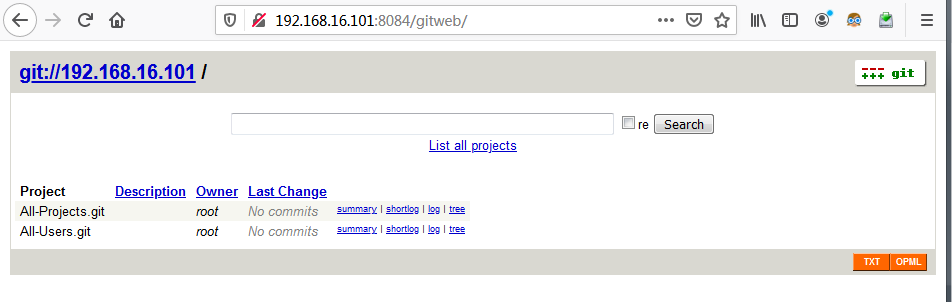
5 - 访问GitWeb
6 - 和Gerrit集成
6.1 更新Gerrit配置文件
增加如下部分
[gitweb]

       type = gitweb

       cgi = /var/www/git/gitweb.cgi
[gerrit@mt101 ~]$ sudo vim gerrit_testsite/etc/gerrit.config

[gerrit@mt101 ~]$ sudo cat gerrit_testsite/etc/gerrit.config

[gerrit]

    basePath = git

    canonicalWebUrl = http://192.168.16.101:8083/

    serverId = 0b911b9e-195a-46b0-a5cd-b407b776b344

[container]

    javaOptions = "-Dflogger.backend_factory=com.google.common.flogger.backend.log4j.Log4jBackendFactory#getInstance"

    javaOptions = "-Dflogger.logging_context=com.google.gerrit.server.logging.LoggingContext#getInstance"

    user = root

    javaHome = /usr/lib/jvm/java-1.8.0-openjdk-1.8.0.161-2.b14.el7.x86_64/jre

[index]

    type = lucene

[auth]

    type = HTTP

[receive]

    enableSignedPush = false

[sendemail]

    smtpServer = localhost

[sshd]

    listenAddress = *:29418

[httpd]

    listenUrl = http://192.168.16.101:8083/

[cache]

    directory = cache

[gitweb]

       type = gitweb

       cgi = /var/www/git/gitweb.cgi

[gerrit@mt101 ~]$
6.2 修改git配置
[gerrit@mt101 ~]$ git config --file /home/gerrit/gerrit_testsite/etc/gerrit.config gitweb.cgi /var/www/git/ gitweb.cgi

[gerrit@mt101 ~]$ git config --file /home/gerrit/gerrit_testsite/etc/gerrit.config --unset gitweb.url

[gerrit@mt101 ~]$
6.3 重启Gerrit服务
[gerrit@mt101 ~]$ sudo gerrit_testsite/bin/gerrit.sh restart

Stopping Gerrit Code Review: OK

Starting Gerrit Code Review: OK

[gerrit@mt101 ~]$
6.4 重新登录,确认GitWeb链接
BROWSE---》Repositories---》Repository Browser---》gitweb链接

点击All-Project的gitweb链接

6.5 配置GitWeb访问权限
默认只有Gerrit管理员用户才有GieWeb的访问权限。
BROWSE---》Repositories---》All-Projects---》Access---》Reference: refs/meta/config
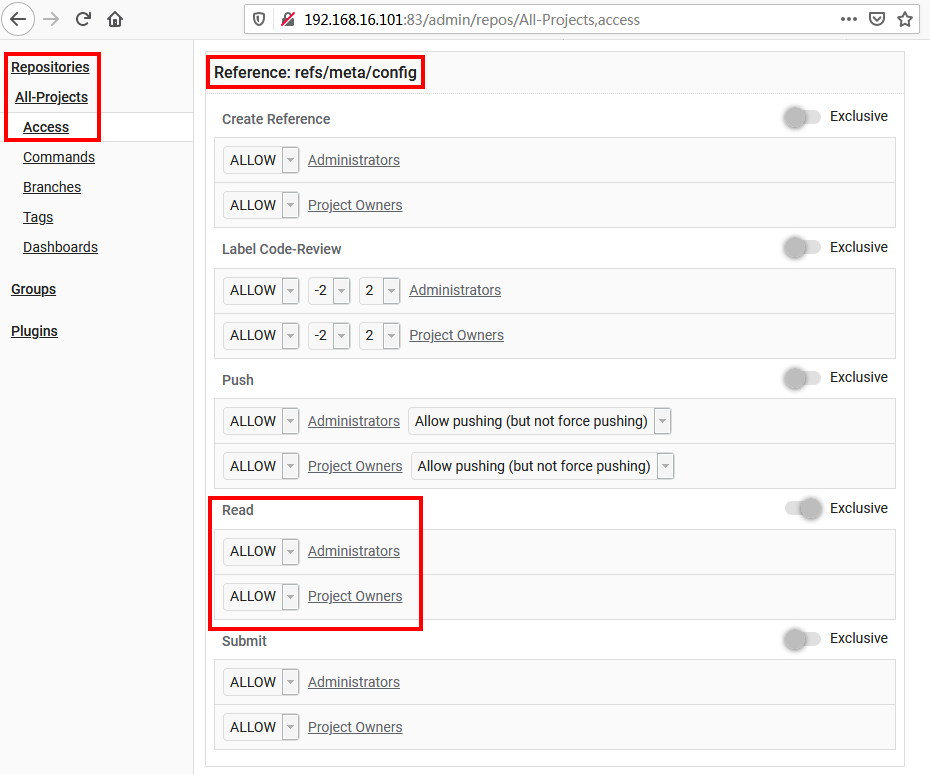
在“refs/meta/config”的Read选项中添加“Registered Users”的ALLOW 权限

Gerrit - 安装配置GitWeb的更多相关文章
- gerrit安装配置记录
gerrit安装配置 java -jar gerrit-2.13.5.war init -d gerrit Authentication method [OPEN/?]: htt Install Ve ...
- Gerrit安装配置
环境: CentOS 1611 + gerrit-2.11.4 (review.openstack.org) 1. 安装java1.8 (>1.7) [root@review ~]# yum i ...
- 安装配置gerrit
Centos 安装配置gerrit 关闭selinux,不然nginx的反向代理会报错connect() to 127.0.0.1:8080 failed (13: Permission denied ...
- gerrit+nginx+centos安装配置
安装环境 centos 6.8 gerrit-full-2.5.2.war 下载地址:https://gerrit-releases.storage.googleapis.com/gerrit-ful ...
- Gerrit+apache+H2数据库简单安装配置及建库流程
Gerrit 是一个基于 Web 的代码评审和项目管理的工具,面向基于 Git 版本控制系统的项目.因此需要Apache.Mysql.GIT等相关软件的支持 系统配置: 新装的UBANTU LINUX ...
- Gerrit安装
1.安装gerrit [sisi@pre-srv44 ~]$ su - gerrit2Password: [gerrit2@pre-srv44 ~]$ lltotal 83872-rw-r--r-- ...
- Gerrit2安装配置
我主要根据下面这个文章而安装,遇到一些小问题,记录如下:2016.4.30 安装 2.12.2,要将加密的东东全装上!!!注意 1) 由于新的git-bash ...
- Centos7安装配置gitlab
Centos7安装配置gitlab 这篇文字我会介绍在Centos7上安装gitlab,配置gitlab的smtp,并且创建项目demo. sudo yum install openssh-serve ...
- Git服务器的Gitosis安装配置及gitignore的使用方法
Git服务器Gitosis安装设置 1.安装 openssh服务器 sudo apt-get install openssh-server openssh-client 2.创建个人公钥和私钥 在默认 ...
随机推荐
- 项目Beta冲刺(团队) ——随笔集合
课程名称:软件工程1916|W(福州大学) 作业要求:项目β冲刺(团队) 团队名称:葫芦娃队 作业目标:汇总这次冲刺项目的所有随笔文件. 队员学号 队员昵称 博客地址 041602421 der hi ...
- NetEQ主要文件简介
accelerate.h,accelerate.cc 加速操作,对语音信号处理以实现快速播放. Accelerate类继承自父类TimeStretch,大多数功能由TimeStretch实现. Ret ...
- CF1105D-Kilani and the Game-(多向bfs)
http://codeforces.com/problemset/problem/1105/D 题意:有一片矩阵区域,一开始有多个势力比如1,2,3,4....9,从势力1开始轮流向外扩张,地图上为‘ ...
- Linked List Sorting
静态链表(用结构体数组模拟链表) 1052 Linked List Sorting (25分) A linked list consists of a series of structur ...
- smashing 开源方便的dashboard 试用
smashing 一个方便的dashboard 工具,是在Shopify/dashing 上维护的一个版本因为原有的官方团队不在维护了 smashing 使用简单,提供了脚手架同时也有好多人开发了一些 ...
- 使用docker部署微服务
https://my.oschina.net/silenceyawen/blog/1819472 http://jvm123.com/2019/08/docker-shi-yong.html 从201 ...
- SpringBoot要点之使用Actuator监控
Actuator是Springboot提供的用来对应用系统进行自省和监控的功能模块,借助于Actuator开发者可以很方便地对应用系统某些监控指标进行查看.统计等. 在pom文件中加入spring-b ...
- 小胖的奇偶(Viojs1112)题解
原题: 题目描述 huyichen和xuzhenyi在玩一个游戏:他写一个由0和1组成的序列. huyichen选其中的一段(比如第3位到第5位),问他这段里面有奇数个1 还是偶数个1.xuzheny ...
- HDU 6212 Zuma
Zuma 这个题没有素质!它卡常! 我发现网上很多人的题解都写得很奇怪,也不好确定正确性,所以我借这篇题解表达一下愚见 定义$ dp[i][j][0...4]$表示 0:消完了 1:还剩1个0 2:还 ...
- 模拟25A 题解
A. Lighthouse m的范围极小,显然的容斥. 总的方案数,减去受任意一个限制的方案数,加回受两个限制的方案数. 就能得到受所有限制的的方案数. 将选择的一些边所指向的点放在同一个联通块里. ...