
Jupyter Notebook---不需认证,与nginx搭配远程访问及下载
如果默认启动,jupyter notebook需要token或是password登陆,且在nginx后面,下载会报403限制。
Blocking Cross Origin request from http://ops-xxxx:8080/tree/xx-test.
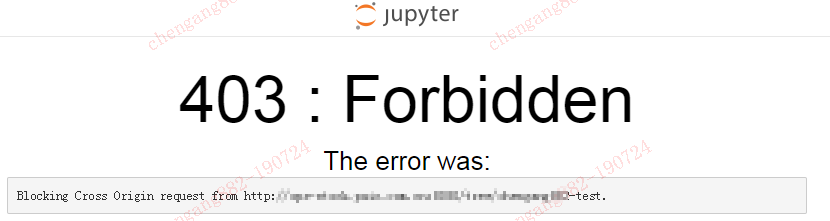
在内部网,可以在启动里加如以下参数,作为测试之用。
command: ["bash", "-c", "source /etc/bash.bashrc && jupyter notebook --notebook-dir=/tf --ip 0.0.0.0 --no-browser --allow-root --NotebookApp.allow_remote_access=True --NotebookApp.disable_check_xsrf=True --NotebookApp.token='' --NotebookApp.password='' --NotebookApp.allow_origin='*' --NotebookApp.allow_origin='*'"]
同时,nginx里可以保持比较小的配置
upstream ai_jupyter {
    ip_hash;
    server 1.2.3.4:12345;
}

server {
    listen       8080;
    server_name  localhost;
    client_max_body_size 500m;
    proxy_connect_timeout    600;
    proxy_read_timeout       600;
    proxy_send_timeout       600;

    add_header 'Access-Control-Allow-Origin' '*';

    location / {
        proxy_pass  http://ai_jupyter;
        proxy_set_header Host $host;
        proxy_set_header X-Real-Scheme $scheme;
        proxy_set_header X-Real-IP $remote_addr;
        proxy_set_header X-Forwarded-For $proxy_add_x_forwarded_for;
    }
    location ~ /api/kernels/ {
        proxy_pass            http://ai_jupyter;
        proxy_set_header      Host $host;
        # websocket support
        proxy_http_version    1.1;
        proxy_set_header      Upgrade "websocket";
        proxy_set_header      Connection "Upgrade";
        proxy_read_timeout    86400;
    }
    location ~ /terminals/ {
        proxy_pass            http://ai_jupyter;
        proxy_set_header      Host $host;
        # websocket support
        proxy_http_version    1.1;
        proxy_set_header      Upgrade "websocket";
        proxy_set_header      Connection "Upgrade";
        proxy_read_timeout    86400;
    }
}
下面,列个jupyter notebook --help的全部可选项吧。需要时,方便
The Jupyter HTML Notebook.

This launches a Tornado based HTML Notebook Server that serves up an
HTML5/Javascript Notebook client.

Subcommands
-----------

Subcommands are launched as `jupyter-notebook cmd [args]`. For information on
using subcommand 'cmd', do: `jupyter-notebook cmd -h`.

list
    List currently running notebook servers.
stop
    Stop currently running notebook server for a given port
password
    Set a password for the notebook server.

Options
-------

Arguments that take values are actually convenience aliases to full
Configurables, whose aliases are listed on the help line. For more information
on full configurables, see '--help-all'.

--debug
    set log level to logging.DEBUG (maximize logging output)
--generate-config
    generate default config file
-y
    Answer yes to any questions instead of prompting.
--no-browser
    Don't open the notebook in a browser after startup.
--pylab
    DISABLED: use %pylab or %matplotlib in the notebook to enable matplotlib.
--no-mathjax
    Disable MathJax

    MathJax is the javascript library Jupyter uses to render math/LaTeX. It is
    very large, so you may want to disable it if you have a slow internet
    connection, or for offline use of the notebook.

    When disabled, equations etc. will appear as their untransformed TeX source.
--allow-root
    Allow the notebook to be run from root user.
--script
    DEPRECATED, IGNORED
--no-script
    DEPRECATED, IGNORED
--log-level=<Enum> (Application.log_level)
    Default: 30
    Choices: (0, 10, 20, 30, 40, 50, 'DEBUG', 'INFO', 'WARN', 'ERROR', 'CRITICAL')
    Set the log level by value or name.
--config=<Unicode> (JupyterApp.config_file)
    Default: ''
    Full path of a config file.
--ip=<Unicode> (NotebookApp.ip)
    Default: 'localhost'
    The IP address the notebook server will listen on.
--port=<Int> (NotebookApp.port)
    Default: 8888
    The port the notebook server will listen on.
--port-retries=<Int> (NotebookApp.port_retries)
    Default: 50
    The number of additional ports to try if the specified port is not
    available.
--transport=<CaselessStrEnum> (KernelManager.transport)
    Default: 'tcp'
    Choices: ['tcp', 'ipc']
--keyfile=<Unicode> (NotebookApp.keyfile)
    Default: ''
    The full path to a private key file for usage with SSL/TLS.
--certfile=<Unicode> (NotebookApp.certfile)
    Default: ''
    The full path to an SSL/TLS certificate file.
--client-ca=<Unicode> (NotebookApp.client_ca)
    Default: ''
    The full path to a certificate authority certificate for SSL/TLS client
    authentication.
--notebook-dir=<Unicode> (NotebookApp.notebook_dir)
    Default: ''
    The directory to use for notebooks and kernels.
--browser=<Unicode> (NotebookApp.browser)
    Default: ''
    Specify what command to use to invoke a web browser when opening the
    notebook. If not specified, the default browser will be determined by the
    `webbrowser` standard library module, which allows setting of the BROWSER
    environment variable to override it.
--pylab=<Unicode> (NotebookApp.pylab)
    Default: 'disabled'
    DISABLED: use %pylab or %matplotlib in the notebook to enable matplotlib.

Class parameters
----------------

Parameters are set from command-line arguments of the form:
`--Class.trait=value`. This line is evaluated in Python, so simple expressions
are allowed, e.g.:: `--C.a='range(3)'` For setting C.a=[0,1,2].

NotebookApp options
-------------------
--NotebookApp.allow_credentials=<Bool>
    Default: False
    Set the Access-Control-Allow-Credentials: true header
--NotebookApp.allow_origin=<Unicode>
    Default: ''
    Set the Access-Control-Allow-Origin header
    Use '*' to allow any origin to access your server.
    Takes precedence over allow_origin_pat.
--NotebookApp.allow_origin_pat=<Unicode>
    Default: ''
    Use a regular expression for the Access-Control-Allow-Origin header
    Requests from an origin matching the expression will get replies with:
        Access-Control-Allow-Origin: origin
    where `origin` is the origin of the request.
    Ignored if allow_origin is set.
--NotebookApp.allow_password_change=<Bool>
    Default: True
    Allow password to be changed at login for the notebook server.
    While loggin in with a token, the notebook server UI will give the
    opportunity to the user to enter a new password at the same time that will
    replace the token login mechanism.
    This can be set to false to prevent changing password from the UI/API.
--NotebookApp.allow_remote_access=<Bool>
    Default: False
    Allow requests where the Host header doesn't point to a local server
    By default, requests get a 403 forbidden response if the 'Host' header shows
    that the browser thinks it's on a non-local domain. Setting this option to
    True disables this check.
    This protects against 'DNS rebinding' attacks, where a remote web server
    serves you a page and then changes its DNS to send later requests to a local
    IP, bypassing same-origin checks.
    Local IP addresses (such as 127.0.0.1 and ::1) are allowed as local, along
    with hostnames configured in local_hostnames.
--NotebookApp.allow_root=<Bool>
    Default: False
    Whether to allow the user to run the notebook as root.
--NotebookApp.answer_yes=<Bool>
    Default: False
    Answer yes to any prompts.
--NotebookApp.base_project_url=<Unicode>
    Default: '/'
    DEPRECATED use base_url
--NotebookApp.base_url=<Unicode>
    Default: '/'
    The base URL for the notebook server.
    Leading and trailing slashes can be omitted, and will automatically be
    added.
--NotebookApp.browser=<Unicode>
    Default: ''
    Specify what command to use to invoke a web browser when opening the
    notebook. If not specified, the default browser will be determined by the
    `webbrowser` standard library module, which allows setting of the BROWSER
    environment variable to override it.
--NotebookApp.certfile=<Unicode>
    Default: ''
    The full path to an SSL/TLS certificate file.
--NotebookApp.client_ca=<Unicode>
    Default: ''
    The full path to a certificate authority certificate for SSL/TLS client
    authentication.
--NotebookApp.config_file=<Unicode>
    Default: ''
    Full path of a config file.
--NotebookApp.config_file_name=<Unicode>
    Default: ''
    Specify a config file to load.
--NotebookApp.config_manager_class=<Type>
    Default: 'notebook.services.config.manager.ConfigManager'
    The config manager class to use
--NotebookApp.contents_manager_class=<Type>
    Default: 'notebook.services.contents.largefilemanager.LargeFileManager'
    The notebook manager class to use.
--NotebookApp.cookie_options=<Dict>
    Default: {}
    Extra keyword arguments to pass to `set_secure_cookie`. See tornado's
    set_secure_cookie docs for details.
--NotebookApp.cookie_secret=<Bytes>
    Default: b''
    The random bytes used to secure cookies. By default this is a new random
    number every time you start the Notebook. Set it to a value in a config file
    to enable logins to persist across server sessions.
    Note: Cookie secrets should be kept private, do not share config files with
    cookie_secret stored in plaintext (you can read the value from a file).
--NotebookApp.cookie_secret_file=<Unicode>
    Default: ''
    The file where the cookie secret is stored.
--NotebookApp.custom_display_url=<Unicode>
    Default: ''
    Override URL shown to users.
    Replace actual URL, including protocol, address, port and base URL, with the
    given value when displaying URL to the users. Do not change the actual
    connection URL. If authentication token is enabled, the token is added to
    the custom URL automatically.
    This option is intended to be used when the URL to display to the user
    cannot be determined reliably by the Jupyter notebook server (proxified or
    containerized setups for example).
--NotebookApp.default_url=<Unicode>
    Default: '/tree'
    The default URL to redirect to from `/`
--NotebookApp.disable_check_xsrf=<Bool>
    Default: False
    Disable cross-site-request-forgery protection
    Jupyter notebook 4.3.1 introduces protection from cross-site request
    forgeries, requiring API requests to either:
    - originate from pages served by this server (validated with XSRF cookie and
    token), or - authenticate with a token
    Some anonymous compute resources still desire the ability to run code,
    completely without authentication. These services can disable all
    authentication and security checks, with the full knowledge of what that
    implies.
--NotebookApp.enable_mathjax=<Bool>
    Default: True
    Whether to enable MathJax for typesetting math/TeX
    MathJax is the javascript library Jupyter uses to render math/LaTeX. It is
    very large, so you may want to disable it if you have a slow internet
    connection, or for offline use of the notebook.
    When disabled, equations etc. will appear as their untransformed TeX source.
--NotebookApp.extra_nbextensions_path=<List>
    Default: []
    extra paths to look for Javascript notebook extensions
--NotebookApp.extra_services=<List>
    Default: []
    handlers that should be loaded at higher priority than the default services
--NotebookApp.extra_static_paths=<List>
    Default: []
    Extra paths to search for serving static files.
    This allows adding javascript/css to be available from the notebook server
    machine, or overriding individual files in the IPython
--NotebookApp.extra_template_paths=<List>
    Default: []
    Extra paths to search for serving jinja templates.
    Can be used to override templates from notebook.templates.
--NotebookApp.file_to_run=<Unicode>
    Default: ''
--NotebookApp.generate_config=<Bool>
    Default: False
    Generate default config file.
--NotebookApp.get_secure_cookie_kwargs=<Dict>
    Default: {}
    Extra keyword arguments to pass to `get_secure_cookie`. See tornado's
    get_secure_cookie docs for details.
--NotebookApp.ignore_minified_js=<Bool>
    Default: False
    Deprecated: Use minified JS file or not, mainly use during dev to avoid JS
    recompilation
--NotebookApp.iopub_data_rate_limit=<Float>
    Default: 1000000
    (bytes/sec) Maximum rate at which stream output can be sent on iopub before
    they are limited.
--NotebookApp.iopub_msg_rate_limit=<Float>
    Default: 1000
    (msgs/sec) Maximum rate at which messages can be sent on iopub before they
    are limited.
--NotebookApp.ip=<Unicode>
    Default: 'localhost'
    The IP address the notebook server will listen on.
--NotebookApp.jinja_environment_options=<Dict>
    Default: {}
    Supply extra arguments that will be passed to Jinja environment.
--NotebookApp.jinja_template_vars=<Dict>
    Default: {}
    Extra variables to supply to jinja templates when rendering.
--NotebookApp.kernel_manager_class=<Type>
    Default: 'notebook.services.kernels.kernelmanager.MappingKernelManager'
    The kernel manager class to use.
--NotebookApp.kernel_spec_manager_class=<Type>
    Default: 'jupyter_client.kernelspec.KernelSpecManager'
    The kernel spec manager class to use. Should be a subclass of
    `jupyter_client.kernelspec.KernelSpecManager`.
    The Api of KernelSpecManager is provisional and might change without warning
    between this version of Jupyter and the next stable one.
--NotebookApp.keyfile=<Unicode>
    Default: ''
    The full path to a private key file for usage with SSL/TLS.
--NotebookApp.local_hostnames=<List>
    Default: ['localhost']
    Hostnames to allow as local when allow_remote_access is False.
    Local IP addresses (such as 127.0.0.1 and ::1) are automatically accepted as
    local as well.
--NotebookApp.log_datefmt=<Unicode>
    Default: '%Y-%m-%d %H:%M:%S'
    The date format used by logging formatters for %(asctime)s
--NotebookApp.log_format=<Unicode>
    Default: '[%(name)s]%(highlevel)s %(message)s'
    The Logging format template
--NotebookApp.log_level=<Enum>
    Default: 30
    Choices: (0, 10, 20, 30, 40, 50, 'DEBUG', 'INFO', 'WARN', 'ERROR', 'CRITICAL')
    Set the log level by value or name.
--NotebookApp.login_handler_class=<Type>
    Default: 'notebook.auth.login.LoginHandler'
    The login handler class to use.
--NotebookApp.logout_handler_class=<Type>
    Default: 'notebook.auth.logout.LogoutHandler'
    The logout handler class to use.
--NotebookApp.mathjax_config=<Unicode>
    Default: 'TeX-AMS-MML_HTMLorMML-full,Safe'
    The MathJax.js configuration file that is to be used.
--NotebookApp.mathjax_url=<Unicode>
    Default: ''
    A custom url for MathJax.js. Should be in the form of a case-sensitive url
    to MathJax, for example:  /static/components/MathJax/MathJax.js
--NotebookApp.max_body_size=<Int>
    Default: 536870912
    Sets the maximum allowed size of the client request body, specified in  the
    Content-Length request header field. If the size in a request  exceeds the
    configured value, a malformed HTTP message is returned to the client.
    Note: max_body_size is applied even in streaming mode.
--NotebookApp.max_buffer_size=<Int>
    Default: 536870912
    Gets or sets the maximum amount of memory, in bytes, that is allocated  for
    use by the buffer manager.
--NotebookApp.nbserver_extensions=<Dict>
    Default: {}
    Dict of Python modules to load as notebook server extensions.Entry values
    can be used to enable and disable the loading ofthe extensions. The
    extensions will be loaded in alphabetical order.
--NotebookApp.notebook_dir=<Unicode>
    Default: ''
    The directory to use for notebooks and kernels.
--NotebookApp.open_browser=<Bool>
    Default: True
    Whether to open in a browser after starting. The specific browser used is
    platform dependent and determined by the python standard library
    `webbrowser` module, unless it is overridden using the --browser
    (NotebookApp.browser) configuration option.
--NotebookApp.password=<Unicode>
    Default: ''
    Hashed password to use for web authentication.
    To generate, type in a python/IPython shell:
      from notebook.auth import passwd; passwd()
    The string should be of the form type:salt:hashed-password.
--NotebookApp.password_required=<Bool>
    Default: False
    Forces users to use a password for the Notebook server. This is useful in a
    multi user environment, for instance when everybody in the LAN can access
    each other's machine through ssh.
    In such a case, server the notebook server on localhost is not secure since
    any user can connect to the notebook server via ssh.
--NotebookApp.port=<Int>
    Default: 8888
    The port the notebook server will listen on.
--NotebookApp.port_retries=<Int>
    Default: 50
    The number of additional ports to try if the specified port is not
    available.
--NotebookApp.pylab=<Unicode>
    Default: 'disabled'
    DISABLED: use %pylab or %matplotlib in the notebook to enable matplotlib.
--NotebookApp.quit_button=<Bool>
    Default: True
    If True, display a button in the dashboard to quit (shutdown the notebook
    server).
--NotebookApp.rate_limit_window=<Float>
    Default: 3
    (sec) Time window used to  check the message and data rate limits.
--NotebookApp.reraise_server_extension_failures=<Bool>
    Default: False
    Reraise exceptions encountered loading server extensions?
--NotebookApp.server_extensions=<List>
    Default: []
    DEPRECATED use the nbserver_extensions dict instead
--NotebookApp.session_manager_class=<Type>
    Default: 'notebook.services.sessions.sessionmanager.SessionManager'
    The session manager class to use.
--NotebookApp.shutdown_no_activity_timeout=<Int>
    Default: 0
    Shut down the server after N seconds with no kernels or terminals running
    and no activity. This can be used together with culling idle kernels
    (MappingKernelManager.cull_idle_timeout) to shutdown the notebook server
    when it's not in use. This is not precisely timed: it may shut down up to a
    minute later. 0 (the default) disables this automatic shutdown.
--NotebookApp.ssl_options=<Dict>
    Default: {}
    Supply SSL options for the tornado HTTPServer. See the tornado docs for
    details.
--NotebookApp.terminado_settings=<Dict>
    Default: {}
    Supply overrides for terminado. Currently only supports "shell_command".
--NotebookApp.terminals_enabled=<Bool>
    Default: True
    Set to False to disable terminals.
    This does *not* make the notebook server more secure by itself. Anything the
    user can in a terminal, they can also do in a notebook.
    Terminals may also be automatically disabled if the terminado package is not
    available.
--NotebookApp.token=<Unicode>
    Default: '<generated>'
    Token used for authenticating first-time connections to the server.
    When no password is enabled, the default is to generate a new, random token.
    Setting to an empty string disables authentication altogether, which is NOT
    RECOMMENDED.
--NotebookApp.tornado_settings=<Dict>
    Default: {}
    Supply overrides for the tornado.web.Application that the Jupyter notebook
    uses.
--NotebookApp.trust_xheaders=<Bool>
    Default: False
    Whether to trust or not X-Scheme/X-Forwarded-Proto and X-Real-
    Ip/X-Forwarded-For headerssent by the upstream reverse proxy. Necessary if
    the proxy handles SSL
--NotebookApp.webapp_settings=<Dict>
    Default: {}
    DEPRECATED, use tornado_settings
--NotebookApp.webbrowser_open_new=<Int>
    Default: 2
    Specify Where to open the notebook on startup. This is the `new` argument
    passed to the standard library method `webbrowser.open`. The behaviour is
    not guaranteed, but depends on browser support. Valid values are:
     - 2 opens a new tab,
     - 1 opens a new window,
     - 0 opens in an existing window.
    See the `webbrowser.open` documentation for details.
--NotebookApp.websocket_compression_options=<Any>
    Default: None
    Set the tornado compression options for websocket connections.
    This value will be returned from
    :meth:`WebSocketHandler.get_compression_options`. None (default) will
    disable compression. A dict (even an empty one) will enable compression.
    See the tornado docs for WebSocketHandler.get_compression_options for
    details.
--NotebookApp.websocket_url=<Unicode>
    Default: ''
    The base URL for websockets, if it differs from the HTTP server (hint: it
    almost certainly doesn't).
    Should be in the form of an HTTP origin: ws[s]://hostname[:port]

KernelManager options
---------------------
--KernelManager.autorestart=<Bool>
    Default: True
    Should we autorestart the kernel if it dies.
--KernelManager.connection_file=<Unicode>
    Default: ''
    JSON file in which to store connection info [default: kernel-<pid>.json]
    This file will contain the IP, ports, and authentication key needed to
    connect clients to this kernel. By default, this file will be created in the
    security dir of the current profile, but can be specified by absolute path.
--KernelManager.control_port=<Int>
    Default: 0
    set the control (ROUTER) port [default: random]
--KernelManager.hb_port=<Int>
    Default: 0
    set the heartbeat port [default: random]
--KernelManager.iopub_port=<Int>
    Default: 0
    set the iopub (PUB) port [default: random]
--KernelManager.ip=<Unicode>
    Default: ''
    Set the kernel's IP address [default localhost]. If the IP address is
    something other than localhost, then Consoles on other machines will be able
    to connect to the Kernel, so be careful!
--KernelManager.kernel_cmd=<List>
    Default: []
    DEPRECATED: Use kernel_name instead.
    The Popen Command to launch the kernel. Override this if you have a custom
    kernel. If kernel_cmd is specified in a configuration file, Jupyter does not
    pass any arguments to the kernel, because it cannot make any assumptions
    about the arguments that the kernel understands. In particular, this means
    that the kernel does not receive the option --debug if it given on the
    Jupyter command line.
--KernelManager.shell_port=<Int>
    Default: 0
    set the shell (ROUTER) port [default: random]
--KernelManager.shutdown_wait_time=<Float>
    Default: 5.0
    Time to wait for a kernel to terminate before killing it, in seconds.
--KernelManager.stdin_port=<Int>
    Default: 0
    set the stdin (ROUTER) port [default: random]
--KernelManager.transport=<CaselessStrEnum>
    Default: 'tcp'
    Choices: ['tcp', 'ipc']

Session options
---------------
--Session.buffer_threshold=<Int>
    Default: 1024
    Threshold (in bytes) beyond which an object's buffer should be extracted to
    avoid pickling.
--Session.check_pid=<Bool>
    Default: True
    Whether to check PID to protect against calls after fork.
    This check can be disabled if fork-safety is handled elsewhere.
--Session.copy_threshold=<Int>
    Default: 65536
    Threshold (in bytes) beyond which a buffer should be sent without copying.
--Session.debug=<Bool>
    Default: False
    Debug output in the Session
--Session.digest_history_size=<Int>
    Default: 65536
    The maximum number of digests to remember.
    The digest history will be culled when it exceeds this value.
--Session.item_threshold=<Int>
    Default: 64
    The maximum number of items for a container to be introspected for custom
    serialization. Containers larger than this are pickled outright.
--Session.key=<CBytes>
    Default: b''
    execution key, for signing messages.
--Session.keyfile=<Unicode>
    Default: ''
    path to file containing execution key.
--Session.metadata=<Dict>
    Default: {}
    Metadata dictionary, which serves as the default top-level metadata dict for
    each message.
--Session.packer=<DottedObjectName>
    Default: 'json'
    The name of the packer for serializing messages. Should be one of 'json',
    'pickle', or an import name for a custom callable serializer.
--Session.session=<CUnicode>
    Default: ''
    The UUID identifying this session.
--Session.signature_scheme=<Unicode>
    Default: 'hmac-sha256'
    The digest scheme used to construct the message signatures. Must have the
    form 'hmac-HASH'.
--Session.unpacker=<DottedObjectName>
    Default: 'json'
    The name of the unpacker for unserializing messages. Only used with custom
    functions for `packer`.
--Session.username=<Unicode>
    Default: 'username'
    Username for the Session. Default is your system username.

MappingKernelManager options
----------------------------
--MappingKernelManager.buffer_offline_messages=<Bool>
    Default: True
    Whether messages from kernels whose frontends have disconnected should be
    buffered in-memory.
    When True (default), messages are buffered and replayed on reconnect,
    avoiding lost messages due to interrupted connectivity.
    Disable if long-running kernels will produce too much output while no
    frontends are connected.
--MappingKernelManager.cull_busy=<Bool>
    Default: False
    Whether to consider culling kernels which are busy. Only effective if
    cull_idle_timeout > 0.
--MappingKernelManager.cull_connected=<Bool>
    Default: False
    Whether to consider culling kernels which have one or more connections. Only
    effective if cull_idle_timeout > 0.
--MappingKernelManager.cull_idle_timeout=<Int>
    Default: 0
    Timeout (in seconds) after which a kernel is considered idle and ready to be
    culled. Values of 0 or lower disable culling. Very short timeouts may result
    in kernels being culled for users with poor network connections.
--MappingKernelManager.cull_interval=<Int>
    Default: 300
    The interval (in seconds) on which to check for idle kernels exceeding the
    cull timeout value.
--MappingKernelManager.default_kernel_name=<Unicode>
    Default: 'python3'
    The name of the default kernel to start
--MappingKernelManager.kernel_info_timeout=<Float>
    Default: 60
    Timeout for giving up on a kernel (in seconds).
    On starting and restarting kernels, we check whether the kernel is running
    and responsive by sending kernel_info_requests. This sets the timeout in
    seconds for how long the kernel can take before being presumed dead.  This
    affects the MappingKernelManager (which handles kernel restarts)  and the
    ZMQChannelsHandler (which handles the startup).
--MappingKernelManager.kernel_manager_class=<DottedObjectName>
    Default: 'jupyter_client.ioloop.IOLoopKernelManager'
    The kernel manager class.  This is configurable to allow subclassing of the
    KernelManager for customized behavior.
--MappingKernelManager.root_dir=<Unicode>
    Default: ''

ContentsManager options
-----------------------
--ContentsManager.allow_hidden=<Bool>
    Default: False
    Allow access to hidden files
--ContentsManager.checkpoints=<Instance>
    Default: None
--ContentsManager.checkpoints_class=<Type>
    Default: 'notebook.services.contents.checkpoints.Checkpoints'
--ContentsManager.checkpoints_kwargs=<Dict>
    Default: {}
--ContentsManager.files_handler_class=<Type>
    Default: 'notebook.files.handlers.FilesHandler'
    handler class to use when serving raw file requests.
    Default is a fallback that talks to the ContentsManager API, which may be
    inefficient, especially for large files.
    Local files-based ContentsManagers can use a StaticFileHandler subclass,
    which will be much more efficient.
    Access to these files should be Authenticated.
--ContentsManager.files_handler_params=<Dict>
    Default: {}
    Extra parameters to pass to files_handler_class.
    For example, StaticFileHandlers generally expect a `path` argument
    specifying the root directory from which to serve files.
--ContentsManager.hide_globs=<List>
    Default: ['__pycache__', '*.pyc', '*.pyo', '.DS_Store', '*.so', '*.dyl...
    Glob patterns to hide in file and directory listings.
--ContentsManager.pre_save_hook=<Any>
    Default: None
    Python callable or importstring thereof
    To be called on a contents model prior to save.
    This can be used to process the structure, such as removing notebook outputs
    or other side effects that should not be saved.
    It will be called as (all arguments passed by keyword)::
        hook(path=path, model=model, contents_manager=self)
    - model: the model to be saved. Includes file contents.
      Modifying this dict will affect the file that is stored.
    - path: the API path of the save destination
    - contents_manager: this ContentsManager instance
--ContentsManager.root_dir=<Unicode>
    Default: '/'
--ContentsManager.untitled_directory=<Unicode>
    Default: 'Untitled Folder'
    The base name used when creating untitled directories.
--ContentsManager.untitled_file=<Unicode>
    Default: 'untitled'
    The base name used when creating untitled files.
--ContentsManager.untitled_notebook=<Unicode>
    Default: 'Untitled'
    The base name used when creating untitled notebooks.

FileContentsManager options
---------------------------
--FileContentsManager.allow_hidden=<Bool>
    Default: False
    Allow access to hidden files
--FileContentsManager.checkpoints=<Instance>
    Default: None
--FileContentsManager.checkpoints_class=<Type>
    Default: 'notebook.services.contents.checkpoints.Checkpoints'
--FileContentsManager.checkpoints_kwargs=<Dict>
    Default: {}
--FileContentsManager.delete_to_trash=<Bool>
    Default: True
    If True (default), deleting files will send them to the platform's
    trash/recycle bin, where they can be recovered. If False, deleting files
    really deletes them.
--FileContentsManager.files_handler_class=<Type>
    Default: 'notebook.files.handlers.FilesHandler'
    handler class to use when serving raw file requests.
    Default is a fallback that talks to the ContentsManager API, which may be
    inefficient, especially for large files.
    Local files-based ContentsManagers can use a StaticFileHandler subclass,
    which will be much more efficient.
    Access to these files should be Authenticated.
--FileContentsManager.files_handler_params=<Dict>
    Default: {}
    Extra parameters to pass to files_handler_class.
    For example, StaticFileHandlers generally expect a `path` argument
    specifying the root directory from which to serve files.
--FileContentsManager.hide_globs=<List>
    Default: ['__pycache__', '*.pyc', '*.pyo', '.DS_Store', '*.so', '*.dyl...
    Glob patterns to hide in file and directory listings.
--FileContentsManager.post_save_hook=<Any>
    Default: None
    Python callable or importstring thereof
    to be called on the path of a file just saved.
    This can be used to process the file on disk, such as converting the
    notebook to a script or HTML via nbconvert.
    It will be called as (all arguments passed by keyword)::
        hook(os_path=os_path, model=model, contents_manager=instance)
    - path: the filesystem path to the file just written - model: the model
    representing the file - contents_manager: this ContentsManager instance
--FileContentsManager.pre_save_hook=<Any>
    Default: None
    Python callable or importstring thereof
    To be called on a contents model prior to save.
    This can be used to process the structure, such as removing notebook outputs
    or other side effects that should not be saved.
    It will be called as (all arguments passed by keyword)::
        hook(path=path, model=model, contents_manager=self)
    - model: the model to be saved. Includes file contents.
      Modifying this dict will affect the file that is stored.
    - path: the API path of the save destination
    - contents_manager: this ContentsManager instance
--FileContentsManager.root_dir=<Unicode>
    Default: ''
--FileContentsManager.save_script=<Bool>
    Default: False
    DEPRECATED, use post_save_hook. Will be removed in Notebook 5.0
--FileContentsManager.untitled_directory=<Unicode>
    Default: 'Untitled Folder'
    The base name used when creating untitled directories.
--FileContentsManager.untitled_file=<Unicode>
    Default: 'untitled'
    The base name used when creating untitled files.
--FileContentsManager.untitled_notebook=<Unicode>
    Default: 'Untitled'
    The base name used when creating untitled notebooks.
--FileContentsManager.use_atomic_writing=<Bool>
    Default: True
    By default notebooks are saved on disk on a temporary file and then if
    succefully written, it replaces the old ones. This procedure, namely
    'atomic_writing', causes some bugs on file system whitout operation order
    enforcement (like some networked fs). If set to False, the new notebook is
    written directly on the old one which could fail (eg: full filesystem or
    quota )

NotebookNotary options
----------------------
--NotebookNotary.algorithm=<Enum>
    Default: 'sha256'
    Choices: ['sha3_384', 'sha512', 'md5', 'sha1', 'sha384', 'sha256', 'blake2b', 'sha224', 'blake2s', 'sha3_256', 'sha3_512', 'sha3_224']
    The hashing algorithm used to sign notebooks.
--NotebookNotary.db_file=<Unicode>
    Default: ''
    The sqlite file in which to store notebook signatures. By default, this will
    be in your Jupyter data directory. You can set it to ':memory:' to disable
    sqlite writing to the filesystem.
--NotebookNotary.secret=<Bytes>
    Default: b''
    The secret key with which notebooks are signed.
--NotebookNotary.secret_file=<Unicode>
    Default: ''
    The file where the secret key is stored.
--NotebookNotary.store_factory=<Callable>
    Default: traitlets.Undefined
    A callable returning the storage backend for notebook signatures. The
    default uses an SQLite database.

KernelSpecManager options
-------------------------
--KernelSpecManager.ensure_native_kernel=<Bool>
    Default: True
    If there is no Python kernelspec registered and the IPython kernel is
    available, ensure it is added to the spec list.
--KernelSpecManager.kernel_spec_class=<Type>
    Default: 'jupyter_client.kernelspec.KernelSpec'
    The kernel spec class.  This is configurable to allow subclassing of the
    KernelSpecManager for customized behavior.
--KernelSpecManager.whitelist=<Set>
    Default: set()
    Whitelist of allowed kernel names.
    By default, all installed kernels are allowed.

Examples
--------

    jupyter notebook                       # start the notebook
    jupyter notebook --certfile=mycert.pem # use SSL/TLS certificate
    jupyter notebook password              # enter a password to protect the server
Jupyter Notebook---不需认证,与nginx搭配远程访问及下载的更多相关文章
- 详解 jupyter notebook 集成 spark 环境安装
来自: 代码大湿 代码大湿 1 相关介绍 jupyter notebook是一个Web应用程序,允许你创建和分享,包含活的代码,方程的文件,可视化和解释性文字.用途包括:数据的清洗和转换.数值模拟.统 ...
- Jupyter Notebook(推荐使用Anaconda安装)
一.Jupyter Notebook介绍 1.简介 Jupyter Notebook是基于网页的用于交互计算的应用程序.其可被应用于全过程计算:开发.文档编写.运行代码和展示结果. 简而言之,Jupy ...
- ldap认证jupyter notebook
虽然jupyter hub是支持ldap的,见ldapauthenticator: 但是登录成功后似乎要以登录用户名启动notebook,而登录用户在服务器上不存在,于是500了: 在服务器上通过pa ...
- Anaconda环境搭配(Ipython)-获得jupyter notebook(适用Win10)
关于如何下载anaconda并获得jupyter notebook的随笔. 首先下载anaconda,然后下载完成后,如果是win10系统,则通过下图的放大镜搜索Jupyter Notebook 会有 ...
- 玩转 Jupyter Notebook (CentOS)
Jupyter Notebook 简介 Jupyter Notebook 是一个开源的 Web 应用程序,可以用来创建和共享包含动态代码.方程式.可视化及解释性文本的文档.其应用于包括:数据整理与转换 ...
- 在服务器搭建Jupyter notebook
安装 Jupyter Notebook (这里虽然是对centos和Python2的,但是在Ubuntu16.04,Python3同样可以照着弄) Jupyter Notebook 简介 Jupyte ...
- 搭建Jupyter Notebook服务器
昨天发了Jupyter的使用,补一篇Jupyter服务器的搭建~ 一.搭建Jupyter 1.安装 使用virtualenv建虚拟环境.在虚拟环境中安装jupyter.matplotlib等等需要的库 ...
- Centos7安装 Anaconda + jupyter notebook
一.安装Anaconda 1 下载Anaconda安装脚本 为了避免漫长的等待,镜像源选择国内的清华镜像源,镜像源地址:https://mirrors.tuna.tsinghua.edu.cn/ana ...
- Python,Jupyter Notebook,IPython快速安装教程
0.安装环境 Windows10,Python3.5.1,IPython,jupyter notebook,and other functionality 官方安装文档Linux版3.x 官方安装文档 ...
随机推荐
- [LeetCode] 255. Verify Preorder Sequence in Binary Search Tree 验证二叉搜索树的先序序列
Given an array of numbers, verify whether it is the correct preorder traversal sequence of a binary ...
- 拒绝后门程序-Alibabaprotect和AliPaladin
详细参考帖子及评论区:流氓进程AlibabaProtect的删除[程序员吧]_百度贴吧 首先打开服务找到AlibabaProtect,然后找到他的位置(C:\Program Files (x86)\A ...
- Spring 常犯的十大错误,这坑你踩过吗?
阅读本文大概需要 9 分钟. 1.错误一:太过关注底层 我们正在解决这个常见错误,是因为 “非我所创” 综合症在软件开发领域很是常见.症状包括经常重写一些常见的代码,很多开发人员都有这种症状. 虽然理 ...
- Spring中抽象类中使用EmbeddedValueResolverAware和@PostConstruct获取配置文件中的参数值
我的需求: 我有一个 abstract class 中包含了很多子类中需要用到的公共方法和变量,我想在抽象类中 使用@Value获取*.properties中的值.但是@Value必须要在Spring ...
- Oracle性能调优之物化视图用法简介
目录 一.物化视图简介 二.实践:创建物化视图 一.物化视图简介 物化视图分类 物化视图分类,物化视图语法和as后面的sql分为: (1) 基于主键的物化视图(主键物化视图) (2)基于Rowid的物 ...
- 初识Go语言--(1)环境安装
1.安装包下载:https://golang.google.cn/dl/ 2. 一直点击下一步进行安装 3.安装后查看版本及帮助信息
- 使用semaphore写一个显示锁
/** * 这里只是将Semaphore包装了一下,注意当Semaphore的构造参数是1时,本身就是一个显示锁 */ public class SemaphoreLock { ); public v ...
- 基于verilog的分频器设计(半整数分频,小数分频:下)
第二种方法:对进行奇数倍n分频时钟,首先进行n/2分频(带小数,即等于(n-1)/2+0.5),然后再进行二分频得到.得到占空比为50%的奇数倍分频.下面讲讲进行小数分频的设计方法. 小数分频:首先讲 ...
- AtCoder diverta 2019 Programming Contest 2
AtCoder diverta 2019 Programming Contest 2 看起来我也不知道是一个啥比赛. 然后就写写题解QWQ. A - Ball Distribution 有\(n\)个 ...
- 【Luogu5349】幂(分治FFT)
[Luogu5349]幂(分治FFT) 题面 洛谷 题解 把多项式每一项拆出来考虑,于是等价于要求的只有\(\sum_{i=0}^\infty i^kr^i\). 令\(f(r)=\sum_{i=0} ...